
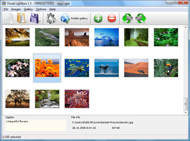



Overview

It's no secret that adding photos to your blog posts is one of the most effective ways to enhance your blog and attract attention to your writing. Flickr has millions of photos available in its database. A simple FREE tool called Flickr Gallery allows you to create a custom image gallery with a cool slide show of the most recent and most interesting photos from Flickr on your website or blog in a few easy steps. Just visit Flickr website and find photostream, photoset or a single photo you like. Enter the address of flickr page to add all photos from this page in your gallery, select the style of thumbnails and the overlay window and add the HTML embed code on your website or blog.
A few clicks and you'll see a stylish photo gallery with beautifull lightbox and zoom effects on your own website or blog!


Flickr Gallery for Windows   Flickr Gallery for MAC

Want more?

Example

Lightbox gallery sample

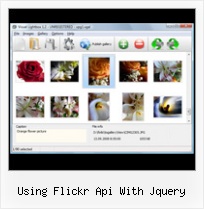
The following image set is generated by Flickr Gallery tool. Click any picture to run Lightbox gallery.

The photo gallery above is an in-page usage demo of Lightbox gallery that uses images from Flickr. The photo gallery created with Flickr Gallery wizard is placed inside the html page. You can also check the full-page demo web gallery. This example takes whole browser area to show the website gallery.Flickr Badge Parameters

How to Use

Step 1. Adding flickr images to your own gallery.


Locate the photo, photoset or photostream you want to use in your Flickr slideshow. Click on it to see the photo on its own page.

Copy URL of the flickr page.

Select Add images from Flickr... from the 'Add' button on the Toolbar.

Add images from Flickr

In the appeared window paste URL of the flickr page. Specify also the number of photos you want to add from the flickr page. Flickr Gallery will now include these photos in your project.

Add images from Flickr

If you have included the photos that you do not wish to be in your web gallery, you can easily remove them. Select all images that you wish to remove from photo gallery, and select Delete images. from the Images menu. You can pick and choose pictures by holding the CTRL while clicking the pictures you like.

Step 2. Adding caption.

The name of the photo on flickr page will automatically appear in the caption. When you select a photo you'll see the various info about it, such as: Path, Size, date of last change and Caption. You can add any comment or text about the photo (up to 512 symbols).

Step 3. Gallery properties.

Change the name of your flickr album, the size and quality of your pictures with Flickr Gallery. From the Gallery menu, select Properties or use "Edit Gallery Properties" button on the toolbar.

On the first tab of the Gallery Properties window you can change the name of your photo album and enable/disable the following properties: Slide Show, Auto play Slide Show, Zoom effect, Overlay Shadow. You can also set the Overlay shadow color and select the Engine you want to use (jQuery or Prototype + script.aculo.us).

On the second tab of the Gallery Properties window you can select the thumbnail you want to use, set the Thumbnails Resolution, Thumbnails Quality, Thumbnails Titles. Select Thumbnails Format (save in PNG or JPG format). Specify the Number of columns in you photo album and the Page color.

On the third tab of the Gallery Properties window you can select the template, Image resolution and Image quality of your pictures and change the Watermark.

You can set up the various sizes for exported images.

Control the quality of output PNG or JPEG format image by defining output "Image quality" and "Thumbnail quality" parameters (0%…100%).

Step 4. Save your photo gallery as project file.

When you exit Flickr Gallery application, you'll be asked if you want to save your project. The project consists of the pictures you choose to put on your web photo gallery and all your settings. It's a good idea to save the project, because that will allow you to change the project in case you decide to do something different with future galleries. So click Yes, then enter a name for your project. To select the location of your project, just click the Browse folders button and choose a different location. Then click Save.

Flickr Preview Html Using Flickr Api With Jquery

Download Flickr Gallery


Download Flickr Gallery Download Free Edition
for Windows
Download Flickr Gallery Download Free Edition
for MAC

Flickr Gallery is free for non - commercial use.

A small fee is required for business use. Flickr Gallery Business Edition additionally provides an option to remove the Flickr Gallery. Com credit string as well as a feature to put your own logo to images. After you complete the payment via the secure order form, you will receive a license key instantly by e-mail that turns the Flickr Gallery Free Edition into a Business one. You can select the most suitable payment procedure: bank transfer, check, PayPal, credit card etc. Also you can get Business Edition for free if you help with translating Flickr Gallery into your native language, please contact us at for more info.

How To Change Flickr Web Address

Buy Flickr GalleryBuy Business Edition
for Windows

$49
Single Website
$69
Unlimited Websites
Buy Flickr GalleryBuy Business Edition
for MAC

$49
Single Website
$69
Unlimited Websites

Support

For feature requests, troubleshooting, general help contact Customer Support at . Make sure to include details on your browser, operating system, Flickr Gallery version and a link (or relevant code).Add Pictures To Gallaery On Flickr

Feedback

    * I have purchased the business and LOVE IT..Your product appears easy to use and close to what I need to help several of my clients..

    * This looks like EXACTLY what I need for my site. It would make my job much faster! Love your program. Thank you!!

    * I have just bought this product and think it is great. As it is extremely easy to use it is something I could get my clients to purchase to upload their own portfolio and latest projects etc.Embed Flickr Set On Webpage Jquery

    * I would like to say that Flickr Gallery is a stunning lil program! Its almost too good to be true i'd say! I've been looking for tutorials to create a lightbox gallery, but just couldnt come right. Im so glad i found Flickr Gallery!

FAQ

RELATED

Using Flickr and jQuery to learn JSONP | Adventures in I was playing around with the Flickr API recently and got a little stuck: when using jQuery to call the Flickr public feed using jQuery's $.getJSON method, I

Tutorial: Use the Flickr API, Javascript (jQuery), AJAX and Tutorial: How to Use the Flickr API, JavaScript, jQuery, Ajax and JSON to Build a Photo Wall If you haven't used the Flickr API before, you should read my post on How to Use the Flickr API first

The Code4Lib Journal – Developing an Academic Image During our initial development, I created a test Flickr group, and wrote PHP code to create an interface that interacted with Flickr using its API. Flickr has an excellent infrastructure for developing image collections, both on the site itself, and with external applications using the API

jQuery Photo Tagger Plugin For Flickr-Style Photo Tagging Ben Nadel demonstrates his new jQuery plugin - Photo Tagger - which provides Flickr-style photo tagging complete with API calls to a server-side persistence layer

Bring Flickr to Your Website Using JSON and jQuery | The Flickr is a great website for hosting and sharing your photos. If you are an amateur photographer who likes to share photos from your latest outdoor adventure, Fear not, because Flickr has developed an API especially for developers, and mixed with a little jQuery and JSON magic, you can update your

Ajax requests using jQuery and PHP | Web Development Blog Our last tutorial about the flickr API was an example on how-to search the flickr photo database for images using some short PHP code. This time we will use

Flickr: Discussing Alternative to photos.search to select a Flickr is almost certainly the best online photo management and sharing application in the world. Show off your favorite photos and videos to the world, securely and privately show content to your friends and family, or blog the photos and videos

jQuery.getJSON() – jQuery API The flickr API, for example, looks for "jsoncallback" instead. If you use the low-level jQuery.ajax() method and set the dataType option to "jsonp", it'll append "&callback=?" to the end of the query string by default — unless you specify a

Build a Photo Viewer Using Flex and the Flickr API | Activetuts+ In this tutorial you will learn how to use the as3flickrlib library to create a Flash Flickr photo viewer. Step 1: The Using Flickr with Flash does require a few steps, but once you get your head around the Flickr API, finding out the Flickr image URLs, loading the images from Flickr

How to Create a Photo Gallery using the Flickr API | Nettuts+ Flickr is, without doubt, the biggest and best photography website on the internet. How to Create a Photo Gallery using the Flickr API. Paul Burgess on Nov 12th 2009 with 79 comments. Tweet. Flickr is, without doubt, the biggest and best photography website on the internet

rpheath's jquery-flickr at master - GitHub Implements (some of) the Flickr API using jQuery. of the supported Flickr API calls available, allowing the user to "chain" the API call directly to the flickr() object

Making a Flickr-powered Slideshow | Tutorialzine In this tutorial we will be developing a jQuery plugin that will make it possible to create slideshows, product guides or presentations from your Flickr photo sets. Starting with the jQuery section, lets first see what a response from the Flickr API looks like:

Using jquery to show flickr photos grouped by set - jQuery Forum jQuery Support Portal I'm new to jquery and haven't used the Flickr API before so was wondering if there was a tutorial, or plugin, anyone knew of that i could use to pull all the photos from a users account and group them on the page by photoset

Building a Volta Control : A Flickr Widget This article illustrates how to create a Volta control around Flickr, the popular image hosting service. It means the API call was completely errorless and successful. Let us make some mistakes intentionally to see how Flickr reacts. Hit the browser using the previous URL with a wrong API Key

Working with the Flickr API " Information Organization Lab If you're accessing the Flickr API from a standalone web page (rather than from a Chrome extension, say), you'll need to use jQuery's $.getJSON method with the ?callback=? option. But, one The sample uses my Flickr API key, so if you're going to use this for anything beyond

Open Source Flash Flickr Photo Gallery The gallery has a location map feature built with Yahoo AS3 libraries that shows the location of the image (if mentioned) using Yahoo maps. This way, registered users can also add comments, tags (if allowed) to the images (Flickr API key needed). Requirements: Flickr & Yahoo API keys

Web Design Schools Guide Use your business name for your Flickr account: Make your name more recognizable and prominent online by using your business name on Flickr. Add a picture description: Share a link with HTML and offer a good LinuxInside: Track page view statistics using the Flickr API and this tool

Create a Photostream Using jQuery and the Flickr API An article on how to use jQuery and the Flickr API to add a photostream to your blog. jQuery 1.1.4: Faster, More Tests, Ready for 1.2 3 years 40 weeks ago. Cultured Perl: Flickr, a business's bst frnd 1 year 25 weeks ago. Learn jQuery with new book 3 years 28 weeks ago

Using jQuery Templates to Bind to JSON data : Quickly display Quickly display Flickr photos using jQuery Ajax and Templates. In this post I'll show you how you can use the new jQuery Templates plug-in to easily For the example we will be using the Flickr API, since it is a free, fast and reliable API that plays nicely with JSONP requests (just think of

Create a Photostream Using jQuery and the Flickr API " Justin Create a Photostream Using jQuery and the Flickr API. by Justin Spradlin. Tags: JavaScript, jQuery. Recently I added a Flickr photostream to the footer of the home page of this blog and I thought it would be cool to post an entry on how you can use jQuery and the Flickr API to do the same

Ryan Heath | (Some of) the Flickr API in jQuery Tagged with api, flickr, javascript, jquery, plugin, programming, and tips (Some of) the Flickr API in jQuery. And by some of I mean 4 methods (at the time of this

Listing your photo albums with the Flickr API and jQuery Listing your photo albums with the Flickr API and jQuery. 18 June 2008. Over the last couple of days, I've tidied up a few things on this site. One task was to make a list of albums appear on the left-hand navigation here, underneath Photographs', downloaded automatically from Flickr

Using the Flickr API: We Don't Need No Stinkin' Badges A while back I wrote about pulling Flickr images using jQuery, but in that example we were using feeds provided by Flickr's services. Feeds are great because they don't require an API key, and with response formats like JSON, its become relatively easy to parse out the information coming in

A jQuery Flickr Feed Plugin This jQuery Flickr plugin allows you to pull a public Flickr feed and display it however you like. Compatible with lightbox, colorbox, cycle, etc

Jquery Flickr Api : Flickr Gallery Jquery Flickr Api. Digital picture albums made with Flickr Gallery are high-end web applications that look and behave exactly like desktop apps!. Joomla Photostream Blog Flickr

Spice World! " Blog Archive " Enumerating note data in Flickr As you can see there's no way, using the API, of getting the ids of notes already associated with an image. Using this information you can update the note using the Flickr API or display the image complete with notes on your own page

