



Overview

It's no secret that adding photos to your blog posts is one of the most effective ways to enhance your blog and attract attention to your writing. Flickr has millions of photos available in its database. A simple FREE tool called Flickr Gallery allows you to create a custom image gallery with a cool slide show of the most recent and most interesting photos from Flickr on your website or blog in a few easy steps. Just visit Flickr website and find photostream, photoset or a single photo you like. Enter the address of flickr page to add all photos from this page in your gallery, select the style of thumbnails and the overlay window and add the HTML embed code on your website or blog.
A few clicks and you'll see a stylish photo gallery with beautifull lightbox and zoom effects on your own website or blog!


Flickr Gallery for Windows   Flickr Gallery for MAC

Want more?

Example

Lightbox gallery sample

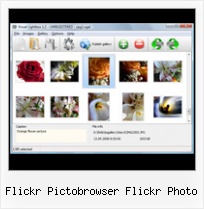
The following image set is generated by Flickr Gallery tool. Click any picture to run Lightbox gallery.

The photo gallery above is an in-page usage demo of Lightbox script with Flickr images. The website gallery created with Flickr Gallery application is placed inside the website page. You can also check the full-page demo web gallery. This example takes whole browser area to show the slideshow.Embed A Flickr Stream

How to Use

Step 1. Adding flickr images to your own gallery.


Locate the photo, photoset or photostream you want to use in your Flickr slideshow. Click on it to see the photo on its own page.

Copy URL of the flickr page.

Select Add images from Flickr... from the 'Add' button on the Toolbar.

Add images from Flickr

In the appeared window paste URL of the flickr page. Specify also the number of photos you want to add from the flickr page. Flickr Gallery will now include these photos in your project.

Add images from Flickr

If you have included the photos that you do not wish to be in your web gallery, you can easily remove them. Select all images that you wish to remove from photo gallery, and select Delete images. from the Images menu. You can pick and choose pictures by holding the CTRL while clicking the pictures you like.

Step 2. Adding caption.

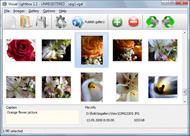
The name of the photo on flickr page will automatically appear in the caption. When you select a photo you'll see the various info about it, such as: Path, Size, date of last change and Caption. You can add any comment or text about the photo (up to 512 symbols).

Step 3. Gallery properties.

Change the name of your flickr album, the size and quality of your pictures with Flickr Gallery. From the Gallery menu, select Properties or use "Edit Gallery Properties" button on the toolbar.

On the first tab of the Gallery Properties window you can change the name of your photo album and enable/disable the following properties: Slide Show, Auto play Slide Show, Zoom effect, Overlay Shadow. You can also set the Overlay shadow color and select the Engine you want to use (jQuery or Prototype + script.aculo.us).

On the second tab of the Gallery Properties window you can select the thumbnail you want to use, set the Thumbnails Resolution, Thumbnails Quality, Thumbnails Titles. Select Thumbnails Format (save in PNG or JPG format). Specify the Number of columns in you photo album and the Page color.

On the third tab of the Gallery Properties window you can select the template, Image resolution and Image quality of your pictures and change the Watermark.

You can set up the various sizes for exported images.

Control the quality of output PNG or JPEG format image by defining output "Image quality" and "Thumbnail quality" parameters (0%…100%).

Step 4. Save your photo gallery as project file.

When you exit Flickr Gallery application, you'll be asked if you want to save your project. The project consists of the pictures you choose to put on your web photo gallery and all your settings. It's a good idea to save the project, because that will allow you to change the project in case you decide to do something different with future galleries. So click Yes, then enter a name for your project. To select the location of your project, just click the Browse folders button and choose a different location. Then click Save.

Wordpress 2 9 2 Flickr Manager Flickr Pictobrowser Flickr Photo

Download Flickr Gallery


Download Flickr Gallery Download Free Edition
for Windows
Download Flickr Gallery Download Free Edition
for MAC

Flickr Gallery is free for non - commercial use.

A small fee is required for business use. Flickr Gallery Business Edition additionally provides an option to remove the Flickr Gallery. Com credit string as well as a feature to put your own logo to images. After you complete the payment via the secure order form, you will receive a license key instantly by e-mail that turns the Flickr Gallery Free Edition into a Business one. You can select the most suitable payment procedure: bank transfer, check, PayPal, credit card etc. Also you can get Business Edition for free if you help with translating Flickr Gallery into your native language, please contact us at for more info.

Flickr Feed Example

Buy Flickr GalleryBuy Business Edition
for Windows

$49
Single Website
$69
Unlimited Websites
Buy Flickr GalleryBuy Business Edition
for MAC

$49
Single Website
$69
Unlimited Websites

Support

For general help, feature requests, troubleshooting contact Customer Support at . Make sure to include details on your operating system, browser, Flickr Gallery version and a link (or relevant code).Flickr Photos Own Website

Feedback

    * I would like to say that Flickr Gallery is a stunning lil program! Its almost too good to be true i'd say! I've been looking for tutorials to create a lightbox gallery, but just couldnt come right. Im so glad i found Flickr Gallery!

    * I have purchased the business and LOVE IT..Your product appears easy to use and close to what I need to help several of my clients..

    * First of all, your product is fantasitc. I looked at the others and your code generator app was insanely easy to use.Flickr Joomla Private

    * Another programmes have incredible functionality but no fantastic interface like your product!

FAQ

Q:Is it possible to load a gallery from within image? So the gallery loads externally?

A:You should start the gallery onClick:

1) Add the following function into the <head> tag:

<script type="text/javascript">
function showLightBox()
{ Lightbox.start(document.getElementById('firstImage'));}
</script>

2) Specify the onClick event for the image (or link):
<img src="thumbnail_gr.jpg" onClick="javascript:showLightBox()" title="Click to see the demo" style="cursor: pointer;">
3) Set the ID for any image in your gallery (id="firstImage"), for example add it to the first image:
<a rel="lightbox_vlb" href="data/images/dscn6831.jpg" title="dscn6831" id="firstImage">
4) Use 'display: none;' property for your gallery in engine\css\vlightbox.css. Just change the following code:

#vlightbox a{
display:-moz-inline-stack;
display:inline-block;
zoom:1;
*display:inline;
position:relative;
vertical-align:top;
margin:3px;
width:160px;
font-family:Trebuchet,Tahoma,Arial,sans-serif;
font-size:11px;
font-weight:normal;
text-align:center;
opacity:0.87;
}

to:

#vlightbox a{
display:-moz-inline-stack;
display:none;
zoom:1;
*display:inline;
position:relative;
vertical-align:top;
margin:3px;
width:160px;
font-family:Trebuchet,Tahoma,Arial,sans-serif;
font-size:11px;
font-weight:normal;
text-align:center;
opacity:0.87;
}

RELATED

Flickr Examples in About This Site at PHSNE Members Pages This page is not tested, may change often, and the markup to embed Flickr photos and may have the usual number of early bugs. You can display individual photos from a Flicker account, or display a slide show or gallery of the photos assigned a specific Flickr tag

12 Slideshow Tools For Photographers - Tim Stanley Why is it so hard to create a professional looking slide show of digital images on a web site? photo editing ability provided, but Picknik does provide the very powerful editing abilities to edit Flickr photos directly on the web. Once the images are on Flickr,

Options for Easily Adding Flickr Photos to Your Website This page shows a number of the leading options for quickly and easily adding your Flickr photos to your website or blog (WordPress, Joomla, TextPattern). They all offer some options and customizations. PictoBrowser – PictoBrowser is a quick way to set up a customized gallery of Flickr

Tools for embedding Flickr Slideshows I came across few nice tools to embed Flickr Photos in your blogs or myspace pages, I will make a list of them here and update the post with new tools whenever All you need to do is enter the flickr URL address, photo set or group you would like to embed along with some options like width and height

kuanhoong dot com " 8 alternate ways to embed flickr photos With Flickr, you can upload your photos to Flickr and even share your photos in your webpages. Flickrshow is a lightweight, cross-browser javascript slideshow, providing you with an easy way to display your Flickr images on your own website

pictobrowser widget, flickr, pictures, badge, slideshow, tools, share, images, viral, community

Panda Spitting Flickr Photos, Cool Slideshow Flickr got interesting new addition - a panda spitting different flickr photos. It shows random photos which you can click through for respective pic

Running a French Holiday Gite in Rural Brittany: Brittany Brittany Photo Gallery - courtesy of Flickr and PictoBrowser. Flickr. Right from the original concepts for our holiday home website I'd planned to include a Photo Gallery of interesting pictures, of the Gite itself, of things to do and see in

More Ways to Embed a Flickr Slideshow on your Site | etc: a More Ways to Embed a Flickr Slideshow on your Site. Advertisement. I posted recently about flickrSLiDR, a quick and easy way to embed a slideshow of flickr photos on your website. Reader Steve suggests another option - PictoBrowser, which is really nice

How to make photo galleries from Flickr [ Online Tool ] PictoBrowser is an online tool which allows you to make image galleries out of your Flickr photos and embed into your web site or blogs. The steps are pretty PictoBrowser is an online tool which allows you to make image galleries out of your Flickr photos and embed into your web site or blogs

List of Flickr Tools 2008 A compiled excel list of helpful Flickr tools and plugins to share and organize your photos on social networks & websites. by ntho in How-To Guides/Manuals, Reference, and research

lib20 / resources-flickr NOTE: flickr & techsoup.org have partnered to provide free PRO account o to qualifying non-profits. Flickr lets you place your photos on a map, providing another way for users to find your photos

4 tools to integrate Flickr photos into your website Flickr is a great and best photo-sharing site, no second thoughts about it. Flickr tools built over Flickr API allow the user to brand their photo into their own site

PictoBrowser Plug-in for Flickr PictoBrowser is an indispensable freeware web application written by New York interactive designers Diego Bauducco and Carlos Gomez. It allows users to browse and display images from Flickr on any web page in a stylish, crisp flash-based

Digital Urban: Flickr - Photo Gallery Flickr - Photo Gallery. Tweet. There are now 48 photographs in our Flickr group and 33 members, some of the submissions so far have been stunning. Using the very easy to use script from Pictobrowser you can now embed the Digital Urban Flickr group - or any Flickr set - in a webpage or blog:

Flickr: pictobrowser's Photostream Flickr is almost certainly the best online photo management and sharing application in the world. Show off your favorite photos and videos to the world, securely and privately show content to your friends and family, or blog the photos and videos

Flickr | MakeUseOf Directory PhotoSync is a simple web app that lets you transfer all of your Flickr photos to Facebook, and also keeps them in sync. It checks the Flickr account every hour so as you upload new pictures there, they'll automatically get copied to your Facebook account

Kumara Sastry " Blog Archives " Flickr pictobrowser plugin Flickr pictobrowser plugin for wordpress. 23 July 2007. I heard about pictobrowser from Julie and like this much better than the flickr slideshow. However, since "object" and "iframe" are stripped out of wordpress for security reasons, I could no longer embed pictobrowser object directly

Flickr slideshow | More than Photography There are many ways to incorporate Flickr slideshows into your blog or website such as Flickrshow or flickrSLiDR but my personal favorite is PictoBrowser It

Flickr Pictobrowser Flickr Photo : Flickr Gallery Flickr Pictobrowser Flickr Photo. Build professional web photo gallery templates in minutes with Flickr Gallery!. Wordpress Sample Blog Using Flickr

Pictobrowser : Another Way to Share Your Flickr Photos Pictobrowser slideshows are more self-contained, and although they do show the link to the image on Flickr, clicking on the images doesn't take the user to the Flickr photo page, and users will tend to stay on your site rather than visiting your Flickr account

web|aggression - photos on flickr - using PictoBrowser Photo Gallery from Flickr using Flickrin. Check us out in some select photos from our Flickr page. You'll also see some pics of things we love like our dogs, sporting

Pictobrowser Pictobrowser is a web-based tool that allows users to easily share large sets of pictures on their websites or blogs. It enhances the functionality of Web 2.0 media sites like Flickr by providing a simple means to display photo sets that a user has previously stored on these sites

BlogCoach: Grow Your Blog: Weekly Widget: Add Flickr Photos Here are three widgets that allow you to create slideshow galleries of chosen Flickr photos in a flash (no plun intended) and place them on your blog. The Flickr badge is an easy widget for those of you who use Flickr.com and use your blogs to keep friends and family caught up

Flickriver: Photos from pictobrowser Flickriver - view images as a 'river of photos' and more Also, allows quickly viewing any Flickr photo on black background in large size. Install "View on Flickriver" script. Bookmarklet. While viewing any Flickr photos page, click on the bookmarklet to open the same view on Flickriver

Embed Flickr Photostreams in Web Pages as a Flash Slideshow Embed Flickr Photostreams in Web Pages as a Flash Slideshow Look no further than PictoBrowser. Here's a sample Flickr Photo slideshow generated just using PictoBrowser - all the pictures are displayed as thumbnail images in the lower navigation bar, you can also read the descriptions of

