



Overview

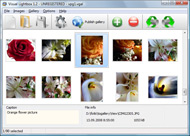
It's no secret that adding photos to your blog posts is one of the most effective ways to enhance your blog and attract attention to your writing. Flickr has millions of photos available in its database. A simple FREE tool called Flickr Gallery allows you to create a custom image gallery with a cool slide show of the most recent and most interesting photos from Flickr on your website or blog in a few easy steps. Just visit Flickr website and find photostream, photoset or a single photo you like. Enter the address of flickr page to add all photos from this page in your gallery, select the style of thumbnails and the overlay window and add the HTML embed code on your website or blog.
A few clicks and you'll see a stylish photo gallery with beautifull lightbox and zoom effects on your own website or blog!


Flickr Gallery for Windows   Flickr Gallery for MAC

Want more?

Example

Lightbox gallery sample

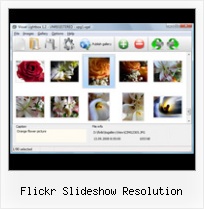
The following image set is generated by Flickr Gallery tool. Click any picture to run Lightbox gallery.

The example above is an in-page usage demo of Lightbox script with Flickr images. The lightbox gallery created with Flickr Gallery wizard is placed inside the page layout. You can also check the full-page demo gallery. This example takes whole browser area to show the website gallery.Flickr Embed On Flash

How to Use

Step 1. Adding flickr images to your own gallery.


Locate the photo, photoset or photostream you want to use in your Flickr slideshow. Click on it to see the photo on its own page.

Copy URL of the flickr page.

Select Add images from Flickr... from the 'Add' button on the Toolbar.

Add images from Flickr

In the appeared window paste URL of the flickr page. Specify also the number of photos you want to add from the flickr page. Flickr Gallery will now include these photos in your project.

Add images from Flickr

If you have included the photos that you do not wish to be in your web gallery, you can easily remove them. Select all images that you wish to remove from photo gallery, and select Delete images. from the Images menu. You can pick and choose pictures by holding the CTRL while clicking the pictures you like.

Step 2. Adding caption.

The name of the photo on flickr page will automatically appear in the caption. When you select a photo you'll see the various info about it, such as: Path, Size, date of last change and Caption. You can add any comment or text about the photo (up to 512 symbols).

Step 3. Gallery properties.

Change the name of your flickr album, the size and quality of your pictures with Flickr Gallery. From the Gallery menu, select Properties or use "Edit Gallery Properties" button on the toolbar.

On the first tab of the Gallery Properties window you can change the name of your photo album and enable/disable the following properties: Slide Show, Auto play Slide Show, Zoom effect, Overlay Shadow. You can also set the Overlay shadow color and select the Engine you want to use (jQuery or Prototype + script.aculo.us).

On the second tab of the Gallery Properties window you can select the thumbnail you want to use, set the Thumbnails Resolution, Thumbnails Quality, Thumbnails Titles. Select Thumbnails Format (save in PNG or JPG format). Specify the Number of columns in you photo album and the Page color.

On the third tab of the Gallery Properties window you can select the template, Image resolution and Image quality of your pictures and change the Watermark.

You can set up the various sizes for exported images.

Control the quality of output PNG or JPEG format image by defining output "Image quality" and "Thumbnail quality" parameters (0%…100%).

Step 4. Save your photo gallery as project file.

When you exit Flickr Gallery application, you'll be asked if you want to save your project. The project consists of the pictures you choose to put on your web photo gallery and all your settings. It's a good idea to save the project, because that will allow you to change the project in case you decide to do something different with future galleries. So click Yes, then enter a name for your project. To select the location of your project, just click the Browse folders button and choose a different location. Then click Save.

Phpflickr Gallery Demo Lightbox Flickr Slideshow Resolution

Download Flickr Gallery


Download Flickr Gallery Download Free Edition
for Windows
Download Flickr Gallery Download Free Edition
for MAC

Flickr Gallery is free for non-commercial use.

A small fee is required for business use. Flickr Gallery Business Edition additionally provides an option to remove the Flickr Gallery. Com credit line as well as a feature to put your own logo to images. After you finish the payment via the secure form, you will receive a license key instantly by e-mail that turns the Flickr Gallery Free Edition into a Business one. You can select the most appropriate payment method: check, credit card, PayPal, bank transfer etc. Also you can get Business Edition for free if you help with translating Flickr Gallery into your native language, please contact us at for more info.

Adding Flickr Photostream To Blogger

Buy Flickr GalleryBuy Business Edition
for Windows

$49
Single Website
$69
Unlimited Websites
Buy Flickr GalleryBuy Business Edition
for MAC

$49
Single Website
$69
Unlimited Websites

Support

For general help, feature requests, troubleshooting contact Customer Support at . Make sure to include details on your browser, a link (or relevant code), operating system and Flickr Gallery version.Flash Embedded Slideshow Flickr Feed

Feedback

    * Let me start just congratulating you, good job, really. I am trying out the free version before I buy it. It works great.

    * I'm absolutely loving Flickr Gallery Business and Video LightBox. Amazing, quick and painless, to create a custom, browser independent gallery. And it works first time - every time! Best value for money I've seen in quite a while...

    * I have just bought this product and think it is great. As it is extremely easy to use it is something I could get my clients to purchase to upload their own portfolio and latest projects etc.Tool Flickr Video Download

    * I tried Flickr Gallery and for me its a very cool and usefull application. Its so easy to manage my galleries and it looks very nice.

FAQ

Q:Instead of making one page with 40 photos, is there no property to make 2 or more pages?

A:You can do it in the following way:

1. Create your gallery in Flickr Gallery and publish it on a local drive in any test folder.
2. Make two copies of the generated index.html file (for example index1.html and index2.html).
3. Open index.html, index1.html and index2.html files in any text editor.
4. Find code for the gallery inside the BODY tag and cut some part of the images, so you'll have different images on each page.

<!-- Start Flickr Gallery.com BODY section -->
<div class="gallery">
<!-- leave the following code on index.html page -->
<a href="./data/images/1.jpg" rel="lightbox[sample]" title="Best Toy Ever"><img src="./data/thumbnails/1.png" /></a>
<a href="./data/images/8.jpg" rel="lightbox[sample]" title="PrueaMacro"><img src="./data/thumbnails/8.png" /></a>

<!-- leave the following code on index1.html page -->
<a href="./data/images/3.jpg" rel="lightbox[sample]" title="Macro Leaf."><img src="./data/thumbnails/3.png" /></a>
<a href="./data/images/11.jpg" rel="lightbox[sample]" title="Bell Pepper"><img src="./data/thumbnails/11.png" /></a>

<!-- leave the following code on index2.html page -->
<a href="./data/images/5_0.jpg" rel="lightbox[sample]" title="5"><img src="./data/thumbnails/5_0.png" /></a>
<a href="./data/images/6_0.jpg" rel="lightbox[sample]" title="6"><img src="./data/thumbnails/6_0.png" /></a>

<!--[if lte IE 6]><script src="engine/js/pngfix_vlb.js" type="text/javascript"></script><![endif]-->
<a id="vlightbox" href="http://Flickr Gallery.com/">Online Photo Album Sharing by Flickr Gallery.com</a>
</div>
<!-- End Flickr Gallery.com BODY section -->

5. Create links to switch between your pages, for example:
<a href="index.html">1</a>  <a href="index1.html">2</a>  <a href="index2.html">3</a> 


Q:I want to change color of the overlay shadow? How can I do this?

A:Open engine\css\Flickr Gallery.css and find the following code:

#overlay{
position: absolute;
top: 0;
left: 0;
z-index: 90;
width: 100%;
height: 500px;
background-color: #FFF;
filter:alpha(opacity=60);
-moz-opacity: 0.6;
opacity: 0.6;
}

set the background-color parameter :

#overlay{
position: absolute;
top: 0;
left: 0;
z-index: 90;
width: 100%;
height: 500px;
background-color: #FF00FF;
filter:alpha(opacity=60);
-moz-opacity: 0.6;
opacity: 0.6;
}


RELATED

Cooliris

Donate Life Rose Parade Float To download a higher resolution version of a photo click the photo during the slideshow, then click again to be taken to the photos' Flickr page. From here you will be able to download higher resolution versions of that photo, just click on "Show All Sizes" above the photo

Peter Liu Photography - How To Embed A Flickr Slideshow In A You are here: Home / Slideshow / How To Embed A Flickr Slideshow In A Tab On Your Facebook Page Simply replace the location of my slideshow with the one Flickr gives you for yours ("page_show_url"), and update the width and

BeagleBoard.org - media The Beagle Board is a low-cost, fan-less single-board computer with all of the expandability of today's desktop machines, but without the bulk, expense, or noise. - Get Yours from Digikey.com Flickr Slide Show Object

Flickr: "resolution" Flickr is almost certainly the best online photo management and sharing application in the world. Show off your favorite photos and videos to the world, securely and privately show content to your friends and family, or blog the photos and videos

How To Get Pictures From Flickr : Flickr Gallery How To Get Pictures From Flickr. With Flickr Gallery comprehensible interface, you need just 4 simple steps to get your photo album website ready!. App That Plays A Flickr Photostream

Flickr Screen Saver 1.1.0 Download - Flickr photo slide show Flickr Plugin for gPhotoShow Pro allows you to display your favorite Flickr photos as screen saver or slideshow. 365 Magnificent Flowers Screen Saver 2.1 - Screensaver with over forty stunning high-resolution close-up photos of flowers

chumby " mniml slideshow (flickr) Mniml Slideshow will load all Flickr photos from a public user or public set. Unless Adobe makes updates to the Flash Lite Player or Flickr offers image sizes which match the Chumby's screen resolution, there's not really any way to fix this. Swetch. November 21, 2007

Flash - AS3 XML Image Slideshow (Flickr Slideshhow Style An Advanced AS3 XML Image Slideshow which is similar as Flickr Slideshow(Image Gallery). Easy,clean and flexible usages for different kinds of needs. Features 1.XML Driven with unlimited num of ima

Picasa Web Albums vs Flickr - Which Photo Sharing Service is Each photo that you upload to a free Flickr account must be less than 5MB in size. 3. Flickr's slideshow is having bad resolution .degrades the experience significantly

How to Make Videos for Flickr From Your Photos Flickr is perfect for sharing short family videos that you have captured with a digital still camera or your mobile phone

Embed Flickr Slideshows On Any Website FlickrSlidr is a free web app that lets you embed your Flickr slideshows on any website or blog. You can combine tons of photos in a cool looking slideshow, but how do you share it with others?

Glendale, AZ - Press Room - Photo Library - High Resolution Glendale, AZ - Press Room - High Resolution Photo Library. View photos in the flickr slideshow below. Click the slideshow to open our flickr library and view larger sizes. You can download large versions of the images for use by clicking the

60+ Tools To Enhance Your Flickr Experience FlickrFaves is a small utility for downloading high-resolution versions of your Flickr favorites to your harddrive. to generate the HTML necessary to embed a custom Flickr Slideshow in your page or blog

Create custom Screensavers or Flash slideshows – Free Flickr downloader allows you to download photos from Flickr and create Flash slideshow for your website or a screensaver. If you wish to create the slideshow or screensaver from your wedding photos then you can directly select them from your

Skill Training Center Content Resources for campus conflict resolution Readers might really enjoy trying out Splashr, a multifaceted slideshow builder that draws on the Flickr photo service

Flickr Slideshow Embed | Flickr Slideshow Flickr Slideshow Embed. Create superior online photo galleries for your Website with jQuery Thickbox Alternative! bbcode flickr album

WiFi Digital Picture Frame Review updating the frame directly from iPhoto, new photos pulled from the internet automatically! Many of my friends post pictures up on sharing sites and social networks like Facebook, why not have those go to the frame as well? memory, Flickr, Gmail and FrameIt content) into one big slideshow or

Flickr Slide Show Lite Unfortunately, no one had proposed any solution other then to beg Flickr to get rid of the flash slide show. This begging appears to have been going on for at least 2 years, so I'm not hopeful of a rapid resolution. vi. How. A New Hope. Flickr provides a REST API for getting at picture meta data

BarCamp Switzerland " Blog Archive " StartupCamp2010 – Flickr StartupCamp2010 – Flickr Slideshow. More photos and higher resolution on Flickr. You're currently reading "StartupCamp2010 – Flickr Slideshow," an entry on BarCamp

iPhone Gems: Every Flickr Application, Reviewed | iLounge Article Likewise, in order to show a preview but maintain a full-resolution image, the preview image shown after taking a photo with an in-application MoPhoTo by Flektor (Free) is a basic photo browser and slideshow viewer for Flickr, Photobucket, Picasa, and MySpace

GoNOLA New Orleans New Year's Resolutions — GoNOLA.com The GoNOLA team offers up their uniquely New Orleans New Year's Resolutions, from watching Mardi Gras Indians, to attending the French Quarter Festival

Useful Tools for Flickr Desktop Applications Flickr Finder - Mac OS X application for browsing your photos. 1001 for Mac OS X is a desktop client to be used in conjunction

How the Big Photo-Sharing Sites Stack Up – AllThingsD With Yahoo closing its photo division, many people will have to find a new photo-storage and sharing service. Tagged with album, blog, EasyShare, email, Flickr, Hewlett-Packard, high resolution, Kodak Gallery, photo, Photobucket, Shutterfly, slideshow, Snapfish, software, video, Web. comments so far

How do I use the Blogger slideshow gadget for a flickr *group How do I use the Blogger slideshow gadget for a flickr *group slideshow, and blogger's slideshow is the second. I'd really prefer to use your code since it allows for group rss feeds, but I'd like the images un-cropped and slightly higher resolution

Download FlickrEdit: Bulk Download and Edit Flickr Photos FlickrEdit is a free software to bulk download your Flickr Photos in their original resolution. Download Free Here

Art Photo Gallery, Box Flash Gallery, 3D ImageFlow Gallery Art Photo Gallery. Box Flash Gallery. Dazzle your viewers with 3D photo navigation. Add Flickr Slideshow to your website on Mac Embed Flickr slideshow on your website in minutes with Flickr Gallery on Mac OS! photo gallery, flash photo gallery, slideshow, photo album, swf

