



Overview

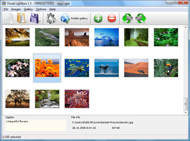
It's no secret that adding photos to your blog posts is one of the most effective ways to enhance your blog and attract attention to your writing. Flickr has millions of photos available in its database. A simple FREE tool called Flickr Gallery allows you to create a custom image gallery with a cool slide show of the most recent and most interesting photos from Flickr on your website or blog in a few easy steps. Just visit Flickr website and find photostream, photoset or a single photo you like. Enter the address of flickr page to add all photos from this page in your gallery, select the style of thumbnails and the overlay window and add the HTML embed code on your website or blog.
A few clicks and you'll see a stylish photo gallery with beautifull lightbox and zoom effects on your own website or blog!


Flickr Gallery for Windows   Flickr Gallery for MAC

Want more?

Example

Lightbox gallery sample

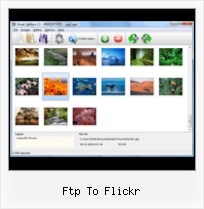
The following image set is generated by Flickr Gallery tool. Click any picture to run Lightbox gallery.

The example above is an in-page usage demo of Lightbox gallery that uses images from Flickr. The website gallery created with Flickr Gallery application is placed inside the html page. You can also check the full-page demo gallery. This example takes whole browser area to show the web gallery.Flickr Start Auto Slide Show

How to Use

Step 1. Adding flickr images to your own gallery.


Locate the photo, photoset or photostream you want to use in your Flickr slideshow. Click on it to see the photo on its own page.

Copy URL of the flickr page.

Select Add images from Flickr... from the 'Add' button on the Toolbar.

Add images from Flickr

In the appeared window paste URL of the flickr page. Specify also the number of photos you want to add from the flickr page. Flickr Gallery will now include these photos in your project.

Add images from Flickr

If you have included the photos that you do not wish to be in your web gallery, you can easily remove them. Select all images that you wish to remove from photo gallery, and select Delete images. from the Images menu. You can pick and choose pictures by holding the CTRL while clicking the pictures you like.

Step 2. Adding caption.

The name of the photo on flickr page will automatically appear in the caption. When you select a photo you'll see the various info about it, such as: Path, Size, date of last change and Caption. You can add any comment or text about the photo (up to 512 symbols).

Step 3. Gallery properties.

Change the name of your flickr album, the size and quality of your pictures with Flickr Gallery. From the Gallery menu, select Properties or use "Edit Gallery Properties" button on the toolbar.

On the first tab of the Gallery Properties window you can change the name of your photo album and enable/disable the following properties: Slide Show, Auto play Slide Show, Zoom effect, Overlay Shadow. You can also set the Overlay shadow color and select the Engine you want to use (jQuery or Prototype + script.aculo.us).

On the second tab of the Gallery Properties window you can select the thumbnail you want to use, set the Thumbnails Resolution, Thumbnails Quality, Thumbnails Titles. Select Thumbnails Format (save in PNG or JPG format). Specify the Number of columns in you photo album and the Page color.

On the third tab of the Gallery Properties window you can select the template, Image resolution and Image quality of your pictures and change the Watermark.

You can set up the various sizes for exported images.

Control the quality of output PNG or JPEG format image by defining output "Image quality" and "Thumbnail quality" parameters (0%…100%).

Step 4. Save your photo gallery as project file.

When you exit Flickr Gallery application, you'll be asked if you want to save your project. The project consists of the pictures you choose to put on your web photo gallery and all your settings. It's a good idea to save the project, because that will allow you to change the project in case you decide to do something different with future galleries. So click Yes, then enter a name for your project. To select the location of your project, just click the Browse folders button and choose a different location. Then click Save.

Flickr Html Photo Gallery Ftp To Flickr

Download Flickr Gallery


Download Flickr Gallery Download Free Edition
for Windows
Download Flickr Gallery Download Free Edition
for MAC

Flickr Gallery is free for non - commercial use.

A small fee is required for business use. Flickr Gallery Business Edition additionally provides an option to remove the Flickr Gallery. Com credit line as well as a feature to put your own logo to images. After you conclude the payment via the secure form, you will receive a license key instantly by email that turns the Flickr Gallery Free Edition into a Business one. You can select the most appropriate payment mode: PayPal, credit card, bank transfer, check etc. Also you can get Business Edition for free if you help with translating Flickr Gallery into your native language, please contact us at for more info.

Flickr Html Gallery Plugin

Buy Flickr GalleryBuy Business Edition
for Windows

$49
Single Website
$69
Unlimited Websites
Buy Flickr GalleryBuy Business Edition
for MAC

$49
Single Website
$69
Unlimited Websites

Support

For troubleshooting, feature requests and general help contact Customer Support at . Make sure to include details on your Flickr Gallery version, browser, operating system and a link (or relevant code).Embed Flickr Gallery

Feedback

    * Just a quick thank you for the software though, It's not often you get a free software version of this quality and style! Well done and please continue this amazing gallery. Hope to see more advances.

    * I'd like to express my gratitude to your efforts on creating such a nice piece of program and best of all it's free! Keep out the good work and I hope to see new features in the near coming future to rate you 5 star!

    * I have purchased the business and LOVE IT..Your product appears easy to use and close to what I need to help several of my clients..Flickr Slideshow Image Scale And Position

    * This looks like EXACTLY what I need for my site. It would make my job much faster! Love your program. Thank you!!

FAQ

Q:Instead of making one page with 40 photos, is there no property to make 2 or more pages?

A:You can do it in the following way:

1. Create your gallery in Flickr Gallery and publish it on a local drive in any test folder.
2. Make two copies of the generated index.html file (for example index1.html and index2.html).
3. Open index.html, index1.html and index2.html files in any text editor.
4. Find code for the gallery inside the BODY tag and cut some part of the images, so you'll have different images on each page.

<!-- Start Flickr Gallery.com BODY section -->
<div class="gallery">
<!-- leave the following code on index.html page -->
<a href="./data/images/1.jpg" rel="lightbox[sample]" title="Best Toy Ever"><img src="./data/thumbnails/1.png" /></a>
<a href="./data/images/8.jpg" rel="lightbox[sample]" title="PrueaMacro"><img src="./data/thumbnails/8.png" /></a>

<!-- leave the following code on index1.html page -->
<a href="./data/images/3.jpg" rel="lightbox[sample]" title="Macro Leaf."><img src="./data/thumbnails/3.png" /></a>
<a href="./data/images/11.jpg" rel="lightbox[sample]" title="Bell Pepper"><img src="./data/thumbnails/11.png" /></a>

<!-- leave the following code on index2.html page -->
<a href="./data/images/5_0.jpg" rel="lightbox[sample]" title="5"><img src="./data/thumbnails/5_0.png" /></a>
<a href="./data/images/6_0.jpg" rel="lightbox[sample]" title="6"><img src="./data/thumbnails/6_0.png" /></a>

<!--[if lte IE 6]><script src="engine/js/pngfix_vlb.js" type="text/javascript"></script><![endif]-->
<a id="vlightbox" href="http://Flickr Gallery.com/">Online Photo Album Sharing by Flickr Gallery.com</a>
</div>
<!-- End Flickr Gallery.com BODY section -->

5. Create links to switch between your pages, for example:
<a href="index.html">1</a>  <a href="index1.html">2</a>  <a href="index2.html">3</a> 


Q:I want to change color of the overlay shadow? How can I do this?

A:Open engine\css\Flickr Gallery.css and find the following code:

#overlay{
position: absolute;
top: 0;
left: 0;
z-index: 90;
width: 100%;
height: 500px;
background-color: #FFF;
filter:alpha(opacity=60);
-moz-opacity: 0.6;
opacity: 0.6;
}

set the background-color parameter :

#overlay{
position: absolute;
top: 0;
left: 0;
z-index: 90;
width: 100%;
height: 500px;
background-color: #FF00FF;
filter:alpha(opacity=60);
-moz-opacity: 0.6;
opacity: 0.6;
}


RELATED

Capture Edit & Share Your Screenshots With Skitch [Mac Only] This is in no way a new application. Skitch has been around for quite some time but we here at Make Use Of don't only cover new applications. We share the most Skitch provides you with the options to upload to your own FTP, SFTP, Flickr or .Mac account

Ftp To Flickr : Flickr Gallery Ftp To Flickr. Flickr Gallery is the first software that creates AJAX-powered online image galleries without the need for server-side setup!. Flickr Gallery Widget Page

Download Dockdrop 1.5.3 Free - Mac OS X application that lets Dockdrop Mac OS X application that lets you share files fast. · FTP · Flickr · WebDAV · SCP. What's New in This Release: [ read full changelog ] · A much nicer icon · Sparkle automatic updating · A dock menu with the 10 most recently uploaded items so you can re-copy URLS to the clipboard

The Lightroom SDK: FTP and Flickr Plugin | Pixiq Adobe provide a Software Development Kit to help those interested in creating addons for Lightroom understand what needs to happen. The Lightroom SDK: FTP and Flickr Plugin. By Sean McCormack Adobe provide a Software Development Kit to help those interested in creating addons for Lightroom

Global Delight : Voila Release Notes One click sharing option to FTP/ SFTP/ Flickr/ YouTube. Configure to Send the files to Option to upload images to FTP and publish on Flickr. Support for exporting images via

Ftp -- TUAW Dockdrop isn't necessarily something new to Mac OS X, but it's a simple and a cool application none-the-less. Dockdrop allows you to drop files on top of it and perform an action. You can use the following protocols to send files: FTP, Flickr, WebDAV, or SCP

Ftp | Facebook, Twitter & MySpace Profile on PeekYou Looking for Ftp ? PeekYou's people search has 2 people named Ftp and you can find contact info, photos, links, family members and more

Solution Grove - How to Use Jing Select File if you want to save the image to you local directory; FTP, if you want to share via FTP, in which case you will be asked to indicate the FTP Settings; Flickr, if you want to upload the image to Flickr; or Screencast.com, if you want to upload to your Screencast.com account

Upload photos in blogger for LiveWriter via Flickr Make sure you've selected the photos you want to upload, then click "Next" Other Recommended Posts on Blogger ftp upload, Flickr Tools, Picture folder Uploading Tools, tricks

Download Flickr Gallery for Mac OS at All Freeware (Gallery Flickr Gallery for Mac OS 4.8 free download, review. A simple FREE Mac tool called Flickr Gallery allows you to embed a custom image gallery, or a cool slideshow with beautiful lightbox and zoom effects of the most interesting photos from Flickr

Buy.com - ZyXEL NSA210 1-bay Network Attached Storage and Not only the 2 Terabytes capacity* lets consumers dump every photos, video clips they downloaded to the box; It also able to efficient way to update multiple FTP servers and share with your friends and family. Flickr / YouTube-- The NSA210 supports auto-upload to Flickr and YouTube as well

Dockdrop Free Download Drag any file or folder you want to share onto the Dockdrop dock icon then choose how you want to send it. Dockdrop uploads it · FTP · Flickr · WebDAV · SCP. User Opinions (Showing 0 of 0) Help other users by being the first to review it

Voila 3.0.3 - Screen Capture Software for Mac | Mac Web Voila swiftly uploads your images and videos to the FTP and SFTP servers. Option to upload images to FTP and publish on Flickr. Support for exporting images via

Zoundry Raven Development Blog - Zoundry 2.0 (Raven) Development Zoundry Raven offers a free WYSIWYG blog editor that makes posting easier and faster. Drag and drop content and use our unique Product Placement Engine to insert affiliate links in your blog that can earn you money. would be things like FTP, WebDAV, Flickr, etc. For the most part,

Uploading Pictures from FTP to Flickr.com - ApatarForge Apatar helps users and mashup developers to join their on-premise data sources with the web without coding. Use this DataMap to upload pictures from your FTP server to Flickr.com

OSL FTP Mirror Oficina de Software Libre. Services. Ftp. Browse. Index of /ubuntu/pool/universe/p/plasmoid-flickr/ File Name. File Size. Date. Parent directory/ current bandwidth usage. Universidade da Coruña. Nginx Powered. Coffee Powered. Valid XHTML 1.0

ZyXEL ZyXEL Communications Corporation a leading supplier of broadband Internet access devices, routers, ISDN terminal adapters, and high performance modems the NSA to FTP servers; it's a very efficient way to update multiple FTP servers and share with your friends and family. Flickr / YouTube-- The

Flickr Gallery - DownloadNew.biz The Flickr Gallery A simple FREE tool called Flickr Gallery allows you to embed a custom image gallery, or a cool slideshow with beautiful lightbox and zoom effects of the most interesting photos from Flickr.com on your website or blog in a few

ZyXEL 2-Bay Media Server / NSA221 ZyXEL Communications Corporation a leading supplier of broadband Internet access devices, routers, ISDN terminal adapters, and high performance modems The NSA221 enables you to establish your FTP server and manage the access authorization for it. The auto-upload function can automatically upload

How do i add photos on PicsEngine - Flash photo gallery Import via FTP. Import via Flickr. Add photos. Upload from your computer. The easier way to add photos on your gallery is uploading them from your The web-upload is powerful, but perhaps it will be quicker to upload photos via FTP and then import them to your gallery

firefox3-ftp | Flickr - Photo Sharing! screenshot of Firefox 3 FTP interface Here's a link to this photo. Just copy and paste! show short URL. Grab the HTML/BBCode. Copy and paste the code below:

Upload To Flickr And More Via FFTP (Faux FTP) | Webmonkey We've written several times about various ways to bulk upload files to sites like Flickr or YouTube, but wouldn't it be nice if you could just login via an FTP interface? While it doesn't actually offer FTP access, the Firefox plugin Firefox

Bucket upload for Android - Flickr, HTTP, FTP and Amazon S3 Upload images and documents from your Google Handset to Flickr, Amazon S3 or any web or ftp server

FTP-like Uploader for Firefox Supports Flickr, Picasa and more One thing that many file sharing sites lack is an FTP-like interface for users to upload their files. Whether it be photos, videos, or just about anything, most power users like having the option to drag-and-drop files from one window to another

