
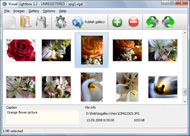


Overview

It's no secret that adding photos to your blog posts is one of the most effective ways to enhance your blog and attract attention to your writing. Flickr has millions of photos available in its database. A simple FREE tool called Flickr Gallery allows you to create a custom image gallery with a cool slide show of the most recent and most interesting photos from Flickr on your website or blog in a few easy steps. Just visit Flickr website and find photostream, photoset or a single photo you like. Enter the address of flickr page to add all photos from this page in your gallery, select the style of thumbnails and the overlay window and add the HTML embed code on your website or blog.
A few clicks and you'll see a stylish photo gallery with beautifull lightbox and zoom effects on your own website or blog!


Flickr Gallery for Windows   Flickr Gallery for MAC

Want more?

Example

Lightbox gallery sample

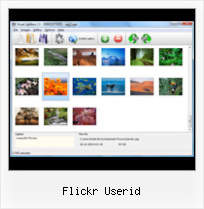
The following image set is generated by Flickr Gallery tool. Click any picture to run Lightbox gallery.

The photo gallery above is an in-page usage demo of Lightbox gallery that uses images from Flickr. The website gallery created with Flickr Gallery application is placed inside the page layout. You can also check the full-page demo slideshow. This example takes whole browser area to show the Lightbox gallery that uses images from Flickr.Flickr Loop Embed Photostream

How to Use

Step 1. Adding flickr images to your own gallery.


Locate the photo, photoset or photostream you want to use in your Flickr slideshow. Click on it to see the photo on its own page.

Copy URL of the flickr page.

Select Add images from Flickr... from the 'Add' button on the Toolbar.

Add images from Flickr

In the appeared window paste URL of the flickr page. Specify also the number of photos you want to add from the flickr page. Flickr Gallery will now include these photos in your project.

Add images from Flickr

If you have included the photos that you do not wish to be in your web gallery, you can easily remove them. Select all images that you wish to remove from photo gallery, and select Delete images. from the Images menu. You can pick and choose pictures by holding the CTRL while clicking the pictures you like.

Step 2. Adding caption.

The name of the photo on flickr page will automatically appear in the caption. When you select a photo you'll see the various info about it, such as: Path, Size, date of last change and Caption. You can add any comment or text about the photo (up to 512 symbols).

Step 3. Gallery properties.

Change the name of your flickr album, the size and quality of your pictures with Flickr Gallery. From the Gallery menu, select Properties or use "Edit Gallery Properties" button on the toolbar.

On the first tab of the Gallery Properties window you can change the name of your photo album and enable/disable the following properties: Slide Show, Auto play Slide Show, Zoom effect, Overlay Shadow. You can also set the Overlay shadow color and select the Engine you want to use (jQuery or Prototype + script.aculo.us).

On the second tab of the Gallery Properties window you can select the thumbnail you want to use, set the Thumbnails Resolution, Thumbnails Quality, Thumbnails Titles. Select Thumbnails Format (save in PNG or JPG format). Specify the Number of columns in you photo album and the Page color.

On the third tab of the Gallery Properties window you can select the template, Image resolution and Image quality of your pictures and change the Watermark.

You can set up the various sizes for exported images.

Control the quality of output PNG or JPEG format image by defining output "Image quality" and "Thumbnail quality" parameters (0%…100%).

Step 4. Save your photo gallery as project file.

When you exit Flickr Gallery application, you'll be asked if you want to save your project. The project consists of the pictures you choose to put on your web photo gallery and all your settings. It's a good idea to save the project, because that will allow you to change the project in case you decide to do something different with future galleries. So click Yes, then enter a name for your project. To select the location of your project, just click the Browse folders button and choose a different location. Then click Save.

Flickr Pro Slideshow Flickr Userid

Download Flickr Gallery


Download Flickr Gallery Download Free Edition
for Windows
Download Flickr Gallery Download Free Edition
for MAC

Flickr Gallery is free for non-commercial use.

A small fee is required for business use. Flickr Gallery Business Edition additionally provides an option to remove the Flickr Gallery. Com credit string as well as a feature to put your own logo to images. After you finish the payment via the secure form, you will receive a license key instantly by email that turns the Flickr Gallery Free Edition into a Business one. You can select the most suitable payment procedure: check, credit card, bank transfer, PayPal etc. Also you can get Business Edition for free if you help with translating Flickr Gallery into your native language, please contact us at for more info.

Embed Flickr Gallery Width

Buy Flickr GalleryBuy Business Edition
for Windows

$49
Single Website
$69
Unlimited Websites
Buy Flickr GalleryBuy Business Edition
for MAC

$49
Single Website
$69
Unlimited Websites

Support

For general help, troubleshooting and feature requests contact Customer Support at . Make sure to include details on your operating system, browser, Flickr Gallery version and a link (or relevant code).Slideshow In Flickr

Feedback

    * I just tried the application, It is wonderful idea. Like you said in the website "few clicks without writing a single line of code" because most of the people is not web designers".

    * Great product by the way and saved me loads of time. I really like your Flickr Gallery program! Very nice.

    * This looks like EXACTLY what I need for my site. It would make my job much faster! Love your program. Thank you!!Flickr For Business Gallery

    * I downloaded your trial version to see if I could get it to work with my website, and I am almost there (I have been looking for something like this for ages)..

FAQ

RELATED

Flicker, a MooTools Class for fetching photos from Flickr element - Element that photos will be appended to // userId - Flickr user ID new Flicker( element, userId, options ).getPhotos(); Options: num (default: 6) - Total photos to display. url - URL used in request to Flickr (usually can be left as default)

Create a Photostream Using jQuery and the Flickr API " Justin apiKey – Your Flickr API key. userId – User ID of the user whose pictures you wish to grab You can find your user id by typing in your Flickr user name into this page:

Flickr: Easy Way to Add A Flickr Slide Show to Any Blog or Flickr rocks. You already have a ton of pictures there. Why not show your flickr photos as a slide show on your web site or blog? The hardest part of the process is figuring out your flickr user id number

Flickr Api Explorer - flickr.people.findByUsername Flickr is almost certainly the best online photo management and sharing application in the world. Show off your favorite photos and videos to the world, securely and privately show content to your friends and family, or blog the photos and videos

Flickr Userid : Flickr Gallery Flickr Userid. Just upload files generated by the photo album builder to your server and it will run immediately, even if it's a free host without php, mysql, asp support!. Flickr Private Photo Find User

googleflickrpictureviewer - russelldad2 In order to do a Flickr search by screen name, Flickr requires the super secret Flickr userID that relates to that screen name In order to do a Flickr search by screen name, Flickr requires the super secret Flickr userID that maps to that screen name

idGettr — Find your Flickr ID A simple utility for finding your Flickr user id number (also works for groups)

How to add Flickr Slideshow into your blog or website? You can simply add any of your flickr slide show into your blog or website just with few simple steps. First of all you need to know your flickr

FAQ " Flickr + Highslide You can use this tool http://idgettr.com/ to find your flickr user ID If you want large images in your blog then you will need to delete the current images from flickr and re-upload them as public photos to flickr

Tools for Flickr Flickr photos on your TiVo. FlickrMap. flickReplacr. FlickrStorm. Gnickr. GLFlickrShow. Glimmr Search Plugins:Flickr. Spahk. Spell with Flickr. Sprinklr. Steganography

Flickr | drupal.org For example, "[flickr-photo:id=230452326,size=m]" generates an tag for flickr photo 230452326 with medium size. idGettr is a handy site if you're having trouble finding your flickr user id

Tagaholic - Flickr Machine Tag Tree This app fetches the last 20 photos of a given user and displays them in a tree organized by machine tags. If there's demand I may increase how many photos it fetches. Instructions: To use this machine tag tree you need a flickr user id of someone who actively machine tags their photos

TiltViewer Flickr Gallery If you already have images on Flickr, the easiest way to create a Set your Flickr user id and optional tag names in the HTML document that contains TiltViewer

snaq.net - FlickrPanoGen FlickrPanoGen is a utility for users of the Flickr image hosting website, which allows panoramic images hosted with Flickr to be viewed interactively. It supports equirectangular/spherical, Flickr PhotoID. Your UserID is the same for all images associated with a specific account; the PhotoID is

plugins:flickr - Geeklog France Geeklog, the open source content management system designed with security in mind. The first parameter is the flickr user ID. A user ID : 21913923@N03. A second optional parameter allow you to specify a set ID for this user. A set ID : 72157603679761232

zFlickrFeed - Flickr Feeds Reader for jQuery This plugin will read Flickr photo feeds for a user and/or a list of tags. Specify a Flickr user ID, photo tags or both. Specify the number of

Find your Flickr ID A simple utility for finding your Flickr user id number. Just enter the address of your photostream or profile and it'll find the number for you. What is the url of your Flickr profile or photostream:

frigtool : Flickr Random Image Generator Optional: enter your numerical Flickr user ID to use your publicly available photos Images selected from Flickr that are not sourced from a specific user accout by supplying a valid Flickr user ID, comply with the necessary Creative Commons licenses that permit image modification and use with

but we all know why You can use Flash to put the power of Flickr to work on your MySpace profile. your email address and Flickr userid and hit the generate button

Flickr Mobile | Wap Review You can see the latest public photos posted to Flickr - which amounts to a constantly changing random assortment of images - most of them unfortunately not very interesting. If you have someone's Flickr user id you can view their public photos, in order from newest to oldest

Did Flickr Miss the Social Revolution? | Cristiano on Tech/Life Flickr launched in February 2004 and was soon known as one of the great examples of the Web2.0 phenomenon. But four years later Flickr already has a good tagging system setup, and people tagging could probably be easily achieved by some machine tags (triples) representing the Flickr UserID and

Google Flickr Picture Viewer In order to do a Flickr search by screen name, Flickr requires the super secret Flickr userID that relates to that screen name In order to do a Flickr search by screen name, Flickr requires the super secret Flickr userID that maps to that screen name

Use The Flickr API To Retrieve a User ID | Tom McFarlin I've been working on a small application that interfaces with the Flickr API in order to dynamically retrieve a stream of photos from a user's Flickr feed. Assuming that you have a Flickr API Key, retrieving the user ID based on the username is

WordPress " Flickr Thumbnails Photostream " WordPress Plugins The two most important attributes to get working are your Flickr API Key and your Flickr user ID. Your user ID or NSID is quite easy to find its located in the address/url bar of your web browser when you are on the "Your Photos" page in your

PmWiki | Cookbook / FlickrAlbum flickralbum user=foo:) can, then, be used to create a similar album of recent photos by someone with the Flickr username foo, etc. The following is a list of arguments possible for other combinations: user=? - flickr userid. tags=? - tags to limit by, comma-delimited

XML Flash Slideshow v4 - Help Next, you'll need to gather the following information about your Flickr Account and the Collection you're going to use with the slideshow: Update the user ID, API key, and collection ID values near the bottom with your Flickr information

Art Nicebox - Joomla! lightbox for images, galleries Art Nicebox - Joomla! lightbox for images, galleries, external pages, Flickr photos with slideshow effect Can use Flickr user id to build gallery from Flickr photos

Flickr Photos Integrated into Yahoo Image Search | Search The Flickr photos in Yahoo Search will be marked by Flickr account name, and searchers can click on the name to view and search all photos by that Flickr user. Searchers can also type in the Flickr User ID in the Yahoo Image Search Box to view images uploaded by a specific Flickr member

