



Overview

It's no secret that adding photos to your blog posts is one of the most effective ways to enhance your blog and attract attention to your writing. Flickr has millions of photos available in its database. A simple FREE tool called Flickr Gallery allows you to create a custom image gallery with a cool slide show of the most recent and most interesting photos from Flickr on your website or blog in a few easy steps. Just visit Flickr website and find photostream, photoset or a single photo you like. Enter the address of flickr page to add all photos from this page in your gallery, select the style of thumbnails and the overlay window and add the HTML embed code on your website or blog.
A few clicks and you'll see a stylish photo gallery with beautifull lightbox and zoom effects on your own website or blog!


Flickr Gallery for Windows   Flickr Gallery for MAC

Want more?

Example

Lightbox gallery sample

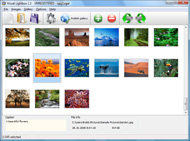
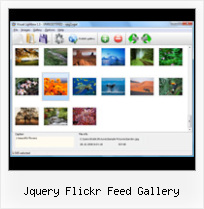
The following image set is generated by Flickr Gallery tool. Click any picture to run Lightbox gallery.

The sample above is an in-page usage demo of Lightbox tool with Flickr images. The photo gallery created with Flickr Gallery tool is placed inside the page layout. You can also check the full-page demo web gallery. This example takes whole browser area to show the Lightbox gallery that uses images from Flickr.Embed Flickr Photo Facebook

How to Use

Step 1. Adding flickr images to your own gallery.


Locate the photo, photoset or photostream you want to use in your Flickr slideshow. Click on it to see the photo on its own page.

Copy URL of the flickr page.

Select Add images from Flickr... from the 'Add' button on the Toolbar.

Add images from Flickr

In the appeared window paste URL of the flickr page. Specify also the number of photos you want to add from the flickr page. Flickr Gallery will now include these photos in your project.

Add images from Flickr

If you have included the photos that you do not wish to be in your web gallery, you can easily remove them. Select all images that you wish to remove from photo gallery, and select Delete images. from the Images menu. You can pick and choose pictures by holding the CTRL while clicking the pictures you like.

Step 2. Adding caption.

The name of the photo on flickr page will automatically appear in the caption. When you select a photo you'll see the various info about it, such as: Path, Size, date of last change and Caption. You can add any comment or text about the photo (up to 512 symbols).

Step 3. Gallery properties.

Change the name of your flickr album, the size and quality of your pictures with Flickr Gallery. From the Gallery menu, select Properties or use "Edit Gallery Properties" button on the toolbar.

On the first tab of the Gallery Properties window you can change the name of your photo album and enable/disable the following properties: Slide Show, Auto play Slide Show, Zoom effect, Overlay Shadow. You can also set the Overlay shadow color and select the Engine you want to use (jQuery or Prototype + script.aculo.us).

On the second tab of the Gallery Properties window you can select the thumbnail you want to use, set the Thumbnails Resolution, Thumbnails Quality, Thumbnails Titles. Select Thumbnails Format (save in PNG or JPG format). Specify the Number of columns in you photo album and the Page color.

On the third tab of the Gallery Properties window you can select the template, Image resolution and Image quality of your pictures and change the Watermark.

You can set up the various sizes for exported images.

Control the quality of output PNG or JPEG format image by defining output "Image quality" and "Thumbnail quality" parameters (0%…100%).

Step 4. Save your photo gallery as project file.

When you exit Flickr Gallery application, you'll be asked if you want to save your project. The project consists of the pictures you choose to put on your web photo gallery and all your settings. It's a good idea to save the project, because that will allow you to change the project in case you decide to do something different with future galleries. So click Yes, then enter a name for your project. To select the location of your project, just click the Browse folders button and choose a different location. Then click Save.

Show Flickr Images On Website Jquery Flickr Feed Gallery

Download Flickr Gallery


Download Flickr Gallery Download Free Edition
for Windows
Download Flickr Gallery Download Free Edition
for MAC

Flickr Gallery is free for non-commercial use.

A small fee is required for business use. Flickr Gallery Business Edition additionally provides an option to remove the Flickr Gallery. Com credit line as well as a feature to put your own logo to images. After you finish the payment via the secure order form, you will receive a license key instantly by e-mail that turns the Flickr Gallery Free Edition into a Business one. You can select the most suitable payment mode: credit card, PayPal, check, bank transfer etc. Also you can get Business Edition for free if you help with translating Flickr Gallery into your native language, please contact us at for more info.

Download Flickr Video On Mac

Buy Flickr GalleryBuy Business Edition
for Windows

$49
Single Website
$69
Unlimited Websites
Buy Flickr GalleryBuy Business Edition
for MAC

$49
Single Website
$69
Unlimited Websites

Support

For general help, troubleshooting and feature requests contact Customer Support at . Make sure to include details on your operating system, browser, Flickr Gallery version and a link (or relevant code).Drupal Embedded Flickr Slideshow Autoplay

Feedback

    * Great product by the way and saved me loads of time. I really like your Flickr Gallery program! Very nice.

    * I have just bought this product and think it is great. As it is extremely easy to use it is something I could get my clients to purchase to upload their own portfolio and latest projects etc.

    * This looks like EXACTLY what I need for my site. It would make my job much faster! Love your program. Thank you!!Flicker Photos Auto Start

    * I LOVE your free Lightbox2 software tool and will purchase the business version shortly. I have seen the Lightbox JS effect used with video tutorials and I was hoping you have a version for video that I can purchase.
Video LightBox: http://videolightbox.com

FAQ

Q:Is it possible to load a gallery from within image? So the gallery loads externally?

A:You should start the gallery onClick:

1) Add the following function into the <head> tag:

<script type="text/javascript">
function showLightBox()
{ Lightbox.start(document.getElementById('firstImage'));}
</script>

2) Specify the onClick event for the image (or link):
<img src="thumbnail_gr.jpg" onClick="javascript:showLightBox()" title="Click to see the demo" style="cursor: pointer;">
3) Set the ID for any image in your gallery (id="firstImage"), for example add it to the first image:
<a rel="lightbox_vlb" href="data/images/dscn6831.jpg" title="dscn6831" id="firstImage">
4) Use 'display: none;' property for your gallery in engine\css\vlightbox.css. Just change the following code:

#vlightbox a{
display:-moz-inline-stack;
display:inline-block;
zoom:1;
*display:inline;
position:relative;
vertical-align:top;
margin:3px;
width:160px;
font-family:Trebuchet,Tahoma,Arial,sans-serif;
font-size:11px;
font-weight:normal;
text-align:center;
opacity:0.87;
}

to:

#vlightbox a{
display:-moz-inline-stack;
display:none;
zoom:1;
*display:inline;
position:relative;
vertical-align:top;
margin:3px;
width:160px;
font-family:Trebuchet,Tahoma,Arial,sans-serif;
font-size:11px;
font-weight:normal;
text-align:center;
opacity:0.87;
}

RELATED

Flickr Feed Jquery : Flickr Gallery Flickr Feed Jquery. Just drag and drop your photos or folders with photos and press

Methods Of Adding Your Flickr Photostream To Your Site – WebM Webmag is a web design magazine with useful tips, freebies and tools for web designers, developers, graphic designers and illustrators. Uses the Flickr API to display your latest Flickr images on your site. Pulling Your Flickr Feed with jQuery. Script that uses JSON to display photos

21 Brilliant jQuery Image Gallery/Slideshow Plugins As jQuery is getting popular day by day, more and more web developers are coming out with new and creative ideas every day. Here are 21 brilliant jQuery plugins which you can easily use to create an image gallery/slideshow for your website

Flickr style photo gallery demo in jQuery Description: This tutorial I'll explain a simple step-by-step way to implement an Flickr style photo gallery demo in Jquery and CSS. The result is

Jquery Flickr Gallery Plugin | Flickr Slideshow Jquery Flickr Gallery Plugin. Build superior photoalbums for your Website with jQuery Thickbox Alternative! flickr gallery thumbnail embed

The Best jQuery Lightbox Scripts | Domain Acquisition Eversince, Lokesh Dhakar created the first lightbox application, photo galleries and popup windows advanced to new era. And there was a time that lightboxes become a default component for every web si

Full Screen Image Gallery " Jquery Labs The Full Screen Image Gallery plugin is full screen image gallery that automatically scales the image with kept aspect ratio to fill the browser background. It | Jquery Labs

jQuery Image Gallery/Slideshow Plugins | Code Album Image galleries and slideshows provide a good user experience and make viewing images more pleasant and intuitive on your website. With the advent of powerful JavaScript frameworks like jQuery, Prototype, Mo

The Book and the Cover " Benjamin Sterling Galleries Benjamin Sterling Galleries: WordPress Photo/Image Gallery Plugin for Flickr & Picasa Well if you did not click the button to add you gallery yet, go a head and paste in the url to your Flickr rss feed and click the first button and there you go, a list of your Flickr photos

WordPress " Support " [Plugin: Flickr Mini Gallery] jQuery I've discovered that the great plugin Flickr Mini Gallery conflicts with Lightbox Plus (and probably any other plugins that implement jQuery using the wp_enqueue_script('jquery'); method. I took a look at the code and have created a hotfix for version 1.0 of Flick Mini Gallery

Pulling Your Flickr Feed with jQuery | Viget Inspire http://api.flickr.com/services/feeds/groups_pool.gne? id=675729@N22&lang=en-us&format=json. Bringing It Into jQuery. So now that you have your JSON feed, lets put it to good use. My co-workers and I are big fans of the JavaScript .com/how-to-use-jquery-with-a-json-flickr-feed-to-display-photos

A jQuery Flickr Feed Plugin This jQuery Flickr plugin allows you to pull a public Flickr feed and display it however you like. Compatible with lightbox, colorbox, cycle, etc

Flickr Feed Gallery Flickr Feed Gallery supports public photo stream, group pool stream, favorites stream and friend's photo stream. All the options can be changed from the settings page. Public photo stream – Photos belonging to a specific Flickr user id or a group of user ids can be displayed

onwebdev: jQuery: a Flickr gallery with JSONP JSONP stands for JSON with Padding and allows you to execute cross-domain AJAX requests using JavaScript (in this case, jQuery). We're going to use the public JSON feed of Flickr to display a simple gallery made up of nine pictures. First of

Create a Slick Flickr Gallery with SimplePie | Nettuts+ I've wanted to write a tutorial for quite some time now, and APIs have always been a particular interest of mine. So with my wife's recent foray into an RSS feed from Flickr, a bit of PHP, and some jQuery to make things nice and interactive! We'll. use SimplePie to handle the RSS feed, as it. makes

jQuery + Flickr Image Gallery Can anyone suggest a simple jQuery Image Gallery that is fed by Flickr. I need something that updates the image gallery on a website when

jFlickrFeed Plugin | The Ultimate jQuery List This plugin works by pulling a JSON feed from Flickr and applying the data it gets back to a template. jQuery Ajax tutorials to jQuery UI examples, you've found the ultimate list of tutorials and plugins for jQuery! Everything from Ajax file uploaders to RSS feed plugins, all on one of the

jFlickrFeed | jQuery Plugins This plugin makes it easy to pull images from a flickr feed and at them to a page using any markup you want. top of the flickr API and has a simple templating language for arbitrary markup. This makes it easy to pull images from flickr and display them using other jquery plugins like colorbox or

15 Great jQuery Images Gallery Plugins To Showcase Your Work If you are showcasing your portfolio and work, image gallery is a very important part for your website. It needs to load fast, good navigation experience, easy to maintain and search engine friendly, therefore non-flash based gallery has been

Flickr Gallery 3.2.3 Freeware Download - Add Flickr Slideshow Download Freeware Flickr Gallery. A simple FREE tool called Flickr Gallery allows you to embed a custom image gallery, or a cool slideshow with beautiful lightbox and zoom effects of the most interesting photos from Flickr.com on your website or

15 Amazing jQuery Image Gallery/Slideshow Plugins and Tutorials Link : Image Gallery Using jQuery and Flickr " Description : This is a full screen image gallery that automatically scales the Fetches the biggest image from flickr using their API. - Caption that can be turned on or off. - Navigate by clicking on either half of the image, or use the thumbnails

Ajax < Web development | AjaxRain.com With a diverse collection of Ajax examples, javascripts, jQuery plugins, web2 codes and demos from around the web, Ajaxrain gives you the perfect start to web development Pulling Your Flickr Feed with jQuery

John Patrick Given is a Programmer jQuery Image Scale Carousel - A jQuery powered image gallery that scales the images to the width and height of the container keeping the images aspect ratio intact. sogd.fm - I created this simply to play with oAuth and the Twitter API. jQuery Flickr Gallery - By simply providing a set ID you get a

mudaimemo - mudaimemo iPhone Apps jQuery Simple Dialog. jQuery Quick Edit. jQuery Form Notifier. jQuery Gallery Plugin Google Ajax Feed API × Amazon RSS Feed. Flickr Photo Stream. PicStream

How to use jQuery with a JSON Flickr feed to display photos How to use jQuery with a JSON Flickr feed to display photos I'm always looking into new ways to integrate a Flickr gallery into a website. I just wrote an article on integrating a Flickr gallery using JSON and jQuery, feel free to check it out for additional ideas: http://bit.ly/7OEpIN

