



Overview

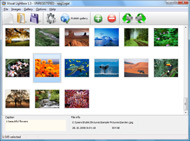
It's no secret that adding photos to your blog posts is one of the most effective ways to enhance your blog and attract attention to your writing. Flickr has millions of photos available in its database. A simple FREE tool called Flickr Gallery allows you to create a custom image gallery with a cool slide show of the most recent and most interesting photos from Flickr on your website or blog in a few easy steps. Just visit Flickr website and find photostream, photoset or a single photo you like. Enter the address of flickr page to add all photos from this page in your gallery, select the style of thumbnails and the overlay window and add the HTML embed code on your website or blog.
A few clicks and you'll see a stylish photo gallery with beautifull lightbox and zoom effects on your own website or blog!


Flickr Gallery for Windows   Flickr Gallery for MAC

Want more?

Example

Lightbox gallery sample

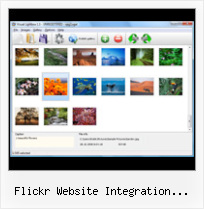
The following image set is generated by Flickr Gallery tool. Click any picture to run Lightbox gallery.

The example above is an in-page usage demo of Lightbox gallery that uses images from Flickr. The website gallery created with Flickr Gallery application is placed inside the html page. You can also check the full-page demo gallery. This example takes whole browser area to show the gallery.Flickr Album Embedded

How to Use

Step 1. Adding flickr images to your own gallery.


Locate the photo, photoset or photostream you want to use in your Flickr slideshow. Click on it to see the photo on its own page.

Copy URL of the flickr page.

Select Add images from Flickr... from the 'Add' button on the Toolbar.

Add images from Flickr

In the appeared window paste URL of the flickr page. Specify also the number of photos you want to add from the flickr page. Flickr Gallery will now include these photos in your project.

Add images from Flickr

If you have included the photos that you do not wish to be in your web gallery, you can easily remove them. Select all images that you wish to remove from photo gallery, and select Delete images. from the Images menu. You can pick and choose pictures by holding the CTRL while clicking the pictures you like.

Step 2. Adding caption.

The name of the photo on flickr page will automatically appear in the caption. When you select a photo you'll see the various info about it, such as: Path, Size, date of last change and Caption. You can add any comment or text about the photo (up to 512 symbols).

Step 3. Gallery properties.

Change the name of your flickr album, the size and quality of your pictures with Flickr Gallery. From the Gallery menu, select Properties or use "Edit Gallery Properties" button on the toolbar.

On the first tab of the Gallery Properties window you can change the name of your photo album and enable/disable the following properties: Slide Show, Auto play Slide Show, Zoom effect, Overlay Shadow. You can also set the Overlay shadow color and select the Engine you want to use (jQuery or Prototype + script.aculo.us).

On the second tab of the Gallery Properties window you can select the thumbnail you want to use, set the Thumbnails Resolution, Thumbnails Quality, Thumbnails Titles. Select Thumbnails Format (save in PNG or JPG format). Specify the Number of columns in you photo album and the Page color.

On the third tab of the Gallery Properties window you can select the template, Image resolution and Image quality of your pictures and change the Watermark.

You can set up the various sizes for exported images.

Control the quality of output PNG or JPEG format image by defining output "Image quality" and "Thumbnail quality" parameters (0%…100%).

Step 4. Save your photo gallery as project file.

When you exit Flickr Gallery application, you'll be asked if you want to save your project. The project consists of the pictures you choose to put on your web photo gallery and all your settings. It's a good idea to save the project, because that will allow you to change the project in case you decide to do something different with future galleries. So click Yes, then enter a name for your project. To select the location of your project, just click the Browse folders button and choose a different location. Then click Save.

Photo Gallery Using Flickr Photos Flickr Website Integration Examples

Download Flickr Gallery


Download Flickr Gallery Download Free Edition
for Windows
Download Flickr Gallery Download Free Edition
for MAC

Flickr Gallery is free for non-commercial use.

A small fee is required for business use. Flickr Gallery Business Edition additionally provides an option to remove the Flickr Gallery. Com credit bar as well as a feature to put your own logo to images. After you finish the payment via the secure form, you will receive a license key instantly by e-mail that turns the Flickr Gallery Free Edition into a Business one. You can select the most appropriate payment method: PayPal, check, bank transfer, credit card etc. Also you can get Business Edition for free if you help with translating Flickr Gallery into your native language, please contact us at for more info.

Mini Flickr Gallery Usage

Buy Flickr GalleryBuy Business Edition
for Windows

$49
Single Website
$69
Unlimited Websites
Buy Flickr GalleryBuy Business Edition
for MAC

$49
Single Website
$69
Unlimited Websites

Support

For general help, feature requests, troubleshooting contact Customer Support at . Make sure to include details on your Flickr Gallery version, operating system, browser and a link (or relevant code).Jquery Parse Flickr Api

Feedback

    * Just a quick thank you for the software though, It's not often you get a free software version of this quality and style! Well done and please continue this amazing gallery. Hope to see more advances.

    * First of all, your product is fantasitc. I looked at the others and your code generator app was insanely easy to use.

    * Just bought the business version of Flickr Gallery and I just had to write and say how impressed I am with it. Really easy to use, intuitive interface and generates a truly professional presentation. Seldom have I been so pleased with a software purchase. Thank you.Joomla Flickr Templates

    * I have installed Flickr Gallery to trial. All good, loving it!! I want to get an business version of your great programm. I love it - soo easy to use!!

FAQ

RELATED

Item Mapper > Home Our design and development teams ensure that your website is clean, professional, and most importantly - an extension of your on a platform that is also a killer content management system which will allow you to easily update the rest of your website

YUI Library Examples: AutoComplete Control Flickr Image Search (included with examples for the Rich Text Editor Logger Integration with YUI Components (included with examples for the Logger Control)

Web 2.0 | Flickr - Photo Sharing! What does Web 2.0 look like? I did some screenshots of sites considered to be examples of Web 2.0 companies to look for common elements. Hover over to read my notes on each. What do these sites have in common? If you know of other Web 2.0 sites

Frame Digital | C#, ASP.NET and Flickr API integration How to use Flickr.NET to access the Flickr API in C# ASP.NET. C#, ASP.NET and Flickr API integration. by Darren James. Flickr has a really nice API exposed that allows anyone with an API key to interrogate and present public Flickr data on their own website or application

Celebrate 100 Million CC Photos on Flickr with Joi Ito's Free Over the last couple of weeks we've been keeping a close eye on the number of CC licensed photos of Flickr. Our calculations now show that Flickr has surpassed 100 million CC licensed photos sometime during the day on Saturday, March 21st, 2009

Facebook, Wordpress, flickr, interoperability and integration I'm already using WordPress for blogging and flickr for photos. would probably mean nice flickr integration with Facebook (since flickr is part of Yahoo)

Viewbook — Text page Sell prints and digital images directly on your Viewbook website with the Fotomoto integration. Tumblr. Flickr. Export Viewbook images directly to your Flickr account to display your work to a wider audience

YUI Library Examples: AutoComplete Control: Find Photos on Flickr YUI Library Examples: AutoComplete Control: Find Photos on Flickr. AutoComplete Control: Find Photos on Flickr. This example uses AutoComplete to find images by tag from the Flickr webservice. A simple PHP proxy is used to access Logger Integration with YUI Components (included with examples for

License Content User-generated content sites like Flickr, Blip.tv, and. SlideShare give contributors the Good examples. are provided by Flickr (http://flickr.com/creativecommons/) and. Jamendo

Integrating Flickr Widgets in HTML webpages How to integrate Flickr widgets and slideshows into your html website. The best and worst widgets. There are a ton of examples (and links to other examples) here: http://www.flickr.com/services

Picnik Picnik lets you edit all your photos online, from one easy place

YUI Library Examples: AutoComplete Control: Use AutoComplete YUI Library Examples: AutoComplete Control: Use AutoComplete with Flickr's XML Webservice. AutoComplete Control: Use AutoComplete with Flickr's XML Webservice. This example uses a DataSource Search (included with examples for Rich Text Editor (beta)) Logger Integration with YUI

The New Brand Web Site Standard – Social Media Integration A new trend is beginning to emerge among brand websites. Some brands, more established in social media uses, have taken the next step beyond However, social media integration within brand sites has evolved since Skittles took the leap. Recent examples by Nissan and Ford offer consumers a

Flickr Integration – Google Buzz and Microsoft Bing Apple, Microsoft, and Google have all recently announced great integrations with Flickr. If you've spent ages building up a library of great photos in Flickr

Q4 Web Systems - Examples Below are examples of how clients have used Q4 to help achieve their goals. Best Practice Investor Website with integrated social media, Vimeo, Slideshare, Flickr and Twitter. Best Practice Investor Website with custom Dividends, Google Maps, YouTube, Social Sharing

WordPress Elegant Flickr Theme - HTML / CSS - Creattica Great CSS website design showcased on Creattica.com. Get inspired with thousands of brilliant CSS based site designs from the Creattica design community

21 Popular Websites with Smartphone Integration | Free and Smartphone is a mobile phone offering advanced capabilities, often with PC-like functionality (PC-mobile handset convergence). There is no industry standard definition of a smartphone. For some, a smartphone is a phone that runs complete

Foliogem - online portfolio system for photographers, artists Foliogem is a self-managed portfolio system that allows photographers, artists and other creatives to display and sell their work with our flexible and creative website templates

Travel Industry Websites: Design Trends and Best Examples Travel Industry Websites: Design Trends and Best Examples The importance of the social media integration can be hardly overrated today. While developing a website for travel agency, hotel or resort, be sure to make the links to social networks and bookmaking websites prominent so that people who have

Oberkampfâ„¢ Oberkampf has been updated for this change in flickr services. B. Development and changes on Oberkampf were retired in 2005 You are probably here because you want some sort of custom gallery on your website that runs off your flickr.com account

Clever Flickr Open Source Flash Image Gallery For Your Flapi is an open source Flash image gallery by Frederik Vincx, Jesse Wynants and Lev Detrez that uses the popular You can integrate the viewer in your weblog, website or even in a Flash file to show your Flickr photo sets. The viewer is easily customizable via an XML file that describes the various

Agile Carousel - Javascript Slideshow - Image Carousel Agile Development can help you complete website development projects on time, within budget and more inline with customer Examples. Click the "View Single Page Example" links to view code samples for each example. All examples (except Flickr example) are using the same data. Using Flickr

Cooliris for Developers | Customize Cooliris on your site Embed a customized Cooliris Wall on your site with the latest scripts, frameworks, tools, examples, and discussion forum. and resources to fully customize the Cooliris experience for your website. Display content from Flickr, Picasa, or any Media RSS feed. Adjust size, row count, wall

Simpleflickr Usage : Flickr Gallery Simpleflickr Usage. Just drag and drop your photos or folders with photos and press Just visit Flickr website and find photostream, photoset or a single photo you like

Social Media Integration: Examples and Tips | [Re]Encoded.com Integrating one or all of your social media feeds is becoming more popular on both personal and professional websites. Whether you just want to show your most recent tweets or integrate an entire lifestream into your site, the examples below can

Image Galleries | Komotion Your online media library contains all your uploaded images. You can set titles, captions, descriptions and other properties for each image, and organize to integrate your Shozam generated galleries seamlessly with your website pages. View Shozam gallery example. Top. Flickr gallery

iDreamDigital : design + marketing + development User accounts, administration, databases, api integration, etc. Please give us a general overview of some of Website integration and automation for Facebook, Twitter, Flickr, etc

