



Overview

It's no secret that adding photos to your blog posts is one of the most effective ways to enhance your blog and attract attention to your writing. Flickr has millions of photos available in its database. A simple FREE tool called Flickr Gallery allows you to create a custom image gallery with a cool slide show of the most recent and most interesting photos from Flickr on your website or blog in a few easy steps. Just visit Flickr website and find photostream, photoset or a single photo you like. Enter the address of flickr page to add all photos from this page in your gallery, select the style of thumbnails and the overlay window and add the HTML embed code on your website or blog.
A few clicks and you'll see a stylish photo gallery with beautifull lightbox and zoom effects on your own website or blog!


Flickr Gallery for Windows   Flickr Gallery for MAC

Want more?

Example

Lightbox gallery sample

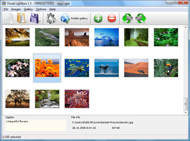
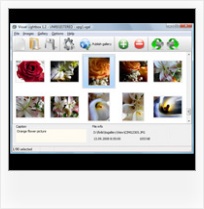
The following image set is generated by Flickr Gallery tool. Click any picture to run Lightbox gallery.

The sample above is an in-page usage demo of Lightbox tool with Flickr images. The slideshow created with Flickr Gallery software is placed inside the website page. You can also check the full-page demo web gallery. This example takes whole browser area to show the slideshow.Flickr Gallery Plugin Html

How to Use

Step 1. Adding flickr images to your own gallery.


Locate the photo, photoset or photostream you want to use in your Flickr slideshow. Click on it to see the photo on its own page.

Copy URL of the flickr page.

Select Add images from Flickr... from the 'Add' button on the Toolbar.

Add images from Flickr

In the appeared window paste URL of the flickr page. Specify also the number of photos you want to add from the flickr page. Flickr Gallery will now include these photos in your project.

Add images from Flickr

If you have included the photos that you do not wish to be in your web gallery, you can easily remove them. Select all images that you wish to remove from photo gallery, and select Delete images. from the Images menu. You can pick and choose pictures by holding the CTRL while clicking the pictures you like.

Step 2. Adding caption.

The name of the photo on flickr page will automatically appear in the caption. When you select a photo you'll see the various info about it, such as: Path, Size, date of last change and Caption. You can add any comment or text about the photo (up to 512 symbols).

Step 3. Gallery properties.

Change the name of your flickr album, the size and quality of your pictures with Flickr Gallery. From the Gallery menu, select Properties or use "Edit Gallery Properties" button on the toolbar.

On the first tab of the Gallery Properties window you can change the name of your photo album and enable/disable the following properties: Slide Show, Auto play Slide Show, Zoom effect, Overlay Shadow. You can also set the Overlay shadow color and select the Engine you want to use (jQuery or Prototype + script.aculo.us).

On the second tab of the Gallery Properties window you can select the thumbnail you want to use, set the Thumbnails Resolution, Thumbnails Quality, Thumbnails Titles. Select Thumbnails Format (save in PNG or JPG format). Specify the Number of columns in you photo album and the Page color.

On the third tab of the Gallery Properties window you can select the template, Image resolution and Image quality of your pictures and change the Watermark.

You can set up the various sizes for exported images.

Control the quality of output PNG or JPEG format image by defining output "Image quality" and "Thumbnail quality" parameters (0%…100%).

Step 4. Save your photo gallery as project file.

When you exit Flickr Gallery application, you'll be asked if you want to save your project. The project consists of the pictures you choose to put on your web photo gallery and all your settings. It's a good idea to save the project, because that will allow you to change the project in case you decide to do something different with future galleries. So click Yes, then enter a name for your project. To select the location of your project, just click the Browse folders button and choose a different location. Then click Save.

Flickr Photostream Not Visible To Some Flickr Latest Photo Widget Typepad

Download Flickr Gallery


Download Flickr Gallery Download Free Edition
for Windows
Download Flickr Gallery Download Free Edition
for MAC

Flickr Gallery is free for non-commercial use.

A small fee is required for business use. Flickr Gallery Business Edition additionally provides an option to remove the Flickr Gallery. Com credit string as well as a feature to put your own logo to images. After you finish the payment via the secure order form, you will receive a license key instantly by e-mail that turns the Flickr Gallery Free Edition into a Business one. You can select the most appropriate payment method: check, PayPal, credit card, bank transfer etc. Also you can get Business Edition for free if you help with translating Flickr Gallery into your native language, please contact us at for more info.

Autostart Flickr Photostream

Buy Flickr GalleryBuy Business Edition
for Windows

$49
Single Website
$69
Unlimited Websites
Buy Flickr GalleryBuy Business Edition
for MAC

$49
Single Website
$69
Unlimited Websites

Support

For feature requests, troubleshooting, general help contact Customer Support at . Make sure to include details on your Flickr Gallery version, browser, a link (or relevant code) and operating system.Flickr Slideshow Screensaver

Feedback

    * I would like to say that Flickr Gallery is a stunning lil program! Its almost too good to be true i'd say! I've been looking for tutorials to create a lightbox gallery, but just couldnt come right. Im so glad i found Flickr Gallery!

    * First of all, your product is fantasitc. I looked at the others and your code generator app was insanely easy to use.

    * Let me start just congratulating you, good job, really. I am trying out the free version before I buy it. It works great.Jquery Slideshow Fed By Flickr

    * I'm absolutely loving Flickr Gallery Business and Video LightBox. Amazing, quick and painless, to create a custom, browser independent gallery. And it works first time - every time! Best value for money I've seen in quite a while...

FAQ

Q:Is it possible to load a gallery from within image? So the gallery loads externally?

A:You should start the gallery onClick:

1) Add the following function into the <head> tag:

<script type="text/javascript">
function showLightBox()
{ Lightbox.start(document.getElementById('firstImage'));}
</script>

2) Specify the onClick event for the image (or link):
<img src="thumbnail_gr.jpg" onClick="javascript:showLightBox()" title="Click to see the demo" style="cursor: pointer;">
3) Set the ID for any image in your gallery (id="firstImage"), for example add it to the first image:
<a rel="lightbox_vlb" href="data/images/dscn6831.jpg" title="dscn6831" id="firstImage">
4) Use 'display: none;' property for your gallery in engine\css\vlightbox.css. Just change the following code:

#vlightbox a{
display:-moz-inline-stack;
display:inline-block;
zoom:1;
*display:inline;
position:relative;
vertical-align:top;
margin:3px;
width:160px;
font-family:Trebuchet,Tahoma,Arial,sans-serif;
font-size:11px;
font-weight:normal;
text-align:center;
opacity:0.87;
}

to:

#vlightbox a{
display:-moz-inline-stack;
display:none;
zoom:1;
*display:inline;
position:relative;
vertical-align:top;
margin:3px;
width:160px;
font-family:Trebuchet,Tahoma,Arial,sans-serif;
font-size:11px;
font-weight:normal;
text-align:center;
opacity:0.87;
}

RELATED

Flickr - 10 Essential Websites - TIME Digital photo–sharing sites have come and gone, but Flickr has remained. It offers some of the smartest tools for managing your ever expanding picture collection — from Photostream, which

Everything TypePad: Widgets the best blog about blogging in the world. You've heard all about the great new widgets that are available for use with your TypePad weblog, but you're not sure how to start using them?

10 Flashy Flickr Tips: Detailed Tagging, Privacy Settings, More If you're an avid photographer or a rabid photo organizer, or if you just love looking through photo albums, Flickr is the social network for you. Flickr supports Blogger, LiveJournal, TypePad, WordPress, and Twitter

Typepad Flickr Widget : Flickr Gallery Typepad Flickr Widget. Just drag and drop your photos or folders with photos and press

ProgrammableWeb Tag Search:: widgets PeoplePond Widget. Sites built on the TypePad platform can be dynamically built around the content from your PeoplePond profile by using the PeoplePond TypePad Plugin. The gadget lets the users turn their RSS album of latest albums, all albums and others into an always updated photo slideshow

Maps widgets for your site, blog, social network, and more Get maps widgets on Widgetbox.com! Find maps widgets for your site, blog, social network, and more! Add a map of your geotagged flickr photos to your blog!

Paying Attention (or Not) to the Flickr Daily Zeitgeist The authors of Mind Hacks explore how elements of web pages attract attention and influence reading. They then apply some of the ideas from their book in the examination of one such element, an animated photo-sharing widget, the Flickr Daily

How to widgetize your blog or website - Bluelime Media These widgets could pull the latest news feed from a site such as Voxant, the latest Dilbert cartoon, a list of books you are reading or meaning to read, the weather, or a series of flickr photos. These widgets can be a fun way to add content to your website

Photos widgets for your site, blog, social network, and more Get photos widgets on Widgetbox.com! Find photos widgets for your site, blog, social network, and more!

Widget wonderland | E-Mail & Internet | Macworld Anyone can slap pictures and text on a Web page and call it a blog. It's much harder to make a blog that stands out from the pack. One way to do so is by dressing up your site with widgets. Widgets are essentially tiny programs that add

Widgets-Blog.com " Archive for Flickr Widgets So if you have an image rich site where you want to display the photos on your website or blog, this may be an easy answer for you. Here's another photo image rotator which operates in a similar way, but has much more control of how, and what you display

Flickr Programs - Touchpoint Gallery, HoudahGeo, Resco Photo View your digital photos in a 3D photo album virtual art gallery and much more. Mac Geocoding Know Where you Took that Photo See your photos in Google Earth. Resco Photo Manager is a fast image viewing editing and management program

Photo widgets for your site, blog, social network, and more Get photo widgets on Widgetbox.com! Find photo widgets for your site, blog, social network, and more!

Six Apart - About - Press Center - Six Apart Launches Open two companies among the first to extend TypePad with widgets that add launched a new, open widget initiative to expand choice and functionality for TypePad subscribers and readers

Loic Le Meur Blog: Six Apart launches TypePad widgets We have just launched TypePad Widgets, TechCrunch has the story and the press release is below. Six Apart Launches Open Widget Platform for TypePad Blogs Thirty-two companies among the first to extend TypePad with widgets that add power to the

PayPal Storefront Widget If you store your photos on a image hosting site like Photobucket, Flickr, etc, make sure that the URL you are using passes back PayPal Widget. Q: I am having trouble loading my product photo which resides on Photobucket/Flickr/Picasa/etc

Iweb Slideshow Widget - Flash Slideshow Builder Iweb Slideshow Widget. Just upload files generated by the Free 3D Flash Slideshow builder to your server and it will run immediately, even if it's a free host without php, mysql, asp support!. Lightroom Flash Gallery Slideshow Seconds Timing

Six Apart widget podcast with Byrne Reese | Niall Kennedy Last Friday I visited Six Apart's headquarters in San Francisco to talk about widgets with Byrne Reese. Byrne is the former product manager of TypePad, currently a product manager of Movable Type, and a developer of plugins and widgets used in

MediaWiki Widgets TypePad Connect comments. RSS Feed widget. Flickr Search widget. Flickr Slideshow widget. Picasa photo album Widgets development, Widgets extension and Widgets themselves, to be sure you have latest security updates and to find new widgets, subscribe

Top 5 widgets every blogger must have Flickr Slideshow - a widget that showcases yours or other peoples photos. Google Site Search - a widget that lets visitors search your blog using Google. del.icio.us Tagroll - a widget that shows off your del.icio.us tags. Flash mini Digg viewer - a widget that shows the latest Digg headlines

Typepad Photo Gallery Typepad Photo Gallery. Improve your online photo gallery with Ajax Photo Gallery!. photo gallery for new web Flickr Copy How To Flickr Latest Photo Widget Typepad . for free if you help with translating Flickr Gallery into your native

e-Clippings (Learning As Art): Bruce Sterling's Flickr set on I really find both the subject matter ("ubiquitous computing in the service of sustainability") and the medium (using flickr with notes) really interesting. I think that people have looked mainly (and understandably) at flickr for photo-sharing

Wordpress Flickr – embed Flickr photos in Wordpress blog To embed your own Flickr photos in your WordPress blog you'll need to getting the widget up and running but I can't link my Flickr page no

Tiger Widgets - Flidget | Flickr - Photo Sharing! Testing out widgets. Using the Capture widget to take a screenshot and then using the Flidget widget to send the screenshot to Flickr and back out via Typepad

