



Overview

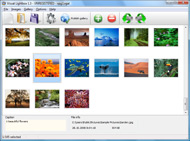
It's no secret that adding photos to your blog posts is one of the most effective ways to enhance your blog and attract attention to your writing. Flickr has millions of photos available in its database. A simple FREE tool called Flickr Gallery allows you to create a custom image gallery with a cool slide show of the most recent and most interesting photos from Flickr on your website or blog in a few easy steps. Just visit Flickr website and find photostream, photoset or a single photo you like. Enter the address of flickr page to add all photos from this page in your gallery, select the style of thumbnails and the overlay window and add the HTML embed code on your website or blog.
A few clicks and you'll see a stylish photo gallery with beautifull lightbox and zoom effects on your own website or blog!


Flickr Gallery for Windows   Flickr Gallery for MAC

Want more?

Example

Lightbox gallery sample

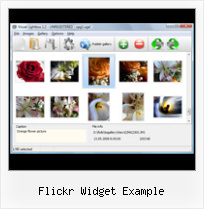
The following image set is generated by Flickr Gallery tool. Click any picture to run Lightbox gallery.

The sample above is an in-page usage demo of Lightbox with images from Flickr. The gallery created with Flickr Gallery application is placed inside the html page. You can also check the full-page demo lightbox gallery. This example takes whole browser area to show the website gallery.Flickr Badge Plugin Joomla

How to Use

Step 1. Adding flickr images to your own gallery.


Locate the photo, photoset or photostream you want to use in your Flickr slideshow. Click on it to see the photo on its own page.

Copy URL of the flickr page.

Select Add images from Flickr... from the 'Add' button on the Toolbar.

Add images from Flickr

In the appeared window paste URL of the flickr page. Specify also the number of photos you want to add from the flickr page. Flickr Gallery will now include these photos in your project.

Add images from Flickr

If you have included the photos that you do not wish to be in your web gallery, you can easily remove them. Select all images that you wish to remove from photo gallery, and select Delete images. from the Images menu. You can pick and choose pictures by holding the CTRL while clicking the pictures you like.

Step 2. Adding caption.

The name of the photo on flickr page will automatically appear in the caption. When you select a photo you'll see the various info about it, such as: Path, Size, date of last change and Caption. You can add any comment or text about the photo (up to 512 symbols).

Step 3. Gallery properties.

Change the name of your flickr album, the size and quality of your pictures with Flickr Gallery. From the Gallery menu, select Properties or use "Edit Gallery Properties" button on the toolbar.

On the first tab of the Gallery Properties window you can change the name of your photo album and enable/disable the following properties: Slide Show, Auto play Slide Show, Zoom effect, Overlay Shadow. You can also set the Overlay shadow color and select the Engine you want to use (jQuery or Prototype + script.aculo.us).

On the second tab of the Gallery Properties window you can select the thumbnail you want to use, set the Thumbnails Resolution, Thumbnails Quality, Thumbnails Titles. Select Thumbnails Format (save in PNG or JPG format). Specify the Number of columns in you photo album and the Page color.

On the third tab of the Gallery Properties window you can select the template, Image resolution and Image quality of your pictures and change the Watermark.

You can set up the various sizes for exported images.

Control the quality of output PNG or JPEG format image by defining output "Image quality" and "Thumbnail quality" parameters (0%…100%).

Step 4. Save your photo gallery as project file.

When you exit Flickr Gallery application, you'll be asked if you want to save your project. The project consists of the pictures you choose to put on your web photo gallery and all your settings. It's a good idea to save the project, because that will allow you to change the project in case you decide to do something different with future galleries. So click Yes, then enter a name for your project. To select the location of your project, just click the Browse folders button and choose a different location. Then click Save.

Autoplay Flickr Flash Slider Flickr Widget Example

Download Flickr Gallery


Download Flickr Gallery Download Free Edition
for Windows
Download Flickr Gallery Download Free Edition
for MAC

Flickr Gallery is free for non - commercial use.

A small fee is required for business use. Flickr Gallery Business Edition additionally provides an option to remove the Flickr Gallery. Com credit bar as well as a feature to put your own logo to images. After you finish the payment via the secure form, you will receive a license key instantly by e-mail that turns the Flickr Gallery Free Edition into a Business one. You can select the most appropriate payment procedure: credit card, bank transfer, check, PayPal etc. Also you can get Business Edition for free if you help with translating Flickr Gallery into your native language, please contact us at for more info.

Make Shared Flickr Slideshow Autoplay

Buy Flickr GalleryBuy Business Edition
for Windows

$49
Single Website
$69
Unlimited Websites
Buy Flickr GalleryBuy Business Edition
for MAC

$49
Single Website
$69
Unlimited Websites

Support

For troubleshooting, feature requests and general help contact Customer Support at . Make sure to include details on your operating system, browser, Flickr Gallery version and a link (or relevant code).Flickr Gallery Html Codes Foto

Feedback

    * I have just bought this product and think it is great. As it is extremely easy to use it is something I could get my clients to purchase to upload their own portfolio and latest projects etc.

    * Another programmes have incredible functionality but no fantastic interface like your product!

    * I am thrilled with what this tool can do for me thanks for all the hard work that must have gone into it.Flickr Embeding Slideshow To Unique Position

    * I LOVE your free Lightbox2 software tool and will purchase the business version shortly. I have seen the Lightbox JS effect used with video tutorials and I was hoping you have a version for video that I can purchase.
Video LightBox: http://videolightbox.com

FAQ

Q:I would like to have a few galleries in one website and even on one page.

A:To create several galleries on your page you should change following parameter in A tag for different galleries:

rel="lightbox_vlb"

For example, for the first gallery you should set rel="lightbox_vlb":

<!-- Start Flickr Gallery.com BODY section -->
<div id="vlightbox">
<a rel="lightbox_vlb" href="data/images/dscn6831.jpg" title="dscn6831" >
<img src="data/thumbnails/dscn6831.png" ><span></span></a>
<a rel="lightbox_vlb" href="data/images/dscn6823.jpg" title="dscn6823">
<img src="data/thumbnails/dscn6823.png"><span></span></a>
<a id="vlb" href="http://Flickr Gallery.com">Photo Gallery For Web by Flickr Gallery.com v2.0</a>
</div>
<!-- End Flickr Gallery.com BODY section -->

and for the second gallery rel="lightbox_vlb1":

<!-- Start Flickr Gallery.com BODY section -->
<div id="vlightbox">
<a rel="lightbox_vlb1" href="data/images/img_0501.jpg" title="img_0501">
<img src="data/thumbnails/img_0501.png"><span></span></a>
<a rel="lightbox_vlb1" href="data/images/img_0481.jpg" title="img_0481">
<img src="data/thumbnails/img_0481.png"><span></span></a>
<a id="vlb" href="http://Flickr Gallery.com">Photo Gallery For Web by Flickr Gallery.com v2.0</a>
</div>
<!-- End Flickr Gallery.com BODY section -->


RELATED

Photo Galleries, Portfolios and Presentations Let's examine the Flickr Gallery and other widgets before going on to explore what we Drag the HTML Widget onto your page and paste the code generated by the Flickr Slidr into the HTML Editor. Click on "Save". In this example the code was adapted to include a Flickr User ID and Set ID (the

Geek Chic of the Week: Widgets! Generally, it's a box containing information from another site that is embedded on web pages, user profiles (like Facebook, Flickr, and Myspace), and blogs. Below is an example of a widget (provided by Facebook) embedded on a different web site

My Flickr widget will make your photostream fly... - Roy Roy Tanck's Flick Widget requires Flash Player 9 or better.If you like, you can now try the Flickr widget I blogged about a little while ago. This is the f

How to: Add a Styled Flickr Photo Stream to Your Blog Adding uniquely-styled Flickr photo streams to your blog is easy, and it's just another thing you can leverage to make your blog stand out among the crowd. Today, my goal is simply to walk you through the process of creating

Install your own Silverlight 1.0 powered Flickr Search Widget he provides you with the files and the full instructions to get your own widgetized flickr search done. Live Example (in japanese) The best of this flickr search is that is done in Silverlight 1.0. so even if silverlight 2.0 final comes out your flickr search widget will get to work with

Funky Flickr Flex Widgets " SitePoint In this tutorial, Jack demonstrates how to create a small Flex widget to display a set of location-based Flickr photos, and embed it so that it doesn't interfere with your web page content

RSW Flow Diagram Example | Flickr - Photo Sharing! Illustration of how the new UX People stencils can be used now that they are available as an Axure Widget Library for download! For context, listen to this

YUI Library Examples: AutoComplete Control: Use AutoComplete YUI Library Examples: AutoComplete Control: Use AutoComplete with Flickr's XML Webservice This example uses a DataSource that points to Flickr Web Services; Flickr returns XML

Blogger Buster: A Simple Flickr Photostream Widget for Blogger It's an ideal solution of you prefer a simpler method to display your Flickr photos which does not slow down page-loading time. You can see an example of how this widget could appear below: www.flickr.com. To add this widget to your Blogger blog,

Blogumus for your Flickr Photos! ~ Graffititools If you enjoyed using Blogumus - the animated flash-based widget to display your blog labels - then I'm sure you'll love Roy Tanck's latest widget creation: an animated, cloud style Flickr widget! You can see an example of this in action on the left which uses my Flickr Photostream

Flickr Widget : Flickr Gallery Flickr Widget. Photo album builder allows you to create and publish rich, interactive web photo galleries for your website!. Web Gallery Using Flickr

Customize Flickr Gallery using CSS – Slickr Flickr Wordpress A Flickr Wordpress Plugin that's easy to change the sizes, fonts and colors of your Flickr Gallery using a few simple lines of CSS Let's look at an example of customizing the Slickr Flickr Gallery hightlight color. It's likely you might want to modify is the highlight color when the visitor moves

Flickr Widgets There are two different forms for this widget: HTML or flash. The flash badge has a slightly fancier, more dynamic, appearence. The HTML badge can be controlled through stylesheets by blog where the badge is installed. You can see an example of a Flash Flickr badge to the left

That IT Girl: Widgets for your Website and Why you Want Them A widget is a chunk of code that you can embed into your website and usually displays a slide show of images, or other arrangements of images you have selected. You get the code from the website offering you the widget. Let's look at a Flickr widget, for example

YUI Library Examples: History Utility: History + TabView This example demonstrates how to add browser history support to a TabView widget using the History Utility. Create an instance of the TabView widget and a history adapter, and restore the bookmarked tab selection, if any

Flickr Widget " Support — WordPress.com The Flickr widget makes it easy to show thumbnails of your latest Flickr photos in your sidebar. must be viewable by the public in order for this feature to work, so be sure to check your Flickr privacy settings before activating this widget. Here's an example of what it looks like:

Widgets - Elgg Documentation Simple Example. Here is a simple Flickr widget that uses Flickr's JSON php echo elgg_echo("flickr:id"); ?>

Widget flickr Apps - Android Download Widget flickr Apps for Android. Reviews, screenshots and comments from the Android Market about Widget flickr like A Flickr: - Upload Photo to flickr - View your photostream - Contact Photo - Photosets , Flickr: Your Flickr on your

What is a widget, download free widgets (Website Design Tips) The widgets main programming code is stored on the original developers webhost but the For example, LabPixies has a Calorie Calculator Widget (gadget)

Flickriver - A new way to view Flickr photos and more Flickriver - view images as a 'river of photos' and more You can place your badge on your Flickr profile, Blog or Website. Add to your iGoogle or Netvibes page. Flickriver widget for iGoogle or Netvibes can display almost any Flickriver view - most interesting today, by user, by group,

Yahoo! Developer Network - Flash Developer Center - Articles We will use the Badge Kit to build a Slideshow Widget that uses the Flickr API to retrieve and display images. Using the Badge Kit: Flickr Slideshow. Now that we know how to set up our files to create Widgets, let's create one. In this

cooltoolsforschools - widgets Just enter the URL of any feed and click the button to create your free widget. The widget can display all standard Web files- view pictures from Flickr, play podcasts and MP3 files within the widget. example. Sign Generator. An online widget that allows you to change the

DotNetNuke Widgets Guide (Part 1 of 4) " TechBubble And using my simplistic example of a Flickr slideshow, you could just as easily get the embed code for the slideshow and use it directly. Five Reasons for using the Widget framework. Let's address these questions by reviewing the five primary reasons for using the Widgets framework:

