
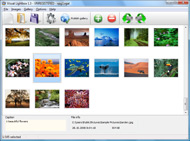



Overview

It's no secret that adding photos to your blog posts is one of the most effective ways to enhance your blog and attract attention to your writing. Flickr has millions of photos available in its database. A simple FREE tool called Flickr Gallery allows you to create a custom image gallery with a cool slide show of the most recent and most interesting photos from Flickr on your website or blog in a few easy steps. Just visit Flickr website and find photostream, photoset or a single photo you like. Enter the address of flickr page to add all photos from this page in your gallery, select the style of thumbnails and the overlay window and add the HTML embed code on your website or blog.
A few clicks and you'll see a stylish photo gallery with beautifull lightbox and zoom effects on your own website or blog!


Flickr Gallery for Windows   Flickr Gallery for MAC

Want more?

Example

Lightbox gallery sample

The following image set is generated by Flickr Gallery tool. Click any picture to run Lightbox gallery.

The sample above is an in-page usage demo of Lightbox with images from Flickr. The photo gallery created with Flickr Gallery application is placed inside the html page. You can also check the full-page demo web gallery. This example takes whole browser area to show the Lightbox gallery that uses images from Flickr.Flickr Gallery Slideshow

How to Use

Step 1. Adding flickr images to your own gallery.


Locate the photo, photoset or photostream you want to use in your Flickr slideshow. Click on it to see the photo on its own page.

Copy URL of the flickr page.

Select Add images from Flickr... from the 'Add' button on the Toolbar.

Add images from Flickr

In the appeared window paste URL of the flickr page. Specify also the number of photos you want to add from the flickr page. Flickr Gallery will now include these photos in your project.

Add images from Flickr

If you have included the photos that you do not wish to be in your web gallery, you can easily remove them. Select all images that you wish to remove from photo gallery, and select Delete images. from the Images menu. You can pick and choose pictures by holding the CTRL while clicking the pictures you like.

Step 2. Adding caption.

The name of the photo on flickr page will automatically appear in the caption. When you select a photo you'll see the various info about it, such as: Path, Size, date of last change and Caption. You can add any comment or text about the photo (up to 512 symbols).

Step 3. Gallery properties.

Change the name of your flickr album, the size and quality of your pictures with Flickr Gallery. From the Gallery menu, select Properties or use "Edit Gallery Properties" button on the toolbar.

On the first tab of the Gallery Properties window you can change the name of your photo album and enable/disable the following properties: Slide Show, Auto play Slide Show, Zoom effect, Overlay Shadow. You can also set the Overlay shadow color and select the Engine you want to use (jQuery or Prototype + script.aculo.us).

On the second tab of the Gallery Properties window you can select the thumbnail you want to use, set the Thumbnails Resolution, Thumbnails Quality, Thumbnails Titles. Select Thumbnails Format (save in PNG or JPG format). Specify the Number of columns in you photo album and the Page color.

On the third tab of the Gallery Properties window you can select the template, Image resolution and Image quality of your pictures and change the Watermark.

You can set up the various sizes for exported images.

Control the quality of output PNG or JPEG format image by defining output "Image quality" and "Thumbnail quality" parameters (0%…100%).

Step 4. Save your photo gallery as project file.

When you exit Flickr Gallery application, you'll be asked if you want to save your project. The project consists of the pictures you choose to put on your web photo gallery and all your settings. It's a good idea to save the project, because that will allow you to change the project in case you decide to do something different with future galleries. So click Yes, then enter a name for your project. To select the location of your project, just click the Browse folders button and choose a different location. Then click Save.

Flickr Show On Black Flickr Widgets Blogger

Download Flickr Gallery


Download Flickr Gallery Download Free Edition
for Windows
Download Flickr Gallery Download Free Edition
for MAC

Flickr Gallery is free for non - commercial use.

A small fee is required for business use. Flickr Gallery Business Edition additionally provides an option to remove the Flickr Gallery. Com credit bar as well as a feature to put your own logo to images. After you complete the payment via the secure form, you will receive a license key instantly by e-mail that turns the Flickr Gallery Free Edition into a Business one. You can select the most appropriate payment mode: PayPal, check, credit card, bank transfer etc. Also you can get Business Edition for free if you help with translating Flickr Gallery into your native language, please contact us at for more info.

Blogger Template With Flickr Slider

Buy Flickr GalleryBuy Business Edition
for Windows

$49
Single Website
$69
Unlimited Websites
Buy Flickr GalleryBuy Business Edition
for MAC

$49
Single Website
$69
Unlimited Websites

Support

For troubleshooting, feature requests and general help contact Customer Support at . Make sure to include details on your Flickr Gallery version, operating system, browser and a link (or relevant code).Mac Flickr Set Of Groups

Feedback

    * I have installed Flickr Gallery to trial. All good, loving it!! I want to get an business version of your great programm. I love it - soo easy to use!!

    * First of all, I love you Flickr Gallery. I think it's beautiful! I purchased the lightbox “business edition” yesterday, and I’m very happy how easy it is to use. Found this to be one of the fastest ways to get a gallery on the web. Thanks.

    * I just tried the application, It is wonderful idea. Like you said in the website "few clicks without writing a single line of code" because most of the people is not web designers".Flickr Jquery Sort By Tag

    * I find Flickr Gallery (and lightbox2) a great tool and was about to proceed in its purchase.

FAQ

Q:I would like to have a few galleries in one website and even on one page.

A:To create several galleries on your page you should change following parameter in A tag for different galleries:

rel="lightbox_vlb"

For example, for the first gallery you should set rel="lightbox_vlb":

<!-- Start Flickr Gallery.com BODY section -->
<div id="vlightbox">
<a rel="lightbox_vlb" href="data/images/dscn6831.jpg" title="dscn6831" >
<img src="data/thumbnails/dscn6831.png" ><span></span></a>
<a rel="lightbox_vlb" href="data/images/dscn6823.jpg" title="dscn6823">
<img src="data/thumbnails/dscn6823.png"><span></span></a>
<a id="vlb" href="http://Flickr Gallery.com">Photo Gallery For Web by Flickr Gallery.com v2.0</a>
</div>
<!-- End Flickr Gallery.com BODY section -->

and for the second gallery rel="lightbox_vlb1":

<!-- Start Flickr Gallery.com BODY section -->
<div id="vlightbox">
<a rel="lightbox_vlb1" href="data/images/img_0501.jpg" title="img_0501">
<img src="data/thumbnails/img_0501.png"><span></span></a>
<a rel="lightbox_vlb1" href="data/images/img_0481.jpg" title="img_0481">
<img src="data/thumbnails/img_0481.png"><span></span></a>
<a id="vlb" href="http://Flickr Gallery.com">Photo Gallery For Web by Flickr Gallery.com v2.0</a>
</div>
<!-- End Flickr Gallery.com BODY section -->


RELATED

How to Create and Display Photo Slideshow on Blogger How to create new Slideshow for Blogger blogs? Create and display Slideshows for Blogger blogs using own Photos or Images on Flickr and show as Blogger slideshow

Bloggers Blog -- Widgets and Blog Add-ons Sites like Flickr, MyBlogLog, YouTube and Technorati all offer widgets that bloggers can place on their blogs. Kineda Launches Blogger Ranking Widget. Kineda has launched a linkbait widget that spits back your blog rank

25 Great Blogger Widgets Here are 25 Blogger widgets to create an even more powerful way of communicating with your visitors

What are Widgets? ~ The Blog Doctor The Blog Doctor, blogger Hacks, Blog design, Blog Template, SEO, Adsense, Blogging Tips and Tricks, Making money through blogs, PPC

Top 5 widgets every blogger must have Top 5 widgets every blogger must have. Tracy Pizzo, the Director of Flickr Slideshow - a widget that showcases yours or other peoples photos

Flickr Blogger Widget : Flickr Gallery Flickr Blogger Widget. Build superior photoalbums for your Website with Flickr Gallery!. Flickr Women In Rubber Macs

8 Must-Have Widgets for Every Personal Blogger! As the line between online and offline world blurs it's important for each of us to have an online identity. This could be in any form, a Facebook profile, a

Disable links in Flickr widget - Blogger Help Disable links in Flickr widget y&source=user&user=Flickr ID" type="text/javascript"/> I got the code along with my template, not from Flickr. And I did not use the Flickr gadget in Blogger

Slideshow for your Blogger blog | Widgets Lab well they are re-using some code from when they decided to make it a iGoogle gadget and now they are finally releasing it as a One Click Blogger Page element so you and pretty much everyone with a Blogspot blog can have it. (This is the actual size of the widget in your blog)

Blogger Gadgets (Page Elements or widgets) ~ Blogger Book Blogger Gadgets (Page Elements or widgets) I have over a period of time received 3 Flickr user name or Blogger) nothing comes up and then when I go to

Create A Widget For Blogger's Blog With WidgetBox Are you familiar with the widgetbox? It's the world's best place to find and create widgets. Flickr, Twitter, Hulu, Youtube and many others are among Flickr, Twitter, Hulu, Youtube and many others are among the most renowned widgets that are offered by widgetbox. This time in the honor of Blogger's

Recent Posts Widget for Blogger (blogspot) Blogs Another Recent Posts Widget for Blogger. Unlike the first Recent Posts widget, this new widget for Blogger lets you display more than 5 recent posts on your blog. It will show not only post titles b

Compender: Display Your Photos By Adding A Flickr Badge To Widgets. Thursday, January 3, 2008. Display Your Photos By Adding A Flickr Badge To Your Sidebar. Posted by Raymond at 9:23 AM. Displaying photos in your Blogger blog from your Flickr account All you need to do is get the Flickr Badge embed code from Flickr and

R/WW Christmas – Widgets, not Cheese! " Alex Iskold Top 5 widgets every blogger must have. Tracy Pizzo, the Director of Business Development The reason is that platforms like WordPress, Blogger and Movable Type vary in the ways that they allow users to add widgets

Flickr Photo Stream | Best Blog Widgets For Free Featuring the Best Widgets and Resources for all blogs.Our Handy Blogger Widgets and Blogger Templates are free. The Best Blog Widgets and great blog tips

Upload photos in blogger for LiveWriter via Flickr Upload photos in blogger for LiveWriter via Flickr. Saturday, July 28, 2007 | Blogger ftp upload, Flickr Tools, Picture folder Uploading Tools, tricks | 1 comments " Bookmark this post:blogger widgets Social Bookmarking Blogger Widget

Free widgets for Flickr users Free web site content if you use flickr social networing software Widgets for Blogger. Utility for finding Flickr id. Word and character counter. Useful website code for Flickr users. Flick r. If you use Flickr, then you can add interesting content to your web pages by pasting any of the code below

Recent Posts with Thumbnails for Blogger ~ Blogger Widgets Blogger Widgets. This is an updated version of my Recent Posts Gadget. But u know, it DO displayed thumbnails (even if a have my pics in flickr)

Five Best Blogger Widgets? If you had to recommend your five best Blogger widgets, what would they be? gone off the map thingy, but Technorati, Flickr, the Blogger in-built Feed widget, De.licio.us, and Amazon Wishlist would have

15 Useful Widgets and Scripts for Blogger | | Blogging There are many useful widgets and scripts which you could use to add interactivity to your Blogger powered blog. Ranging

Flickr: zsutti's Photostream Widget — Widgetbox Get the Flickr: zsutti's Photostream widget on Widgetbox.com! Flickr widget for Blogger

Blogger Buster: Mobile blogging with Flickr You could still post by email using your mobile phone, but image attachments are not supported by Blogger. So what's the alternative? Use Flickr's mobile blogging service instead! I often post by camera phone on one of my other blogs, and have

flickr widgets " Browse widget gallery for flickr widgets Widget tags: flickr. Africa photos PodiPodi Joyful Version Pick the Flick'R US Top 51 Searched Sites INTIGRITI - The Way to Look into the Web

Twitter, Flickr and Squarespace: Social Media Widgets are Twitter, Flickr and Squarespace: Social Media Widgets are Live! Josh Braaten | Monday, May 3, 2010 at 7:30AM. Tweet. If you're a blogger, you know how social media networks like Twitter, Facebook and LinkedIn can be a great source of traffic and engagement for your blog

