



Overview

It's no secret that adding photos to your blog posts is one of the most effective ways to enhance your blog and attract attention to your writing. Flickr has millions of photos available in its database. A simple FREE tool called Flickr Gallery allows you to create a custom image gallery with a cool slide show of the most recent and most interesting photos from Flickr on your website or blog in a few easy steps. Just visit Flickr website and find photostream, photoset or a single photo you like. Enter the address of flickr page to add all photos from this page in your gallery, select the style of thumbnails and the overlay window and add the HTML embed code on your website or blog.
A few clicks and you'll see a stylish photo gallery with beautifull lightbox and zoom effects on your own website or blog!


Flickr Gallery for Windows   Flickr Gallery for MAC

Want more?

Example

Lightbox gallery sample

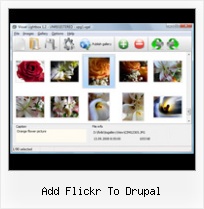
The following image set is generated by Flickr Gallery tool. Click any picture to run Lightbox gallery.

The sample above is an in-page usage demo of Lightbox tool with Flickr images. The slideshow created with Flickr Gallery application is placed inside the page layout. You can also check the full-page demo gallery. This example takes whole browser area to show the website gallery.Flickr Thumbnail Image

How to Use

Step 1. Adding flickr images to your own gallery.


Locate the photo, photoset or photostream you want to use in your Flickr slideshow. Click on it to see the photo on its own page.

Copy URL of the flickr page.

Select Add images from Flickr... from the 'Add' button on the Toolbar.

Add images from Flickr

In the appeared window paste URL of the flickr page. Specify also the number of photos you want to add from the flickr page. Flickr Gallery will now include these photos in your project.

Add images from Flickr

If you have included the photos that you do not wish to be in your web gallery, you can easily remove them. Select all images that you wish to remove from photo gallery, and select Delete images. from the Images menu. You can pick and choose pictures by holding the CTRL while clicking the pictures you like.

Step 2. Adding caption.

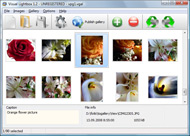
The name of the photo on flickr page will automatically appear in the caption. When you select a photo you'll see the various info about it, such as: Path, Size, date of last change and Caption. You can add any comment or text about the photo (up to 512 symbols).

Step 3. Gallery properties.

Change the name of your flickr album, the size and quality of your pictures with Flickr Gallery. From the Gallery menu, select Properties or use "Edit Gallery Properties" button on the toolbar.

On the first tab of the Gallery Properties window you can change the name of your photo album and enable/disable the following properties: Slide Show, Auto play Slide Show, Zoom effect, Overlay Shadow. You can also set the Overlay shadow color and select the Engine you want to use (jQuery or Prototype + script.aculo.us).

On the second tab of the Gallery Properties window you can select the thumbnail you want to use, set the Thumbnails Resolution, Thumbnails Quality, Thumbnails Titles. Select Thumbnails Format (save in PNG or JPG format). Specify the Number of columns in you photo album and the Page color.

On the third tab of the Gallery Properties window you can select the template, Image resolution and Image quality of your pictures and change the Watermark.

You can set up the various sizes for exported images.

Control the quality of output PNG or JPEG format image by defining output "Image quality" and "Thumbnail quality" parameters (0%…100%).

Step 4. Save your photo gallery as project file.

When you exit Flickr Gallery application, you'll be asked if you want to save your project. The project consists of the pictures you choose to put on your web photo gallery and all your settings. It's a good idea to save the project, because that will allow you to change the project in case you decide to do something different with future galleries. So click Yes, then enter a name for your project. To select the location of your project, just click the Browse folders button and choose a different location. Then click Save.

Flickr Batch Save To Computer Add Flickr To Drupal

Download Flickr Gallery


Download Flickr Gallery Download Free Edition
for Windows
Download Flickr Gallery Download Free Edition
for MAC

Flickr Gallery is free for non - commercial use.

A small fee is required for business use. Flickr Gallery Business Edition additionally provides an option to remove the Flickr Gallery. Com credit line as well as a feature to put your own logo to images. After you finish the payment via the secure order form, you will receive a license key instantly by email that turns the Flickr Gallery Free Edition into a Business one. You can select the most appropriate payment method: credit card, PayPal, check, bank transfer etc. Also you can get Business Edition for free if you help with translating Flickr Gallery into your native language, please contact us at for more info.

Blogengine Net Widgets Flickr

Buy Flickr GalleryBuy Business Edition
for Windows

$49
Single Website
$69
Unlimited Websites
Buy Flickr GalleryBuy Business Edition
for MAC

$49
Single Website
$69
Unlimited Websites

Support

For troubleshooting, feature requests and general help contact Customer Support at . Make sure to include details on your operating system, browser, a link (or relevant code) and Flickr Gallery version.View Your Flickr Images In Black

Feedback

    * First of all, I love you Flickr Gallery. I think it's beautiful! I purchased the lightbox ā€œbusiness editionā€ yesterday, and I’m very happy how easy it is to use. Found this to be one of the fastest ways to get a gallery on the web. Thanks.

    * I have installed Flickr Gallery to trial. All good, loving it!! I want to get an business version of your great programm. I love it - soo easy to use!!

    * This looks like EXACTLY what I need for my site. It would make my job much faster! Love your program. Thank you!!Link Flickr Photos To Blogspot

    * I ran into your website wile looking for a JavaScript to manage a personal Photo Gallery. I downloaded the trial version and immediately fell in love with your Flickr Gallery, it is one of the best products I’ve ever found; it is very user friendly and easy to use and creates great Photo Galleries.

FAQ

Q:I would like to reposition the Previous and Next buttons to a position below the images and have them be visible all the time.Where do I have to go to make these changes in the code?

A:Find the css file in the folder generated by gallery:
engine\css\
or in the following folder:
c:\Program Files\Visual LightBox Business\templates\Default\engine\css\

To set their position you should change 15% to something different:
#prevLink:hover, #prevLink:visited:hover { background: url(../images/prevlabel.gif) left 15% no-repeat; }
#nextLink:hover, #nextLink:visited:hover { background: url(../images/nextlabel.gif) right 15% no-repeat; }

For example:
#prevLink:hover, #prevLink:visited:hover { background:url(../images/prevlabel.gif) left 75% no-repeat; }
#nextLink:hover, #nextLink:visited:hover { background: url(../images/nextlabel.gif) right 75% no-repeat;}

RELATED

YouTube - How We Do It: Manage a Travel Blog After spending a year on the road and always hearing people ask about our process for keeping the site up to date, we made this video to show how easy it is I recommend downloading the "Flickr Uploadr" for adding photos to Flickr. You can find that here: flickr (dotcom)/tools. The only

Drupal 5: Add Google Lead Conversion Tracking to registration Ever wanted to alter the the registration page in Drupal 5 to add your own bit of custom code or text? We needed to add a bit of Google lead conversion tracking code (javascript+html) on the website registration page

Download Flickrstickr - This Drupal module is an AJAX based Flickrstickr This Drupal module is an AJAX based solution to easily insert Flickr photos into posts

Leaving notes on pictures a la Flickr with Drupal | Teddy.fr Leaving notes on pictures a la Flickr with Drupal. Posted by hunvreus on March 6th, 2009 If you sign in using OpenID, you will be able to add new pictures, but even anonymous users can add notes to existing pictures

Flickr - Drupal Module Reviews and Ratings Flickr Drupal module. Access photos on Flickr's site via their API. The module provides a filter for inserting photos and photosets and allows

How to build Flickr in Drupal | Lullabot Learn Drupal! How to build Flickr in Drupal. Article by Angie Byron August 16, 2006 - 7:36pm. Using the delightful combination of Image and Image Exact Sizes modules, two parts Views, and a dash of theming magic, you too can have Next, we need to use Drupal's spiffy taxonomy system to create a "

Flickr: Drupal Flickr is almost certainly the best online photo management and sharing application in the world. Show off your favorite photos and videos to the world, securely and privately show content to your friends and family, or blog the photos and videos

Drupal site building tips - Kubuntuguide 20.2 Add the Quotes modules to Drupal. Introduction. Drupal is one of the most widely used website servers in the world. It is even used by the US White House. It is free and open source and can be customised to many different uses gz sudo tar zxvf flickr-6.x-1.2.tar.gz sudo rm flickr-6.x-1.2.tar.gz

How to embed Flickr slideshows and add Shadow box for added How to embed Flickr slideshows and add Shadow box for added awesomeness You can also use Lightbox to have the same effect, but I will be covering Shadowbox here b/c I use it on my site and I like it better. If you use WordPress, Drupal, or some other CMS/blogging platform you

Embed Flickr Drupal | Flickr Slideshow Embed Flickr Drupal. Make it easy for people to find all your photos on the site! Try jQuery Thickbox Alternative! flickr photostream addon How to shadowbox embed Flickr slideshows and follow these steps add Shadow box for added awesomeness If you use WordPress, Drupal, or how to some

Flickr Drupal : Flickr Gallery Flickr Drupal. Web photo album? With Flickr Gallery, you need just 4 simple steps to get your web photo album ready! demonstrate how to add an image to a content page in Drupal using HTML code automatically generated by Flickr

Flickr Social Marketing list for Metropolitan Area Children's This is a help file for Children's Museums in metropolitan areas that lists how to get started on Flickr. If you can read between the examples most of this can be used for any organization that has a need for

FLEX{er} " Blog Archive " FxGallery – Drupal Image Module The image module can manage 3 kinds of image galleries: Flickr, Picasa and Local Gallery that is saved directly in the Drupal. In Single View there is also the possibility to add comments for the local gallery. The project is kind of complex

flickr | Dan Karran On Friday 26th October there is going to be a Flickr meetup here in Stuttgart. We'll be meeting at 6pm in the Calwer Eck pub in downtown Stuttgart. All are welcome to come along, just leave a comment or add yourself to the event on upcoming.org if you're interested

Create a Drupal Photo Gallery Using Flickr, CCK & Views Drupal-focused web development blog. Featuring tips, tricks and solutions to help you build websites with Drupal. Add the Flickr filter (called Flickr linker) to your input filter. Then you can easily test this by creating a new page and simply pasting either: [flickr-photo:id=230452326,size=s] or

Issue 158 - google-highly-open-participation-drupal - Run Run at least three sessions to test the usability of drupal's content creation (node-add) and content-editing (node-edit) forms. ( Tag them with drupalui [9] if using flickr.) Bevan [10] is the owner / mentor of this task. Bevan is working on improving node add and edit forms as part of the Season

Drupal Recipes: Building Image Galleries with jQuery and Flickr Covering Flickr, jQuery, and Drupal best practices Flickr Import Plan: • Automatically download new photos from Flickr • Create Drupal nodes with attached images • Import Flickr tags to taxonomy terms Problem: I couldn't find a module to do this. The closest I could find

Flickr | drupal.org Allows admins to assigns a flickr image as a property of the node. Download Flickr module to your modules directory (DRUPAL-ROOT/sites/all/modules, DRUPAL-ROOT/sites/default/modules, DRUPAL-ROOT/sites/example.com/modules, etc)

UFKU.com | Drupal Ufku Drupal. Flickr module provides a filter for inserting photos and photosets into your This Flickr button here provides an UI for inserting Flickr filter syntax. Note that, you must enable flickr filter for your content's input format in order to see the photos. Add new

10 Reasons to Use Drupal CMS (A Comparison with Joomla, Plone Also, good content management systems allow non-technical users add and edit the content without needing to know any HTML or Web Here is a quick & basic intro to Views called How To Build Flickr in Drupal

Picture Moblogging with flickr and drupal | Matt Farina Building a moblog with flickr is one of the easiest ways to go. To set this up I decided to use drupal and flickr. After looking at the built in way to

Recipe for a Flash-Free Flickr Slideshow in Drupal | johanna If you are comfortable installing Drupal modules and using Views, it's not hard to pull any RSS feed into Drupal from Flickr and use Views to generate a jQuery slideshow. Add the URL for the Flickr RSS feed you want to use. Run cron. Add jQuery.cycle Plugin: Download jQuery.cycle plugin here and

Flickr | Nate Angell The goal: automatically show selected pictures from my flickr stream with no extra steps other than posting to flickr and maybe adding a special tag. All I have to do to add a new image to my site header rotation is add one extra tag to a picture when I upload it to flickr

Configuring Flickr and LightBox2 Drupal Modules | scotthowe.com Configuring Flickr and LightBox2 Drupal Modules. Submitted by scott on From here you can follow the link to setup your api key and shared secret for communication with flickr's site

Drupal Slideshow : Free SlideShow Software Free Slideshow Creator! Drupal Slideshow. Make it easy for people to find all your photos on the site! From the Images menu, select Add images . Browse to the location of the folder you'd like to add and select the images.You can also use Add images from folder , Add images from Flickr

