


Overview

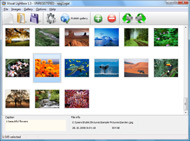
It's no secret that adding photos to your blog posts is one of the most effective ways to enhance your blog and attract attention to your writing. Flickr has millions of photos available in its database. A simple FREE tool called Flickr Gallery allows you to create a custom image gallery with a cool slide show of the most recent and most interesting photos from Flickr on your website or blog in a few easy steps. Just visit Flickr website and find photostream, photoset or a single photo you like. Enter the address of flickr page to add all photos from this page in your gallery, select the style of thumbnails and the overlay window and add the HTML embed code on your website or blog.
A few clicks and you'll see a stylish photo gallery with beautifull lightbox and zoom effects on your own website or blog!


Flickr Gallery for Windows   Flickr Gallery for MAC

Want more?

Example

Lightbox gallery sample

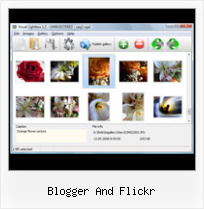
The following image set is generated by Flickr Gallery tool. Click any picture to run Lightbox gallery.

The sample above is an in-page usage demo of Lightbox gallery that uses images from Flickr. The slideshow created with Flickr Gallery software is placed inside the page layout. You can also check the full-page demo website gallery. This example takes whole browser area to show the web gallery.Flickr Lightbox Style Widget

How to Use

Step 1. Adding flickr images to your own gallery.


Locate the photo, photoset or photostream you want to use in your Flickr slideshow. Click on it to see the photo on its own page.

Copy URL of the flickr page.

Select Add images from Flickr... from the 'Add' button on the Toolbar.

Add images from Flickr

In the appeared window paste URL of the flickr page. Specify also the number of photos you want to add from the flickr page. Flickr Gallery will now include these photos in your project.

Add images from Flickr

If you have included the photos that you do not wish to be in your web gallery, you can easily remove them. Select all images that you wish to remove from photo gallery, and select Delete images. from the Images menu. You can pick and choose pictures by holding the CTRL while clicking the pictures you like.

Step 2. Adding caption.

The name of the photo on flickr page will automatically appear in the caption. When you select a photo you'll see the various info about it, such as: Path, Size, date of last change and Caption. You can add any comment or text about the photo (up to 512 symbols).

Step 3. Gallery properties.

Change the name of your flickr album, the size and quality of your pictures with Flickr Gallery. From the Gallery menu, select Properties or use "Edit Gallery Properties" button on the toolbar.

On the first tab of the Gallery Properties window you can change the name of your photo album and enable/disable the following properties: Slide Show, Auto play Slide Show, Zoom effect, Overlay Shadow. You can also set the Overlay shadow color and select the Engine you want to use (jQuery or Prototype + script.aculo.us).

On the second tab of the Gallery Properties window you can select the thumbnail you want to use, set the Thumbnails Resolution, Thumbnails Quality, Thumbnails Titles. Select Thumbnails Format (save in PNG or JPG format). Specify the Number of columns in you photo album and the Page color.

On the third tab of the Gallery Properties window you can select the template, Image resolution and Image quality of your pictures and change the Watermark.

You can set up the various sizes for exported images.

Control the quality of output PNG or JPEG format image by defining output "Image quality" and "Thumbnail quality" parameters (0%…100%).

Step 4. Save your photo gallery as project file.

When you exit Flickr Gallery application, you'll be asked if you want to save your project. The project consists of the pictures you choose to put on your web photo gallery and all your settings. It's a good idea to save the project, because that will allow you to change the project in case you decide to do something different with future galleries. So click Yes, then enter a name for your project. To select the location of your project, just click the Browse folders button and choose a different location. Then click Save.

Embed Flickr Slideshow Autostart Blogger And Flickr

Download Flickr Gallery


Download Flickr Gallery Download Free Edition
for Windows
Download Flickr Gallery Download Free Edition
for MAC

Flickr Gallery is free for non - commercial use.

A small fee is required for business use. Flickr Gallery Business Edition additionally provides an option to remove the Flickr Gallery. Com credit string as well as a feature to put your own logo to images. After you complete the payment via the secure form, you will receive a license key instantly by email that turns the Flickr Gallery Free Edition into a Business one. You can select the most suitable payment method: bank transfer, check, credit card, PayPal etc. Also you can get Business Edition for free if you help with translating Flickr Gallery into your native language, please contact us at for more info.

Lightbox And Flickr

Buy Flickr GalleryBuy Business Edition
for Windows

$49
Single Website
$69
Unlimited Websites
Buy Flickr GalleryBuy Business Edition
for MAC

$49
Single Website
$69
Unlimited Websites

Support

For general help, troubleshooting and feature requests contact Customer Support at . Make sure to include details on your Flickr Gallery version, browser, operating system and a link (or relevant code).Flickr Edit Slideshow Options

Feedback

    * I downloaded your trial version to see if I could get it to work with my website, and I am almost there (I have been looking for something like this for ages)..

    * Another programmes have incredible functionality but no fantastic interface like your product!

    * I am thrilled with what this tool can do for me thanks for all the hard work that must have gone into it.Wordpress Flickr Gallery Html

    * I tried Flickr Gallery and for me its a very cool and usefull application. Its so easy to manage my galleries and it looks very nice.

FAQ

Q:How do I embed the lightbox image gallery into an existing page?

A:To install Flickr Gallery gallery on your page you should:

1. Create your gallery in Flickr Gallery and publish it on a local drive in any test folder.
2. Open index.html file from the saved folder in any text editor.
3. Copy code for the HEAD section and paste it inside the HEAD section of you own webpage, for example:

<head>
...
<!-- Start Flickr Gallery.com HEAD section -->
<link rel="stylesheet" href="engine/css/vlightbox.css" type="text/css" />
<style>#vlightbox a#vlb{display:none}</style>
<link rel="stylesheet" href="engine/css/Flickr Gallery.css" type="text/css" media="screen" />
<script src="engine/js/jquery.js" type="text/javascript"></script>
<script src="engine/js/jquery.tools.min.js" type="text/javascript"></script>
<script src="engine/js/visuallightbox.js" type="text/javascript"></script>
<!-- End Flickr Gallery.com HEAD section -->

...
</head>


4. Copy code for the BODY section and paste it inside the Body section of you own webpage in the place where you want to have a gallery, for example:

<body>
...
<!-- Start Flickr Gallery.com BODY section -->
<div id="vlightbox">
<a rel="lightbox_vlb" href="data/images/dscn6831.jpg" title="DSCN6831"><img src="data/thumbnails/dscn6831.png"><span></span></a>
<a rel="lightbox_vlb" href="data/images/dscn6823.jpg" title="DSCN6823"><img src="data/thumbnails/dscn6823.png"><span></span></a>
<a rel="lightbox_vlb" href="data/images/dscn6819.jpg" title="DSCN6819"><img src="data/thumbnails/dscn6819.png"><span></span></a>
<a id="vlb" href="http://Flickr Gallery.com">Photo Gallery For Web by Flickr Gallery.com v2.1</a>
</div>
<!-- End Flickr Gallery.com BODY section -->

...
</body>


5. Copy 'data' folder with images and thumbnails and 'engine' folder with .css and .js files into the same folder with your own webpage.
You can find the example on our website:
http://www.Flickr Gallery.com/#example


RELATED

Embed flickr on blogger in style Ever wanted to make your flickr images appear on your blog? Like you saw in those wordpress blogs?(If you din't know flickr allows you to store images online

Blogger Buzz: Flickr Support for Blogger in beta Flickr is using a secure authentication method made possible by the new Blogger's use of Google Accounts. Flickr (and other websites that support this technology) will never see your username or password; all of that information is kept securely on

CJU.com - Parsing and Using Blogger & Flickr Feeds with Perl If you're reading this, you probably already know what Flickr and Blogger are, so I won't waste our time going into that, but you may not know that the content you post on both of those sites can be syndicated via RSS and Atom-style feeds, both rather easily

Flickr Blogger : Flickr Gallery Flickr Blogger. Make superior ajax picture gallery for your web site with Flickr Gallery!. Flickr Album To Posts

Christine: Caterina Fake and Meg Hourihan Share Flickr Did you know that two of Web 2.0's biggest success stories - Flickr and Blogger - were never meant to be? Caterina Fake, co-founder of Flickr, and Meg Hourihan, co-founder of Pyra Labs and Blogger, shared tantalizing tales of hard work and

SportsShooter.com - New York Times Blogger: Steal Flickr Photos Members log in here with your user name and password to access the your admin page and other special features. As for the Blogger, this part of his interview with the "legal expert" was rather interesting: ""There are a lot of parallels with what's going on with Flickr," Mr. Falzone said

Free Photo Scanning for Facebook, MySpace, Blogger and Flickr We selected Facebook, MySpace, Blogger and Flickr social networking members to receive this $49.95 value because they represent the most cutting-edge and innovative group of consumers. In exchange, we ask people to post reviews on their

Configure proxy in Flickr Uploadr | Perfect Blogger Learn how to make the latest and greatest version of Flickr Uploadr use a proxy server

The BlogoGalaxy of Famous Bloggers on Flickr I have spend a few hours uploading our Famous Bloggers Club members photos to Flickr to share it with all of you Dear friends and members of Famous Bloggers Club, here we are all together again

Help Saudi Bloggers: Saudi Arabia Blocks Blogger and Flickr Two days ago, the Internet Services Unit (ISU) at King Abdul-Aziz City for Science and Technology (KACST), the governing body of the internet in Saudi Arabia, have blocked Blogger, denying users inside the country accessing their blogs. They have

Improving DMCA Takedowns at Blogger, Flickr | Electronic In the past couple weeks, two major online service providers, Blogger and Flickr, announced improvements to their DMCA takedown policies. EFF had a hand in both: Blogger contacted us to discuss their improvements, and we contacted Flickr to raise

My LA Blog | Life and Ramblings of an LA Blogger Gal Just beyond 30-something, small biz gal, w/ a hubs, a cat and a dog, helping other small biz folks, tweeting about random life stuff in and around LA. LA Blogger Gal's Flickr

Brooklyn Museum: Community: bloggers@brooklynmuseum " Flickr We realized that our own statement on Flickr was generating confusion because it didn't state these expectations one way or another. Like everything we jump into, we change and adjust as needed. Pingback: Brooklyn Museum: Community: bloggers@brooklynmuseum " Flickr Commons: A Delicate Balance

How do I post pictures from Flickr? - Blogger Help Blogger now supports image uploading for all users, but we also know that a lot of people have Flickr accounts as well. So if you'd like to post pictures using Flickr, here's how. ( we're just covering photo-blogging in this tutorial, but there's plenty more cool stuff to configure and do at Flickr, too)

Flickr supports the new Blogger beta - Download Squad Blogger and Flickr are not so strange bed-fellows now that Flickr has support for the new Blogger in beta. It really does help to be both for this to work, just for your information. Flickr uses a secure authentication method and updated their software so it would work with Blogger's new version

Flickr: "blogger" Flickr is almost certainly the best online photo management and sharing application in the world. Show off your favorite photos and videos to the world, securely and privately show content to your friends and family, or blog the photos and videos

Blogger Buster: A Simple Flickr Photostream Widget for Blogger This version of the Flickr Photostream is a static widget designed to display thumbnails of your most recent Flickr uploads, and can be added quickly to your Blogger layout using a one-click installer. It's an ideal solution of you prefer a

30+ Top Flickr Hacks for Bloggers, Photographers, and 30+ Top Flickr Hacks for Bloggers, Photographers, and Creative Commons Lovers If you are a Flickr user or a blogger, put your content under partial or full creative commons license

Upload photos in blogger for LiveWriter via Flickr Step 12 - Review your photos. A Flickr window will open, showing your uploaded photos. From here you can add titles, descriptions and tags. If you like this post then please Tweet this or Subscribe to the Bookmark this post:blogger widgets Social Bookmarking Blogger Widget. Search below for

Canon Blogger: Home of the Learning Digital Photography Podcast Contest, Flickr. May We Salute You. June 2, 2010 1 Comment. The May pool of photos that everyone contributed to was quite stunning – the listening and reading audience is quite a talented group and some of the images on here were really incredible

Flickr | SMO Blogger Flickr The quintessential web 2.0 photo site. Post your own pics free. Comment on images of others. Flickr (Yahoo!) wants to help people make their Flickr was posted to SMO Blogger on Monday, September 10th, 2007 at 8:28 pm and is filed under SMO

Photoblogging with TwitPic and Twitter - Photoblog with Photoblog with Flickr, Blogger, TwitPic & Twitter Photoblogging with TwitPic and Twitter This article, Photoblog with Flickr, Blogger, TwitPic & Twitter, was last updated on 11 May 2009 and is now out of date and held in our online archive for reference

iPhotoWalker: [Tutorial] SimpleViewer 2.0 in Blogger (with With the latest version of SimpleViewer 2.0 + Flickr + Blogger, the whole setup process will take you about 3 minutes only, less hassle and less reading for the tutorial. ( You can always go to the SimpleViewer's support site for the details and extra configuration options)

BreadKrumbs: Frequently Asked Questions for Flickr Bloggers If you need further help, Visit the BreadKrumbs Flickr Group and post a question. How much does it cost? Nothing. But I am asking people to include a small snippet in their blog side-panel where other Flickr Bloggers can find it, promoting the tool

Ultimate Blogger 2 : The $1000 Prize Package! First and foremost, for title of Ultimate Blogger, given only once a year to the winner of this internet championship. Next we're going to give the champion a Canon digital camera to take pictures and shoot video, along with a 1 year Flickr pro account to post and permanently archive their photos

Inserting Images into the post Learn how to include images in the post of your blog and how to handle formatting it. flickr.com provides such a facility to post to blogger directly. If you are using such a facility it amounts to creating a post and publishing it directly from that site

Flickr tutorial for bloggers - posting images Video – 5min.com A quick and useful tutorial on how to post photos from flickr to your blog retaining the creative commons license

Consuming Flickr via RSS — Another Blogger Consuming Flickr via RSS. March 19, 2008 by Aaron B. Hockley 9 Comments. I love using RSS Feeds and my feed aggregator as my primary portal for incoming information, and I love sharing my photography on Flickr. Let's take a look at making the most of Flickr's RSS feeds

