



Overview

It's no secret that adding photos to your blog posts is one of the most effective ways to enhance your blog and attract attention to your writing. Flickr has millions of photos available in its database. A simple FREE tool called Flickr Gallery allows you to create a custom image gallery with a cool slide show of the most recent and most interesting photos from Flickr on your website or blog in a few easy steps. Just visit Flickr website and find photostream, photoset or a single photo you like. Enter the address of flickr page to add all photos from this page in your gallery, select the style of thumbnails and the overlay window and add the HTML embed code on your website or blog.
A few clicks and you'll see a stylish photo gallery with beautifull lightbox and zoom effects on your own website or blog!


Flickr Gallery for Windows   Flickr Gallery for MAC

Want more?

Example

Lightbox gallery sample

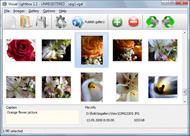
The following image set is generated by Flickr Gallery tool. Click any picture to run Lightbox gallery.

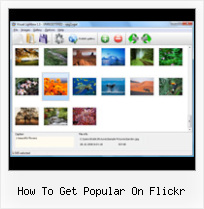
The photo gallery above is an in-page usage demo of Lightbox script with Flickr images. The lightbox gallery created with Flickr Gallery software is placed inside the website page. You can also check the full-page demo slideshow. This example takes whole browser area to show the Lightbox gallery that uses images from Flickr.Blog Flickr On Tumblr

How to Use

Step 1. Adding flickr images to your own gallery.


Locate the photo, photoset or photostream you want to use in your Flickr slideshow. Click on it to see the photo on its own page.

Copy URL of the flickr page.

Select Add images from Flickr... from the 'Add' button on the Toolbar.

Add images from Flickr

In the appeared window paste URL of the flickr page. Specify also the number of photos you want to add from the flickr page. Flickr Gallery will now include these photos in your project.

Add images from Flickr

If you have included the photos that you do not wish to be in your web gallery, you can easily remove them. Select all images that you wish to remove from photo gallery, and select Delete images. from the Images menu. You can pick and choose pictures by holding the CTRL while clicking the pictures you like.

Step 2. Adding caption.

The name of the photo on flickr page will automatically appear in the caption. When you select a photo you'll see the various info about it, such as: Path, Size, date of last change and Caption. You can add any comment or text about the photo (up to 512 symbols).

Step 3. Gallery properties.

Change the name of your flickr album, the size and quality of your pictures with Flickr Gallery. From the Gallery menu, select Properties or use "Edit Gallery Properties" button on the toolbar.

On the first tab of the Gallery Properties window you can change the name of your photo album and enable/disable the following properties: Slide Show, Auto play Slide Show, Zoom effect, Overlay Shadow. You can also set the Overlay shadow color and select the Engine you want to use (jQuery or Prototype + script.aculo.us).

On the second tab of the Gallery Properties window you can select the thumbnail you want to use, set the Thumbnails Resolution, Thumbnails Quality, Thumbnails Titles. Select Thumbnails Format (save in PNG or JPG format). Specify the Number of columns in you photo album and the Page color.

On the third tab of the Gallery Properties window you can select the template, Image resolution and Image quality of your pictures and change the Watermark.

You can set up the various sizes for exported images.

Control the quality of output PNG or JPEG format image by defining output "Image quality" and "Thumbnail quality" parameters (0%…100%).

Step 4. Save your photo gallery as project file.

When you exit Flickr Gallery application, you'll be asked if you want to save your project. The project consists of the pictures you choose to put on your web photo gallery and all your settings. It's a good idea to save the project, because that will allow you to change the project in case you decide to do something different with future galleries. So click Yes, then enter a name for your project. To select the location of your project, just click the Browse folders button and choose a different location. Then click Save.

Aperture Flickr Exporter How To Get Popular On Flickr

Download Flickr Gallery


Download Flickr Gallery Download Free Edition
for Windows
Download Flickr Gallery Download Free Edition
for MAC

Flickr Gallery is free for non-commercial use.

A small fee is required for business use. Flickr Gallery Business Edition additionally provides an option to remove the Flickr Gallery. Com credit string as well as a feature to put your own logo to images. After you finish the payment via the secure form, you will receive a license key instantly by e-mail that turns the Flickr Gallery Free Edition into a Business one. You can select the most appropriate payment method: PayPal, check, bank transfer, credit card etc. Also you can get Business Edition for free if you help with translating Flickr Gallery into your native language, please contact us at for more info.

Hottest Flickr Babes

Buy Flickr GalleryBuy Business Edition
for Windows

$49
Single Website
$69
Unlimited Websites
Buy Flickr GalleryBuy Business Edition
for MAC

$49
Single Website
$69
Unlimited Websites

Support

For general help, troubleshooting and feature requests contact Customer Support at . Make sure to include details on your operating system, browser, Flickr Gallery version and a link (or relevant code).Flickr Album Layout

Feedback

    * Great product by the way and saved me loads of time. I really like your Flickr Gallery program! Very nice.

    * I am thrilled with what this tool can do for me thanks for all the hard work that must have gone into it.

    * I LOVE your free Lightbox2 software tool and will purchase the business version shortly. I have seen the Lightbox JS effect used with video tutorials and I was hoping you have a version for video that I can purchase.
Video LightBox: http://videolightbox.comWordpress Flickr Photo Gallery

    * I find Flickr Gallery (and lightbox2) a great tool and was about to proceed in its purchase.

FAQ

Q:Instead of making one page with 40 photos, is there no property to make 2 or more pages?

A:You can do it in the following way:

1. Create your gallery in Flickr Gallery and publish it on a local drive in any test folder.
2. Make two copies of the generated index.html file (for example index1.html and index2.html).
3. Open index.html, index1.html and index2.html files in any text editor.
4. Find code for the gallery inside the BODY tag and cut some part of the images, so you'll have different images on each page.

<!-- Start Flickr Gallery.com BODY section -->
<div class="gallery">
<!-- leave the following code on index.html page -->
<a href="./data/images/1.jpg" rel="lightbox[sample]" title="Best Toy Ever"><img src="./data/thumbnails/1.png" /></a>
<a href="./data/images/8.jpg" rel="lightbox[sample]" title="PrueaMacro"><img src="./data/thumbnails/8.png" /></a>

<!-- leave the following code on index1.html page -->
<a href="./data/images/3.jpg" rel="lightbox[sample]" title="Macro Leaf."><img src="./data/thumbnails/3.png" /></a>
<a href="./data/images/11.jpg" rel="lightbox[sample]" title="Bell Pepper"><img src="./data/thumbnails/11.png" /></a>

<!-- leave the following code on index2.html page -->
<a href="./data/images/5_0.jpg" rel="lightbox[sample]" title="5"><img src="./data/thumbnails/5_0.png" /></a>
<a href="./data/images/6_0.jpg" rel="lightbox[sample]" title="6"><img src="./data/thumbnails/6_0.png" /></a>

<!--[if lte IE 6]><script src="engine/js/pngfix_vlb.js" type="text/javascript"></script><![endif]-->
<a id="vlightbox" href="http://Flickr Gallery.com/">Online Photo Album Sharing by Flickr Gallery.com</a>
</div>
<!-- End Flickr Gallery.com BODY section -->

5. Create links to switch between your pages, for example:
<a href="index.html">1</a>  <a href="index1.html">2</a>  <a href="index2.html">3</a> 


Q:I want to change color of the overlay shadow? How can I do this?

A:Open engine\css\Flickr Gallery.css and find the following code:

#overlay{
position: absolute;
top: 0;
left: 0;
z-index: 90;
width: 100%;
height: 500px;
background-color: #FFF;
filter:alpha(opacity=60);
-moz-opacity: 0.6;
opacity: 0.6;
}

set the background-color parameter :

#overlay{
position: absolute;
top: 0;
left: 0;
z-index: 90;
width: 100%;
height: 500px;
background-color: #FF00FF;
filter:alpha(opacity=60);
-moz-opacity: 0.6;
opacity: 0.6;
}


RELATED

Getting Started With Flickr - Learn What The Popular Photo You've heard about Flickr.com, but you have no idea how to use it. This article series takes you from getting started and making an account on Flickr and adding your first digital photo, all the way to finding and adding friends and joining

Flickr.com Site Info Visitors to the site view an average of 9.1 unique pages per day. Visitors to Flickr spend about five minutes per visit to the site and 26 seconds per pageview. Is this your site? Learn how to get more traffic with the Alexa Site to flickr.com and pageviews on flickr.com over the past 3 months

iPhone is Popular on Flickr I've owned a few camera phones over the last several years but the camera part of those phones has always been pretty useless because I rarely used it. I don't know if it's because the pictures never turned out that great or because once I took a

How to Get Paid for your Flickr Photos Photography: Peter Faretra It's happening. In fact, it's been happening for a while. But it's happening quietly, and outside a few forums on Flickr,

How to Get Your Photos Explored on Flickr | MyWestworld How to Get Your Photos Explored on Flickr. Posted on 04. May, 2009 by Lisa Bettany in Fresh Trax. Explore is Flickr's Daily Artist Showcase. Every day Flickr admins choose 500 of the most interesting images determined by "interestingness". Being

How to enhance your flickr account using various tools Flickr is being a popular online image uploading platform.What we all do start uploading our photos (like jpeg, jpg, gif, png etc.) on Flickr easily via the web or use uploading tools for Mac and Windows to make it easy to upload a batch of hi How to enhance your flickr account using various tools

Popular cameras on Flickr | ShanKrila Now that you are hooked to Flickr after reading my posts here and here (wishful thinking!), now you can see how popular or unpopular your camera is at Flickr!

How To Create a Flickr Banner | How To Do Things Want to attract readers and followers to your blog or website? Learn tips to make banners and badges on Flickr. Here's how to create a Flickr banner

Thomas Hawk Digital Connection " Blog Archive " Top 10 Tips So this rather lengthy introduction to top tips for getting attention on Flickr hopefully will be read before I begin to get my first critical One thing I really don't understand and find a bit confusing on flickr (otherwise a great site) is how some people seem to get tons of good

How to get your photos Explored on Flickr | MostlyLisa.com How to get your photos Explored on Flickr. Apr 18 2009. This Rainbow Lorikeet let Front Page Explore go straight to it's little head. Explore is Flickr's Daily Artist Showcase. Every day Flickr admins choose 500 of the most interesting images determined by "interestingness"

Start The New Year With A Flickr Self-Portrait Project One of the most popular groups on Flickr is one aptly called 365 DaysÂť , a year-long creative Flickr self portrait project started by Flickr member, Chris How To Get Started. 1. A good time to begin the project is on January 1st when many other

Flickr & Nokia join forces Flickr is almost certainly the best online photo management and sharing application in the world. Show off your favorite photos and videos to the world, securely and privately show content to your friends and family, or blog the photos and videos

Flickr Expert Tips: How to Make the Photo Site Work for You These insider tricks--some from the site developers themselves--will help you get things done in no time on ten popular sites. Flickr is the most popular place on the Web for people to share and manage their photos, and to view images taken by others

How to Get Original Size of Any Flickr Photo Flickr users have an option to turn off "All Sizes" of their photos when uploading them to the image hosting service. If you are the owner of the

How to get your photos out of Flickr, Picasa Web Albums Everyone should keep backups of their photos offline, of course, but what if your PC suffers a catastrophic crash or your backup gets stolen? Here's how you can pull your photos back down from a couple of popular photo sharing sites. How to get your photos out of Flickr, Picasa Web Albums

Flickr: 704 API Calls per Second ProgrammableWeb.com keeps you up to date with web mashups and APIs: what's new, interesting, useful and important. Hundreds of mashups and APIs. Contribute, search, view, and chart them

Photo sharing Flickr app appears in App Store Yahoo's Flickr service now has a native app available in the App Store. The iPhone has become the most popular cell phone camera used to upload photos to the

Perfect Your Picasa to Flickr Workflow Desktop photo manager Picasa is a Google product, and photo-sharing web site Flickr's owned by Yahoo, and the two companies don't make it obvious how to get the apps to talk to one another. When I returned home from a vacation on the beaches of

6 Tips to Gaining Attention on Flickr Optimized images may appear on SERPs and because image searches have a much lower competition, yours (if properly optimized) stand a chance to rank highly. Caterina offers some great tips on how to get noticed, how to improve your Flickr photo stream's visibility, and more

5 Tools To Revolutionize Your Flickr Experience This is a post by one of our new contributors, Sumesh. Flickr is undoubtedly the most popular image sharing website, and a whole community of 1. How to Get a Better Flickr Viewer With Pictobrowser

How to Use Flickr: Basics and Beyond Flickr is one of the most popular photo-sharing sites on the Internet. Owned by Yahoo!, Flickr offers its users a website where they can create free accounts that let How to Use Flickr: Basics and Beyond. Tweet. Flickr is one of the most popular photo-sharing sites on the Internet. Owned by Yahoo!

Fun With Flickr Photos - The Fun Times Guide to Cameras A sample of all of the cool FUN things you can do with Flickr -- the photo storage and organization site! Official Flickr Blog — Find out what's new on Flickr, when there's a new "contest" you can participate in, how to get more exposure for your own photos, find new

Flickr Embed Tool : Flickr Gallery Flickr Embed Tool. Flickr Gallery is the first software that creates AJAX-powered web image galleries without the need for server-side setup! Make sure to include details on your operating system, browser, a link (or relevant code) and Flickr Gallery version.How To Get Flickrset Number

How to Create a Photo Set on Flickr | eHow.com How to Create a Photo Set on Flickr. Flickr is a popular web-based photo- and video-sharing site that also functions as an online community. Offering free photo-storage accounts to users, Flickr is a great place to post and share

Using Flickr to Determine Your Best Shots - The Digital Story Weekly digital photography podcasts, photo tips, reader submitted pictures, equipment reviews and more. Flicker Essential Training on Lynda.com. If you want to learn more about the benefits of Flickr, and how to get better at using it, take a look at my Flickr Essential Training on Lynda.com

iPhone 4 Set To Become Most Popular Camera On Flickr Flickr keeps track of which camera models are the most popular amongst its users, and for the first time a cellphone is set to process of using Flickr's app to upload images, and you have an incredibly easy way for large numbers of people to get their

