


Overview

It's no secret that adding photos to your blog posts is one of the most effective ways to enhance your blog and attract attention to your writing. Flickr has millions of photos available in its database. A simple FREE tool called Flickr Gallery allows you to create a custom image gallery with a cool slide show of the most recent and most interesting photos from Flickr on your website or blog in a few easy steps. Just visit Flickr website and find photostream, photoset or a single photo you like. Enter the address of flickr page to add all photos from this page in your gallery, select the style of thumbnails and the overlay window and add the HTML embed code on your website or blog.
A few clicks and you'll see a stylish photo gallery with beautifull lightbox and zoom effects on your own website or blog!


Flickr Gallery for Windows   Flickr Gallery for MAC

Want more?

Example

Lightbox gallery sample

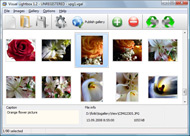
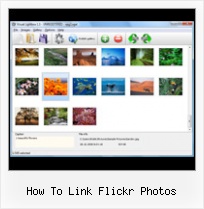
The following image set is generated by Flickr Gallery tool. Click any picture to run Lightbox gallery.

The example above is an in-page usage demo of Lightbox script with Flickr images. The photo gallery created with Flickr Gallery tool is placed inside the html page. You can also check the full-page demo web gallery. This example takes whole browser area to show the web gallery.Flickr Iphoto 09 Sync

How to Use

Step 1. Adding flickr images to your own gallery.


Locate the photo, photoset or photostream you want to use in your Flickr slideshow. Click on it to see the photo on its own page.

Copy URL of the flickr page.

Select Add images from Flickr... from the 'Add' button on the Toolbar.

Add images from Flickr

In the appeared window paste URL of the flickr page. Specify also the number of photos you want to add from the flickr page. Flickr Gallery will now include these photos in your project.

Add images from Flickr

If you have included the photos that you do not wish to be in your web gallery, you can easily remove them. Select all images that you wish to remove from photo gallery, and select Delete images. from the Images menu. You can pick and choose pictures by holding the CTRL while clicking the pictures you like.

Step 2. Adding caption.

The name of the photo on flickr page will automatically appear in the caption. When you select a photo you'll see the various info about it, such as: Path, Size, date of last change and Caption. You can add any comment or text about the photo (up to 512 symbols).

Step 3. Gallery properties.

Change the name of your flickr album, the size and quality of your pictures with Flickr Gallery. From the Gallery menu, select Properties or use "Edit Gallery Properties" button on the toolbar.

On the first tab of the Gallery Properties window you can change the name of your photo album and enable/disable the following properties: Slide Show, Auto play Slide Show, Zoom effect, Overlay Shadow. You can also set the Overlay shadow color and select the Engine you want to use (jQuery or Prototype + script.aculo.us).

On the second tab of the Gallery Properties window you can select the thumbnail you want to use, set the Thumbnails Resolution, Thumbnails Quality, Thumbnails Titles. Select Thumbnails Format (save in PNG or JPG format). Specify the Number of columns in you photo album and the Page color.

On the third tab of the Gallery Properties window you can select the template, Image resolution and Image quality of your pictures and change the Watermark.

You can set up the various sizes for exported images.

Control the quality of output PNG or JPEG format image by defining output "Image quality" and "Thumbnail quality" parameters (0%…100%).

Step 4. Save your photo gallery as project file.

When you exit Flickr Gallery application, you'll be asked if you want to save your project. The project consists of the pictures you choose to put on your web photo gallery and all your settings. It's a good idea to save the project, because that will allow you to change the project in case you decide to do something different with future galleries. So click Yes, then enter a name for your project. To select the location of your project, just click the Browse folders button and choose a different location. Then click Save.

How To Save Flickr Com How To Link Flickr Photos

Download Flickr Gallery


Download Flickr Gallery Download Free Edition
for Windows
Download Flickr Gallery Download Free Edition
for MAC

Flickr Gallery is free for non-commercial use.

A small fee is required for business use. Flickr Gallery Business Edition additionally provides an option to remove the Flickr Gallery. Com credit bar as well as a feature to put your own logo to images. After you conclude the payment via the secure order form, you will receive a license key instantly by e-mail that turns the Flickr Gallery Free Edition into a Business one. You can select the most appropriate payment mode: bank transfer, credit card, check, PayPal etc. Also you can get Business Edition for free if you help with translating Flickr Gallery into your native language, please contact us at for more info.

How To Share Flickr

Buy Flickr GalleryBuy Business Edition
for Windows

$49
Single Website
$69
Unlimited Websites
Buy Flickr GalleryBuy Business Edition
for MAC

$49
Single Website
$69
Unlimited Websites

Support

For troubleshooting, feature requests and general help contact Customer Support at . Make sure to include details on your Flickr Gallery version, a link (or relevant code), browser and operating system.Flickr Login

Feedback

    * First of all, your product is fantasitc. I looked at the others and your code generator app was insanely easy to use.

    * I LOVE your free Lightbox2 software tool and will purchase the business version shortly. I have seen the Lightbox JS effect used with video tutorials and I was hoping you have a version for video that I can purchase.
Video LightBox: http://videolightbox.com

    * I tried Flickr Gallery and for me its a very cool and usefull application. Its so easy to manage my galleries and it looks very nice.Widget Flick Css

    * Another programmes have incredible functionality but no fantastic interface like your product!

FAQ

Q:I purchased your business license today but I don't see any way to update so the watermark is either missing or replace with mine.What do I do?

A:Free edition of Flickr Gallery doesn't allow you to remove our watermark.

Register your Flickr Gallery application at first. Use reg. key from the license message you received after the purchase. After the registration you can remove watermarks.

Open Gallery->Properties->Templates: Watermark. Click to disable this option or use your own watermark.


RELATED

How to backup your photos from Flickr How to backup your photos from Flickr. By Mark Pack | Published 10th January 2009 - 9:20 am. What backup Flickr photos? Flickr is a very powerful online photo gallery and is increasingly widely used by activists. Its online nature makes it a

Print photos from Flickr Print photos from Flickr using this how-to guide On the popular photo management site Flickr, you can upload, save, and share your digital images

How to Use Flickr: Basics and Beyond Flickr is one of the most popular photo-sharing sites on the Internet. Owned by Yahoo!, Flickr offers its users a website where they can create free accounts that let them store, share, and explore digital photos. Flickr is also an online social

Flickriver - A new way to view Flickr photos and more A Greasemonkey script that adds Flickriver links to various Flickr photo pages - user photos, favorites, pools etc, allowing to quickly open the While viewing any Flickr photos page, click on the bookmarklet to open the same view on

Easily download full-size Flickr photos with Flickr Original Follow Flickr Original on twitter for status updates (UPDATE: Version 1.0.7 available! jma: Sorry, I directly call the Flickr API client-side and link to the photo download directly, so I can't do any dynamic renaming

FLICKR TOOLBOX: 100+ Tools For Flickr Addicts Flickr is back in the news this week with reports that it will add video. But we're still loving the photo-sharing element: here's 100+ ways to get even

Flickr Tag and browse photos, and upload pictures and short videos with Flickr, a digital photography and media file sharing website

How To Link Flickr : Flickr Gallery How To Link Flickr. Flickr Gallery is the first software that creates AJAX-powered online image galleries without the need for server-side setup.. Flickr Para Blogspot

How to Market on Flickr | Small Business Search Marketing The second reason is that search engine crawlers should follow a prominent link from your web site to your Flickr photos, and when that happens, you have more potential matches for search engine users. ( Yes, Flickr photo pages are crawled by Google, Yahoo, MSN, and Ask.com, too

A Complete Guide to Finding and Using Incredible Flickr A Complete Guide to Finding and Using Incredible Flickr Images. Photo by Leposava. I don't think this blog would be half of what it is without Flickr. The images included with most posts magnetize the eye to Secondly, I want to explain how Creative Commons works for Flickr images — and what that

Embedding Flickr Photos We can do lots of cool things with Flickr data. To keep it simple, in this tutorial, I'll explain how to obtain photos corresponding to a certain tag and displaying the square thumbnails as a grid using GridPanel Component of Netbeans 6.0 Visual Web tool

Flickr Guide: How to Do Everything with Flickr Flickr Guide will show you how to do everything on Flickr. You can download and backup flickr pictures, set them as rotating wallpapers, browse pictures in 3D, make a screensaver and more

WordPress Tutorial – How to Add Flickr Photo Widget to This Intermediate-level WordPress Tutorial shows how to add Flickr Photo Widget to your WordPress blog's sidebar so that you can display thumbnails of your Flickr photos. The Flickr Widget comes with WordPress 2.5+ on the WordPress.com hosting site

How to Post Photos on Flickr | eHow.com How to Post Photos on Flickr. Flickr is one of the many online photo-sharing websites available on the Internet. Owned by Yahoo!, Flickr is popular for many of its advanced features, such as tagging and geotagging. If you're a new

How to: Add a Styled Flickr Photo Stream to Your Blog Adding uniquely-styled Flickr photo streams to your blog is easy, and it's just another thing you can leverage to make your blog stand out among the crowd. Today, my goal is simply to walk you through the process of creating

Twitter your Flickr " Flickr Blog Share your Flickr content either via "upload by email" or feature existing Flickr content in your Twitter stream. If you'd like to Twitter your Flickr then check out the following three FAQs for easy setup and use: How do I Twitter my Flickr photos?

Make: Online | HOW TO GPS Tag Photos: Flickr, Mappr, Google Earth DIY projects, how-tos, and inspiration from the workshops and minds of geeks, makers, and hackers @ the Make: Magazine blog Sometimes it takes a short while for the lon/lat tags to appear in the XML data I get back from the flickr API. More here. Looking at the Photos on the Map (with Mappr)

YouTube - How To Use Flickr Expand the description and view the text of the steps for this how-to video. Check out Howcast for other do-it-yourself videos from SheriffThompson and more Share your photos by giving friends and family the link in the address bar from your homepage on Flickr

Newbie's Guide to Flickr | Webware - CNET Wondering what Flickr is and why you should use it? We'll tell you. Read this blog post by Josh Lowensohn on Webware. Continue reading to learn how to tag and organize photos, add notes, geotag, create albums, find out if you need a premium membership, and our list of Flickr users worth

How To Geotag Your Flickr Photos on Google Maps & Earth I am a bit of a Google Maps & Google Earth fan. I used them to get hopelessly lost between Germany and the Netherlands the other week. Other times, I like How To Geotag Your Flickr Photos on Google Maps & Earth

How to Use the Flickr API Flickr is a very well developed web application that allows you to store and share your photos. The site has an easy to use API that will allow you to use access almost all of the data on Flickr. In this tutorial, you'll learn how the basics of

How To Make Money With Photos: How To Make Money From Photos How To Make Money From Photos Step Two - Flickr. So, now that you have yourself a blog or website to showcase your photos the next step is to promote them a bit through the site Flickr. Flickr is basically the biggest picture sharing site out

Make a Flickr pic Link to Your Website Video – 5min.com Make a Flickr pic Link to Your Website - Learn how to Make Flickr pic or jpg link to your website on your Craigslist or Backpage ad. This video shows you a neat little trick on how to make a Flickr pic on Craigslist redirect to your website of

How to Upload and Organize Photos with Flickr | Photo HowTo Select the Batch Organize Link at the top of the every Flickr page. Click on the Jump to date link located on the right side, to go to a specific date in your photo albums

Flickr2Twitter - How To Link Your Flickr And Twitter Accounts This post will show you how to link your Flick and Twitter accounts so you can easily tweet photos or videos from Flickr, tweet via the Flickr API, and more

