


Overview

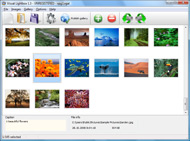
It's no secret that adding photos to your blog posts is one of the most effective ways to enhance your blog and attract attention to your writing. Flickr has millions of photos available in its database. A simple FREE tool called Flickr Gallery allows you to create a custom image gallery with a cool slide show of the most recent and most interesting photos from Flickr on your website or blog in a few easy steps. Just visit Flickr website and find photostream, photoset or a single photo you like. Enter the address of flickr page to add all photos from this page in your gallery, select the style of thumbnails and the overlay window and add the HTML embed code on your website or blog.
A few clicks and you'll see a stylish photo gallery with beautifull lightbox and zoom effects on your own website or blog!


Flickr Gallery for Windows   Flickr Gallery for MAC

Want more?

Example

Lightbox gallery sample

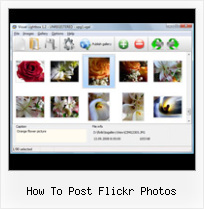
The following image set is generated by Flickr Gallery tool. Click any picture to run Lightbox gallery.

The photo gallery above is an in-page usage demo of Lightbox with images from Flickr. The web gallery created with Flickr Gallery wizard is placed inside the html page. You can also check the full-page demo web gallery. This example takes whole browser area to show the website gallery.Flickr Ozio Gallery Joomla Tutorial

How to Use

Step 1. Adding flickr images to your own gallery.


Locate the photo, photoset or photostream you want to use in your Flickr slideshow. Click on it to see the photo on its own page.

Copy URL of the flickr page.

Select Add images from Flickr... from the 'Add' button on the Toolbar.

Add images from Flickr

In the appeared window paste URL of the flickr page. Specify also the number of photos you want to add from the flickr page. Flickr Gallery will now include these photos in your project.

Add images from Flickr

If you have included the photos that you do not wish to be in your web gallery, you can easily remove them. Select all images that you wish to remove from photo gallery, and select Delete images. from the Images menu. You can pick and choose pictures by holding the CTRL while clicking the pictures you like.

Step 2. Adding caption.

The name of the photo on flickr page will automatically appear in the caption. When you select a photo you'll see the various info about it, such as: Path, Size, date of last change and Caption. You can add any comment or text about the photo (up to 512 symbols).

Step 3. Gallery properties.

Change the name of your flickr album, the size and quality of your pictures with Flickr Gallery. From the Gallery menu, select Properties or use "Edit Gallery Properties" button on the toolbar.

On the first tab of the Gallery Properties window you can change the name of your photo album and enable/disable the following properties: Slide Show, Auto play Slide Show, Zoom effect, Overlay Shadow. You can also set the Overlay shadow color and select the Engine you want to use (jQuery or Prototype + script.aculo.us).

On the second tab of the Gallery Properties window you can select the thumbnail you want to use, set the Thumbnails Resolution, Thumbnails Quality, Thumbnails Titles. Select Thumbnails Format (save in PNG or JPG format). Specify the Number of columns in you photo album and the Page color.

On the third tab of the Gallery Properties window you can select the template, Image resolution and Image quality of your pictures and change the Watermark.

You can set up the various sizes for exported images.

Control the quality of output PNG or JPEG format image by defining output "Image quality" and "Thumbnail quality" parameters (0%…100%).

Step 4. Save your photo gallery as project file.

When you exit Flickr Gallery application, you'll be asked if you want to save your project. The project consists of the pictures you choose to put on your web photo gallery and all your settings. It's a good idea to save the project, because that will allow you to change the project in case you decide to do something different with future galleries. So click Yes, then enter a name for your project. To select the location of your project, just click the Browse folders button and choose a different location. Then click Save.

Flickr Album On My Webpage How To Post Flickr Photos

Download Flickr Gallery


Download Flickr Gallery Download Free Edition
for Windows
Download Flickr Gallery Download Free Edition
for MAC

Flickr Gallery is free for non-commercial use.

A small fee is required for business use. Flickr Gallery Business Edition additionally provides an option to remove the Flickr Gallery. Com credit line as well as a feature to put your own logo to images. After you finish the payment via the secure form, you will receive a license key instantly by e-mail that turns the Flickr Gallery Free Edition into a Business one. You can select the most suitable payment method: PayPal, credit card, check, bank transfer etc. Also you can get Business Edition for free if you help with translating Flickr Gallery into your native language, please contact us at for more info.

Show Flickr Photostream Drupal

Buy Flickr GalleryBuy Business Edition
for Windows

$49
Single Website
$69
Unlimited Websites
Buy Flickr GalleryBuy Business Edition
for MAC

$49
Single Website
$69
Unlimited Websites

Support

For troubleshooting, feature requests and general help contact Customer Support at . Make sure to include details on your Flickr Gallery version, a link (or relevant code), browser and operating system.Ps Bridge Output To Flickr

Feedback

    * I have just bought this product and think it is great. As it is extremely easy to use it is something I could get my clients to purchase to upload their own portfolio and latest projects etc.

    * I downloaded your trial version to see if I could get it to work with my website, and I am almost there (I have been looking for something like this for ages)..

    * Just bought the business version of Flickr Gallery and I just had to write and say how impressed I am with it. Really easy to use, intuitive interface and generates a truly professional presentation. Seldom have I been so pleased with a software purchase. Thank you.Embed Flickr Gallery Typepad

    * This looks like EXACTLY what I need for my site. It would make my job much faster! Love your program. Thank you!!

FAQ

Q:Is it possible to load a gallery from within image? So the gallery loads externally?

A:You should start the gallery onClick:

1) Add the following function into the <head> tag:

<script type="text/javascript">
function showLightBox()
{ Lightbox.start(document.getElementById('firstImage'));}
</script>

2) Specify the onClick event for the image (or link):
<img src="thumbnail_gr.jpg" onClick="javascript:showLightBox()" title="Click to see the demo" style="cursor: pointer;">
3) Set the ID for any image in your gallery (id="firstImage"), for example add it to the first image:
<a rel="lightbox_vlb" href="data/images/dscn6831.jpg" title="dscn6831" id="firstImage">
4) Use 'display: none;' property for your gallery in engine\css\vlightbox.css. Just change the following code:

#vlightbox a{
display:-moz-inline-stack;
display:inline-block;
zoom:1;
*display:inline;
position:relative;
vertical-align:top;
margin:3px;
width:160px;
font-family:Trebuchet,Tahoma,Arial,sans-serif;
font-size:11px;
font-weight:normal;
text-align:center;
opacity:0.87;
}

to:

#vlightbox a{
display:-moz-inline-stack;
display:none;
zoom:1;
*display:inline;
position:relative;
vertical-align:top;
margin:3px;
width:160px;
font-family:Trebuchet,Tahoma,Arial,sans-serif;
font-size:11px;
font-weight:normal;
text-align:center;
opacity:0.87;
}

RELATED

How To Make Money With Photos: How To Make Money From Photos How To Make Money With Photos. Striving to be the best free online resource for turning your photographs into extra income How To Make Money From Photos Step Two - Flickr. So, now that you have yourself a blog or website to showcase your photos the next step is to promote them a bit through

Post photos from Flickr to your Facebook account We show you how to easily publish your Flickr photos on Facebook. I regularly post photos to my Flickr account, but I haven't found a way to cross-post the images to Facebook

Make: Online | HOW TO GPS Tag Photos: Flickr, Mappr, Google Earth DIY projects, how-tos, and inspiration from the workshops and minds of geeks, makers, and hackers @ the Make: Magazine blog Uploading the photos to Flickr. Flickr is pretty much, hands down, the coolest and best way to post photos online- It's my favorite "application" of all time, each week

Post Flickr photo updates on Facebook, automatically Post Flickr photo updates on Facebook automatically. Configure your Flickr account settings and login into Facebook account to authorize posting of updates

Flickr How to Post Photos to Your Blog You can post a blog entry on any public Flickr photo to TypePad, Blogger, LiveJournal, Movable Type and many other weblog systems, directly from Flickr! First you need to configure your blog account: 1) Visit http://flickr.com/ 2) Sign in to your flicker account. 3) Click on Your Account

How to Market on Flickr | Small Business Search Marketing Don't add a photo of a widget to a group specifically for photos of doodads. How NOT to market your business on Flickr Don't spam. There's no need to stuff linked keywords into your photo descriptions, into the comments you

A Complete Guide to Finding and Using Incredible Flickr Most importantly, how do you find such great images that you can use freely? In this post, I want to share everything I've learned about how you can quickly and easily find Flickr's best images to suit your needs, whether it's for a blog post,

Flickr Tag and browse photos, and upload pictures and short videos with Flickr, a digital photography and media file sharing website

How to Use Flickr: Basics and Beyond Flickr is one of the most popular photo-sharing sites on the Internet. Owned by Yahoo!, Flickr offers its users a website where they can create free accounts that let them store, share, and explore digital photos. Flickr is also an online social

How to get your photos Explored on Flickr | MostlyLisa.com How to get your photos Explored on Flickr. Apr 18 2009. This Rainbow Lorikeet let Front After all, photography is art and the personal taste of the Flickr admins does impact the photos that are chosen

Sol Young " How-to: Post Flickr images with iPhone WordPress app What if you're shooting with another camera and want to post high quality photos not taken with the iPhone crackerjack cam? Here's the instructions, including detailed pictures, on how I get photos from Flickr in to an iPhone WordPress blog post:

Flickr FAQs How to post flickr photos to tumblr?. I make draftings on my flickr account that I would like to share on my tumblr, simply I don't understand what the proper way to do it would be. I experience lashings of people do it, so how? I want to comment on someone's photo – . When i type the comment, and

How to Post Photos on Flickr | eHow.com How to Post Photos on Flickr. Flickr is one of the many online photo-sharing websites available on the Internet. Owned by Yahoo!, Flickr is popular for many of its advanced features, such as tagging and geotagging. If you're a new

How to Post to Flickr Using Photoshop Elements - wikiHow wikiHow article about How to Post to Flickr Using Photoshop Elements

Flickr Easy Photo Post - Greasemonkey - 6V8 - Production of provide an easy solution to post photos to flickr discussions and comments without copy/paste. Yet Another Way To Post Photo In Comments | 2 March 2007, by Mortimer

How I post my iPhone photos to Flickr and Twitter Thanks to a tip by Ianiv awhile ago, I've discovered a great way to post iPhone photos online very quickly and without a lot of effort. Sure you can simply

How to post photos from Flickr to your blog | Video " Wonder Post photos from Flickr to your blog | A quick and useful tutorial on how to post photos from Flickr to your blog and retain the creative commons license. Also watch more computers & programming how to videos including tips, tricks, advice, and

How To Post Pictures From Flickr : Flickr Gallery How To Post Pictures From Flickr. Create excellent online photo websites with Flickr Gallery!. Photo Properties Flickr It's no secret that adding photos to your blog posts is one of the most effective ways to enhance your blog and attract attention to your writing

How To Post Photos To Flickr | General Internet | Howcast.com How To Post Photos To Flickr. Post photos to Flickr and share your pictures with friends and family

How To Post your Flickr Photo's On Twitter | Blogging In Web Now the question come into mind that how we can post pictures of using our Flickr account to twitter. Than here is a online free service Twitter Gram which allows us to link our flickr account & twitter account in one place and we will on the go to post photos we uploaded on our flickr account

How to Post photos from Flickr? To post photos from Flickr, you first need to Configure your blog to your Flickr account. When this is done, you can post photos from Flickr using following steps: When you want a blog a photo, look for the 'Blog This' button right above it (you

Flickr Guide: How to Do Everything with Flickr Flickr Guide will show you how to do everything on Flickr. You can download and backup flickr pictures, set them as rotating wallpapers, browse pictures in 3D, make a screensaver and more

WordPress Tutorial – How to Add Flickr Photo Widget to This Intermediate-level WordPress Tutorial shows how to add Flickr Photo Widget to your WordPress blog's sidebar so that you can display thumbnails of your Flickr photos. The Flickr Widget comes with WordPress 2.5+ on the WordPress.com hosting site

How to post event photos on the Flickr photo sharing website Document: How to post event photos on the Flickr photo sharing website

JISC Digital Media - Still Images: Finding Images on Flickr As the Flickr FAQ states: "When you contact a photographer, it's best to include as much info as possible about the photo, yourself, and how you want to use the photo. how can write programs to "present public Flickr data (like photos,

Flickr Photos " Support — WordPress.com It takes care of your image resizing, allows you to tag your photos, and even enables notes and comments to be submitted on each photo by visitors. What's more, with just a few clicks, you can post a photo from your Flickr account onto your WordPress.com blog. Setup

