


Overview

It's no secret that adding photos to your blog posts is one of the most effective ways to enhance your blog and attract attention to your writing. Flickr has millions of photos available in its database. A simple FREE tool called Flickr Gallery allows you to create a custom image gallery with a cool slide show of the most recent and most interesting photos from Flickr on your website or blog in a few easy steps. Just visit Flickr website and find photostream, photoset or a single photo you like. Enter the address of flickr page to add all photos from this page in your gallery, select the style of thumbnails and the overlay window and add the HTML embed code on your website or blog.
A few clicks and you'll see a stylish photo gallery with beautifull lightbox and zoom effects on your own website or blog!


Flickr Gallery for Windows   Flickr Gallery for MAC

Want more?

Example

Lightbox gallery sample

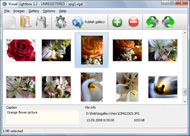
The following image set is generated by Flickr Gallery tool. Click any picture to run Lightbox gallery.

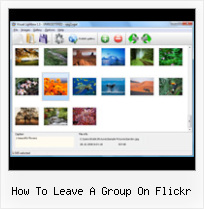
The sample above is an in-page usage demo of Lightbox tool with Flickr images. The slideshow created with Flickr Gallery software is placed inside the website page. You can also check the full-page demo web gallery. This example takes whole browser area to show the slideshow.Best Of Flickr Slideshow

How to Use

Step 1. Adding flickr images to your own gallery.


Locate the photo, photoset or photostream you want to use in your Flickr slideshow. Click on it to see the photo on its own page.

Copy URL of the flickr page.

Select Add images from Flickr... from the 'Add' button on the Toolbar.

Add images from Flickr

In the appeared window paste URL of the flickr page. Specify also the number of photos you want to add from the flickr page. Flickr Gallery will now include these photos in your project.

Add images from Flickr

If you have included the photos that you do not wish to be in your web gallery, you can easily remove them. Select all images that you wish to remove from photo gallery, and select Delete images. from the Images menu. You can pick and choose pictures by holding the CTRL while clicking the pictures you like.

Step 2. Adding caption.

The name of the photo on flickr page will automatically appear in the caption. When you select a photo you'll see the various info about it, such as: Path, Size, date of last change and Caption. You can add any comment or text about the photo (up to 512 symbols).

Step 3. Gallery properties.

Change the name of your flickr album, the size and quality of your pictures with Flickr Gallery. From the Gallery menu, select Properties or use "Edit Gallery Properties" button on the toolbar.

On the first tab of the Gallery Properties window you can change the name of your photo album and enable/disable the following properties: Slide Show, Auto play Slide Show, Zoom effect, Overlay Shadow. You can also set the Overlay shadow color and select the Engine you want to use (jQuery or Prototype + script.aculo.us).

On the second tab of the Gallery Properties window you can select the thumbnail you want to use, set the Thumbnails Resolution, Thumbnails Quality, Thumbnails Titles. Select Thumbnails Format (save in PNG or JPG format). Specify the Number of columns in you photo album and the Page color.

On the third tab of the Gallery Properties window you can select the template, Image resolution and Image quality of your pictures and change the Watermark.

You can set up the various sizes for exported images.

Control the quality of output PNG or JPEG format image by defining output "Image quality" and "Thumbnail quality" parameters (0%…100%).

Step 4. Save your photo gallery as project file.

When you exit Flickr Gallery application, you'll be asked if you want to save your project. The project consists of the pictures you choose to put on your web photo gallery and all your settings. It's a good idea to save the project, because that will allow you to change the project in case you decide to do something different with future galleries. So click Yes, then enter a name for your project. To select the location of your project, just click the Browse folders button and choose a different location. Then click Save.

Alternative Flickr Addresses How To Leave A Group On Flickr

Download Flickr Gallery


Download Flickr Gallery Download Free Edition
for Windows
Download Flickr Gallery Download Free Edition
for MAC

Flickr Gallery is free for non-commercial use.

A small fee is required for business use. Flickr Gallery Business Edition additionally provides an option to remove the Flickr Gallery. Com credit line as well as a feature to put your own logo to images. After you conclude the payment via the secure order form, you will receive a license key instantly by email that turns the Flickr Gallery Free Edition into a Business one. You can select the most suitable payment mode: credit card, PayPal, bank transfer, check etc. Also you can get Business Edition for free if you help with translating Flickr Gallery into your native language, please contact us at for more info.

Gallery From Flickr Stream

Buy Flickr GalleryBuy Business Edition
for Windows

$49
Single Website
$69
Unlimited Websites
Buy Flickr GalleryBuy Business Edition
for MAC

$49
Single Website
$69
Unlimited Websites

Support

For general help, feature requests, troubleshooting contact Customer Support at . Make sure to include details on your Flickr Gallery version, browser, operating system and a link (or relevant code).Flickr Embeding Slideshow To Unique Position

Feedback

    * Another programmes have incredible functionality but no fantastic interface like your product!

    * I have purchased the business and LOVE IT..Your product appears easy to use and close to what I need to help several of my clients..

    * I am thrilled with what this tool can do for me thanks for all the hard work that must have gone into it.Simple Image Gallery Using Flickr Api

    * I tried Flickr Gallery and for me its a very cool and usefull application. Its so easy to manage my galleries and it looks very nice.

FAQ

Q:Instead of making one page with 40 photos, is there no property to make 2 or more pages?

A:You can do it in the following way:

1. Create your gallery in Flickr Gallery and publish it on a local drive in any test folder.
2. Make two copies of the generated index.html file (for example index1.html and index2.html).
3. Open index.html, index1.html and index2.html files in any text editor.
4. Find code for the gallery inside the BODY tag and cut some part of the images, so you'll have different images on each page.

<!-- Start Flickr Gallery.com BODY section -->
<div class="gallery">
<!-- leave the following code on index.html page -->
<a href="./data/images/1.jpg" rel="lightbox[sample]" title="Best Toy Ever"><img src="./data/thumbnails/1.png" /></a>
<a href="./data/images/8.jpg" rel="lightbox[sample]" title="PrueaMacro"><img src="./data/thumbnails/8.png" /></a>

<!-- leave the following code on index1.html page -->
<a href="./data/images/3.jpg" rel="lightbox[sample]" title="Macro Leaf."><img src="./data/thumbnails/3.png" /></a>
<a href="./data/images/11.jpg" rel="lightbox[sample]" title="Bell Pepper"><img src="./data/thumbnails/11.png" /></a>

<!-- leave the following code on index2.html page -->
<a href="./data/images/5_0.jpg" rel="lightbox[sample]" title="5"><img src="./data/thumbnails/5_0.png" /></a>
<a href="./data/images/6_0.jpg" rel="lightbox[sample]" title="6"><img src="./data/thumbnails/6_0.png" /></a>

<!--[if lte IE 6]><script src="engine/js/pngfix_vlb.js" type="text/javascript"></script><![endif]-->
<a id="vlightbox" href="http://Flickr Gallery.com/">Online Photo Album Sharing by Flickr Gallery.com</a>
</div>
<!-- End Flickr Gallery.com BODY section -->

5. Create links to switch between your pages, for example:
<a href="index.html">1</a>  <a href="index1.html">2</a>  <a href="index2.html">3</a> 


Q:I want to change color of the overlay shadow? How can I do this?

A:Open engine\css\Flickr Gallery.css and find the following code:

#overlay{
position: absolute;
top: 0;
left: 0;
z-index: 90;
width: 100%;
height: 500px;
background-color: #FFF;
filter:alpha(opacity=60);
-moz-opacity: 0.6;
opacity: 0.6;
}

set the background-color parameter :

#overlay{
position: absolute;
top: 0;
left: 0;
z-index: 90;
width: 100%;
height: 500px;
background-color: #FF00FF;
filter:alpha(opacity=60);
-moz-opacity: 0.6;
opacity: 0.6;
}


RELATED

planeta - flickr 3 – Put your photos on your computer or on a CD or memory stick. 4 – Add your photos to your Flickr account. 5 – Add a relevant title, description, Go to your Groups page and select the group you'd like to leave. On

flickr On January 4, 2011, In Shot of the Week, By The A-Team. December was a busy month in our Flickr group. We welcomed about 20 new members and 100 new photos to the group. Tuesdays, By The A-Team. If you're a photographer, then you've probably heard of Flickr

Flickr galleries How to create a screen grab of your SBI! website and add it to a Flickr gallery Here's how you do it. 1) Click on the word 'Groups' at the top of the Flickr page and you'll be taken to the 'Your Groups' page. 2) Search for 'Site Build It' as in the screen grab below:

iPhone Wallpapers Group at Flickr Photo-sharing site Flickr has a group especially for iPhone wallpapers. Flickr iPhone Wallpapers group. This entry was posted by Alan on Saturday, August 16th, 2008 and is filed under iPhone Wallpapers. You can follow any responses to this entry through RSS 2.0. You can leave a

Black Hair and Skin Care.net The Official Beauty Space for Women of Color, how to hair and skin care videos, weaves, natural hair, extensions. And more. Create your own Beauty Space(TM) @ blackhairandskincare.com Black Hair, Skin Care, and Make-up Photos, a group on Flickr

EcoVelo " Blog Archive " Flickr Group Pools How to Be Happier. July 18th, 2008. Flickr Group Pools. A Panda Portrait. I get a kick out of looking through Flickr group pools. photos on a particular subject (or in a particular photographic style) submitted by members of the group

Flickr: A Bride's Best Friend | BridePop Flickr is like a treasure chest of wedding resources and can be your best friend during these months of planning. Helpful from the start, Flickr is a great

PSDlearning Flickr Group | Learning Resources for Adobe Photoshop I thought a great way to expand this community would be to create a Flickr group where anyone can add their art and photos to. I've set it up so the nine newest

How to Leave Comments on a Photo On Flickr | eHow.com How to Leave Comments on a Photo On Flickr. Commenting on Flickr photos is a simple way to share your opinion about photos and reach out to your family and friends, no matter where they are. You can leave comments, observations or

Join "The Dooars : Flickr Group" : GreenCamp.in Or you may simply add this tag "#gctd" to your photo on Flickr, we will search and add those photos to "The Dooars" group pool. Leave A Comment. Click here to cancel reply. Name (required) Mail (will not be published) (required)

Top 7 Techie Flickr Groups — PaulStamatiou.com This post is dedicated to the top 7 (as organized by me) tech-related Flickr groups. The popular What's In Your Bag group on Flickr provides a venue for people to display their collections

Flickr: Increase your visibility online! | MyCharityConnects Further, we all know how much bandwidth (web space) photos can take up. Using Flickr to host your photos saves you space on your website! You can also connect with your supporters with a Flickr group. Groups are places to share photos related

BBC - Britain in Pictures - FAQs: Groups 3. How do I add a photo to the BBC Britain in Pictures group? 7. How do I leave a group group? Go to your Groups page and select the group you'd like to leave. On the right-hand side, underneath the box where you can search group discussions, there's a red link labelled 'Quit (group name)

Flickr - Wikipedia, the free encyclopedia If a group is public the photo becomes public as well. Flickr also list" which can be used to control image access for a specific set of users in a way

How to Remove Yourself From a Facebook Group Social Media This will list all the groups that you are a member of, or were previously invited to before the switch to the new format. You can also go to the Group Page and click the option to "Leave Group," which is featured under the Member module on the right

How To Remove Oneself From A Facebook Group? - Yahoo! Answers How To Remove Oneself From A Facebook Group? How can I leave a group on the "new" go to the group click on "leave this group" on the right hand side of the screen

Child Photography, flickr Group of the Week | Baby Photos Here at MBP, we like to feature great baby and kid photos from groups on flickr. This week we picked a group called Child Photography. Child Photography is

October " 2008 " Hamilton Flickr Group These two GBH were acting up in a territorial battle at Valley Inn Road. Uploaded by For anyone who wants to take a trip to the base of Tews, we now have a way of getting

Flickr: Help: Groups Flickr is almost certainly the best online photo management and sharing application in the world. Show off your favorite photos and videos to the world, securely and privately show content to your friends and family, or blog the photos and videos

Flickr | PresetsHeaven How to export your images from Lightroom to flickr. October 21, 2008 by Pierre. Filed under Plugins, Tutorials. 4 Comments. Now that I've just set up a group on flickr for presetsheaven, wouldn't it be nice to be able to export your photos directly from Lightroom to your account on flickr.com?

screencasters.heathenx.org " Blog Archive " The Screencasters It should be a good place to check out what others are doing, get some comments on your own work and maybe even find some inspiration (something I know I'm always looking for). Anyone can view the Flickr group, but to contribute (upload stuff, leave comments etc.) you have to join Flickr

How To Leave A Group On Flickr : Flickr Gallery How To Leave A Group On Flickr. Flickr Slideshow. The most powerful photo gallery maker on the Web!. Show Flickr Photos On Iphone On the right-hand side, underneath the box where you can search group discussions, there's a red link labelled 'Quit (group name)

Web Ops Visualizations Group on Flickr We've blogged about some of how and why we do it. One thing we're in the habit of is screenshotting these graphs when things go wrong, right, or indifferent, and adding them to a group on Flickr. I've decided to make a public group for these sort of screenshots, for anyone to contribute to:

Online Flickr (mtw) | Planeta Online Flickr Guide is featured on Planeta.com and provides tips for users wishing to upgrade their web presence and understanding. This document is a work in progress and is updated via our personalized seminars and webinars. Go to your Groups page and select the group you'd like to leave

GM Script: Flickr Group Pool Admin: Warn + Delete - Steeev's Flickr Group Pool Admin: Warn+Delete is a Greasemonkey script that lets you single click to remove images from a group pool, delete all a user's images from a pool, also easily mail a user and remove or ban them all from the group pool page

Friends and Groups On Flickr.com - Getting Comfortable in the You've made an account and added photos, now you need to learn how to network. Your online photos aren't doing you any good if no one is looking at them! This article explains how to find friends and join groups on Flickr. Photos are always more

Flickr Photo Project: Featured Nonprofit - The TechSoup Blog We're delighted that many people grabbed their cameras and showed us how their work contributed to the success of their organizations by uploading photos to our group on Flickr. View all photos and join TechSoup's group so you can leave comments and add photos of your own!

