
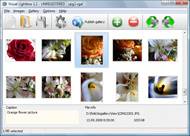


Overview

It's no secret that adding photos to your blog posts is one of the most effective ways to enhance your blog and attract attention to your writing. Flickr has millions of photos available in its database. A simple FREE tool called Flickr Gallery allows you to create a custom image gallery with a cool slide show of the most recent and most interesting photos from Flickr on your website or blog in a few easy steps. Just visit Flickr website and find photostream, photoset or a single photo you like. Enter the address of flickr page to add all photos from this page in your gallery, select the style of thumbnails and the overlay window and add the HTML embed code on your website or blog.
A few clicks and you'll see a stylish photo gallery with beautifull lightbox and zoom effects on your own website or blog!


Flickr Gallery for Windows   Flickr Gallery for MAC

Want more?

Example

Lightbox gallery sample

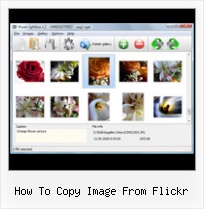
The following image set is generated by Flickr Gallery tool. Click any picture to run Lightbox gallery.

The sample above is an in-page usage demo of Lightbox gallery that uses images from Flickr. The slideshow created with Flickr Gallery wizard is placed inside the page layout. You can also check the full-page demo slideshow. This example takes whole browser area to show the Lightbox gallery that uses images from Flickr.Embed Flicr Gallery Php

How to Use

Step 1. Adding flickr images to your own gallery.


Locate the photo, photoset or photostream you want to use in your Flickr slideshow. Click on it to see the photo on its own page.

Copy URL of the flickr page.

Select Add images from Flickr... from the 'Add' button on the Toolbar.

Add images from Flickr

In the appeared window paste URL of the flickr page. Specify also the number of photos you want to add from the flickr page. Flickr Gallery will now include these photos in your project.

Add images from Flickr

If you have included the photos that you do not wish to be in your web gallery, you can easily remove them. Select all images that you wish to remove from photo gallery, and select Delete images. from the Images menu. You can pick and choose pictures by holding the CTRL while clicking the pictures you like.

Step 2. Adding caption.

The name of the photo on flickr page will automatically appear in the caption. When you select a photo you'll see the various info about it, such as: Path, Size, date of last change and Caption. You can add any comment or text about the photo (up to 512 symbols).

Step 3. Gallery properties.

Change the name of your flickr album, the size and quality of your pictures with Flickr Gallery. From the Gallery menu, select Properties or use "Edit Gallery Properties" button on the toolbar.

On the first tab of the Gallery Properties window you can change the name of your photo album and enable/disable the following properties: Slide Show, Auto play Slide Show, Zoom effect, Overlay Shadow. You can also set the Overlay shadow color and select the Engine you want to use (jQuery or Prototype + script.aculo.us).

On the second tab of the Gallery Properties window you can select the thumbnail you want to use, set the Thumbnails Resolution, Thumbnails Quality, Thumbnails Titles. Select Thumbnails Format (save in PNG or JPG format). Specify the Number of columns in you photo album and the Page color.

On the third tab of the Gallery Properties window you can select the template, Image resolution and Image quality of your pictures and change the Watermark.

You can set up the various sizes for exported images.

Control the quality of output PNG or JPEG format image by defining output "Image quality" and "Thumbnail quality" parameters (0%…100%).

Step 4. Save your photo gallery as project file.

When you exit Flickr Gallery application, you'll be asked if you want to save your project. The project consists of the pictures you choose to put on your web photo gallery and all your settings. It's a good idea to save the project, because that will allow you to change the project in case you decide to do something different with future galleries. So click Yes, then enter a name for your project. To select the location of your project, just click the Browse folders button and choose a different location. Then click Save.

Flickr Typepad Badge How To Copy Image From Flickr

Download Flickr Gallery


Download Flickr Gallery Download Free Edition
for Windows
Download Flickr Gallery Download Free Edition
for MAC

Flickr Gallery is free for non-commercial use.

A small fee is required for business use. Flickr Gallery Business Edition additionally provides an option to remove the Flickr Gallery. Com credit bar as well as a feature to put your own logo to images. After you finish the payment via the secure form, you will receive a license key instantly by e-mail that turns the Flickr Gallery Free Edition into a Business one. You can select the most suitable payment procedure: bank transfer, check, PayPal, credit card etc. Also you can get Business Edition for free if you help with translating Flickr Gallery into your native language, please contact us at for more info.

Flickr Or Website

Buy Flickr GalleryBuy Business Edition
for Windows

$49
Single Website
$69
Unlimited Websites
Buy Flickr GalleryBuy Business Edition
for MAC

$49
Single Website
$69
Unlimited Websites

Support

For general help, feature requests, troubleshooting contact Customer Support at . Make sure to include details on your Flickr Gallery version, a link (or relevant code), operating system and a browser.Flickr Slideshows On Media Center

Feedback

    * I LOVE your free Lightbox2 software tool and will purchase the business version shortly. I have seen the Lightbox JS effect used with video tutorials and I was hoping you have a version for video that I can purchase.
Video LightBox: http://videolightbox.com

    * I have purchased the business and LOVE IT..Your product appears easy to use and close to what I need to help several of my clients..

    * I am thrilled with what this tool can do for me thanks for all the hard work that must have gone into it.Copy Flickr Set To Facebook

    * I find Flickr Gallery (and lightbox2) a great tool and was about to proceed in its purchase.

FAQ

Q:I purchased your business license today but I don't see any way to update so the watermark is either missing or replace with mine.What do I do?

A:Free edition of Flickr Gallery doesn't allow you to remove our watermark.

Register your Flickr Gallery application at first. Use reg. key from the license message you received after the purchase. After the registration you can remove watermarks.

Open Gallery->Properties->Templates: Watermark. Click to disable this option or use your own watermark.


RELATED

How to identify public domain photos on Flickr :: Free Tech Free Tech Support on How to identify public domain photos on Flickr from Dave Taylor I want to add photos to my blog, and a buddy told me that I can use images from the Yahoo Flickr site

How to Create Sunshine Effect in Studio with Artificial Sunlight Video by Robert Grant, Article by SASHA GiTiN Wish you could take gorgeous photos? Now you can! see our Review of a New Educational Resource - Tools and Techniques for Creative Photography - eBook In this tutorial video we'll give you tips

The Messaging Times :: flickr Then, go back to your Flickr account and select the image (make sure you select the one Right-click the image and select "Copy Image Location" or on "Properties" and copy the image location from that screen

Movie Copy | Answerbag Movie Copy. Learn about Movie Copy on Answerbag.com. Get information and videos on Movie Copy including articles on dvd to dvd copying, how to copy a dvd, download dvd and more! Day 187 image by pasukaru76 from Flickr.com, CC-BY

How to download non-downloadable images from Flickr (with Here's how to get at the toughest to download Flickr images just using your web browser and built-in functionality. Technique will work with most photo sites

FataL - How to copy pictures from free Flickr accounts How to copy pictures from free Flickr accounts. Friday, 5. December So, how to save a picture you like in that case? Opera's Block Content feature created

How To Copy Images From Flickr : Flickr Gallery How To Copy Images From Flickr. Flickr Slide Show creates Vista-style javascript photo gallery with minimum effort!. Flickr Mobile Slideshow

Using Images from Flickr and Facebook - Photography How to copy an image location from Flickr or Facebook to use in discussions, How to copy an image location from Flickr or Facebook to use in discussions, debates, and comments

How To: Posting FlickR to WordPress Manually I'm going to go ahead and run a how-to on this despite the fact that I haven't gotten it perfect yet. than me, and I might learn something from it. The reason I like to use FlickR when posting images instead of the WordPress file-upload, image posting utilities, and plugins is that posting

How to put an image in Yahoo email signature Quickly put an image in your Yahoo email signature - include company logo, photograph or a scanned image for your signature

Flickr: The Help Forum: copying my image to paste in my yahoo Flickr is almost certainly the best online photo management and sharing application in the world. Show off your favorite photos and videos to the world, securely and privately show content to your friends and family, or blog the photos and videos How do I copy my image to paste it in my signature?

Add Text Watermarks To Your Flickr Photos Learn how to add watermarks to your Flickr Photographs without leaving Flickr. Now select any font for the watermark from the drop-down and then drag the Fade slider to around 55%. That will make your text slightly transparent so the image portions beneath it are also visible

The Job Purpose of a Copy Typist | eHow.com Education Image by Flickr.com, courtesy of Tilemahos Efthimiadis. In order to become a copy typist, an individual should know how to use a word processor, computer and/or a typewriter. Some companies expect an individual to have prior experience in clerical or secretarial work

[How-To] Add Flickr Photos to your Word Documents with Ease This post introduces an interesting tool called Flickr4Word using which you can easily insert and embed images from Flickr into Microsoft Word documents. [How-To] Add Flickr Photos to your Word Documents with Ease What do you do when you have to embed an image from Flickr into your Word Documents?

Why can't I copy an image from Flickr.com & save it to My Why can't I copy an image from Flickr.com & save it to My Pictures? To copy a picture from Flickr, you can take a screenshot of the page (press PrintScreen key, open Paint, paste the picture and save it to your

Life and Tech Blog After that you need to copy the permanent link for the uploaded image. Using Flickr, just click on the Share this link and select Flickr, just click on the Share this link and select on Grab HTML/BBCode link. No need to select the whole code just copy the beginning from http until jpg. In Blogger,

How to add photos to a Wordpress blog | New York Music How to use wordpress, flickr and photoshelter to add photos to your wordpress blog. I know that Flickr TOS states that any image coming from their service should link back to the flickr page of that image, but I don't think selling images violates it

Downloading fantastic Flickr photos If you want great looking presentations, you'll need great looking photos to go on your slides. But how can you get hold of professional photos without splashing out on professional graphics, learn by cutshaw in Tutorial, photos, and Flickr

Finding and Adding Creative Commons Images To Your Blog Posts This post explains how to find and add creative commons Flickr images to blog posts. This post blogged from Flickr to my personal blog explains How to Blog an image from Flickr and shows what a post written using Flickr looks like

How To Improve Uploaded Photos, Pictures Colors On Flickr Today, we will tell you about how can you improve existing colors or add more colors to your already uploaded flickr photos without downloading the image itself from flickr, as you can do it on the same image uploaded there on flickr. Follow the procedure below to edit an uploaded image on flickr

Save unsavable images from any Web site Home " Internet " How to save copy righted Images from Flickr Some images in Flickr are protected so that nobody would save them to their computer

How To Add Pictures To Comments On DIYPhotography.net Step 1 - upload your image to Flickr (or any other image hosting service) Step 3 - copy the image URL from the bottom of the screen where is says "Grab the photo's URL:" Or you can copy the text where it says: "Copy and paste this HTML into your webpage:" If you are using other

The Squat Pen Rests: How to Copy Flickr Image Locations How to Copy Flickr Image Locations. The spaceball picture is really annoying. You head to Flickr, find the perfect image to accentuate your blog post, right click on the to download the Flickr image. Make sure the tip of your arrow just barely crosses over into the image. If you

Download Photo Images From Flickr Protected By Spaceball.gif How to download photo or images from Flickr.com that is protected by spaceball.gif? When saving an image to your computer you get an image with the file name called spaceball.gif then you should follow the rest of the steps to

Create local copy of image for Imagecache and ThickBox The problem with that is that imagecache actually creates a copy of the image, and emfield isn't pulling the image onto your site, but rather embedding the flickr hosted image on your site. "Import to local Image-module node types from Flickr" somewhere, or

PhotoCopy mirrors iPhoto images on Flickr | Photography PhotoCopy is a new utility that helps you keep offsite backups of your iPhoto library on Flickr. PhotoCopy iPhoto/Flickr tool gains speed, stability. Control your online albums with iPhoto. Copying iPhoto images over a network. Canon imageFormula P-150. How to make a photo journal in iPhoto

