



Overview

It's no secret that adding photos to your blog posts is one of the most effective ways to enhance your blog and attract attention to your writing. Flickr has millions of photos available in its database. A simple FREE tool called Flickr Gallery allows you to create a custom image gallery with a cool slide show of the most recent and most interesting photos from Flickr on your website or blog in a few easy steps. Just visit Flickr website and find photostream, photoset or a single photo you like. Enter the address of flickr page to add all photos from this page in your gallery, select the style of thumbnails and the overlay window and add the HTML embed code on your website or blog.
A few clicks and you'll see a stylish photo gallery with beautifull lightbox and zoom effects on your own website or blog!


Flickr Gallery for Windows   Flickr Gallery for MAC

Want more?

Example

Lightbox gallery sample

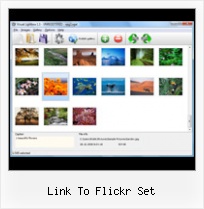
The following image set is generated by Flickr Gallery tool. Click any picture to run Lightbox gallery.

The sample above is an in-page usage demo of Lightbox with images from Flickr. The photo gallery created with Flickr Gallery application is placed inside the html page. You can also check the full-page demo web gallery. This example takes whole browser area to show the Lightbox gallery that uses images from Flickr.Flickr Mature Photo Thumbnails

How to Use

Step 1. Adding flickr images to your own gallery.


Locate the photo, photoset or photostream you want to use in your Flickr slideshow. Click on it to see the photo on its own page.

Copy URL of the flickr page.

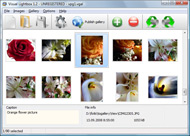
Select Add images from Flickr... from the 'Add' button on the Toolbar.

Add images from Flickr

In the appeared window paste URL of the flickr page. Specify also the number of photos you want to add from the flickr page. Flickr Gallery will now include these photos in your project.

Add images from Flickr

If you have included the photos that you do not wish to be in your web gallery, you can easily remove them. Select all images that you wish to remove from photo gallery, and select Delete images. from the Images menu. You can pick and choose pictures by holding the CTRL while clicking the pictures you like.

Step 2. Adding caption.

The name of the photo on flickr page will automatically appear in the caption. When you select a photo you'll see the various info about it, such as: Path, Size, date of last change and Caption. You can add any comment or text about the photo (up to 512 symbols).

Step 3. Gallery properties.

Change the name of your flickr album, the size and quality of your pictures with Flickr Gallery. From the Gallery menu, select Properties or use "Edit Gallery Properties" button on the toolbar.

On the first tab of the Gallery Properties window you can change the name of your photo album and enable/disable the following properties: Slide Show, Auto play Slide Show, Zoom effect, Overlay Shadow. You can also set the Overlay shadow color and select the Engine you want to use (jQuery or Prototype + script.aculo.us).

On the second tab of the Gallery Properties window you can select the thumbnail you want to use, set the Thumbnails Resolution, Thumbnails Quality, Thumbnails Titles. Select Thumbnails Format (save in PNG or JPG format). Specify the Number of columns in you photo album and the Page color.

On the third tab of the Gallery Properties window you can select the template, Image resolution and Image quality of your pictures and change the Watermark.

You can set up the various sizes for exported images.

Control the quality of output PNG or JPEG format image by defining output "Image quality" and "Thumbnail quality" parameters (0%…100%).

Step 4. Save your photo gallery as project file.

When you exit Flickr Gallery application, you'll be asked if you want to save your project. The project consists of the pictures you choose to put on your web photo gallery and all your settings. It's a good idea to save the project, because that will allow you to change the project in case you decide to do something different with future galleries. So click Yes, then enter a name for your project. To select the location of your project, just click the Browse folders button and choose a different location. Then click Save.

Embed Flickr Photo In Joomla Article Link To Flickr Set

Download Flickr Gallery


Download Flickr Gallery Download Free Edition
for Windows
Download Flickr Gallery Download Free Edition
for MAC

Flickr Gallery is free for non - commercial use.

A small fee is required for business use. Flickr Gallery Business Edition additionally provides an option to remove the Flickr Gallery. Com credit line as well as a feature to put your own logo to images. After you conclude the payment via the secure form, you will receive a license key instantly by email that turns the Flickr Gallery Free Edition into a Business one. You can select the most appropriate payment method: check, bank transfer, credit card, PayPal etc. Also you can get Business Edition for free if you help with translating Flickr Gallery into your native language, please contact us at for more info.

Tumblr Recent Flickr Widget

Buy Flickr GalleryBuy Business Edition
for Windows

$49
Single Website
$69
Unlimited Websites
Buy Flickr GalleryBuy Business Edition
for MAC

$49
Single Website
$69
Unlimited Websites

Support

For troubleshooting, feature requests and general help contact Customer Support at . Make sure to include details on your Flickr Gallery version, browser, operating system and a link (or relevant code).Customize Html Flickr Badge

Feedback

    * Just a quick thank you for the software though, It's not often you get a free software version of this quality and style! Well done and please continue this amazing gallery. Hope to see more advances.

    * First of all, I love you Flickr Gallery. I think it's beautiful! I purchased the lightbox “business edition” yesterday, and I’m very happy how easy it is to use. Found this to be one of the fastest ways to get a gallery on the web. Thanks.

    * Just bought the business version of Flickr Gallery and I just had to write and say how impressed I am with it. Really easy to use, intuitive interface and generates a truly professional presentation. Seldom have I been so pleased with a software purchase. Thank you.Flickr Teen Flasher

    * First of all, your product is fantasitc. I looked at the others and your code generator app was insanely easy to use.

FAQ

Q:I would like to reposition the Previous and Next buttons to a position below the images and have them be visible all the time.Where do I have to go to make these changes in the code?

A:Find the css file in the folder generated by gallery:
engine\css\
or in the following folder:
c:\Program Files\Visual LightBox Business\templates\Default\engine\css\

To set their position you should change 15% to something different:
#prevLink:hover, #prevLink:visited:hover { background: url(../images/prevlabel.gif) left 15% no-repeat; }
#nextLink:hover, #nextLink:visited:hover { background: url(../images/nextlabel.gif) right 15% no-repeat; }

For example:
#prevLink:hover, #prevLink:visited:hover { background:url(../images/prevlabel.gif) left 75% no-repeat; }
#nextLink:hover, #nextLink:visited:hover { background: url(../images/nextlabel.gif) right 75% no-repeat;}

RELATED

Flickrbits FSViewr (short for Flickr set viewer), is a light-weight, easy to configure Flash environment for displaying images from a Flickr photo set on a separate website. Uses could include a Nostalgia allows you to search flickr remotely and create local sets from the photos you discover

WSDOT - Web Toolkit - Host Flickr Images Then click the link that says "Choose photos and videos" and select the photos you want to upload. Organizing Images: Once you have several Flickr sets for your program or activity, you can organize them into collections

Flickr - Did By Graham Links Collected articles that I have found that are useful to me, and maybe you

Creating a Flickr Photostream | PCWorld We set up a custom link for our photostream so that friends could Go to Organize, Permissions (or click Edit next to the copyright symbol) to set permissions and specify whether other people can distribute and display your snaps. 10. If yours is a free Flickr account, friends can only download

Multicolr Search Lab

Flickr Photo Sets Video – 5min.com Flickr Photo Sets - As your image collection grows on Flickr, the importance of keeping things organized will be apparent. Best to get started with the practice of organizing your photos before your gallery becomes a potpourri of photos or a

Flickr Guide: How to Do Everything with Flickr Flickr Guide will show you how to do everything on Flickr. You can download and backup flickr pictures, set them as rotating wallpapers, browse pictures in 3D, make a screensaver and more

FlickrSync FlickrSync is a photo synchronization application for flickr users. It displays your local folders and your flickr sets and it can establish synchronization rules between them. This way you can manage all your photos locally and FlickrSync will

Flickr Flickr is almost certainly the best online photo management and sharing application in the world. Show off your favorite photos and videos to the world, securely and privately show content to your friends and family, or blog the photos and videos

Flickriver: Photoset 'Flickr' by °Jen° Flickriver - view images as a 'river of photos' and more While viewing any Flickr photos page, click on the bookmarklet to open the same view on Flickriver. To install: drag and drop the following link to your Bookmarks

Flickr Photobar Gallery | Codrops After we got a lot of great feedback for our image galleries we decided to follow some of the suggestions and create a gallery that uses the Flickr API. The aim was to build a bottom photobar that one can easily integrate into a website. It is

Mini-feature: Auto-embed Flickr sets and tags - The Official still got a bunch of bigger things in the pipe you'll hear about soon, but wanted to let you know that now you can easily embed Flickr sets and tags. Just paste the URL, e.g. from the address bar: didn't work for me today, set link posted as merely a link

Office Chair make-over! (link to flickr set and group in post#10) Office Chair make-over! (link to flickr set and group in post#10) There is also a link to a group so that you can add your finished picture. If you do this project I would love to see your finished chairs too! I am new to flickr so I may need help to

Flickr Set Link : Flickr Gallery Flickr Set Link. Flickr Gallery. The most powerful image gallery software on the Web.. Allow Tagging On Flickr Creating a Flickr account - Office of Web and New Media If you navigate to a Set you have created, use the same link on that page

Flickr Sets " Publication Design Have found a few sets within Flickr of graphic design that you might like. You must be logged in to post a comment. Hi. This blog will change focus a little from September 2008 as I will be studying a Master of Information Design at Reading University. Thanks to all my students past and present from

Get the Most Out of Flickr - Wired How-To Wiki 4. Geocode your pics by dropping your photos onto Flickr's map (under the Organize heading) for an alternate means of navigation -- or to create a quick travelog. Flickr Set Manager - This handy web-based tool allows you to create "smart" Flickr sets using a wide variety

admin-options.html To insert photos into your posts, just click the Photos tab in the edit screen and then click on a thumbnail. Important: After you have updated or created a new Flickr set, visit this page to update your photo album's cache with your latest photos

Web Design Schools Guide Link to your own site within the photo: Be sure to add a link within your photo's description to get traffic Use Flickr as hosting: Store your photos on Flickr, and link directly to them to take a load off of your server

QOOP flickr Photo Printer

Flickr Photo Set to KML by Adam Franco upload it to your own blog or web site. paste its URL into GoogleMaps. This will speed up loading of your photo set and reduce the load on my server. In GoogleMaps click on the 'Link to this page' link to get an HTML snippet to embed the map in your website

Set Random Images From Flickr As WallPapers | TECH YARD Set random images from Flickr based on usernames or tags as wallPapers using WallpaperFlickr. You can rotate the wallpaper at regular intervals

2 Great Ways To Automate Set Management In Flickr Flickr has a great ability to create Sets of images, and then group the sets as Collections. I've talked about Flickr sets before, in terms of how to best

Setting sets free " Flickr Blog It used to be that members with free accounts could only organize their photos into 3 sets. About Flickr. Flickr is a revolution in photo storage, sharing and organization, making photo management an easy, natural and collaborative process. Get comments, notes, and tags on your photos, post to any

Compfight / A Flickr Search Tool Search engine for visual inspiration and free stock photos for the advertising community including images of creative commons and public domain

Flickr - Wikipedia, the free encyclopedia However, sets are more flexible than the traditional folder-based method of organizing files, as one photo can belong to one set, many sets, or In November 2006 Flickr created a "guest pass" system that allows private photos to be shared with non Flickr members

How Do I Link My Website to My Flickr Photostream? Tips How do I link my website to my Flickr photostream? Well, you will need some patience since it's not the same as it was. But, any user can quickly add their photostream to their blog or website

dopiaza.org | Flickr Set Manager Click on the link below to start. Before you can start using it for the first time, you will be taken to the Flickr web site and asked to grant permission for write access - this is so that Set Manager can create new sets in your Flickr account and add photos to them

