




Overview

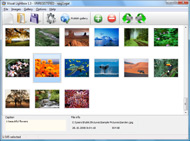
It's no secret that adding photos to your blog posts is one of the most effective ways to enhance your blog and attract attention to your writing. Flickr has millions of photos available in its database. A simple FREE tool called Flickr Gallery allows you to create a custom image gallery with a cool slide show of the most recent and most interesting photos from Flickr on your website or blog in a few easy steps. Just visit Flickr website and find photostream, photoset or a single photo you like. Enter the address of flickr page to add all photos from this page in your gallery, select the style of thumbnails and the overlay window and add the HTML embed code on your website or blog.
A few clicks and you'll see a stylish photo gallery with beautifull lightbox and zoom effects on your own website or blog!


Flickr Gallery for Windows   Flickr Gallery for MAC

Want more?

Example

Lightbox gallery sample

The following image set is generated by Flickr Gallery tool. Click any picture to run Lightbox gallery.

The sample above is an in-page usage demo of Lightbox tool with Flickr images. The slideshow created with Flickr Gallery application is placed inside the page layout. You can also check the full-page demo gallery. This example takes whole browser area to show the website gallery.Jquery Gallerific Open Api Flickr

How to Use

Step 1. Adding flickr images to your own gallery.


Locate the photo, photoset or photostream you want to use in your Flickr slideshow. Click on it to see the photo on its own page.

Copy URL of the flickr page.

Select Add images from Flickr... from the 'Add' button on the Toolbar.

Add images from Flickr

In the appeared window paste URL of the flickr page. Specify also the number of photos you want to add from the flickr page. Flickr Gallery will now include these photos in your project.

Add images from Flickr

If you have included the photos that you do not wish to be in your web gallery, you can easily remove them. Select all images that you wish to remove from photo gallery, and select Delete images. from the Images menu. You can pick and choose pictures by holding the CTRL while clicking the pictures you like.

Step 2. Adding caption.

The name of the photo on flickr page will automatically appear in the caption. When you select a photo you'll see the various info about it, such as: Path, Size, date of last change and Caption. You can add any comment or text about the photo (up to 512 symbols).

Step 3. Gallery properties.

Change the name of your flickr album, the size and quality of your pictures with Flickr Gallery. From the Gallery menu, select Properties or use "Edit Gallery Properties" button on the toolbar.

On the first tab of the Gallery Properties window you can change the name of your photo album and enable/disable the following properties: Slide Show, Auto play Slide Show, Zoom effect, Overlay Shadow. You can also set the Overlay shadow color and select the Engine you want to use (jQuery or Prototype + script.aculo.us).

On the second tab of the Gallery Properties window you can select the thumbnail you want to use, set the Thumbnails Resolution, Thumbnails Quality, Thumbnails Titles. Select Thumbnails Format (save in PNG or JPG format). Specify the Number of columns in you photo album and the Page color.

On the third tab of the Gallery Properties window you can select the template, Image resolution and Image quality of your pictures and change the Watermark.

You can set up the various sizes for exported images.

Control the quality of output PNG or JPEG format image by defining output "Image quality" and "Thumbnail quality" parameters (0%…100%).

Step 4. Save your photo gallery as project file.

When you exit Flickr Gallery application, you'll be asked if you want to save your project. The project consists of the pictures you choose to put on your web photo gallery and all your settings. It's a good idea to save the project, because that will allow you to change the project in case you decide to do something different with future galleries. So click Yes, then enter a name for your project. To select the location of your project, just click the Browse folders button and choose a different location. Then click Save.

Supress This Product Uses The Flickr Wordpress Ajax Flickr Slideshow

Download Flickr Gallery


Download Flickr Gallery Download Free Edition
for Windows
Download Flickr Gallery Download Free Edition
for MAC

Flickr Gallery is free for non - commercial use.

A small fee is required for business use. Flickr Gallery Business Edition additionally provides an option to remove the Flickr Gallery. Com credit line as well as a feature to put your own logo to images. After you finish the payment via the secure order form, you will receive a license key instantly by email that turns the Flickr Gallery Free Edition into a Business one. You can select the most appropriate payment procedure: credit card, PayPal, bank transfer, check etc. Also you can get Business Edition for free if you help with translating Flickr Gallery into your native language, please contact us at for more info.

Windows 7 Slideshow Flickr Gadget

Buy Flickr GalleryBuy Business Edition
for Windows

$49
Single Website
$69
Unlimited Websites
Buy Flickr GalleryBuy Business Edition
for MAC

$49
Single Website
$69
Unlimited Websites

Support

For general help, feature requests, troubleshooting contact Customer Support at . Make sure to include details on your operating system, browser, a link (or relevant code) and Flickr Gallery version.Ruby Rails Flickr Slideshows

Feedback

    * I'd like to express my gratitude to your efforts on creating such a nice piece of program and best of all it's free! Keep out the good work and I hope to see new features in the near coming future to rate you 5 star!

    * Another programmes have incredible functionality but no fantastic interface like your product!

    * This looks like EXACTLY what I need for my site. It would make my job much faster! Love your program. Thank you!!Flickr Html Gallery Plugin

    * I have installed Flickr Gallery to trial. All good, loving it!! I want to get an business version of your great programm. I love it - soo easy to use!!

FAQ

Q:How do I embed the lightbox image gallery into an existing page?

A:To install Flickr Gallery gallery on your page you should:

1. Create your gallery in Flickr Gallery and publish it on a local drive in any test folder.
2. Open index.html file from the saved folder in any text editor.
3. Copy code for the HEAD section and paste it inside the HEAD section of you own webpage, for example:

<head>
...
<!-- Start Flickr Gallery.com HEAD section -->
<link rel="stylesheet" href="engine/css/vlightbox.css" type="text/css" />
<style>#vlightbox a#vlb{display:none}</style>
<link rel="stylesheet" href="engine/css/Flickr Gallery.css" type="text/css" media="screen" />
<script src="engine/js/jquery.js" type="text/javascript"></script>
<script src="engine/js/jquery.tools.min.js" type="text/javascript"></script>
<script src="engine/js/visuallightbox.js" type="text/javascript"></script>
<!-- End Flickr Gallery.com HEAD section -->

...
</head>


4. Copy code for the BODY section and paste it inside the Body section of you own webpage in the place where you want to have a gallery, for example:

<body>
...
<!-- Start Flickr Gallery.com BODY section -->
<div id="vlightbox">
<a rel="lightbox_vlb" href="data/images/dscn6831.jpg" title="DSCN6831"><img src="data/thumbnails/dscn6831.png"><span></span></a>
<a rel="lightbox_vlb" href="data/images/dscn6823.jpg" title="DSCN6823"><img src="data/thumbnails/dscn6823.png"><span></span></a>
<a rel="lightbox_vlb" href="data/images/dscn6819.jpg" title="DSCN6819"><img src="data/thumbnails/dscn6819.png"><span></span></a>
<a id="vlb" href="http://Flickr Gallery.com">Photo Gallery For Web by Flickr Gallery.com v2.1</a>
</div>
<!-- End Flickr Gallery.com BODY section -->

...
</body>


5. Copy 'data' folder with images and thumbnails and 'engine' folder with .css and .js files into the same folder with your own webpage.
You can find the example on our website:
http://www.Flickr Gallery.com/#example


RELATED

Post Ajax Slider Wordpress Plugin Hi, This plugin is used to create viewable updated post in slider view. It will display in the sidebar of the blog. Requires WordPress Version: 2.7.0 or higher More Details And Download Thanks, Shane G

Flickr Slideshows : Free SlideShow Software Free Slideshow Creator! Flickr Slideshows. You just upload files generated by the online photo album software to your server and an online photo album will run immediately!. Album On Web Page

MooPix – Flickr MooTools Plugin | Ajaxmint - Endless Ajax Another Javascript slideshow using a popular framework! Fear not — MooPix isn't a slideshow, it's a way for you to access your public Flickr photos without

56 Scripts For Galleries, Slideshows and Lightboxes The Slide Show is a simple to use application of the Google AJAX Feed API that is slide show control takes photo feeds from all popular sites, such as PhotoBucket, Flickr,

Wordpress Plugins for Photo Galleries - Photoblogging Part II " Wordpress Plugins for Photo Galleries - Photoblogging Part II. Web design blog with graphics and web design resources, lists of graphic design tools, utilities, and other web site design resources, including Web Design and Development articles

Discover From Your Favorite Topic or Web Page: slideshow [Discover] Welcome to splashr.com http://splashr.com/ (photography flickr slideshow photos) [Discover] TripTracker slideshow - Home http://slideshow.triptracker.net/ (javascript slideshow ajax tools) [Discover] PictoBrowser - Free Flickr Slideshow for your Site or Blog http://www

Adding a Google AJAX SlideShow to Your WordPress Site Inserting a customizable slide show on your WordPress site can be done without a plugin using the following tools: Scripts from Google AJAX Feed API An online web album such as Picasa A sidebar text widget Step One: Review the

Flickr Gallery for Mac OS, Art Photo Gallery, Box Flash Add Flickr Slideshow to your website on Mac. Art Photo Gallery. Box Flash Gallery. Dazzle your viewers with 3D photo navigation

Google AJAX Feed Slide Show Widget | Martin Jonsson This is a wordpress plugin that displays a photo slide show as a sidebar widget or in lined in your posts using a shortcode. The plugin uses Media RSS as a

How To make Ajax Slideshows with Google Ajax Feed Today I have something very unique to share with my readers and fellow bloggers. I will be providing a simple tutorial on how to make Ajax Slideshows with The slide show control takes photo feeds from all popular sites, such as PhotoBucket, Flickr, and Picasa Web Albums

Tylr Slidr // Tyler Craft // Interactive Developer In particular, clients wanted to be able to add a slideshow of their Flickr photos, so that they only had to manage their photos in one place. Flickr has a nice slideshow feature, however, there wasn't an easy way to incorporate this into a post or page in Wordpress

12 Awesome WordPress SlideShow Plugins - Showcases - Geek Sucks Everyone love to see image on any website and if it is a slideshow people like to see it much. Furthermore, perfect use of slide show gives gorgeousness to a site. And why the WordPerss users will stay away from the use of slide show. I got some

Stylish Plugin Sampler: 15 Design-Friendly Plugins For Your Looking for some quick and easy ways to improve your WordPress site design? We've selected a few of the best plugins available for WordPress 3.0 wordpress audio player, wordpress design plugins, wordpress flickr plugin, wordpress gallery plugin, wordpress simile timeline, wordpress slide show

Ajax Photo Albums Ajax Photo Albums. Build professional online photo galleries for your Website with Photo Slide Show!. stamp album page printable

ExtJS, Flickr and Wordpress | aKa Web Design ExtJS, Flickr and WordPress. Posted on April 13, 2010 by Arthur Kay. I recently built a website for my sister (Jennifer Kay) to But here's the cool part: my sister can edit the slideshow from her Flickr account without touching a single line of HTML or JavaScript! Now some of you may be asking

Wordpress Photo Gallery Plugins | Wordpress Directory Flick Gallery WordPress plugin: Flickr gallery does just what you would expect it to – it allows you to create a gallery of pictures stored in flickr (Yahoo!) accounts via API. You can get recent photos, photosets, a custom search, user tags, and do slideshow and gallery

100 wordpress ajax plugins Ajax is very popular when it comes to WordPress. There are many WordPress Ajax plugins i collect more than 20+ Beautiful WordPress Slideshow Plugins. In this post we have collected some beautiful and amazing wordpress slideshow plugins, that hope it will

Ajax Flickr : Flickr Gallery Ajax Flickr. Make it easy for people to find all your photos on the site! Try Flickr Gallery!. Flickr Galery To Tumblr

35 Gallery - Ajax Slideshows | Premium Wordpress Themes Wp Ajax Image Galleries Lightboxes TripTracker The TripTracker slideshow is a lightweight JavaScript image viewer with an animated slideshow

AJAX SlideShow TripTracker.net blog has rolled out their "Revamped Slideshow" Javascript for public use. The interface to the slideshow is simple — insert the script source, initialize the viewer and photo links and then call the viewer.show() method. They have

Free Slideshow Plugins For WordPress – Best of Resources Slideshow is a brilliant method to stack and present series of items (such as images) in your website especially when space is a constraint. It is also commonly

Inline Google AJAX Feeds Slideshow plugin for WordPress This is a WordPress plugin, which converts the RSS links of images to a flash-based slideshow by using Google AJAX Feeds API. Today, I read this article, in which that Google announced an extension, Slide Show Control, of its AJAX Feeds API

WordPress " Google AJAX Feed Slide Show Widget " WordPress This is a wordpress plugin that displays a photo slide show as a sidebar widget or in lined in your posts using a shortcode. You can easily display a slide show from photo feeds from all popular sites, such as Expono, PhotoBucket, Flickr, and Picasa Web Albums

WordPress - Revoltz - Premium WordPress Theme - 3 in 1 Theme Description Note: Support requests are now handled in the Support Forum. Read more. — Version 1.0.71 is Available. Revoltz features a Top of the Line WordPress Framework, created from s

Widgetop News Tags: Ajax, Apple, dashboard, download, Downloads, flickr, iphone, photobucket, Slideshow, Tags, Widget Tags: Ajax, dashboard, feed, flickr, images, photobucket, rss, Slideshow, web2.0, webtop, Widget. We enhanced the Add RSS Feeds section to easily add image slideshows to your Widgetop

