
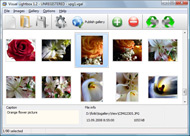


Overview

It's no secret that adding photos to your blog posts is one of the most effective ways to enhance your blog and attract attention to your writing. Flickr has millions of photos available in its database. A simple FREE tool called Flickr Gallery allows you to create a custom image gallery with a cool slide show of the most recent and most interesting photos from Flickr on your website or blog in a few easy steps. Just visit Flickr website and find photostream, photoset or a single photo you like. Enter the address of flickr page to add all photos from this page in your gallery, select the style of thumbnails and the overlay window and add the HTML embed code on your website or blog.
A few clicks and you'll see a stylish photo gallery with beautifull lightbox and zoom effects on your own website or blog!


Flickr Gallery for Windows   Flickr Gallery for MAC

Want more?

Example

Lightbox gallery sample

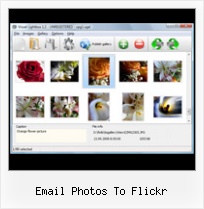
The following image set is generated by Flickr Gallery tool. Click any picture to run Lightbox gallery.

The example above is an in-page usage demo of Lightbox gallery that uses images from Flickr. The gallery created with Flickr Gallery application is placed inside the html page. You can also check the full-page demo gallery. This example takes whole browser area to show the slideshow.Embed Flickr Personal Site

How to Use

Step 1. Adding flickr images to your own gallery.


Locate the photo, photoset or photostream you want to use in your Flickr slideshow. Click on it to see the photo on its own page.

Copy URL of the flickr page.

Select Add images from Flickr... from the 'Add' button on the Toolbar.

Add images from Flickr

In the appeared window paste URL of the flickr page. Specify also the number of photos you want to add from the flickr page. Flickr Gallery will now include these photos in your project.

Add images from Flickr

If you have included the photos that you do not wish to be in your web gallery, you can easily remove them. Select all images that you wish to remove from photo gallery, and select Delete images. from the Images menu. You can pick and choose pictures by holding the CTRL while clicking the pictures you like.

Step 2. Adding caption.

The name of the photo on flickr page will automatically appear in the caption. When you select a photo you'll see the various info about it, such as: Path, Size, date of last change and Caption. You can add any comment or text about the photo (up to 512 symbols).

Step 3. Gallery properties.

Change the name of your flickr album, the size and quality of your pictures with Flickr Gallery. From the Gallery menu, select Properties or use "Edit Gallery Properties" button on the toolbar.

On the first tab of the Gallery Properties window you can change the name of your photo album and enable/disable the following properties: Slide Show, Auto play Slide Show, Zoom effect, Overlay Shadow. You can also set the Overlay shadow color and select the Engine you want to use (jQuery or Prototype + script.aculo.us).

On the second tab of the Gallery Properties window you can select the thumbnail you want to use, set the Thumbnails Resolution, Thumbnails Quality, Thumbnails Titles. Select Thumbnails Format (save in PNG or JPG format). Specify the Number of columns in you photo album and the Page color.

On the third tab of the Gallery Properties window you can select the template, Image resolution and Image quality of your pictures and change the Watermark.

You can set up the various sizes for exported images.

Control the quality of output PNG or JPEG format image by defining output "Image quality" and "Thumbnail quality" parameters (0%…100%).

Step 4. Save your photo gallery as project file.

When you exit Flickr Gallery application, you'll be asked if you want to save your project. The project consists of the pictures you choose to put on your web photo gallery and all your settings. It's a good idea to save the project, because that will allow you to change the project in case you decide to do something different with future galleries. So click Yes, then enter a name for your project. To select the location of your project, just click the Browse folders button and choose a different location. Then click Save.

Put Flickr On Your Blogger Email Photos To Flickr

Download Flickr Gallery


Download Flickr Gallery Download Free Edition
for Windows
Download Flickr Gallery Download Free Edition
for MAC

Flickr Gallery is free for non - commercial use.

A small fee is required for business use. Flickr Gallery Business Edition additionally provides an option to remove the Flickr Gallery. Com credit line as well as a feature to put your own logo to images. After you conclude the payment via the secure order form, you will receive a license key instantly by e-mail that turns the Flickr Gallery Free Edition into a Business one. You can select the most suitable payment procedure: check, credit card, bank transfer, PayPal etc. Also you can get Business Edition for free if you help with translating Flickr Gallery into your native language, please contact us at for more info.

Rss Slideshow Flickr

Buy Flickr GalleryBuy Business Edition
for Windows

$49
Single Website
$69
Unlimited Websites
Buy Flickr GalleryBuy Business Edition
for MAC

$49
Single Website
$69
Unlimited Websites

Support

For general help, troubleshooting and feature requests contact Customer Support at . Make sure to include details on your operating system, browser, a link (or relevant code) and Flickr Gallery version.Flickr Badge Code

Feedback

    * First of all, your product is fantasitc. I looked at the others and your code generator app was insanely easy to use.

    * I just tried the application, It is wonderful idea. Like you said in the website "few clicks without writing a single line of code" because most of the people is not web designers".

    * I tried Flickr Gallery and for me its a very cool and usefull application. Its so easy to manage my galleries and it looks very nice.Embed Flickr Photostream Lightbox

    * I have just bought this product and think it is great. As it is extremely easy to use it is something I could get my clients to purchase to upload their own portfolio and latest projects etc.

FAQ

Q:I would like to have a few galleries in one website and even on one page.

A:To create several galleries on your page you should change following parameter in A tag for different galleries:

rel="lightbox_vlb"

For example, for the first gallery you should set rel="lightbox_vlb":

<!-- Start Flickr Gallery.com BODY section -->
<div id="vlightbox">
<a rel="lightbox_vlb" href="data/images/dscn6831.jpg" title="dscn6831" >
<img src="data/thumbnails/dscn6831.png" ><span></span></a>
<a rel="lightbox_vlb" href="data/images/dscn6823.jpg" title="dscn6823">
<img src="data/thumbnails/dscn6823.png"><span></span></a>
<a id="vlb" href="http://Flickr Gallery.com">Photo Gallery For Web by Flickr Gallery.com v2.0</a>
</div>
<!-- End Flickr Gallery.com BODY section -->

and for the second gallery rel="lightbox_vlb1":

<!-- Start Flickr Gallery.com BODY section -->
<div id="vlightbox">
<a rel="lightbox_vlb1" href="data/images/img_0501.jpg" title="img_0501">
<img src="data/thumbnails/img_0501.png"><span></span></a>
<a rel="lightbox_vlb1" href="data/images/img_0481.jpg" title="img_0481">
<img src="data/thumbnails/img_0481.png"><span></span></a>
<a id="vlb" href="http://Flickr Gallery.com">Photo Gallery For Web by Flickr Gallery.com v2.0</a>
</div>
<!-- End Flickr Gallery.com BODY section -->


RELATED

Earthling - EarthLink blog: How To Upload Photos To Flickr Thanks to some teamwork between Helio and Flickr/Yahoo, a glitch that was stopping photos from making it from a Helio device to Flickr has been fixed. Last night I confirmed that you can easily send photos taken on a Drift at up to full 1600 x 1200 to your Flickr account via Pic Msg

Flickr | ArchDaily We are slowly getting closer to 50,000 photos on our Flickr Pool, so if you want to see a lot of amazing architecture photography, go ahead. Remember you can submit your own photo here, and don't forget to follow us through Twitter and our Facebook Fan Page to find many more features

Flickr: Use Your Email Client to Upload Photos - Tech-Recipes Did you know that you can use Outlook, Evolution, Thunderbird, Gmail, or any other email client to upload your photos to Flickr. The benefits of this

Uploading Photos from Phone or Email to Flickr Video – 5min.com Uploading Photos from Phone or Email to Flickr - If you have a mobile phone and a Flickr account, it's easy to post to your photostream from anywhere, no computer required. Simply snap a pic of what you see and if it turned out as you'd hoped,

How to add photos in Flickr and Picasa from email You can upload and add photos in your Picasa and flickr accounts using only your email.This tricks can be used when you can't access Flickr Picasa at your workplace

How to Use Flickr: Basics and Beyond Flickr is one of the most popular photo-sharing sites on the Internet. Owned by Yahoo!, Flickr offers its users a website where they can create free accounts that let them store, share, and explore digital photos. Flickr is also an online social

Tip: Upload pictures to flickr via email This is a great feature to use if you are behind a firewall that doesn't allow access to flickr, or if you want to upload images from a mobile device that has email but not web capability. To set this up, you need to find out your flickr email address

Upload Pictures to Twitter through an Email from Flickr Learn how to upload photographs to your Twitter account via email from Flickr or Posterous. This method of posting images is actually very handy for mobile phone users

Email To Flickr : Flickr Gallery Email To Flickr. Creating excellent dynamic photo gallery with minimum effort!. How To Organize Photostream Flickr Flickr has millions of photos available in its database. A simple FREE tool called Flickr Gallery allows you to create a custom image gallery with a cool slide show of

How to Send Flickr Photos Easily in Yahoo! Mail - About Email You don't have to open Flickr to browse your photos and send nicely crafted emails with them. You can do it right in Yahoo! Mail, and it works for others' stunning images, too

Flickr®7 for mobile Get Flickr on your phone from Yahoo!7 It's the photo sharing service that let's you can take photos, upload them, and share them with family and friends from your phone

Automatically post Flickr photos on Twitter via email Post new flickr photo updates to Twitter account automatically. Integrate and sync your Twitter and Flickr accounts from Flickr settings page

Notifyr.com - get emails on new Flickr photos (e.g., http://flickr.com/photos/someones_page) Notifyr is built so that users don't need to register in order to use it. You can subscribe anyone to your photo page by sending them a Notifyr link containing your Flickr page address and their email, like:

Posting Flickr Photos on WordPress (and other Blogs!) via For professional and casual photographers alike, Flickr provides the perfect place for you to store, share, and get feedback on Now that you have set up Flickr photos auto-posting to your blog, setting up photo email to your blog is a snap

Flickr Bits " Flickr Tutorials and docs " Uploading photos by Choose "Uploading photos by email" from the list of options under "Photo Settings" in the lefthand column. You will now have your Flickr email address in front of you, It is probably a good idea to add the address into your address book to speed up the process in the future

Flickr email Photo blogging Of course, this isn't something new if you have checked out Kristal Kraft's blogs before. She has a camera phone photo blog. I thought this was really cool. I tried finding a post explaining this since she is the "unofficial tech support" and

How I post my iPhone photos to Flickr and Twitter Thanks to a tip by Ianiv awhile ago, I've discovered a great way to post iPhone photos online very quickly and without a lot of effort. Sure you can simply Sure you can simply email your photos to Flickr or post them to Twitter via Twitpic, but why not do both at the same time and with more control

Gmail, Picasa and Flickr I'm a big fan of the Flickr photo sharing and publication service. It is an amazing web application that lets When you email from Picasa, you can tell the application to automatically resize your photos before sending them. So uploading to Flickr has become

Geek to Live: Flickr Advanced User Guide Photo-sharing web application Flickr is like an onion: it has many, many layers to discover. Last February I published an article here on Lifehacker called Tips for Flickr beginners, a quick rundown on how to get started on Configure your Flickr account to accept photo uploads via email

How to Email Photos Using Flickr | eHow.com How to Email Photos Using Flickr. Flickr provides its users with a variety of ways to share their photos with friends and family

email photos Software - Free Download email photos - Top 4 email photos Software - Free Download email photos - Top 4 Download - Free Download Software It's software that allows you to download photos from Flickr and create Flash slideshow for your

Phil801 – Geek Blog " How To: Uploading Photos to Flickr from I've also been asked how to post photos from Flickr onto Twitter, I recently had a big goof with that; so I'll also go over how to auto-Twitter photos from your phone and how not to make my mistake. First, the pre-req's: 1) You have to be able to send email from your phone!

Flickr® for mobile Get Flickr on your phone from Yahoo! It's the photo sharing service that let's you can take photos, upload them, and share them with family and friends from your phone

Can I email photos to Flickr? :: Free Tech Support :: Ask Can I email photos to Flickr? I've been finding it tedious to go to Flickr to upload photos and am wondering if there's any way I can just email the photos to Flickr and have them automatically show up in my Flickr stream? Dave's Answer: You're in luck!

Flickr Email Upload and Send to Twitter Today, I tried another Flickr feature. It's similar to what they have right now -- upload by email. The difference is that after the photo uploaded, it will

Getting photos from iPhone to Flickr — Scobleizer Then, take pictures and click the "send as email" button after you snap a picture. That's how Patrick was getting photos on Flickr while we were walking around the neighborhood. No syncing required. On my Nokia N95 I just use Shozu, which is a Java app, to upload my photos

Flickr Tests Twitter Integration With Email Uploads Watch out TwitPic, Flickr is finally waking up to the power of letting users share links to their photos over Twitter. Flickr members can now sign up for the Flickr Twitter Beta, which allows them to link their Flickr and Twitter accounts (using

Flickr: Help: Photos Flickr is almost certainly the best online photo management and sharing application in the world. Show off your favorite photos and videos to the world, securely and privately show content to your friends and family, or blog the photos and videos

