


Overview

It's no secret that adding photos to your blog posts is one of the most effective ways to enhance your blog and attract attention to your writing. Flickr has millions of photos available in its database. A simple FREE tool called Flickr Gallery allows you to create a custom image gallery with a cool slide show of the most recent and most interesting photos from Flickr on your website or blog in a few easy steps. Just visit Flickr website and find photostream, photoset or a single photo you like. Enter the address of flickr page to add all photos from this page in your gallery, select the style of thumbnails and the overlay window and add the HTML embed code on your website or blog.
A few clicks and you'll see a stylish photo gallery with beautifull lightbox and zoom effects on your own website or blog!


Flickr Gallery for Windows   Flickr Gallery for MAC

Want more?

Example

Lightbox gallery sample

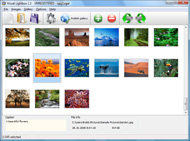
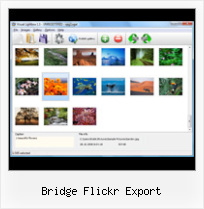
The following image set is generated by Flickr Gallery tool. Click any picture to run Lightbox gallery.

The photo gallery above is an in-page usage demo of Lightbox script with Flickr images. The lightbox gallery created with Flickr Gallery software is placed inside the website page. You can also check the full-page demo slideshow. This example takes whole browser area to show the Lightbox gallery that uses images from Flickr.Plugins Para O Flickr

How to Use

Step 1. Adding flickr images to your own gallery.


Locate the photo, photoset or photostream you want to use in your Flickr slideshow. Click on it to see the photo on its own page.

Copy URL of the flickr page.

Select Add images from Flickr... from the 'Add' button on the Toolbar.

Add images from Flickr

In the appeared window paste URL of the flickr page. Specify also the number of photos you want to add from the flickr page. Flickr Gallery will now include these photos in your project.

Add images from Flickr

If you have included the photos that you do not wish to be in your web gallery, you can easily remove them. Select all images that you wish to remove from photo gallery, and select Delete images. from the Images menu. You can pick and choose pictures by holding the CTRL while clicking the pictures you like.

Step 2. Adding caption.

The name of the photo on flickr page will automatically appear in the caption. When you select a photo you'll see the various info about it, such as: Path, Size, date of last change and Caption. You can add any comment or text about the photo (up to 512 symbols).

Step 3. Gallery properties.

Change the name of your flickr album, the size and quality of your pictures with Flickr Gallery. From the Gallery menu, select Properties or use "Edit Gallery Properties" button on the toolbar.

On the first tab of the Gallery Properties window you can change the name of your photo album and enable/disable the following properties: Slide Show, Auto play Slide Show, Zoom effect, Overlay Shadow. You can also set the Overlay shadow color and select the Engine you want to use (jQuery or Prototype + script.aculo.us).

On the second tab of the Gallery Properties window you can select the thumbnail you want to use, set the Thumbnails Resolution, Thumbnails Quality, Thumbnails Titles. Select Thumbnails Format (save in PNG or JPG format). Specify the Number of columns in you photo album and the Page color.

On the third tab of the Gallery Properties window you can select the template, Image resolution and Image quality of your pictures and change the Watermark.

You can set up the various sizes for exported images.

Control the quality of output PNG or JPEG format image by defining output "Image quality" and "Thumbnail quality" parameters (0%…100%).

Step 4. Save your photo gallery as project file.

When you exit Flickr Gallery application, you'll be asked if you want to save your project. The project consists of the pictures you choose to put on your web photo gallery and all your settings. It's a good idea to save the project, because that will allow you to change the project in case you decide to do something different with future galleries. So click Yes, then enter a name for your project. To select the location of your project, just click the Browse folders button and choose a different location. Then click Save.

Publish To Flickr Bridge Flickr Export

Download Flickr Gallery


Download Flickr Gallery Download Free Edition
for Windows
Download Flickr Gallery Download Free Edition
for MAC

Flickr Gallery is free for non - commercial use.

A small fee is required for business use. Flickr Gallery Business Edition additionally provides an option to remove the Flickr Gallery. Com credit line as well as a feature to put your own logo to images. After you finish the payment via the secure order form, you will receive a license key instantly by email that turns the Flickr Gallery Free Edition into a Business one. You can select the most appropriate payment procedure: credit card, PayPal, bank transfer, check etc. Also you can get Business Edition for free if you help with translating Flickr Gallery into your native language, please contact us at for more info.

Use Multiple Flickr Slideshows On Wordpress

Buy Flickr GalleryBuy Business Edition
for Windows

$49
Single Website
$69
Unlimited Websites
Buy Flickr GalleryBuy Business Edition
for MAC

$49
Single Website
$69
Unlimited Websites

Support

For feature requests, troubleshooting, general help contact Customer Support at . Make sure to include details on your Flickr Gallery version, browser, a link (or relevant code) and operating system.Flickr Desktop File Uploader

Feedback

    * I'd like to express my gratitude to your efforts on creating such a nice piece of program and best of all it's free! Keep out the good work and I hope to see new features in the near coming future to rate you 5 star!

    * First of all, your product is fantasitc. I looked at the others and your code generator app was insanely easy to use.

    * I am thrilled with what this tool can do for me thanks for all the hard work that must have gone into it.Flickr Photo Removal

    * I find Flickr Gallery (and lightbox2) a great tool and was about to proceed in its purchase.

FAQ

Q:How do I embed the lightbox image gallery into an existing page?

A:To install Flickr Gallery gallery on your page you should:

1. Create your gallery in Flickr Gallery and publish it on a local drive in any test folder.
2. Open index.html file from the saved folder in any text editor.
3. Copy code for the HEAD section and paste it inside the HEAD section of you own webpage, for example:

<head>
...
<!-- Start Flickr Gallery.com HEAD section -->
<link rel="stylesheet" href="engine/css/vlightbox.css" type="text/css" />
<style>#vlightbox a#vlb{display:none}</style>
<link rel="stylesheet" href="engine/css/Flickr Gallery.css" type="text/css" media="screen" />
<script src="engine/js/jquery.js" type="text/javascript"></script>
<script src="engine/js/jquery.tools.min.js" type="text/javascript"></script>
<script src="engine/js/visuallightbox.js" type="text/javascript"></script>
<!-- End Flickr Gallery.com HEAD section -->

...
</head>


4. Copy code for the BODY section and paste it inside the Body section of you own webpage in the place where you want to have a gallery, for example:

<body>
...
<!-- Start Flickr Gallery.com BODY section -->
<div id="vlightbox">
<a rel="lightbox_vlb" href="data/images/dscn6831.jpg" title="DSCN6831"><img src="data/thumbnails/dscn6831.png"><span></span></a>
<a rel="lightbox_vlb" href="data/images/dscn6823.jpg" title="DSCN6823"><img src="data/thumbnails/dscn6823.png"><span></span></a>
<a rel="lightbox_vlb" href="data/images/dscn6819.jpg" title="DSCN6819"><img src="data/thumbnails/dscn6819.png"><span></span></a>
<a id="vlb" href="http://Flickr Gallery.com">Photo Gallery For Web by Flickr Gallery.com v2.1</a>
</div>
<!-- End Flickr Gallery.com BODY section -->

...
</body>


5. Copy 'data' folder with images and thumbnails and 'engine' folder with .css and .js files into the same folder with your own webpage.
You can find the example on our website:
http://www.Flickr Gallery.com/#example


RELATED

PictureSync " Upload Photos Everywhere Easily annotate and share, your photos and videos from your desktop. Integrates many online photo sharing web sites; iPhoto, Lightroom, Expression Media / iView MediaPro, and IPTC / XMP applications

Export Panel has been Fixed in Bridge CS5 | photoframd.com Within the past 2 weeks, Adobe has released 2 updates for Bridge CS5. Now at version 4.0.2.1, I am happy to report that the Export Panel has been fixed

Holland.com : Tag Search Results for bridge Tag Results: bridge. Holland.com > Bridge. Leliegracht. Jun 04, 2007 10: Amsterdam Dusk. May 24, 2007 10:00 AM GMT Source: Flickr. Photo posted by Flickr user jimheid. Must view big!

Upload to Facebook, Flickr, Photoshop.com from Adobe Bridge n this Adobe Bridge Video Tip you will learn how to create a preset and upload files to Facebook, Flickr, Photoshop.com

Adobe Bridge CS5 Review - Adobe Bridge CS5 Organizational Adobe Bridge CS5 Review: Adobe Bridge CS5 is a file manager and asset organizer that can make managing large projects easier. Supports Flickr, Facebook, Photoshop.com, and your choice of export functions. Powerful batch renaming tools. Cons. The only supported image export format is JPEG

Vincent Thomas Bridge | Flickr - Photo Sharing! This was the view from the back of our Cruise Ship as we departed San Pedro Harbour, Los Angeles on a 3 night cruise to Ensenada, Mexico. Exposure: 30mm, 1/50 sec @ f/2.4, ISO400 on the back of a moving, vibrating ship. I enjoy it best large on

Noded: Exporting From Photoshop CS5 (Bridge) The other day I discovered that Adobe Bridge (part of Photoshop CS5) has an export process that allows you to directly export images to Flickr, Facebook, or your hard drive. The program does all the conversion from most file formats, like your cameras raw format or photoshop files

Jeffrey Friedl's Blog " SmugMug/Zenfolio/Flickr Export-to The export plugins for Lightroom 1.3 that I mentioned here and here have now been I am using your Flickr exporter and it works great, but what does it do with the local

Flickrexport Articles on TUAW - The Unofficial Apple Weblog Most Mac users know Fraser Speirs as the developer of FlickrExport which allows you to easily export pictures from iPhoto or Aperture to Flickr. allow you export photos straight from iPhoto, or Aperture, to Flickr

Flickr Bridge : Flickr Gallery Flickr Bridge. Don't allow your website visitors to get lost! Try Flickr Slide Show!. How To Attract Attention To Flickr

Coding Robots Open Source: Coding Robots Open Source Lua bridge to Objective-C with ability to create ObjC classes from Lua. Aims to provide a Flickr Export plugin for Acorn — Upload images to Flickr right from Acorn image editor

Bridge Sourcing Team - Home bridge sourcing team- we build bridges for your quality sourcing needs

Langkawi Sky Bridge - Wikipedia, the free encyclopedia Langkawi Sky Bridge. Langkawi Sky Bridge is a 125 metres (410 ft) curved pedestrian cable-stayed bridge in Malaysia. It is located 21/langkawi-sky-bridge/ ^ http://www.flickr.com/photos/petermacdonald

Flickr and iPhoto: Hand in Hand | Photography | Mac Gems A plugin lets you publish your iPhoto images to the Flickr photo-sharing site. but really dig Flickr's handling of photo publication—tagging, photo sets, a photostream, and comments—the Flickr Export Plugin for iPhoto may be the bridge between these two worlds

CS5 Users: Download Bridge CS5 Update 4.0.1! Here's How to I see a fair amount of people (myself included) cannot yet get the export to Facebook, Flickr & Photoshop.com export module options loaded/working despite the recent bridge updates, I believe the problem is simply that the full array of options are only available

bridge " Michigan in Pictures Belle Isle Bridge "Douglas MacArthur Bridge" at HistoricBridges.org explains: We also know that one out of every eight jobs in Detroit is in the export industry

Gallery2Flickr Only some of the flickr search options are currently available in Gallery2Flickr. Export. The export page allows you to export images or a complete set to your flickr photo

FlickrExport.inc <?php /* * Gallery2Flickr * * A bridge between your gallery2 installation and flickr.com * * File: FlickrExport.inc * * Export an image or an album to flickr. * * Copyright: * (c) 2006 - 2007 P@rdus * Distributed under

How to Use Digikam to Export Photos to Flickr, PicasaWeb, and How to Use Digikam to Export Photos to Flickr, PicasaWeb, and Facebook rate them, edit them, and export them to various services or custom

Lightroom Export Plugin for Flickr - Inside Lightroom Ever since Lightroom 1.3 was released with support for export plugins, I've been looking forward to being able to export directly to Flickr from inside Lightroom. Today, while searching around on the net, I found that fellow O'Reilly author

Export From Bridge CS5 | Ask Dave Q: How do I make use of the new Export feature in Bridge CS5?

Review - Adobe Bridge CS5 - Applelinks.com Bridge CS5 continues its development with improved speed, more output options, better customization in creating web galleries and PDF exports, better batch renaming, and the introduction of Mini Bridge, to name just a few of the new features in

Exporting from Bridge CS5 to Social Media sites | TipSquirrel Back when Adobe engineers were developing CS4, the social network phenomenon was just hitting the mainstream, and there was no way to predict the popularit look at Bridge CS5's new Export Panel, and we'll explore the mechanism for uploading images to Facebook, Flickr, and Photoshop

Major Photoshop Upgrade Is Overkill for the Flickr Crowd However, Bridge does have a revamped plug-in architecture that will allow outside developers to build tools to leverage online services -- much like the Flickr plug-in for Apple's Aperture. I can process my images and upload directly to the web with the Flickr export plug-in

