



Overview

It's no secret that adding photos to your blog posts is one of the most effective ways to enhance your blog and attract attention to your writing. Flickr has millions of photos available in its database. A simple FREE tool called Flickr Gallery allows you to create a custom image gallery with a cool slide show of the most recent and most interesting photos from Flickr on your website or blog in a few easy steps. Just visit Flickr website and find photostream, photoset or a single photo you like. Enter the address of flickr page to add all photos from this page in your gallery, select the style of thumbnails and the overlay window and add the HTML embed code on your website or blog.
A few clicks and you'll see a stylish photo gallery with beautifull lightbox and zoom effects on your own website or blog!


Flickr Gallery for Windows   Flickr Gallery for MAC

Want more?

Example

Lightbox gallery sample

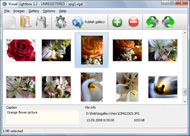
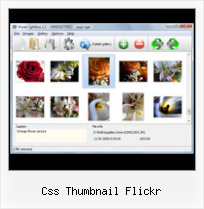
The following image set is generated by Flickr Gallery tool. Click any picture to run Lightbox gallery.

The photo gallery above is an in-page usage demo of Lightbox tool with Flickr images. The website gallery created with Flickr Gallery wizard is placed inside the page layout. You can also check the full-page demo lightbox gallery. This example takes whole browser area to show the web gallery.Flickr Slideshow Zoom

How to Use

Step 1. Adding flickr images to your own gallery.


Locate the photo, photoset or photostream you want to use in your Flickr slideshow. Click on it to see the photo on its own page.

Copy URL of the flickr page.

Select Add images from Flickr... from the 'Add' button on the Toolbar.

Add images from Flickr

In the appeared window paste URL of the flickr page. Specify also the number of photos you want to add from the flickr page. Flickr Gallery will now include these photos in your project.

Add images from Flickr

If you have included the photos that you do not wish to be in your web gallery, you can easily remove them. Select all images that you wish to remove from photo gallery, and select Delete images. from the Images menu. You can pick and choose pictures by holding the CTRL while clicking the pictures you like.

Step 2. Adding caption.

The name of the photo on flickr page will automatically appear in the caption. When you select a photo you'll see the various info about it, such as: Path, Size, date of last change and Caption. You can add any comment or text about the photo (up to 512 symbols).

Step 3. Gallery properties.

Change the name of your flickr album, the size and quality of your pictures with Flickr Gallery. From the Gallery menu, select Properties or use "Edit Gallery Properties" button on the toolbar.

On the first tab of the Gallery Properties window you can change the name of your photo album and enable/disable the following properties: Slide Show, Auto play Slide Show, Zoom effect, Overlay Shadow. You can also set the Overlay shadow color and select the Engine you want to use (jQuery or Prototype + script.aculo.us).

On the second tab of the Gallery Properties window you can select the thumbnail you want to use, set the Thumbnails Resolution, Thumbnails Quality, Thumbnails Titles. Select Thumbnails Format (save in PNG or JPG format). Specify the Number of columns in you photo album and the Page color.

On the third tab of the Gallery Properties window you can select the template, Image resolution and Image quality of your pictures and change the Watermark.

You can set up the various sizes for exported images.

Control the quality of output PNG or JPEG format image by defining output "Image quality" and "Thumbnail quality" parameters (0%…100%).

Step 4. Save your photo gallery as project file.

When you exit Flickr Gallery application, you'll be asked if you want to save your project. The project consists of the pictures you choose to put on your web photo gallery and all your settings. It's a good idea to save the project, because that will allow you to change the project in case you decide to do something different with future galleries. So click Yes, then enter a name for your project. To select the location of your project, just click the Browse folders button and choose a different location. Then click Save.

Beautiful Flickr Flash Gallery Css Thumbnail Flickr

Download Flickr Gallery


Download Flickr Gallery Download Free Edition
for Windows
Download Flickr Gallery Download Free Edition
for MAC

Flickr Gallery is free for non - commercial use.

A small fee is required for business use. Flickr Gallery Business Edition additionally provides an option to remove the Flickr Gallery. Com credit string as well as a feature to put your own logo to images. After you complete the payment via the secure order form, you will receive a license key instantly by e-mail that turns the Flickr Gallery Free Edition into a Business one. You can select the most suitable payment method: PayPal, credit card, bank transfer, check etc. Also you can get Business Edition for free if you help with translating Flickr Gallery into your native language, please contact us at for more info.

Flicr Gallery Explored

Buy Flickr GalleryBuy Business Edition
for Windows

$49
Single Website
$69
Unlimited Websites
Buy Flickr GalleryBuy Business Edition
for MAC

$49
Single Website
$69
Unlimited Websites

Support

For troubleshooting, feature requests and general help contact Customer Support at . Make sure to include details on your Flickr Gallery version, a link (or relevant code), browser and operating system.Embed Flickr Album Set

Feedback

    * I have just bought this product and think it is great. As it is extremely easy to use it is something I could get my clients to purchase to upload their own portfolio and latest projects etc.

    * I ran into your website wile looking for a JavaScript to manage a personal Photo Gallery. I downloaded the trial version and immediately fell in love with your Flickr Gallery, it is one of the best products I’ve ever found; it is very user friendly and easy to use and creates great Photo Galleries.

    * I just tried the application, It is wonderful idea. Like you said in the website "few clicks without writing a single line of code" because most of the people is not web designers".Demo Flickr Html

    * Another programmes have incredible functionality but no fantastic interface like your product!

FAQ

Q:How do I embed the lightbox image gallery into an existing page?

A:To install Flickr Gallery gallery on your page you should:

1. Create your gallery in Flickr Gallery and publish it on a local drive in any test folder.
2. Open index.html file from the saved folder in any text editor.
3. Copy code for the HEAD section and paste it inside the HEAD section of you own webpage, for example:

<head>
...
<!-- Start Flickr Gallery.com HEAD section -->
<link rel="stylesheet" href="engine/css/vlightbox.css" type="text/css" />
<style>#vlightbox a#vlb{display:none}</style>
<link rel="stylesheet" href="engine/css/Flickr Gallery.css" type="text/css" media="screen" />
<script src="engine/js/jquery.js" type="text/javascript"></script>
<script src="engine/js/jquery.tools.min.js" type="text/javascript"></script>
<script src="engine/js/visuallightbox.js" type="text/javascript"></script>
<!-- End Flickr Gallery.com HEAD section -->

...
</head>


4. Copy code for the BODY section and paste it inside the Body section of you own webpage in the place where you want to have a gallery, for example:

<body>
...
<!-- Start Flickr Gallery.com BODY section -->
<div id="vlightbox">
<a rel="lightbox_vlb" href="data/images/dscn6831.jpg" title="DSCN6831"><img src="data/thumbnails/dscn6831.png"><span></span></a>
<a rel="lightbox_vlb" href="data/images/dscn6823.jpg" title="DSCN6823"><img src="data/thumbnails/dscn6823.png"><span></span></a>
<a rel="lightbox_vlb" href="data/images/dscn6819.jpg" title="DSCN6819"><img src="data/thumbnails/dscn6819.png"><span></span></a>
<a id="vlb" href="http://Flickr Gallery.com">Photo Gallery For Web by Flickr Gallery.com v2.1</a>
</div>
<!-- End Flickr Gallery.com BODY section -->

...
</body>


5. Copy 'data' folder with images and thumbnails and 'engine' folder with .css and .js files into the same folder with your own webpage.
You can find the example on our website:
http://www.Flickr Gallery.com/#example


RELATED

Flickr Thumbnail Gallery : Flickr Gallery Flickr Thumbnail Gallery. A few clicks to create stylish photo gallery webpage!. Rip Movies From Flickr

Code: Flickr Developer Blog " Lessons Learned while Building For a large site like Flickr, 25 KB worth of JavaScript and CSS barely scratches the surface. Inspiration Tuesday Posted by standardpixel on Mar 2, 2011. A YUI3 Module for the Flickr API Posted by

A Digg-like, Flickr-like Pagination Style Using CSS | Web This tutorial explains how to design a pagination for search results or more in general to split a long list of records in more pages. It's a question I

Flickr Thumbnail Photostream Wordpress plugin v1.1 The Flickr Thumbnail Photostream Wordpress plugin makes including and linking to photos on a Flickr account simple and flexible. To change the size of the pictures you need to edit the style.css file in the flickr-thumbnails-photostream folder

Creating Thumbnails Using the CSS Clip Property Creating Thumbnails Using the CSS Clip Property. One of the least used properties in CSS is the Clip property. As an example, flickr actually creates and stores multiple thumbnails on the server, where as they could easily use this method to simulate the square thumbnail. 3. From Thomas Thomassen. on

The Top: 12 Best jQuery Image Galleries There are countless of jQuery image galleries out there, here we gathered the best ones for you. Full screen image gallery using jQuery and Flickr A gallery based on the Flickr API, using full

The Top: 12 Best jQuery Image Galleries | Devlounge Flickr search using jQuery and JSON. Full screen with kept ratio using CSS only. A png raster to even out up-scaled jpegs. Thumbnails with loader indicator and a nice hover effect that shows a bigger thumb (or description) A preloader loads the large images one by one for super-fast viewing

XForms and Internet Applications: The XForms Flickrbar and Within this span we going to create a sort of 'canvas' onto which to render first the Flickr thumbnail, and then the time that the photo was taken, and we'll use ordinary CSS positioning to place this on top of the image. First the canvas:

Flickr like horizontal menu by Antonio Lupetti Tag css html javascript. Save to delicious This tutorial explains how to implement an horizontal menu Flickr-like using CSS and Javascript to show/hide sub-menu:

TECHFLAPS - Waves of Technology | 75 CSS, JavaScript & Flash CSS Gallery 3 : This is a purely CSS based image gallery that displays larger versions of thumbnail images All of the work you do on Flickr is mirrored on your website via Satelliteâ„¢

Flickr Filmstrips in Javascript As an avid Flickr junkie, one of the things I wanted to do was to put a scrollable filmstrip on my site to show off a few Flickr RSS feeds. Little did I know what that undertaking would entail. Quite frankly, good DHTML & javascript filmstrips

All sizes | css mess | Flickr - Photo Sharing! Flickr is almost certainly the best online photo management and sharing application in the world. Show off your favorite photos and videos to the world, securely and privately show content to your friends and family, or blog the photos and videos

WordPress " Flickr Thumbnails Photostream " WordPress Plugins All the main functions of control such as connecting to a Flickr account and storing information on the photo thumbnails, can be achieved through the "Flickr Control" GUI in the WordPress admin panel. A CSS file is supplied to provide a starting point for displaying the thumbnails, but

Customize Flickr Gallery using CSS – Slickr Flickr Wordpress A Flickr Wordpress Plugin that's easy to change the sizes, fonts and colors of your Flickr Gallery using a few simple lines of CSS It's likely you might want to modify is the highlight color when the visitor moves their cursor over a thumbnail in the Flickr gallery

Essential CSS Tricks: Image Frames // Plasticmind Blog CSS Image Framing, The Concept. First, the concept: We begin with a thumbnail from Flickr. Then we'll need to create a transparent frame that will be placed over our thumbnail. ( If the frame is larger than the thumbnail, we'll have to factor some padding into our styling

Extended Flickr Extension Syntax - Edward 384194246|thumb|none|t|From Albert Embankment Thumbnail with caption text underneath that has one or more links. Currently links in captions do not work, as at version 0.2a. If you would like this then please leave a comment on the talk page

Integrating Flickr Into Your Wordpress Theme Ever wanted to learn how to integrate your flickr feed into your Wordpress blog? Read on to find out how! The above CSS will style your flickr thumbnails exactly like mine

Flickr RSS Thumbnails | Free Wordpress Themes threaded comments, widget ready, pagenavi, social bookmarking, valid xhtml, valid css. License: A group of people gather together, on the beach, or Flickr RSS Thumbnails. Flowers. Fluid Width. Food and Drink. Footer Widgets. Fun and Games

Css Flickr Gallery Blogger | Flickr Slideshow Css Flickr Gallery Blogger. jQuery Thickbox Alternative enables you to make an online photo album with ease. embed live flickr stream

Thumbnail Gallery 101 | etc: a stream of web dev and design A stream of webdev and design consciousness: webdev, css, web design,digital photography, Firefox, Photoshop etc

DHTML Site - 20 Free CSS Image Galleries + Slideshows A Javascript + CSS replacement for Flash photo fading slideshow. Inspired by Richard Rutter's image fade JS is a piece of JavaScript that streamlines the use of thumbnail images on web pages

The College of St. Scholastica | Home Page The College of St. Scholastica is an independent private college based in Duluth, Minnesota with campuses across the state. St. Scholastica offers undergraduate, graduate and certificate programs both online and on campus

Free CSS Drop-Down Menu Framework - LWIS.NET Clean, standards-friendly, free, easy, cross browser framework for css drop-down menus Flickr vertical right-to-left. Lwis Celebrity advanced horizontal

Get Flickr Images Using SimpleXML Before getting started with the PHP code, let's take a look at the source of Flickr RSS feeds. I am not going to explain the above CSS in this article because it's not related to our topic. But as you can see from the above code that many CSS3

Flcikr Photo Thumbnails Creator flickr api, flickr badge, flickr preview, flickr thumbnail A region is the place where flickr photos will be displayed on page loading, so you may want to add CSS styles to it

