



Overview

It's no secret that adding photos to your blog posts is one of the most effective ways to enhance your blog and attract attention to your writing. Flickr has millions of photos available in its database. A simple FREE tool called Flickr Gallery allows you to create a custom image gallery with a cool slide show of the most recent and most interesting photos from Flickr on your website or blog in a few easy steps. Just visit Flickr website and find photostream, photoset or a single photo you like. Enter the address of flickr page to add all photos from this page in your gallery, select the style of thumbnails and the overlay window and add the HTML embed code on your website or blog.
A few clicks and you'll see a stylish photo gallery with beautifull lightbox and zoom effects on your own website or blog!


Flickr Gallery for Windows   Flickr Gallery for MAC

Want more?

Example

Lightbox gallery sample

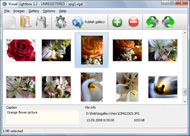
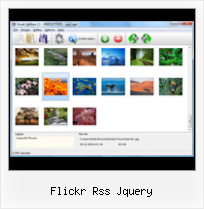
The following image set is generated by Flickr Gallery tool. Click any picture to run Lightbox gallery.

The photo gallery above is an in-page usage demo of Lightbox script with Flickr images. The website gallery created with Flickr Gallery application is placed inside the website page. You can also check the full-page demo web gallery. This example takes whole browser area to show the slideshow.How To Share Flickr Sets Examples

How to Use

Step 1. Adding flickr images to your own gallery.


Locate the photo, photoset or photostream you want to use in your Flickr slideshow. Click on it to see the photo on its own page.

Copy URL of the flickr page.

Select Add images from Flickr... from the 'Add' button on the Toolbar.

Add images from Flickr

In the appeared window paste URL of the flickr page. Specify also the number of photos you want to add from the flickr page. Flickr Gallery will now include these photos in your project.

Add images from Flickr

If you have included the photos that you do not wish to be in your web gallery, you can easily remove them. Select all images that you wish to remove from photo gallery, and select Delete images. from the Images menu. You can pick and choose pictures by holding the CTRL while clicking the pictures you like.

Step 2. Adding caption.

The name of the photo on flickr page will automatically appear in the caption. When you select a photo you'll see the various info about it, such as: Path, Size, date of last change and Caption. You can add any comment or text about the photo (up to 512 symbols).

Step 3. Gallery properties.

Change the name of your flickr album, the size and quality of your pictures with Flickr Gallery. From the Gallery menu, select Properties or use "Edit Gallery Properties" button on the toolbar.

On the first tab of the Gallery Properties window you can change the name of your photo album and enable/disable the following properties: Slide Show, Auto play Slide Show, Zoom effect, Overlay Shadow. You can also set the Overlay shadow color and select the Engine you want to use (jQuery or Prototype + script.aculo.us).

On the second tab of the Gallery Properties window you can select the thumbnail you want to use, set the Thumbnails Resolution, Thumbnails Quality, Thumbnails Titles. Select Thumbnails Format (save in PNG or JPG format). Specify the Number of columns in you photo album and the Page color.

On the third tab of the Gallery Properties window you can select the template, Image resolution and Image quality of your pictures and change the Watermark.

You can set up the various sizes for exported images.

Control the quality of output PNG or JPEG format image by defining output "Image quality" and "Thumbnail quality" parameters (0%…100%).

Step 4. Save your photo gallery as project file.

When you exit Flickr Gallery application, you'll be asked if you want to save your project. The project consists of the pictures you choose to put on your web photo gallery and all your settings. It's a good idea to save the project, because that will allow you to change the project in case you decide to do something different with future galleries. So click Yes, then enter a name for your project. To select the location of your project, just click the Browse folders button and choose a different location. Then click Save.

Flash Flickr Badge Widget For Wordpress Flickr Rss Jquery

Download Flickr Gallery


Download Flickr Gallery Download Free Edition
for Windows
Download Flickr Gallery Download Free Edition
for MAC

Flickr Gallery is free for non-commercial use.

A small fee is required for business use. Flickr Gallery Business Edition additionally provides an option to remove the Flickr Gallery. Com credit line as well as a feature to put your own logo to images. After you finish the payment via the secure form, you will receive a license key instantly by e-mail that turns the Flickr Gallery Free Edition into a Business one. You can select the most suitable payment method: PayPal, credit card, check, bank transfer etc. Also you can get Business Edition for free if you help with translating Flickr Gallery into your native language, please contact us at for more info.

Flickr Insert Photo Html

Buy Flickr GalleryBuy Business Edition
for Windows

$49
Single Website
$69
Unlimited Websites
Buy Flickr GalleryBuy Business Edition
for MAC

$49
Single Website
$69
Unlimited Websites

Support

For troubleshooting, feature requests and general help contact Customer Support at . Make sure to include details on your Flickr Gallery version, browser, operating system and a link (or relevant code).Flickr View On Black Html

Feedback

    * Just a quick thank you for the software though, It's not often you get a free software version of this quality and style! Well done and please continue this amazing gallery. Hope to see more advances.

    * I have purchased the business and LOVE IT..Your product appears easy to use and close to what I need to help several of my clients..

    * I find Flickr Gallery (and lightbox2) a great tool and was about to proceed in its purchase.Link To Flickr Images

    * Great product by the way and saved me loads of time. I really like your Flickr Gallery program! Very nice.

FAQ

Q:Can this be adapted so only one image is shown and then the gallery opens to flick through the rest of the images..

A:You can use the following parameter to hide thumbnails you don't want to display on the page:

style="display: none;"

for example:

<!-- Start Flickr Gallery.com BODY section -->
<div id="vlightbox">
<a rel="lightbox_vlb" href="data/images/dscn6831.jpg" title="dscn6831" ><img src="data/thumbnails/dscn6831.png" ><span></span></a>
<a rel="lightbox_vlb" href="data/images/dscn6823.jpg" title="dscn6823"><img src="data/thumbnails/dscn6823.png" style="display: none"><span></span></a>
<a rel="lightbox_vlb" href="data/images/dscn6819.jpg" title="dscn6819"><img src="data/thumbnails/dscn6819.png" style="display:none"><span></span></a>
<a id="vlb" href="http://Flickr Gallery.com">Photo Gallery For Web by Flickr Gallery.com v2.0</a>
</div>
<!-- End Flickr Gallery.com BODY section -->


RELATED

[Sedna RSS] jQuery.info Flickr/jquery - jQuery Blog - jQuery.info - Learning jQuery - planet.jquery. opml. Sedna time! RSS RSS. Dernière syndication de ce site effectuée 5 minutes ago

How To Add Flickr To Wordpress In 5 Simple Steps | A In today's tutorial, I will be showing you how to add your Flickr Photostream to your Wordpress blog using jSon and jQuery. I learned how to do this trick a few

Recipe for a Flash-Free Flickr Slideshow in Drupal | johanna Flash is notorious for being far less cross-browser/platform compatible and user-accessible than Javascript/jQuery. For example, a jQuery slideshow will work on most smartphones, whereas Flash may or may not. to pull any RSS feed into Drupal from Flickr and use Views to generate a jQuery slideshow

Update: jQuery Photo Tagger Plugin For Flickr-Style Photo Tagging Ben Nadel makes some updates to his jQuery Flickr-style Photo Tagging plugin - PhotoTagger. This update makes it work in IE as well as adds feature to programmatically control tag creation and deletion

Jquery Flickr Rss Gallery : Flickr Gallery Jquery Flickr Rss Gallery. Flickr Gallery is the best photo gallery software on the Web!. Wikidot Flickr Gallery

Testing Flickr API w/JQuery & Thickbox Testing Flickr API w/JQuery & Thickbox. This one uses a straight JSON call to flickr RSS feed and parses that. Can't get it to work with any lightbox/thickbox implementation so far. One nice thing: Does not require a plugin

Pulling Your Flickr Feed with jQuery | Viget Inspire Pulling Your Flickr Feed with jQuery. Keith Muth, ON THE TOPIC OF Development and Favorites and Javascript. 5/12. 2008 100. Feeds are the easiest way to view updated content, whether it's through a feed reader or Flickr, we can click on the feed (orange button, bottom of the page) and bring up a RSS

The Book and the Cover " jQuery: jqAlbumParser Plugin, parses The jQuery jqAlbumParser Plugin takes a link linking to your Flickr or Picasa photo album and parses it into It looks like Flickr limits rss feeds to 20, there is an alternatives, but will require you getting an api key (http://www.flickr.com/services/api/keys/) and then what we will need to do is

timsport | rss feed driven sport news site | Flickr - Photo rss feed driven sport news site the content is created dynamically via ajax technology timsport "http://www.flickr.com/photos/-blanc-/5005325853/" title="timsport | rss feed driven sport news site by Stefan Kandlbinder, on Flickr">

Create a Slick Flickr Gallery with SimplePie | Nettuts+ Using RSS, Flickr and jQuery all together was pretty fun too. an RSS feed from Flickr, a bit of PHP, and some jQuery to make things nice and interactive! We'll. use SimplePie to handle the RSS feed, as it. makes life much easier, and can be used in any other projects where RSS feeds are involved. Step 1

Tutorial: Use the Flickr API, Javascript (jQuery), AJAX and A tutorial on how to build a detailed Flickr photo wall with JavaScript, jQuery, JSON and Ajax

Open Source Flickr Photo Gallery Using jQuery - Web Development flickrGallery is an open-source photo gallery for jQuery that allows you to dynamically pull images from a photoset in Flickr. The main functionaliti

Flickr style photo gallery demo in jQuery Description: This tutorial I'll explain a simple step-by-step way to implement an Flickr style photo gallery demo in Jquery and CSS. The result is

jquery.ui.flickr.rss | GodLikeMouse GodLikeMouse " jquery.ui.flickr.rss, best practices, music and more. The Flickr RSS jQuery plugin makes it easy to retrieve RSS information from Flickr and display it on a page using all client side code

Flickr-Style Photo Tagging | The Ultimate jQuery List The jQuery Photo Tagger plugin allows you to add Flickr-style photo tagging to your images. jQuery Ajax tutorials to jQuery UI examples, you've found the ultimate list of tutorials and plugins for jQuery! Everything from Ajax file uploaders to RSS feed plugins, all on one of the

flickr Software - Free Download flickr - Top 4 Download flickr Software - Free Download flickr - Top 4 Download - Free Download Software flickr gallery lightbox jquery flickr slideshow flickr wordpress flickr how to flickr plugin flickr blog flickr embed flickr add flickr jquery flickr embed slideshow flickr photo gallery how to download flickr

Json Flickr Feed example | Css templates | CssTemplatesWeb Jquery is able to transfer data between domains, and this means that with a little code, we can use this to show our pictures from the rss feed from the Flickr group. I've put together an example on how to do this (you can download this as a .zip file at the bottom of the article)

Flickrush - A jQuery flickr plugin | web design blog Flickrush is a jQuery plugin designed to make it quick and easy to add your flickr photo stream to any web page with minimal effort. Fully customisable you can choose the number of photos, randmise the ordering and style to fit in with any blog

WordPress Flickr Plugin – Slickr Flickr Easy Flickr Slickr Flickr installation and usage notes plus links to FAQ, known issues and tips and best practices for creating Flickr slideshows and galleries

Flickr Free Web Resources Everyday - WebResourcesDepot So So Social is a jQuery plugin which parses RSS feeds from your various social networks and displays them as an "activity feed"

How to Enable a Sitewide Lightbox Effect for WPMU with Easy I love hacks that benefit WPMU so I'm always on the hunt to find ones that will be helpful to our readers. If you've ever experienced the frustration you install a flickr widget, such as this one, and make it available to your blog users, they can easily enter their Flickr RSS and have their stream

Script jQuery risorse gratuite css - Beat Fly | Download Beat Fly Multimedia Lab - Studio associato. Servizi di web design brand image sviluppo applicazioni multimediali con una particolare esperienza nello sviluppo di progetti jQuery XHTML CSS PHP iPhone

13 Great Flickr Galleries to Integrate into Your Site Flickr is a great site for uploading and managing all of your images. What happens when you want to integrate those images into your site though? Well that's where these image galleries come in handy

Prepare images with Flickr XML source | Digicrafts Flash Navigate to a Flickr page that you want. Find the rss feed icon in the near bottom of the can visit http://www.flickr.com/services/feeds/ to build the rss feed

