
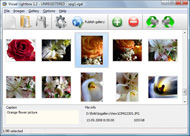



Overview

It's no secret that adding photos to your blog posts is one of the most effective ways to enhance your blog and attract attention to your writing. Flickr has millions of photos available in its database. A simple FREE tool called Flickr Gallery allows you to create a custom image gallery with a cool slide show of the most recent and most interesting photos from Flickr on your website or blog in a few easy steps. Just visit Flickr website and find photostream, photoset or a single photo you like. Enter the address of flickr page to add all photos from this page in your gallery, select the style of thumbnails and the overlay window and add the HTML embed code on your website or blog.
A few clicks and you'll see a stylish photo gallery with beautifull lightbox and zoom effects on your own website or blog!


Flickr Gallery for Windows   Flickr Gallery for MAC

Want more?

Example

Lightbox gallery sample

The following image set is generated by Flickr Gallery tool. Click any picture to run Lightbox gallery.

The example above is an in-page usage demo of Lightbox gallery that uses images from Flickr. The website gallery created with Flickr Gallery application is placed inside the html page. You can also check the full-page demo gallery. This example takes whole browser area to show the web gallery.Flickr Developer Retrieve Thumbnail

How to Use

Step 1. Adding flickr images to your own gallery.


Locate the photo, photoset or photostream you want to use in your Flickr slideshow. Click on it to see the photo on its own page.

Copy URL of the flickr page.

Select Add images from Flickr... from the 'Add' button on the Toolbar.

Add images from Flickr

In the appeared window paste URL of the flickr page. Specify also the number of photos you want to add from the flickr page. Flickr Gallery will now include these photos in your project.

Add images from Flickr

If you have included the photos that you do not wish to be in your web gallery, you can easily remove them. Select all images that you wish to remove from photo gallery, and select Delete images. from the Images menu. You can pick and choose pictures by holding the CTRL while clicking the pictures you like.

Step 2. Adding caption.

The name of the photo on flickr page will automatically appear in the caption. When you select a photo you'll see the various info about it, such as: Path, Size, date of last change and Caption. You can add any comment or text about the photo (up to 512 symbols).

Step 3. Gallery properties.

Change the name of your flickr album, the size and quality of your pictures with Flickr Gallery. From the Gallery menu, select Properties or use "Edit Gallery Properties" button on the toolbar.

On the first tab of the Gallery Properties window you can change the name of your photo album and enable/disable the following properties: Slide Show, Auto play Slide Show, Zoom effect, Overlay Shadow. You can also set the Overlay shadow color and select the Engine you want to use (jQuery or Prototype + script.aculo.us).

On the second tab of the Gallery Properties window you can select the thumbnail you want to use, set the Thumbnails Resolution, Thumbnails Quality, Thumbnails Titles. Select Thumbnails Format (save in PNG or JPG format). Specify the Number of columns in you photo album and the Page color.

On the third tab of the Gallery Properties window you can select the template, Image resolution and Image quality of your pictures and change the Watermark.

You can set up the various sizes for exported images.

Control the quality of output PNG or JPEG format image by defining output "Image quality" and "Thumbnail quality" parameters (0%…100%).

Step 4. Save your photo gallery as project file.

When you exit Flickr Gallery application, you'll be asked if you want to save your project. The project consists of the pictures you choose to put on your web photo gallery and all your settings. It's a good idea to save the project, because that will allow you to change the project in case you decide to do something different with future galleries. So click Yes, then enter a name for your project. To select the location of your project, just click the Browse folders button and choose a different location. Then click Save.

Wordpress Flickr Gallery Prototype Flickr Plugin Blogger

Download Flickr Gallery


Download Flickr Gallery Download Free Edition
for Windows
Download Flickr Gallery Download Free Edition
for MAC

Flickr Gallery is free for non-commercial use.

A small fee is required for business use. Flickr Gallery Business Edition additionally provides an option to remove the Flickr Gallery. Com credit line as well as a feature to put your own logo to images. After you complete the payment via the secure order form, you will receive a license key instantly by e-mail that turns the Flickr Gallery Free Edition into a Business one. You can select the most suitable payment method: bank transfer, PayPal, check, credit card etc. Also you can get Business Edition for free if you help with translating Flickr Gallery into your native language, please contact us at for more info.

Lightbox Api Flickr Private Photos

Buy Flickr GalleryBuy Business Edition
for Windows

$49
Single Website
$69
Unlimited Websites
Buy Flickr GalleryBuy Business Edition
for MAC

$49
Single Website
$69
Unlimited Websites

Support

For troubleshooting, feature requests and general help contact Customer Support at . Make sure to include details on your Flickr Gallery version, a link (or relevant code), operating system and a browser.Show Images From Flickr

Feedback

    * Let me start just congratulating you, good job, really. I am trying out the free version before I buy it. It works great.

    * First of all, I love you Flickr Gallery. I think it's beautiful! I purchased the lightbox “business edition” yesterday, and I’m very happy how easy it is to use. Found this to be one of the fastest ways to get a gallery on the web. Thanks.

    * I find Flickr Gallery (and lightbox2) a great tool and was about to proceed in its purchase.Flickr Sizing Options Embedding Sets

    * Just a quick thank you for the software though, It's not often you get a free software version of this quality and style! Well done and please continue this amazing gallery. Hope to see more advances.

FAQ

Q:In previewing some of my own slides on the browser, I find the background (thumb nails visible) too busy and distracting. Is there a way to darken the background?

A:You may set the following parameter in engine\js\visuallightbox.js file in a such way:

overlayOpacity: 1, // controls transparency of shadow overlay


RELATED

Jeffrey Friedl's Blog " Jeffrey's Lightroom Goodies (Plugins I have LR 2.0 and love your flickr plugin. Problem is it takes FOREVER to export photos. How do I make the plugin upload the original photo to Flickr without making any changes to it, besides having the keywords go with it?

Windows Live Writer Plugins for Digg, Flickr & Twitter Windows Live Writer is a free software to blog and interface with different blogging platforms like Wordpress, Blogger etc. New plugins have been released to Windows Live Writer Plugins for Digg, Flickr & Twitter

WP Flickr Background Plugin For Wordpress Hi, This plugin allows to display a photo from Flickr as the theme background without modification requirement in any file of the blog. You just need to create one or more galleries within the help of this plugin, each containing a collection of

8 Best Wordpress Photo Gallery Plugins " Tips Blogger You can turn your wordpress into a photoblog using some wordpress photo gallery themes given here or using some photo gallery plugins for wordpress. Another Flickr based image gallery plugin which allows you to quickly and easily incorporate your Flickr photos into your wordpress pages and

Canon Blogger: Home of the Learning Digital Photography Podcast While recently participating in a Photowalk group outing to Rocky Mountain National Park, with the fellow local photogs, I learned about this great little have the Flickr plugin – it is that much easier for you to participate in the Monthly Giveaways here at Canon Blogger/Learning Digital Photography!

How to Integrate Flickr Album on Your Wordpress Blog or blog Integrate Flickr Album on Your Wordpress Blog or blog posts using these Wordpress Plugins Surender Sharma is Editor-in-Chief and founder of Technogati.com,an Entrepreneur and Passionate Blogger. You

Flickr photos with flickrRSS Plugin | Earn Blogger How can you decorate your blog? You can do it in different ways and it mostly depends on your own tastes and choices. But one of the most easiest and

5 Free Useful Plugins for Windows Live Writer Windows Live Writer have lots of embedded features. Apart from those features there are few free plugins available which will make your blogging experience fun and easy

Find Creative Commons Licenced Photos from Flickr via Your WP This WP plugin looks amazing - it finds Flickr Creative Commons licenced images all from within WP. With

[WordPress Plugin] Live Flickr comment importer at SANIsoft Show me a blogger who denies this and I will show you a liar This plugin allows importing of comments made on a Flickr photo into a WordPress post of your choice. There is another plugin that I found which allows such imports but it has a few drawbacks which I did not like

Using the Photo Dropper Plugin to Find Free Images Photo Dropper is a WordPress plugin that makes it easy for you to search Flickr for photos with Creative Commons License and insert appropriate images into your blog. using WordPress not on Blogger or WordPress.com blogs. Install the Plugin. You can install the plugin by logging into your

Search Plugin:Flickr - Mozilla Community Install search plugin

Flickr Blogger : Flickr Gallery Flickr Blogger. Make superior ajax picture gallery for your web site with Flickr Gallery! Flickr tools for WordPress bloggers | Plugins | WereWP Social networking and social websites are growing more and more popular everyday

Flickr: Discussing ** Important notice about the plugin ** in Flickr is almost certainly the best online photo management and sharing application in the world. Show off your favorite photos and videos to the world, securely and privately show content to your friends and family, or blog the photos and videos

Flickr-ize Image Search Plugin This post lists in detail why this plugin is needed for almost anyone who wants to easily search images in their own blog or at Flickr. This would be a useful plugin for any blogger,i haven't used Flickr too much but i should probably start to use it more often

DLS Tip: Flickr can moblog your photos for you We've noticed various bloggers kicking around options for moblogging pictures. Some use Blogger, which has its own built-in moblogging options, while And there you have it - easy-breezy Flickr uploading + moblogging that doesn't require a fancy plug-in or PHP ninja skills

FlickrExport Lite for Aperture, new versions all around First there was FlickrExport for iPhoto, and it was good. Then its developer, Fraser Speirs, asked us whether we wanted him to make a FlickrExport for Previously known at Flickr as the Flickr Plugin for Aperture, Fraser has re-named the plugin and brought it home to be displayed alongside its bigger

Committee to Protect Bloggers " Bypass Flickr Ban with I discovered today via VentureBeat a Firefox plugin that works to circumvent Flickr bans without the use of a proxy. plugin, called Access Flickr, was developed by Hamed Saber, an Iranian photographer who uses Flickr heavily

Blogger Buster: A Simple Flickr Photostream Widget for Blogger This version of the Flickr Photostream is a static widget designed to display thumbnails your most recent Flickr uploads, and can be added quickly to your Blogger layout using a

Picasa Widgets and Plugins for your Blog | | Blogging Second to Flickr, Google owned Picasa is probably the most used photo-sharing service online. Blogger users in particular make great Picasa Widgets and Plugins for your Blog Amanda Fazani- 23rd March. Second to Flickr, Google owned Picasa is probably the most used photo-sharing

5 Time Saving Windows Live Writer Plugins For Bloggers There's a lot of customizable options and plugins available for WLW, but I'd like to share with you some of my favorite plugins that every blogger using WLW will find useful. Windows Live Writer Plugins and using Flickr for uploads instead, here's a plugin to easily grab Flickr photos and

Flickr Attribution Plugin | Irish Internet Entrepreneur - Smemon Tags: attribution, flickr, plugin. Posted in Work | 5 Comments. One of the biggest challenges i face as a blogger is trying to find appropriate images for a blog post. I'm not sure if mulley uses a flickr plugin for his attribution, but i've always been envious of his photos

The BlogoGalaxy of Famous Bloggers on Flickr I have spend a few hours uploading our Famous Bloggers Club members photos to Flickr to share it with all of you Blogger uses every day to generate shed loads of traffic leads and orders! By: Mavis and Phill. List Eruption WordPress Plugin!

Flickr Photo Album WordPress Plugin Flickr Photo Album WordPress Plugin. By Scott Beale on October 31, 2006. I recently came across my all-time favorite WordPress plugin, Flickr Photo Album. Flickr, you guys should consider adding something like this on your end, maybe even developing similar plugins for Movable Type, Blogger, etc

Flickr Slideshow Generator Widget Plugin,embed in Wordpress Flash slide show maker gadget plugin is the best Yahoo Flickr slideshow widget to make free iamge galleries and embed into Facebook, Wordpress, Blogger blogspot

