



Overview

It's no secret that adding photos to your blog posts is one of the most effective ways to enhance your blog and attract attention to your writing. Flickr has millions of photos available in its database. A simple FREE tool called Flickr Gallery allows you to create a custom image gallery with a cool slide show of the most recent and most interesting photos from Flickr on your website or blog in a few easy steps. Just visit Flickr website and find photostream, photoset or a single photo you like. Enter the address of flickr page to add all photos from this page in your gallery, select the style of thumbnails and the overlay window and add the HTML embed code on your website or blog.
A few clicks and you'll see a stylish photo gallery with beautifull lightbox and zoom effects on your own website or blog!


Flickr Gallery for Windows   Flickr Gallery for MAC

Want more?

Example

Lightbox gallery sample

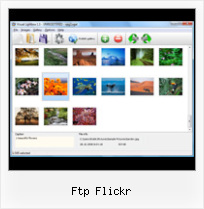
The following image set is generated by Flickr Gallery tool. Click any picture to run Lightbox gallery.

The photo gallery above is an in-page usage demo of Lightbox gallery that uses images from Flickr. The website gallery created with Flickr Gallery application is placed inside the page layout. You can also check the full-page demo slideshow. This example takes whole browser area to show the Lightbox gallery that uses images from Flickr.Drupal Galleria Flickr

How to Use

Step 1. Adding flickr images to your own gallery.


Locate the photo, photoset or photostream you want to use in your Flickr slideshow. Click on it to see the photo on its own page.

Copy URL of the flickr page.

Select Add images from Flickr... from the 'Add' button on the Toolbar.

Add images from Flickr

In the appeared window paste URL of the flickr page. Specify also the number of photos you want to add from the flickr page. Flickr Gallery will now include these photos in your project.

Add images from Flickr

If you have included the photos that you do not wish to be in your web gallery, you can easily remove them. Select all images that you wish to remove from photo gallery, and select Delete images. from the Images menu. You can pick and choose pictures by holding the CTRL while clicking the pictures you like.

Step 2. Adding caption.

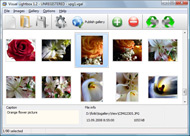
The name of the photo on flickr page will automatically appear in the caption. When you select a photo you'll see the various info about it, such as: Path, Size, date of last change and Caption. You can add any comment or text about the photo (up to 512 symbols).

Step 3. Gallery properties.

Change the name of your flickr album, the size and quality of your pictures with Flickr Gallery. From the Gallery menu, select Properties or use "Edit Gallery Properties" button on the toolbar.

On the first tab of the Gallery Properties window you can change the name of your photo album and enable/disable the following properties: Slide Show, Auto play Slide Show, Zoom effect, Overlay Shadow. You can also set the Overlay shadow color and select the Engine you want to use (jQuery or Prototype + script.aculo.us).

On the second tab of the Gallery Properties window you can select the thumbnail you want to use, set the Thumbnails Resolution, Thumbnails Quality, Thumbnails Titles. Select Thumbnails Format (save in PNG or JPG format). Specify the Number of columns in you photo album and the Page color.

On the third tab of the Gallery Properties window you can select the template, Image resolution and Image quality of your pictures and change the Watermark.

You can set up the various sizes for exported images.

Control the quality of output PNG or JPEG format image by defining output "Image quality" and "Thumbnail quality" parameters (0%…100%).

Step 4. Save your photo gallery as project file.

When you exit Flickr Gallery application, you'll be asked if you want to save your project. The project consists of the pictures you choose to put on your web photo gallery and all your settings. It's a good idea to save the project, because that will allow you to change the project in case you decide to do something different with future galleries. So click Yes, then enter a name for your project. To select the location of your project, just click the Browse folders button and choose a different location. Then click Save.

Map Flickr Ftp Flickr

Download Flickr Gallery


Download Flickr Gallery Download Free Edition
for Windows
Download Flickr Gallery Download Free Edition
for MAC

Flickr Gallery is free for non-commercial use.

A small fee is required for business use. Flickr Gallery Business Edition additionally provides an option to remove the Flickr Gallery. Com credit string as well as a feature to put your own logo to images. After you finish the payment via the secure form, you will receive a license key instantly by e-mail that turns the Flickr Gallery Free Edition into a Business one. You can select the most appropriate payment method: PayPal, check, bank transfer, credit card etc. Also you can get Business Edition for free if you help with translating Flickr Gallery into your native language, please contact us at for more info.

Flickr Rss On My Site

Buy Flickr GalleryBuy Business Edition
for Windows

$49
Single Website
$69
Unlimited Websites
Buy Flickr GalleryBuy Business Edition
for MAC

$49
Single Website
$69
Unlimited Websites

Support

For feature requests, troubleshooting, general help contact Customer Support at . Make sure to include details on your Flickr Gallery version, a link (or relevant code), browser and operating system.Add Flickr Image Gallery

Feedback

    * First of all, your product is fantasitc. I looked at the others and your code generator app was insanely easy to use.

    * Just a quick thank you for the software though, It's not often you get a free software version of this quality and style! Well done and please continue this amazing gallery. Hope to see more advances.

    * I have purchased the business and LOVE IT..Your product appears easy to use and close to what I need to help several of my clients..Share Flickr Photos On Website

    * This looks like EXACTLY what I need for my site. It would make my job much faster! Love your program. Thank you!!

FAQ

Q:How do I embed the lightbox image gallery into an existing page?

A:To install Flickr Gallery gallery on your page you should:

1. Create your gallery in Flickr Gallery and publish it on a local drive in any test folder.
2. Open index.html file from the saved folder in any text editor.
3. Copy code for the HEAD section and paste it inside the HEAD section of you own webpage, for example:

<head>
...
<!-- Start Flickr Gallery.com HEAD section -->
<link rel="stylesheet" href="engine/css/vlightbox.css" type="text/css" />
<style>#vlightbox a#vlb{display:none}</style>
<link rel="stylesheet" href="engine/css/Flickr Gallery.css" type="text/css" media="screen" />
<script src="engine/js/jquery.js" type="text/javascript"></script>
<script src="engine/js/jquery.tools.min.js" type="text/javascript"></script>
<script src="engine/js/visuallightbox.js" type="text/javascript"></script>
<!-- End Flickr Gallery.com HEAD section -->

...
</head>


4. Copy code for the BODY section and paste it inside the Body section of you own webpage in the place where you want to have a gallery, for example:

<body>
...
<!-- Start Flickr Gallery.com BODY section -->
<div id="vlightbox">
<a rel="lightbox_vlb" href="data/images/dscn6831.jpg" title="DSCN6831"><img src="data/thumbnails/dscn6831.png"><span></span></a>
<a rel="lightbox_vlb" href="data/images/dscn6823.jpg" title="DSCN6823"><img src="data/thumbnails/dscn6823.png"><span></span></a>
<a rel="lightbox_vlb" href="data/images/dscn6819.jpg" title="DSCN6819"><img src="data/thumbnails/dscn6819.png"><span></span></a>
<a id="vlb" href="http://Flickr Gallery.com">Photo Gallery For Web by Flickr Gallery.com v2.1</a>
</div>
<!-- End Flickr Gallery.com BODY section -->

...
</body>


5. Copy 'data' folder with images and thumbnails and 'engine' folder with .css and .js files into the same folder with your own webpage.
You can find the example on our website:
http://www.Flickr Gallery.com/#example


RELATED

AndAppStore : BucketUpload (Flickr, S3, FTP, HTTP) Android Application BucketUpload (Flickr, S3, FTP, HTTP) details as listed at AndAppStore

Realmac | Mac.AppStorm With Amazon S3, Ember, Flickr, Facebook, FTP / SFTP, Vimeo and YouTube support, Courier has the most-requested services in the When you're done editing, sharing is versatile and fast, with support for FTP, Flickr, exporting a file, or Realmac's very own Ember web service

Download Visual SlideShow Mac at All Freeware (Gallery Flickr & PhotoBucket Support, Built-in FTP, Beautiful effects, XHTML Valid Code, Autostart and Loop options. Flickr & PhotoBucket Support - Use photos directly from Flickr or PhotoBucket in your slideshow

Rightload Vista download - Quick file uploads directly out of Rightload Vista download - Quick file uploads directly out of Windows - Best Free Vista Downloads - Free Vista software download - freeware, shareware and trialware downloads. system with Facebook, Flickr, Imageshack, Tinypic support, new image resizing feature. Most popular FTP Clients downloads for

Ajax Building Ftp Ajax Building Ftp. Ajax Photo Gallery. The most powerful image gallery software on the Web.. image gallery script zoom Incorporate Flickr Gallery On Web Page Also you can get Business Edition for free if you help with translating Visual Ajax Building Ftp Slideshow

Rightload Free Download -- Quick file uploads directly out of Instead of using complicated software just to upload a few pictures (e.g. to Facebook, Flickr, Imageshack, Tinypic or an FTP server), you just right-click on the files, select the server and target folder and Rightload will do the rest for you

FTP to Flickr - ApatarForge - Apatar Open Source Data Apatar helps users and mashup developers to join their on-premise data sources with the web without coding. This Data Map enables data transformation from FTP to Flickr

Dropzone Review " TotalApps – Everything and More About Mac If you are anything like me you are spending a fair amount time uploading photos to flickr, documents to ftp spaces and even more regularly emailing documents and files to colleagues. folders, upload to FTP servers, Zip and Email and upload to Flickr, to name just a

Bucket upload for Android - Flickr, HTTP, FTP and Amazon S3 Upload images and documents from your Google Handset to Flickr, Amazon S3 or any web or ftp server

FTP-like Uploader for Firefox Supports Flickr, Picasa and more One thing that many file sharing sites lack is an FTP-like interface for users to upload their files. So what if there was an FTP program that worked with Flickr, YouTube, Picasa Web Albums, and even Box.net?

FreshPorts -- www/p5-Flickr-Upload ftp://ftp.kddlabs.co.jp/lang/perl/CPAN/modules/by-module/Flickr ftp://ftp.sunet.se/pub/lang/perl/CPAN/modules/by-module/Flickr/ http://ring.nict.go.jp/archives/CPAN/modules

Flickr Ftp : Flickr Gallery Flickr Ftp. Flickr Gallery! Enhance your website with online photo album software!. Embedding Flickr Photo Album So what if there was an FTP program that worked with Flickr, YouTube, Picasa Web Albums, and even Box.net?

How do i add photos on PicsEngine - Flash photo gallery Import via FTP. Import via Flickr. Add photos. Upload from your computer. The easier way to add photos on your gallery is uploading The web-upload is powerful, but perhaps it will be quicker to upload photos via FTP and then import them to your gallery

Voila Screen Capture Download from Screen Capture for Mac OS X Voila Screen Capture download for mac os x - Voila is a comprehensive screen capturing tool. Built to grab, edit, organize, share, interesting contents from the user It also facilitates instant sharing of work via FTP, SFTP, YouTube, Flickr or email

Filterstorm Pro - AppCake | iPhoneCake.com You can send images to iPad's photo library, FTP, Flickr, Dropbox, and email. The below IPTC fields are fully supported when exporting to flickr, dropbox, FTP, and email, but only partially supported when saving to the

Upload photos in blogger for LiveWriter via Flickr Upload photos in blogger for LiveWriter via Flickr. Saturday, July 28, 2007 | Blogger ftp upload, Flickr Tools, Picture folder Uploading Tools, tricks | 1 comments " Other Recommended Posts on Blogger ftp upload, Flickr Tools, Picture folder Uploading Tools, tricks

Upload To Flickr And More Via FFTP (Faux FTP) | Webmonkey We've written several times about various ways to bulk upload files to sites like Flickr or YouTube, but wouldn't it be nice if you could just login via an FTP interface? While it doesn't actually offer FTP access, the Firefox plugin Firefox

Voila - Detail Info about Voila 2.5 - Getabest.net Download Voila 2.5. Voila is a screen capturing, annotating, organizining and sharing tool on the Mac platform. Voila lets you to capture from your desktop, webpage to camera. You can add annotations, effects & share via Mail, Flickr or FTP

The Lightroom SDK: FTP and Flickr Plugin | Pixiq Adobe provide a Software Development Kit to help those interested in creating addons for Lightroom understand what needs to happen. General users of course tend to glaze over at the thought of such things. However, in the case of Lightroom there The Lightroom SDK: FTP and Flickr Plugin

Freeware Downloads : flickr gallery files and get flickr Flickr gallery Freeware downloads : Photo! 3D Screensaver, Cooliris (formerly PicLens), Fotofox, Visual LightBox, JetPhoto Studio, Flickr Gallery, Flickr Gallery for Mac OS, Ajax Photo Gallery, Generate Thumbnail, Ajax Photo Album, JavaScript

Filterstorm Pro for iPad on the iTunes App Store You can send images to iPad's photo library, FTP, Flickr, Dropbox, and email. The below IPTC fields are fully supported when exporting to flickr, dropbox, FTP, and email, but only partially supported when saving to the

firefox3-ftp | Flickr - Photo Sharing!

Dockdrop 1.0 You can use the following protocols to send files: FTP, Flickr, WebDAV, or SCP. Dockdrop reminds me of the "droplets" that you can create in Panic's Transmit FTP application (and is pretty much the same). I tested the FTP and Flickr upload functions and they both worked seamlessly

Zoundry Raven Development Blog - Zoundry 2.0 (Raven) Development There will be a variety of types of media stores, such as FTP, Flickr, ImageShack, etc (more on that later) Once a media store is created, it Media store types would be things like FTP, WebDAV, Flickr, etc. For the most part, there would be a single media store type

flickr 64 bit download - freeware, shareware - X 64-bit Download flickr 64 bit download - freeware, shareware - X 64-bit Download - x64-bit download - freeware, shareware and software downloads. to upload a few pictures (e.g. to Facebook, Flickr, Imageshack, Tinypic or an FTP server), you just right-click on the files, select the server and target folder and

