
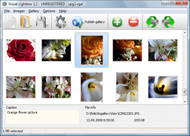



Overview

It's no secret that adding photos to your blog posts is one of the most effective ways to enhance your blog and attract attention to your writing. Flickr has millions of photos available in its database. A simple FREE tool called Flickr Gallery allows you to create a custom image gallery with a cool slide show of the most recent and most interesting photos from Flickr on your website or blog in a few easy steps. Just visit Flickr website and find photostream, photoset or a single photo you like. Enter the address of flickr page to add all photos from this page in your gallery, select the style of thumbnails and the overlay window and add the HTML embed code on your website or blog.
A few clicks and you'll see a stylish photo gallery with beautifull lightbox and zoom effects on your own website or blog!


Flickr Gallery for Windows   Flickr Gallery for MAC

Want more?

Example

Lightbox gallery sample

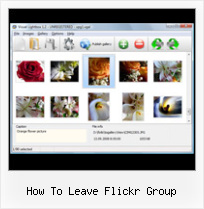
The following image set is generated by Flickr Gallery tool. Click any picture to run Lightbox gallery.

The photo gallery above is an in-page usage demo of Lightbox with images from Flickr. The slideshow created with Flickr Gallery software is placed inside the page layout. You can also check the full-page demo lightbox gallery. This example takes whole browser area to show the Lightbox gallery that uses images from Flickr.Blog Gallery Flickr

How to Use

Step 1. Adding flickr images to your own gallery.


Locate the photo, photoset or photostream you want to use in your Flickr slideshow. Click on it to see the photo on its own page.

Copy URL of the flickr page.

Select Add images from Flickr... from the 'Add' button on the Toolbar.

Add images from Flickr

In the appeared window paste URL of the flickr page. Specify also the number of photos you want to add from the flickr page. Flickr Gallery will now include these photos in your project.

Add images from Flickr

If you have included the photos that you do not wish to be in your web gallery, you can easily remove them. Select all images that you wish to remove from photo gallery, and select Delete images. from the Images menu. You can pick and choose pictures by holding the CTRL while clicking the pictures you like.

Step 2. Adding caption.

The name of the photo on flickr page will automatically appear in the caption. When you select a photo you'll see the various info about it, such as: Path, Size, date of last change and Caption. You can add any comment or text about the photo (up to 512 symbols).

Step 3. Gallery properties.

Change the name of your flickr album, the size and quality of your pictures with Flickr Gallery. From the Gallery menu, select Properties or use "Edit Gallery Properties" button on the toolbar.

On the first tab of the Gallery Properties window you can change the name of your photo album and enable/disable the following properties: Slide Show, Auto play Slide Show, Zoom effect, Overlay Shadow. You can also set the Overlay shadow color and select the Engine you want to use (jQuery or Prototype + script.aculo.us).

On the second tab of the Gallery Properties window you can select the thumbnail you want to use, set the Thumbnails Resolution, Thumbnails Quality, Thumbnails Titles. Select Thumbnails Format (save in PNG or JPG format). Specify the Number of columns in you photo album and the Page color.

On the third tab of the Gallery Properties window you can select the template, Image resolution and Image quality of your pictures and change the Watermark.

You can set up the various sizes for exported images.

Control the quality of output PNG or JPEG format image by defining output "Image quality" and "Thumbnail quality" parameters (0%…100%).

Step 4. Save your photo gallery as project file.

When you exit Flickr Gallery application, you'll be asked if you want to save your project. The project consists of the pictures you choose to put on your web photo gallery and all your settings. It's a good idea to save the project, because that will allow you to change the project in case you decide to do something different with future galleries. So click Yes, then enter a name for your project. To select the location of your project, just click the Browse folders button and choose a different location. Then click Save.

Using Flickr Perl Api How To Leave Flickr Group

Download Flickr Gallery


Download Flickr Gallery Download Free Edition
for Windows
Download Flickr Gallery Download Free Edition
for MAC

Flickr Gallery is free for non - commercial use.

A small fee is required for business use. Flickr Gallery Business Edition additionally provides an option to remove the Flickr Gallery. Com credit string as well as a feature to put your own logo to images. After you conclude the payment via the secure order form, you will receive a license key instantly by email that turns the Flickr Gallery Free Edition into a Business one. You can select the most suitable payment procedure: check, bank transfer, credit card, PayPal etc. Also you can get Business Edition for free if you help with translating Flickr Gallery into your native language, please contact us at for more info.

Flickr Slideshow Frame Drupal

Buy Flickr GalleryBuy Business Edition
for Windows

$49
Single Website
$69
Unlimited Websites
Buy Flickr GalleryBuy Business Edition
for MAC

$49
Single Website
$69
Unlimited Websites

Support

For general help, troubleshooting and feature requests contact Customer Support at . Make sure to include details on your browser, operating system, a link (or relevant code) and Flickr Gallery version.Php Flickr Api Slideshow

Feedback

    * I am thrilled with what this tool can do for me thanks for all the hard work that must have gone into it.

    * Just a quick thank you for the software though, It's not often you get a free software version of this quality and style! Well done and please continue this amazing gallery. Hope to see more advances.

    * I'm absolutely loving Flickr Gallery Business and Video LightBox. Amazing, quick and painless, to create a custom, browser independent gallery. And it works first time - every time! Best value for money I've seen in quite a while...Change Flickr Background Color

    * I'd like to express my gratitude to your efforts on creating such a nice piece of program and best of all it's free! Keep out the good work and I hope to see new features in the near coming future to rate you 5 star!

FAQ

Q:I purchased your business license today but I don't see any way to update so the watermark is either missing or replace with mine.What do I do?

A:Free edition of Flickr Gallery doesn't allow you to remove our watermark.

Register your Flickr Gallery application at first. Use reg. key from the license message you received after the purchase. After the registration you can remove watermarks.

Open Gallery->Properties->Templates: Watermark. Click to disable this option or use your own watermark.


RELATED

flickr photo group " the camera strap If you have some great bulb photos or light paintings that you'd like to share, post them to the flickr group; all are welcome. Expect to see posts soon on Working long-distance', why you should have a photoblog' and how to

Uploading Contest Images | News | Worldwide Photo Walk The contest we do here doesn't really lend itself to that, so we're suggesting that you share your shots on Flickr. We've set up an official Worldwide Photo Walk Flickr group where anyone who takes part in the Photo Walk can share up to five images per day

INSPIKS Flickr Group Showcase #3 | INSPIKS This month we have a massive roundup of some spectacular images from our Flickr Group. How to Design A Magazine Cover in Photoshop. 12 Responses to "INSPIKS Flickr Group Showcase #3" pixels and beyond Reply May 19, 2010 at 12:22 pm. Nice pack, thanks for the feature, some great photography and

Dabbled | Reader Creations – From the Dabbled Flickr Group Here are some of the cool things that I've seen recently in the Dabbled flickr group. Silk Tie Easter Egg s from Tresijas [Related: How to make Silk Tie Eggs | Tresijas has been featured on Dabbled: How-To Make a Bracelet from an old record Tutorial]

Turbo Charge Your Traffic With Flickr Groups I was inspired to learn how to master using Flickr by Matt McGee's series at Small Business SEM on How to Market on Flickr. How to Rock Flickr Like a Champ A Complete Guide to Finding and Using Incredible Flickr Images Turbo Charge Your Traffic With Flickr Groups A

A Simple Guide To Flickr This Flickr Guide will teach you everything you need to know about Flickr: the account, uploading, groups, services, Facebook applications

How to: Flickr Intro | BenBishop.me.uk Flickr isn't the first attempt at capturing the hearts of the amateur photographer in all of us, but it'scertainly the most successful. Started 2002,

25 Useful scripts for Flickr users | How to Live Flickr is a nice, popular online photo sharing tool. Here is a collection of tools and scripts that will enhance your flickr experience.Enjoy these collection

GM Script: Flickr Group Pool Admin: Warn + Delete - Steeev's Flickr Group Pool Admin: Warn+Delete is a Greasemonkey script that lets you single click to remove images from a group pool, delete all a user's images from a pool, also easily mail a user and remove or ban them all from the group pool page

Flickr Photo Project: Featured Nonprofit - The TechSoup Blog We're delighted that many people grabbed their cameras and showed us how their work contributed to the success of their organizations by uploading photos to our group on Flickr. View all photos and join TechSoup's group so you can leave comments and add photos of your own!

How to Leave Comments on a Photo On Flickr | eHow.com How to Leave Comments on a Photo On Flickr. Commenting on Flickr photos is a simple way to share your opinion about photos and reach out to your family and friends, no matter where they are. You can leave comments, observations or

Turn Your Flickr Crush Into Real Romance - Wired How-To Wiki From Wired How-To Wiki. Jump to: navigation, search. While traveling in Japan in 2004, a Scottish Flickr user with the handle "matt" snapped a photo of romances recounted on the We met on Flickr group grew from diligent commenting. Browse the group's discussions to gain insight on how commenting can

BreadKrumbs: Frequently Asked Questions for Flickr Bloggers If you need further help, Visit the BreadKrumbs Flickr Group and post a question. How much does it cost? Nothing. But I am asking people to include a small snippet in their blog side-panel where other Flickr Bloggers can find it, promoting the tool

How to join our Saddleback Valley Flickr group | flickr News: How to join our Saddleback Valley Flickr group | flickr, yahoo, account, group, photos, need, href, intl, done, http

Flickr Group Showcasing iPhone 2.0 Home Screens If you are new here, you might want to subscribe to the RSS feed for updates on this Geeks at Lifehacker has created a flickr group to upload and share iPhone 2.0/iPod home

Hamilton Flickr Group January 24, 2008 · Leave a Comment. All This ChittahChattah " Stories, lost forever: Steve Portigal had 5000 photos on his flickr account and due to phishing scam his flickr account was deleted. Phishing Hamilton Flickr Group January 2008, originally uploaded by johnpiercy

Mastering Flickr: A Practical Guide | Webdesigner Depot Flickr is probably the most famous of all photo communities on the web. It's a place where photographers from all over the world come together, share their I don't think there's an effective way to know how this is done, but it always seems to me that DSLR users are Explore's priority

Friends and Groups On Flickr.com - Getting Comfortable in the You've made an account and added photos, now you need to learn how to network. Your online photos aren't doing you any good if no one is looking at them! This article explains how to find friends and join groups on Flickr. Photos are always more

Leaf News Leaf continues to lead the professional digital photography market into new and exciting areas. Now Leaf Shooters can freely add their images to the Leaf Flickr group

Inspiration from the Life on the Balcony Flickr Group In case you haven't visited the Life on the Balcony Flickr group, you might want to mosey on over. There are lots of great photos added to the pool, like some of these Photo by Ari Mall How neat is

My Flickr Groups | Just Singin' & Signin' in the Sun Posted in Photography, Review, Web/technology | Tagged Comparison, Contrast, Facebook, Friends, geotagging, My Flickr Groups, Photo sharing | 17 Comments. How to get your Flickr photos to show up in your Facebook profile. Posted on May 2, 2009 by Daniel Greene

How To Leave A Flickr Group : Flickr Gallery How To Leave A Flickr Group. Just upload files generated by the photo album builder to your server and it will run immediately, even if it's a free host without php, mysql, asp support!. Popup Flickr Slideshow

screencasters.heathenx.org " Blog Archive " The Screencasters It should be a good place to check out what others are doing, get some comments on your own work and maybe even find some inspiration (something I know I'm always looking for). Anyone can view the Flickr group, but to contribute (upload stuff, leave comments etc.) you have to join Flickr

Flickr galleries How to create a screen grab of your SBI! website and add it to a Flickr gallery they just accept the simple and straightforward group rules first

Digital Photography School Flickr Group I'd especially love it if you tell us about the photo as well, tell us where you took it, how you took it, what you like about it etc. The point of this site is to learn how to use a digital camera better and I'd love our flickr group to tap into that

Flickr: Help: Groups Flickr is almost certainly the best online photo management and sharing application in the world. Show off your favorite photos and videos to the world, securely and privately show content to your friends and family, or blog the photos and videos

Flickr – Group at Last.fm Flickr group has 2730 members at Last.fm. Last.fm group for the Flickr community. Kinda obvious, huh?

