
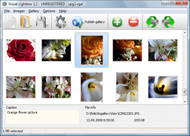



Overview

It's no secret that adding photos to your blog posts is one of the most effective ways to enhance your blog and attract attention to your writing. Flickr has millions of photos available in its database. A simple FREE tool called Flickr Gallery allows you to create a custom image gallery with a cool slide show of the most recent and most interesting photos from Flickr on your website or blog in a few easy steps. Just visit Flickr website and find photostream, photoset or a single photo you like. Enter the address of flickr page to add all photos from this page in your gallery, select the style of thumbnails and the overlay window and add the HTML embed code on your website or blog.
A few clicks and you'll see a stylish photo gallery with beautifull lightbox and zoom effects on your own website or blog!


Flickr Gallery for Windows   Flickr Gallery for MAC

Want more?

Example

Lightbox gallery sample

The following image set is generated by Flickr Gallery tool. Click any picture to run Lightbox gallery.

The photo gallery above is an in-page usage demo of Lightbox with images from Flickr. The lightbox gallery created with Flickr Gallery tool is placed inside the website page. You can also check the full-page demo website gallery. This example takes whole browser area to show the Lightbox gallery that uses images from Flickr.Lightbox2 Flickr Code

How to Use

Step 1. Adding flickr images to your own gallery.


Locate the photo, photoset or photostream you want to use in your Flickr slideshow. Click on it to see the photo on its own page.

Copy URL of the flickr page.

Select Add images from Flickr... from the 'Add' button on the Toolbar.

Add images from Flickr

In the appeared window paste URL of the flickr page. Specify also the number of photos you want to add from the flickr page. Flickr Gallery will now include these photos in your project.

Add images from Flickr

If you have included the photos that you do not wish to be in your web gallery, you can easily remove them. Select all images that you wish to remove from photo gallery, and select Delete images. from the Images menu. You can pick and choose pictures by holding the CTRL while clicking the pictures you like.

Step 2. Adding caption.

The name of the photo on flickr page will automatically appear in the caption. When you select a photo you'll see the various info about it, such as: Path, Size, date of last change and Caption. You can add any comment or text about the photo (up to 512 symbols).

Step 3. Gallery properties.

Change the name of your flickr album, the size and quality of your pictures with Flickr Gallery. From the Gallery menu, select Properties or use "Edit Gallery Properties" button on the toolbar.

On the first tab of the Gallery Properties window you can change the name of your photo album and enable/disable the following properties: Slide Show, Auto play Slide Show, Zoom effect, Overlay Shadow. You can also set the Overlay shadow color and select the Engine you want to use (jQuery or Prototype + script.aculo.us).

On the second tab of the Gallery Properties window you can select the thumbnail you want to use, set the Thumbnails Resolution, Thumbnails Quality, Thumbnails Titles. Select Thumbnails Format (save in PNG or JPG format). Specify the Number of columns in you photo album and the Page color.

On the third tab of the Gallery Properties window you can select the template, Image resolution and Image quality of your pictures and change the Watermark.

You can set up the various sizes for exported images.

Control the quality of output PNG or JPEG format image by defining output "Image quality" and "Thumbnail quality" parameters (0%…100%).

Step 4. Save your photo gallery as project file.

When you exit Flickr Gallery application, you'll be asked if you want to save your project. The project consists of the pictures you choose to put on your web photo gallery and all your settings. It's a good idea to save the project, because that will allow you to change the project in case you decide to do something different with future galleries. So click Yes, then enter a name for your project. To select the location of your project, just click the Browse folders button and choose a different location. Then click Save.

Find Flickr Album Filename How To Save Photos On Flickr

Download Flickr Gallery


Download Flickr Gallery Download Free Edition
for Windows
Download Flickr Gallery Download Free Edition
for MAC

Flickr Gallery is free for non - commercial use.

A small fee is required for business use. Flickr Gallery Business Edition additionally provides an option to remove the Flickr Gallery. Com credit string as well as a feature to put your own logo to images. After you complete the payment via the secure order form, you will receive a license key instantly by e-mail that turns the Flickr Gallery Free Edition into a Business one. You can select the most appropriate payment procedure: bank transfer, credit card, check, PayPal etc. Also you can get Business Edition for free if you help with translating Flickr Gallery into your native language, please contact us at for more info.

Flickr Valuation

Buy Flickr GalleryBuy Business Edition
for Windows

$49
Single Website
$69
Unlimited Websites
Buy Flickr GalleryBuy Business Edition
for MAC

$49
Single Website
$69
Unlimited Websites

Support

For troubleshooting, feature requests and general help contact Customer Support at . Make sure to include details on your Flickr Gallery version, browser, operating system and a link (or relevant code).Stream Flickr On Facebook

Feedback

    * First of all, your product is fantasitc. I looked at the others and your code generator app was insanely easy to use.

    * I have purchased the business and LOVE IT..Your product appears easy to use and close to what I need to help several of my clients..

    * I'm absolutely loving Flickr Gallery Business and Video LightBox. Amazing, quick and painless, to create a custom, browser independent gallery. And it works first time - every time! Best value for money I've seen in quite a while...Flickr Module Joomla

    * Let me start just congratulating you, good job, really. I am trying out the free version before I buy it. It works great.

FAQ

Q:I would like to have a few galleries in one website and even on one page.

A:To create several galleries on your page you should change following parameter in A tag for different galleries:

rel="lightbox_vlb"

For example, for the first gallery you should set rel="lightbox_vlb":

<!-- Start Flickr Gallery.com BODY section -->
<div id="vlightbox">
<a rel="lightbox_vlb" href="data/images/dscn6831.jpg" title="dscn6831" >
<img src="data/thumbnails/dscn6831.png" ><span></span></a>
<a rel="lightbox_vlb" href="data/images/dscn6823.jpg" title="dscn6823">
<img src="data/thumbnails/dscn6823.png"><span></span></a>
<a id="vlb" href="http://Flickr Gallery.com">Photo Gallery For Web by Flickr Gallery.com v2.0</a>
</div>
<!-- End Flickr Gallery.com BODY section -->

and for the second gallery rel="lightbox_vlb1":

<!-- Start Flickr Gallery.com BODY section -->
<div id="vlightbox">
<a rel="lightbox_vlb1" href="data/images/img_0501.jpg" title="img_0501">
<img src="data/thumbnails/img_0501.png"><span></span></a>
<a rel="lightbox_vlb1" href="data/images/img_0481.jpg" title="img_0481">
<img src="data/thumbnails/img_0481.png"><span></span></a>
<a id="vlb" href="http://Flickr Gallery.com">Photo Gallery For Web by Flickr Gallery.com v2.0</a>
</div>
<!-- End Flickr Gallery.com BODY section -->


RELATED

How To Geotag Your Flickr Photos on Google Maps & Earth I am a bit of a Google Maps & Google Earth fan. I used them to get hopelessly lost between Germany and the Netherlands the other week. Other times, I like How To Geotag Your Flickr Photos on Google Maps & Earth

# How to Save or Download Protected Images in Flickr / Orkut A friend ( reader) was asking me How to Save or Download Protected Images in flickr ?. I myself faced a problem when I wanted to Save this nice Image for my

URL Hack: View and save original photos on Flickr - Tech-Recipes Have you ever been frustrated of wanting to save a really nice photo on Flickr, but when you try to save it, what you got was “spacer.gif”

Flickr: Help: Photos Flickr is almost certainly the best online photo management and sharing application in the world. Show off your favorite photos and videos to the world, securely and privately show content to your friends and family, or blog the photos and videos

Most 40+ Tools And Tips For Flickr Lovers How to Download Locked or Restricted Images from Photo websites like Flickr: If a Flickr user does not want Flickr photo download: How to save those beautiful images: Here I will show you how to use the features of Firefox to take back the web and

flickr add Software - Free Download flickr add - Top 4 Download Save your blog and attract attention to your writing. Flickr has millions of photos available in its database. FREE Mac tool called Flickr Gallery allows you to create a custom image the most recent and most interesting photos from Flickr on your website or blog in a few easy steps

How To Save A Protected Flickr Image | PCLicious Video Tutorial: In this video tutorial I will how you how to easily save a protected Flickr image to your computer! I will also show you the hard way!

How to Use Flickr: Basics and Beyond Flickr is one of the most popular photo-sharing sites on the Internet. Owned by Yahoo!, Flickr offers its users a website where they can create free accounts that let How to Use Flickr: Basics and Beyond. Tweet. Flickr is one of the most popular photo-sharing sites on the Internet. Owned by Yahoo!

Sharing Photos With Yahoo! Messenger: Saving Photos to Your Here's How. To save one photo to your Flickr account, do the following: Click the arrow to the right of the Save button, then select Save to Flickr from the menu. The Flickr Photo Save window opens. Provide as much information as you like in the Flickr window. Name—the name of the photo file

How to: Flickr Intro | BenBishop.me.uk Flickr isn't the first attempt at capturing the hearts of the amateur photographer in all of us, but it'scertainly the most successful. Started 2002,

How to Upload Photos On Flickr | eHow.com How to Upload Photos On Flickr. Flickr is easy to use and gives anyone an opportunity to view your photos easily from home. If you don't have the time to print out photos and send them to friends and relatives, you can simply

Sharpening Your Photos like Flickr Sharpening Your Photos like Flickr. Michael Zhang · May 19, 2009. When browsing around on Flickr, I used to be amazed by how sharp many of the photographs I came across were, and thought that the reason my web-res images weren't as sharp was because I had poor technique or an inferior lens

Print photos from Flickr Print photos from Flickr using this how-to guide On the popular photo management site Flickr, you can upload, save, and share your digital images

Get the Most Out of Flickr - Wired How-To Wiki Comment on users' work, ask about techniques, and check camera when it comes to Flickr, though. You can easily send photos straight from your camera

How To Save Photos On Flickr : Flickr Gallery How To Save Photos On Flickr. Make superior ajax picture gallery for your web site with Flickr Gallery!. How To Link Blogspot To Flickr

Batch Upload Photos In Flickr at a Scheduled Time How to Batch Upload Photos In Flickr at a Scheduled Time. Written by Amit Banerjee on Sunday, November 8th, 2009. Tweet. You can use a desktop tool to view and download your Flickr photos but what about uploading multiple photos to your Flickr account from the desktop ?

Save locked Orkut album and profile photos Orkut and other social media websites have strict policies regarding the privacy of its users. Users have the ability to block selected friends or non-friends

How To Upload Photos To Flickr From Picasa How To Upload Photos To Flickr From Picasa using Flickr Uploader tool

Flickr photo download: save those beautiful pictures with Firefox How to save those beautiful images. flickr has a beautiful collection of photographs. Enjoying them in a simple webbrowser won't always give them the attention they need. Althogh the slideshow is nice, when you look at it with a large resolution setting, the photo's tend to be pretty small

bristaweddingphotos - bradleystilger How to save photos from Flickr. on the page for the photo you want to save, click the "all s photo plugin. If you would like to utilize the much cooler and more efficient photo experience pictured below, follow these instructions (you won't regret it): install the CoolIris photo viewing plugin here

How to edit online photos in Flickr Flickr is one of the best sites for sharing your photos and thanks to collaboration with the site Picnik lets you edit your photos online. If you do not have a Flickr account, go to the site, create one and take a look at this short tour (http:

A Whole Lotta Nothing: How to enjoy bigger photos on Flickr As a longtime flickr user and photographer with ever increasing megapixels at bay, I've slowly become dissatisfied with the small 500px wide default photo layouts at Flickr. I edit my photos full screen on a huge monitor and I'm often

Download Flickr Photos protected by spaceball.gif! [Flickr Flickr protects pictures by putting the transparent spaceball.gif on the photos to protect some from being downloaded. It's been done by the users not wanting

How To Save Multiple Flickr Photos To Computer | Multimedia How To Save Multiple Flickr Photos To Computer. This article demonstrates how to *download Flickr photos in batch* so that you could use them under corresponding license

How to Save or Download Protected Images in Flickr / Orkut Posted by Shekhar Saxena on April 1, 2009 in Orkut Hacks · 0 Comment. A friend ( reader) was asking me "How to Save or Download Protected Images in flickr ?". I myself faced a problem when I wanted to Save this nice Image for my stock photo Collections

