



Overview

It's no secret that adding photos to your blog posts is one of the most effective ways to enhance your blog and attract attention to your writing. Flickr has millions of photos available in its database. A simple FREE tool called Flickr Gallery allows you to create a custom image gallery with a cool slide show of the most recent and most interesting photos from Flickr on your website or blog in a few easy steps. Just visit Flickr website and find photostream, photoset or a single photo you like. Enter the address of flickr page to add all photos from this page in your gallery, select the style of thumbnails and the overlay window and add the HTML embed code on your website or blog.
A few clicks and you'll see a stylish photo gallery with beautifull lightbox and zoom effects on your own website or blog!


Flickr Gallery for Windows   Flickr Gallery for MAC

Want more?

Example

Lightbox gallery sample

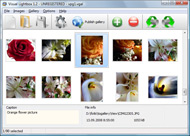
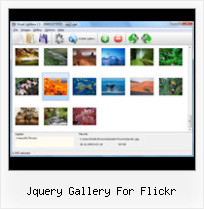
The following image set is generated by Flickr Gallery tool. Click any picture to run Lightbox gallery.

The photo gallery above is an in-page usage demo of Lightbox gallery that uses images from Flickr. The photo gallery created with Flickr Gallery wizard is placed inside the html page. You can also check the full-page demo web gallery. This example takes whole browser area to show the website gallery.How To Block Someone From Flickr

How to Use

Step 1. Adding flickr images to your own gallery.


Locate the photo, photoset or photostream you want to use in your Flickr slideshow. Click on it to see the photo on its own page.

Copy URL of the flickr page.

Select Add images from Flickr... from the 'Add' button on the Toolbar.

Add images from Flickr

In the appeared window paste URL of the flickr page. Specify also the number of photos you want to add from the flickr page. Flickr Gallery will now include these photos in your project.

Add images from Flickr

If you have included the photos that you do not wish to be in your web gallery, you can easily remove them. Select all images that you wish to remove from photo gallery, and select Delete images. from the Images menu. You can pick and choose pictures by holding the CTRL while clicking the pictures you like.

Step 2. Adding caption.

The name of the photo on flickr page will automatically appear in the caption. When you select a photo you'll see the various info about it, such as: Path, Size, date of last change and Caption. You can add any comment or text about the photo (up to 512 symbols).

Step 3. Gallery properties.

Change the name of your flickr album, the size and quality of your pictures with Flickr Gallery. From the Gallery menu, select Properties or use "Edit Gallery Properties" button on the toolbar.

On the first tab of the Gallery Properties window you can change the name of your photo album and enable/disable the following properties: Slide Show, Auto play Slide Show, Zoom effect, Overlay Shadow. You can also set the Overlay shadow color and select the Engine you want to use (jQuery or Prototype + script.aculo.us).

On the second tab of the Gallery Properties window you can select the thumbnail you want to use, set the Thumbnails Resolution, Thumbnails Quality, Thumbnails Titles. Select Thumbnails Format (save in PNG or JPG format). Specify the Number of columns in you photo album and the Page color.

On the third tab of the Gallery Properties window you can select the template, Image resolution and Image quality of your pictures and change the Watermark.

You can set up the various sizes for exported images.

Control the quality of output PNG or JPEG format image by defining output "Image quality" and "Thumbnail quality" parameters (0%…100%).

Step 4. Save your photo gallery as project file.

When you exit Flickr Gallery application, you'll be asked if you want to save your project. The project consists of the pictures you choose to put on your web photo gallery and all your settings. It's a good idea to save the project, because that will allow you to change the project in case you decide to do something different with future galleries. So click Yes, then enter a name for your project. To select the location of your project, just click the Browse folders button and choose a different location. Then click Save.

Flickr Albums On Tumblr Jquery Gallery For Flickr

Download Flickr Gallery


Download Flickr Gallery Download Free Edition
for Windows
Download Flickr Gallery Download Free Edition
for MAC

Flickr Gallery is free for non - commercial use.

A small fee is required for business use. Flickr Gallery Business Edition additionally provides an option to remove the Flickr Gallery. Com credit string as well as a feature to put your own logo to images. After you conclude the payment via the secure order form, you will receive a license key instantly by email that turns the Flickr Gallery Free Edition into a Business one. You can select the most suitable payment procedure: check, bank transfer, credit card, PayPal etc. Also you can get Business Edition for free if you help with translating Flickr Gallery into your native language, please contact us at for more info.

My Photo Gallery Feed Flickr

Buy Flickr GalleryBuy Business Edition
for Windows

$49
Single Website
$69
Unlimited Websites
Buy Flickr GalleryBuy Business Edition
for MAC

$49
Single Website
$69
Unlimited Websites

Support

For general help, troubleshooting and feature requests contact Customer Support at . Make sure to include details on your operating system, browser, Flickr Gallery version and a link (or relevant code).Getting Links From Flickr

Feedback

    * Let me start just congratulating you, good job, really. I am trying out the free version before I buy it. It works great.

    * I downloaded your trial version to see if I could get it to work with my website, and I am almost there (I have been looking for something like this for ages)..

    * I have purchased the business and LOVE IT..Your product appears easy to use and close to what I need to help several of my clients..Sexy Flickr Photos

    * First of all, I love you Flickr Gallery. I think it's beautiful! I purchased the lightbox “business edition” yesterday, and I’m very happy how easy it is to use. Found this to be one of the fastest ways to get a gallery on the web. Thanks.

FAQ

Q:How do I embed the lightbox image gallery into an existing page?

A:To install Flickr Gallery gallery on your page you should:

1. Create your gallery in Flickr Gallery and publish it on a local drive in any test folder.
2. Open index.html file from the saved folder in any text editor.
3. Copy code for the HEAD section and paste it inside the HEAD section of you own webpage, for example:

<head>
...
<!-- Start Flickr Gallery.com HEAD section -->
<link rel="stylesheet" href="engine/css/vlightbox.css" type="text/css" />
<style>#vlightbox a#vlb{display:none}</style>
<link rel="stylesheet" href="engine/css/Flickr Gallery.css" type="text/css" media="screen" />
<script src="engine/js/jquery.js" type="text/javascript"></script>
<script src="engine/js/jquery.tools.min.js" type="text/javascript"></script>
<script src="engine/js/visuallightbox.js" type="text/javascript"></script>
<!-- End Flickr Gallery.com HEAD section -->

...
</head>


4. Copy code for the BODY section and paste it inside the Body section of you own webpage in the place where you want to have a gallery, for example:

<body>
...
<!-- Start Flickr Gallery.com BODY section -->
<div id="vlightbox">
<a rel="lightbox_vlb" href="data/images/dscn6831.jpg" title="DSCN6831"><img src="data/thumbnails/dscn6831.png"><span></span></a>
<a rel="lightbox_vlb" href="data/images/dscn6823.jpg" title="DSCN6823"><img src="data/thumbnails/dscn6823.png"><span></span></a>
<a rel="lightbox_vlb" href="data/images/dscn6819.jpg" title="DSCN6819"><img src="data/thumbnails/dscn6819.png"><span></span></a>
<a id="vlb" href="http://Flickr Gallery.com">Photo Gallery For Web by Flickr Gallery.com v2.1</a>
</div>
<!-- End Flickr Gallery.com BODY section -->

...
</body>


5. Copy 'data' folder with images and thumbnails and 'engine' folder with .css and .js files into the same folder with your own webpage.
You can find the example on our website:
http://www.Flickr Gallery.com/#example


RELATED

15 Amazing jQuery Image Gallery/Slideshow Plugins and Tutorials Link : Image Gallery Using jQuery and Flickr " Description : This is It uses the flickr search engine with thumbnail preview, captions, preloader and some

jQuery Flickr Photo Gallery jQuery Flickr Photo Gallery Plug-In - Powered by Flickr Sets Add the ez-jquery-flickr directory to your codebase. Simply link the CSS and JS files in your tag as you would normally

Flickr jQuery Gallery Module by Simon Ovens - DotNetNuke 5 Flickr jQuery Gallery Module by Simon Ovens - DotNetNuke 5 Modules - Snowcovered.com - This module gives a nice AJAX experience and is all hosted on flickr, saving your disk space and bandwidth not to mention flickr's servers are designed to

onwebdev: jQuery: a Flickr gallery with JSONP jQuery: a Flickr gallery with JSONP. In this post I'm going to show you how to create a simple Flickr gallery with jQuery and JSONP. JSONP stands for JSON with Padding and allows you to execute cross-domain AJAX requests using JavaScript (in this case, jQuery)

Flickr There is an embedded lightbox script (SlimBox) for photo slideshows. Flogr generates a tag cloud from the tags of images Flapi is an open source Flash gallery for displaying Flickr photo sets/images

Bring Flickr to Your Website Using JSON and jQuery | The Flickr is a great website for hosting and sharing your photos. If you are an amateur photographer who likes to share photos from your latest outdoor adventure,

57+ Free Image Gallery, Slideshow And Lightbox Solutions Choose between more than 57+ free javascript, ajax, css, jquery, flash based image galleries. Find the best solution for You!

Flickr Jquery - jQuery Lightbox Flickr Jquery. With DHTML Popup comprehensible interface, you need just 4 simple steps to get your photo album website ready!. javascript popup set content type

The Top: 12 Best jQuery Image Galleries | Devlounge Flickr search using jQuery and JSON. Full screen with kept ratio using Galleria is a Javascript image gallery written in jQuery. It loads the images one by one from an unordered list and displays thumbnails when each image is loaded. It will create thumbnails for you if you

Open Source Flickr Photo Gallery Using jQuery - Web Development flickrGallery is an open-source photo gallery for jQuery that allows you to dynamically pull images from a photoset in Flickr. The main functionaliti

jQuery.flickrGallery Call the flickrGallery() method on a set of elements to create the flickr gallery element. $('#id').flickrGallery(options); Full API Documentation below. flickrGallery is a jQuery plugin that provides a way to embed flickr images into your site

15 Great jQuery Images Gallery Plugins To Showcase Your Work If you are showcasing your portfolio and work, image gallery is a very important part for your website. It needs to load fast, good navigation experience, easy to maintain and search engine friendly, therefore non-flash based gallery has been

Flickr Photobar Gallery | Codrops After we got a lot of great feedback for our image galleries we decided to follow some of the suggestions and create a gallery that uses the Flickr API. The aim was to build a bottom photobar that one can easily integrate into a website. It is

The Top: 12 Best jQuery Image Galleries There are countless of jQuery image galleries out there, here we gathered the best ones for you. Full screen image gallery using jQuery and Flickr A gallery based on the Flickr API, using full

Jquery Flickr Gallery Plugin | Flickr Slideshow Jquery Flickr Gallery Plugin. Build superior photoalbums for your Website with jQuery Thickbox Alternative! flickr gallery thumbnail embed

flickrGallery - Dynamic Flickr Photo Gallery with Slider flickrGallery - Dynamic Flickr Photo Gallery with Slider. Submitted by StevenDugas on November 25, 2008 - 11:02am. flickrGallery is an open-source photo gallery for jQuery that allows you to dynamically pull images from a photoset in Flickr

The Book and the Cover " jQuery: jqAlbumParser Plugin, parses Well, after building a few photo gallery plugins and plans for different variations of flash-like galleries (I am on a convert flash apps to jQuery ran apps kick), I found myself wanting to use other peoples photos, ie. friends and families, but did not want to download them

Flickr Slideshow : Flickr Gallery Flickr Slideshow. Don't allow your website visitors to get lost! Try Flickr Slide Show!. Linking To Pictures On Flickr Tumblr

Drupal Recipes: Building Image Galleries with jQuery and Flickr Covering Flickr, jQuery, and Drupal best practices Drupal Recipes: Building Image Galleries Covering Flickr, jQuery, and Drupal best practices Presented by Benjamin Shell from WorkHabit. Start with a plan, and make Drupal work for you

Flickr style photo gallery demo in jQuery Description: This tutorial I'll explain a simple step-by-step way to implement an Flickr style photo gallery demo in Jquery and CSS. The result is

flickr photogallery, make flickr a photo gallery, flickr script flickr photogallery, make flickr a photo gallery, flickr script Query.flickrGallery is a jQuery plugin for interacting with the flickr api via javascript

Flickr Gallery Plus! - Robert's talk One of the most popular photo sharing web sites on the web is Flickr, and it does indeed have some very nice features. Their set/gallery view, however, is in my

iamjpg's jQuery-Flickr-Gallery-Plug-In at master - GitHub jQuery Flickr Photo Gallery Plug-In - Powered by Flickr Sets The jQuery Flickr Gallery Plug-In Requirements: Your own Flickr API Key which can be obtained at http://www.flickr.com/services/api/misc.api_keys.html A Flickr Set for the plug in interact with. If you need help in setting up a

Create a Slick Flickr Gallery with SimplePie | Nettuts+ I've wanted to write a tutorial for quite some time now, and APIs have always been a particular interest of mine. So with my wife's recent foray into

