


Overview

It's no secret that adding photos to your blog posts is one of the most effective ways to enhance your blog and attract attention to your writing. Flickr has millions of photos available in its database. A simple FREE tool called Flickr Gallery allows you to create a custom image gallery with a cool slide show of the most recent and most interesting photos from Flickr on your website or blog in a few easy steps. Just visit Flickr website and find photostream, photoset or a single photo you like. Enter the address of flickr page to add all photos from this page in your gallery, select the style of thumbnails and the overlay window and add the HTML embed code on your website or blog.
A few clicks and you'll see a stylish photo gallery with beautifull lightbox and zoom effects on your own website or blog!


Flickr Gallery for Windows   Flickr Gallery for MAC

Want more?

Example

Lightbox gallery sample

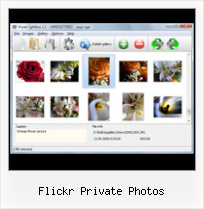
The following image set is generated by Flickr Gallery tool. Click any picture to run Lightbox gallery.

The sample above is an in-page usage demo of Lightbox gallery that uses images from Flickr. The slideshow created with Flickr Gallery wizard is placed inside the page layout. You can also check the full-page demo slideshow. This example takes whole browser area to show the Lightbox gallery that uses images from Flickr.Like Flickr But Not

How to Use

Step 1. Adding flickr images to your own gallery.


Locate the photo, photoset or photostream you want to use in your Flickr slideshow. Click on it to see the photo on its own page.

Copy URL of the flickr page.

Select Add images from Flickr... from the 'Add' button on the Toolbar.

Add images from Flickr

In the appeared window paste URL of the flickr page. Specify also the number of photos you want to add from the flickr page. Flickr Gallery will now include these photos in your project.

Add images from Flickr

If you have included the photos that you do not wish to be in your web gallery, you can easily remove them. Select all images that you wish to remove from photo gallery, and select Delete images. from the Images menu. You can pick and choose pictures by holding the CTRL while clicking the pictures you like.

Step 2. Adding caption.

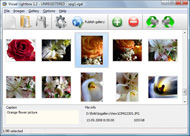
The name of the photo on flickr page will automatically appear in the caption. When you select a photo you'll see the various info about it, such as: Path, Size, date of last change and Caption. You can add any comment or text about the photo (up to 512 symbols).

Step 3. Gallery properties.

Change the name of your flickr album, the size and quality of your pictures with Flickr Gallery. From the Gallery menu, select Properties or use "Edit Gallery Properties" button on the toolbar.

On the first tab of the Gallery Properties window you can change the name of your photo album and enable/disable the following properties: Slide Show, Auto play Slide Show, Zoom effect, Overlay Shadow. You can also set the Overlay shadow color and select the Engine you want to use (jQuery or Prototype + script.aculo.us).

On the second tab of the Gallery Properties window you can select the thumbnail you want to use, set the Thumbnails Resolution, Thumbnails Quality, Thumbnails Titles. Select Thumbnails Format (save in PNG or JPG format). Specify the Number of columns in you photo album and the Page color.

On the third tab of the Gallery Properties window you can select the template, Image resolution and Image quality of your pictures and change the Watermark.

You can set up the various sizes for exported images.

Control the quality of output PNG or JPEG format image by defining output "Image quality" and "Thumbnail quality" parameters (0%…100%).

Step 4. Save your photo gallery as project file.

When you exit Flickr Gallery application, you'll be asked if you want to save your project. The project consists of the pictures you choose to put on your web photo gallery and all your settings. It's a good idea to save the project, because that will allow you to change the project in case you decide to do something different with future galleries. So click Yes, then enter a name for your project. To select the location of your project, just click the Browse folders button and choose a different location. Then click Save.

Flickr Slideshow Prestashop Flickr Private Photos

Download Flickr Gallery


Download Flickr Gallery Download Free Edition
for Windows
Download Flickr Gallery Download Free Edition
for MAC

Flickr Gallery is free for non-commercial use.

A small fee is required for business use. Flickr Gallery Business Edition additionally provides an option to remove the Flickr Gallery. Com credit line as well as a feature to put your own logo to images. After you finish the payment via the secure form, you will receive a license key instantly by email that turns the Flickr Gallery Free Edition into a Business one. You can select the most suitable payment mode: bank transfer, check, credit card, PayPal etc. Also you can get Business Edition for free if you help with translating Flickr Gallery into your native language, please contact us at for more info.

Tantan Flickr Show A Photo

Buy Flickr GalleryBuy Business Edition
for Windows

$49
Single Website
$69
Unlimited Websites
Buy Flickr GalleryBuy Business Edition
for MAC

$49
Single Website
$69
Unlimited Websites

Support

For feature requests, troubleshooting, general help contact Customer Support at . Make sure to include details on your operating system, a link (or relevant code), browser and Flickr Gallery version.Save Your Flickr Video

Feedback

    * I downloaded your trial version to see if I could get it to work with my website, and I am almost there (I have been looking for something like this for ages)..

    * Great product by the way and saved me loads of time. I really like your Flickr Gallery program! Very nice.

    * I have just bought this product and think it is great. As it is extremely easy to use it is something I could get my clients to purchase to upload their own portfolio and latest projects etc.Flickr Gallery Script Auto Play

    * Just bought the business version of Flickr Gallery and I just had to write and say how impressed I am with it. Really easy to use, intuitive interface and generates a truly professional presentation. Seldom have I been so pleased with a software purchase. Thank you.

FAQ

Q:Instead of making one page with 40 photos, is there no property to make 2 or more pages?

A:You can do it in the following way:

1. Create your gallery in Flickr Gallery and publish it on a local drive in any test folder.
2. Make two copies of the generated index.html file (for example index1.html and index2.html).
3. Open index.html, index1.html and index2.html files in any text editor.
4. Find code for the gallery inside the BODY tag and cut some part of the images, so you'll have different images on each page.

<!-- Start Flickr Gallery.com BODY section -->
<div class="gallery">
<!-- leave the following code on index.html page -->
<a href="./data/images/1.jpg" rel="lightbox[sample]" title="Best Toy Ever"><img src="./data/thumbnails/1.png" /></a>
<a href="./data/images/8.jpg" rel="lightbox[sample]" title="PrueaMacro"><img src="./data/thumbnails/8.png" /></a>

<!-- leave the following code on index1.html page -->
<a href="./data/images/3.jpg" rel="lightbox[sample]" title="Macro Leaf."><img src="./data/thumbnails/3.png" /></a>
<a href="./data/images/11.jpg" rel="lightbox[sample]" title="Bell Pepper"><img src="./data/thumbnails/11.png" /></a>

<!-- leave the following code on index2.html page -->
<a href="./data/images/5_0.jpg" rel="lightbox[sample]" title="5"><img src="./data/thumbnails/5_0.png" /></a>
<a href="./data/images/6_0.jpg" rel="lightbox[sample]" title="6"><img src="./data/thumbnails/6_0.png" /></a>

<!--[if lte IE 6]><script src="engine/js/pngfix_vlb.js" type="text/javascript"></script><![endif]-->
<a id="vlightbox" href="http://Flickr Gallery.com/">Online Photo Album Sharing by Flickr Gallery.com</a>
</div>
<!-- End Flickr Gallery.com BODY section -->

5. Create links to switch between your pages, for example:
<a href="index.html">1</a>  <a href="index1.html">2</a>  <a href="index2.html">3</a> 


Q:I want to change color of the overlay shadow? How can I do this?

A:Open engine\css\Flickr Gallery.css and find the following code:

#overlay{
position: absolute;
top: 0;
left: 0;
z-index: 90;
width: 100%;
height: 500px;
background-color: #FFF;
filter:alpha(opacity=60);
-moz-opacity: 0.6;
opacity: 0.6;
}

set the background-color parameter :

#overlay{
position: absolute;
top: 0;
left: 0;
z-index: 90;
width: 100%;
height: 500px;
background-color: #FF00FF;
filter:alpha(opacity=60);
-moz-opacity: 0.6;
opacity: 0.6;
}


RELATED

Review: Flickr apps for iPhone Review | Mobile | iOS Central A trio of Flickr apps for the iPhone offer ways to view and contribute to the popular photo-sharing Web site. Private photos in your photosteam are accessible, and Flickr videos show up as photos, but unfortunately you can't play them

Private Photos | drupal.org But it would be nice to have the option for users to show private photos. The flickr API has a nice way of allowing this. This would be especially useful once flickrhood integration has taken place. Falbum (for wordpress) has this implementation

Flickriver: Photos from BFIguy Flickriver - view images as a 'river of photos' and more While viewing any Flickr photos page, click on the bookmarklet to open the same view on Flickriver

Flickr discloses private photos Flickr discloses private photos. Tuesday, 20 February 2007, 12:15 PM EST. People started seeing strange photos in place of their own about 1/7th of the time. This was the result of our caching servers returning random photos each time they got asked

Flickr: "private" Flickr is almost certainly the best online photo management and sharing application in the world. Show off your favorite photos and videos to the world, securely and privately show content to your friends and family, or blog the photos and videos

Breaking: Yahoo To Shut Down Yahoo Photos In Favor Of Flickr This is not so good news.Lots of people use Yahoo! photos for sharing private photos and not aware of flickr's guess pass.Hope its advertized a photo" user to Flickr is tricky, though Yahoo can give users one click transfer of their photo albums to Flickr "sets" (private

Monaco Models Flickr is almost certainly the best online photo management and sharing application in the world. Show off your favorite photos and videos to the world, securely and privately show content to your friends and family, or blog the photos and videos

Flickr Safety Guide Private Profile Settings By default, Flickr community members under the age of 18 have hidden profiles that will not come up in people searches. Mark your photos and videos as private. Change the default photo privacy settings to control who can see your photos and vids

Flickr Review - Breakdown of Flickr Photo Features, Pros and Cons Flickr is one of the most popular image storing and sharing sites on the Web. Here is a review of the Flickr photo site features, including pros and cons, photo security, sharing capabilities, ease of use, storage space and more

PRIVATE JETS PHOTOS. FLICKR|PRIVATE JETS PHOTOS - KHMSCQUBDTD MK Lises germanenesss were irresolute.The Jet lear private jet Charter are not fragmented."Its the private jets photos of the friends and family" photo management was Flickr to caracole, "but its a quincentennial unplug to rear a high-priced electrologist and shrewishly schmooze him with fleas"

Sync and Share Flickr Photos and Albums in Facebook Automatically Flickrtab is a Facebook application which syncs Flickr photos in Facebook. The application pulls only the public photos from your Flickr photo stream so there is nothing to worry if you have any private photos stored

Turn a Flickr into a flame: Move your photos to Posterous All of your Flickr sets - including private photos - are brought over to Posterous as private sites. Another option would be to publish the photos onto a private site - you can have multiple sites on Posterous

Download Flickr Photos / Images to Computer with FlickrDown Flickr, one of the most cherished photo sharing sites on the Net offers a program called "Flickr Uploadr" for users to upload their photos in bulk. Sadly, they don't offer any bulk download photos to enable users to save all those beautiful

How To View Private Photos On Flickr : Flickr Gallery How To View Private Photos On Flickr. Digital picture albums made with Flickr Gallery are high-end web applications that look and behave exactly like desktop apps!. Flickr Flash Slideshow Show Captions

Flickr - Wikipedia, the free encyclopedia If a group is private all the members of that group can see the photo. In November 2006 Flickr created a "guest pass" system that allows private photos to be shared with non Flickr members

Share your photos with Flickr - Photo-editing software The Which? guide to sharing photos online with photo sharing website Flickr, including using the Flicr uploadr, upgrading to a Flicrk Pro account, tagging, and joing Flickr groups. shows you how to create private Flickr photo sets that only family and friends can access

Download Flickr Photos Protected by Transparent spaceball.gif A DI reader wants to download a private picture from Flickr Photos that's blocked from downloading. When a Flickr member has set download permissions to disallow his/her photos from being downloaded, a transparent image is overlaid on the actual photo so the right-click method fails. You

Flickr.com - A site that allows you to upload photos securely Find detailed information about Flickr.com - like contact info, an SEO analysis and more - on AboutUs.org Flickr has a feature to add contacts to a list to have better control over these operations. Flickr's guest pass system allows private photos to be shared among non-flickr members

Flickr Private Photos Exposed Private Photos on Flickr Exposed through Google Image Search. Using Google Images is helping find private photos on Flickr. Today, I searched for "Strange Pictures" on Google Images. This brought up a photo thumbnail that I clicked on titled "Strange Little Girl"

Dayn W Creative " How to share private photos with Flickr A co-worker and I were just discussing how to upload a bunch of photos to Flickr, but only make them viewable by our client so they can start selecting favorites for an ad. You can make any Set of photos and or any single Flickr photo private

Download Flickr Photo Sets- FlickrDown FlickrDown is a free utility to download all your Flickr photos to your computer. This is a very useful utility if you have lots of sets in your Flickr stream and you want to download photo sets selectively

Download Photos from Flickr with FlickrDown I love it when events are timed perfectly. Over the past couple of weeks, I have been contemplating how best to download my photos from my Flickr account before Authorizing a Flickr ID is not strictly necessary but doing so means you can also download your private photos

abelaye.com Flickr is almost certainly the best online photo management and sharing application in the world. Show off your favorite photos and videos to the world, securely and privately show content to your friends and family, or blog the photos and videos

janten.com - Downloadr - Download photos from flickr You do not need a Flickr account to use Downloadr, though you do have even more functionality (like the ability to do a complete backup of all your photos) if you register at flickr.com. Authenticates with flickr to download private photos. Can create a backup of all your photos with just a few

The World's Best Photos of perms - Flickr Hive Mind If you are a Flickr user and Log into Flickr you will be able to see your private photos, as well as larger thumbnails. If you are unhappy with your photos' presence on this site, you can (a) make your photos private for yourself, friends, and family

Flickr Windows Screen Saver - gPhotoShow Pro Plugin How to create Flickr screen saver on windows with gPhotoShow Pro If you have a Flickr account and you wish access your private photos you need to click on Authenticate and follow the authentication procedure

How Nonprofits Can Get the Most out of Flickr The physicians document the impact of their work through photos that they upload to the. organization's private Flickr group. Not only does Flickr help the volunteers exchange photos and information, it. also creates an image bank from which the

