



Overview

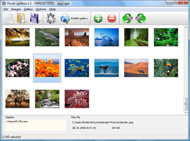
It's no secret that adding photos to your blog posts is one of the most effective ways to enhance your blog and attract attention to your writing. Flickr has millions of photos available in its database. A simple FREE tool called Flickr Gallery allows you to create a custom image gallery with a cool slide show of the most recent and most interesting photos from Flickr on your website or blog in a few easy steps. Just visit Flickr website and find photostream, photoset or a single photo you like. Enter the address of flickr page to add all photos from this page in your gallery, select the style of thumbnails and the overlay window and add the HTML embed code on your website or blog.
A few clicks and you'll see a stylish photo gallery with beautifull lightbox and zoom effects on your own website or blog!


Flickr Gallery for Windows   Flickr Gallery for MAC

Want more?

Example

Lightbox gallery sample

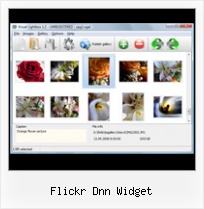
The following image set is generated by Flickr Gallery tool. Click any picture to run Lightbox gallery.

The photo gallery above is an in-page usage demo of Lightbox script with Flickr images. The lightbox gallery created with Flickr Gallery software is placed inside the website page. You can also check the full-page demo slideshow. This example takes whole browser area to show the Lightbox gallery that uses images from Flickr.Flickr Wiget Iweb

How to Use

Step 1. Adding flickr images to your own gallery.


Locate the photo, photoset or photostream you want to use in your Flickr slideshow. Click on it to see the photo on its own page.

Copy URL of the flickr page.

Select Add images from Flickr... from the 'Add' button on the Toolbar.

Add images from Flickr

In the appeared window paste URL of the flickr page. Specify also the number of photos you want to add from the flickr page. Flickr Gallery will now include these photos in your project.

Add images from Flickr

If you have included the photos that you do not wish to be in your web gallery, you can easily remove them. Select all images that you wish to remove from photo gallery, and select Delete images. from the Images menu. You can pick and choose pictures by holding the CTRL while clicking the pictures you like.

Step 2. Adding caption.

The name of the photo on flickr page will automatically appear in the caption. When you select a photo you'll see the various info about it, such as: Path, Size, date of last change and Caption. You can add any comment or text about the photo (up to 512 symbols).

Step 3. Gallery properties.

Change the name of your flickr album, the size and quality of your pictures with Flickr Gallery. From the Gallery menu, select Properties or use "Edit Gallery Properties" button on the toolbar.

On the first tab of the Gallery Properties window you can change the name of your photo album and enable/disable the following properties: Slide Show, Auto play Slide Show, Zoom effect, Overlay Shadow. You can also set the Overlay shadow color and select the Engine you want to use (jQuery or Prototype + script.aculo.us).

On the second tab of the Gallery Properties window you can select the thumbnail you want to use, set the Thumbnails Resolution, Thumbnails Quality, Thumbnails Titles. Select Thumbnails Format (save in PNG or JPG format). Specify the Number of columns in you photo album and the Page color.

On the third tab of the Gallery Properties window you can select the template, Image resolution and Image quality of your pictures and change the Watermark.

You can set up the various sizes for exported images.

Control the quality of output PNG or JPEG format image by defining output "Image quality" and "Thumbnail quality" parameters (0%…100%).

Step 4. Save your photo gallery as project file.

When you exit Flickr Gallery application, you'll be asked if you want to save your project. The project consists of the pictures you choose to put on your web photo gallery and all your settings. It's a good idea to save the project, because that will allow you to change the project in case you decide to do something different with future galleries. So click Yes, then enter a name for your project. To select the location of your project, just click the Browse folders button and choose a different location. Then click Save.

Does Flickr Work With Lytebox Embed Flickr Dnn Widget

Download Flickr Gallery


Download Flickr Gallery Download Free Edition
for Windows
Download Flickr Gallery Download Free Edition
for MAC

Flickr Gallery is free for non - commercial use.

A small fee is required for business use. Flickr Gallery Business Edition additionally provides an option to remove the Flickr Gallery. Com credit string as well as a feature to put your own logo to images. After you complete the payment via the secure form, you will receive a license key instantly by email that turns the Flickr Gallery Free Edition into a Business one. You can select the most suitable payment method: bank transfer, check, credit card, PayPal etc. Also you can get Business Edition for free if you help with translating Flickr Gallery into your native language, please contact us at for more info.

Beautiful Flickr Embed

Buy Flickr GalleryBuy Business Edition
for Windows

$49
Single Website
$69
Unlimited Websites
Buy Flickr GalleryBuy Business Edition
for MAC

$49
Single Website
$69
Unlimited Websites

Support

For feature requests, troubleshooting, general help contact Customer Support at . Make sure to include details on your browser, operating system, Flickr Gallery version and a link (or relevant code).Style Flickr Badge

Feedback

    * I downloaded your trial version to see if I could get it to work with my website, and I am almost there (I have been looking for something like this for ages)..

    * I would like to say that Flickr Gallery is a stunning lil program! Its almost too good to be true i'd say! I've been looking for tutorials to create a lightbox gallery, but just couldnt come right. Im so glad i found Flickr Gallery!

    * Great product by the way and saved me loads of time. I really like your Flickr Gallery program! Very nice.Comment Flickr

    * First of all, your product is fantasitc. I looked at the others and your code generator app was insanely easy to use.

FAQ

Q:I would like to have a few galleries in one website and even on one page.

A:To create several galleries on your page you should change following parameter in A tag for different galleries:

rel="lightbox_vlb"

For example, for the first gallery you should set rel="lightbox_vlb":

<!-- Start Flickr Gallery.com BODY section -->
<div id="vlightbox">
<a rel="lightbox_vlb" href="data/images/dscn6831.jpg" title="dscn6831" >
<img src="data/thumbnails/dscn6831.png" ><span></span></a>
<a rel="lightbox_vlb" href="data/images/dscn6823.jpg" title="dscn6823">
<img src="data/thumbnails/dscn6823.png"><span></span></a>
<a id="vlb" href="http://Flickr Gallery.com">Photo Gallery For Web by Flickr Gallery.com v2.0</a>
</div>
<!-- End Flickr Gallery.com BODY section -->

and for the second gallery rel="lightbox_vlb1":

<!-- Start Flickr Gallery.com BODY section -->
<div id="vlightbox">
<a rel="lightbox_vlb1" href="data/images/img_0501.jpg" title="img_0501">
<img src="data/thumbnails/img_0501.png"><span></span></a>
<a rel="lightbox_vlb1" href="data/images/img_0481.jpg" title="img_0481">
<img src="data/thumbnails/img_0481.png"><span></span></a>
<a id="vlb" href="http://Flickr Gallery.com">Photo Gallery For Web by Flickr Gallery.com v2.0</a>
</div>
<!-- End Flickr Gallery.com BODY section -->


RELATED

Popeye Widget | Widget Suite for DotNetNuke | Skin Widgets | DNN The Popeye Widget allows you to create inline lightbox style from a predefined unodered list structure

DnnModules.cn_Article_Module develop Localization (5/7/2011) Module develop 14:Using Dnn Api - Module Settings and Personalization (5/7/2011) Module develop 11:Using Dnn Api - ISearchable (5/7/2011) Module develop 10:Using Dnn Api - IPortable (5/7/2011) Module develop 9:

Text | CMS Desk In an earlier tutorial, I showed how to add Flickr photos to a wordpress sidebar using the Flickr photo widget. 14 Flickr Plugins for WordPress (kimwoodbridge.com) Working with events and reusing your

Widget Directory for Ultimate DNN Blog Module - SunBlogNuke Plugins can extend SunBlogNuke to do almost anything you can imagine. In the directory you can find, download, rate, and comment on all the best widgets the community has to offer

DotNetNuke 5 Widgets: Embed Widget - YouTube - The Mighty This is the blog by the well-known DotNetNuke enthusiast, Will Strohl. Here, he speaks about DNN, technology, programming, VB, SQL Server, customer service, and more. widget that makes it easy to embed many common objects such as: YouTube videos, Google Analytics code, Flash objects, Flickr,

Young Liberals and Student Liberals of WA Portal for youth branch of the Western Australian Liberal party. We are a vibrant and dynamic organisation for like-minded young Western Australia. Photos on Flickr. Roy Tanck's Flickr Widget requires Flash Player 9 or better. Get this widget at roytanck.com. Upcoming Events. First Friday Drinks

How to use built-in DNN embed widgets in DNN5.x? How to use built-in DNN embed widgets in DNN5.x? specific how do I get the flickr widget working. before you point me at other blogs, I read them

Mash-Ups - DotNetNuke (DNN) Modules, Skins & more Mash-Ups - DotNetNuke (DNN) Modules, Skins & more - Snowcovered.com Twitter Search Widget can meet your needs. You can enter the search query and control the module display from settings page. This module helps you to customize the twitter search widget directly from your DNN portal .read more

Flickr Dnn Widget : Flickr Gallery Flickr Dnn Widget. Flickr Gallery. The most powerful image gallery software on the Web.. Flickr Rss On My Site DotNetNuke Widgets Guide (Part 1 of 4) | TechBubble Let's address these questions by reviewing the five primary reasons for using the Widgets framework: new to DNN, but a 'hack' developer

Widgets Widgets Flickr. Flickr users can see photos of funded projects from around the country. Facebook. ARPA-E on Facebook allows users to discuss projects and programs. YOUTUBE. Watch videos of ARPA-E funded projects and follow their progress by subscribing to our channel on YouTube

Project Directory A free DotNetNuke skin initially created for the DotNetNuke Skinning Presentation at the 2nd meeting of the DNN Greek Community. Flickr badge desktop module allows you to display image thumbnails from Flickr and preview them inside DotNetNuke or on Flickr (controlled by

Dnn Ajax Image Album Dnn Ajax Image Album. Web Photo Album Creator! Enhance your website with online photo album software!. image gallery with thumbnails css

Dnn Gallery Lightbox Free Dnn Gallery Lightbox Free. Creating excellent dynamic photo gallery with minimum effort! Flickr Dnn Widget : Flickr Gallery. A simple FREE tool called Flickr Gallery allows you to create a custom image The photo gallery above is an in-page usage demo of Lightbox with images from Flickr

Itellu > Home a dnn module develope website. implement my new idear Use xml+ xslt+ js to implement a plugin-able gallery .like jquery.flickr but more power. A jquery gallery has a navigation plugin for category navigation,a list pligin

Facebook Widgets Add the Facebook widgets and badges to your site to get increased exposure on the leading social networking site

Flickr Embed Widget | Flickr Slideshow Flickr Embed Widget. Create superior online photo galleries for your Website with jQuery Thickbox Alternative! show flickr set in gallery jquery

Flickriver: Photos from mtt dnn Flickriver - view images as a 'river of photos' and more You can place your badge on your Flickr profile, Blog or Website. Add to your iGoogle or Netvibes page. Flickriver widget for iGoogle or Netvibes can display almost any Flickriver view - most interesting today,

News widgets for Netvibes, Mac, Google More than 180,000 widgets are available for the best services and news. Get the best widgets for Mac Os X, Windows Vista, iGoogle, etc. Create your own widgets, and share them with your friends. Netvibes Widgets Ecosystem is the most exhaustive

meraTechPort: Silverlight on DNN - Step by step Silverlight on DNN - Step by step. Tweet. In my previous post as I posted about implemeting my previous post related to DNN and Silverlight here: http://vasudevg

Add YouTube Video to DotNetNuke Using Widgets > Torxweb.com One easy way to embed YouTube videos into DotNetNuke is by using the "Embed Widget" available in DNN 5 (verify you are using DotNetNuke 5+ before using code). The embed widget can be used to embed several different objects including YouTube videos, Adobe Flash objects, Flickr, and others

DotNetNuke Widgets Guide (Part 1 of 4) " TechBubble Let's address these questions by reviewing the five primary reasons for using the Widgets framework: new to DNN, but a 'hack' developer. I posted the code in the page, and it did 'bang' off of Flickr (with a

Mobypicture - Share your adventures with your friends realtime widget new! show stream as. list. grid. map. schotman. schotman. Dnn. All postings containing "#dnn" will be collected here. statistics Flickr. Youtube. Wordpress. Hyves. and more Ways to use Moby: iPhone. Android. Blackberry

Flash Slideshow Widget : Free Flash SlideShow Maker Flash SlideShow w/o Flash! Flash Slideshow Widget. Flickr Slide Show enables you to make an online photo album with ease.. flash custom transitions

Working with DNN 3.0 : Digging My Blog Just finished up my first “real” project with DotNetNuke : http://www.gettingconnecteddc.org I have played around with it for a while for some internal stuff, but this is the first one I've actually built for a client. We

