



Overview

It's no secret that adding photos to your blog posts is one of the most effective ways to enhance your blog and attract attention to your writing. Flickr has millions of photos available in its database. A simple FREE tool called Flickr Gallery allows you to create a custom image gallery with a cool slide show of the most recent and most interesting photos from Flickr on your website or blog in a few easy steps. Just visit Flickr website and find photostream, photoset or a single photo you like. Enter the address of flickr page to add all photos from this page in your gallery, select the style of thumbnails and the overlay window and add the HTML embed code on your website or blog.
A few clicks and you'll see a stylish photo gallery with beautifull lightbox and zoom effects on your own website or blog!


Flickr Gallery for Windows   Flickr Gallery for MAC

Want more?

Example

Lightbox gallery sample

The following image set is generated by Flickr Gallery tool. Click any picture to run Lightbox gallery.

The photo gallery above is an in-page usage demo of Lightbox gallery that uses images from Flickr. The gallery created with Flickr Gallery wizard is placed inside the page layout. You can also check the full-page demo lightbox gallery. This example takes whole browser area to show the Lightbox gallery that uses images from Flickr.Flickr Single Album Gallery Showing Only

How to Use

Step 1. Adding flickr images to your own gallery.


Locate the photo, photoset or photostream you want to use in your Flickr slideshow. Click on it to see the photo on its own page.

Copy URL of the flickr page.

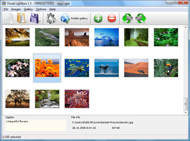
Select Add images from Flickr... from the 'Add' button on the Toolbar.

Add images from Flickr

In the appeared window paste URL of the flickr page. Specify also the number of photos you want to add from the flickr page. Flickr Gallery will now include these photos in your project.

Add images from Flickr

If you have included the photos that you do not wish to be in your web gallery, you can easily remove them. Select all images that you wish to remove from photo gallery, and select Delete images. from the Images menu. You can pick and choose pictures by holding the CTRL while clicking the pictures you like.

Step 2. Adding caption.

The name of the photo on flickr page will automatically appear in the caption. When you select a photo you'll see the various info about it, such as: Path, Size, date of last change and Caption. You can add any comment or text about the photo (up to 512 symbols).

Step 3. Gallery properties.

Change the name of your flickr album, the size and quality of your pictures with Flickr Gallery. From the Gallery menu, select Properties or use "Edit Gallery Properties" button on the toolbar.

On the first tab of the Gallery Properties window you can change the name of your photo album and enable/disable the following properties: Slide Show, Auto play Slide Show, Zoom effect, Overlay Shadow. You can also set the Overlay shadow color and select the Engine you want to use (jQuery or Prototype + script.aculo.us).

On the second tab of the Gallery Properties window you can select the thumbnail you want to use, set the Thumbnails Resolution, Thumbnails Quality, Thumbnails Titles. Select Thumbnails Format (save in PNG or JPG format). Specify the Number of columns in you photo album and the Page color.

On the third tab of the Gallery Properties window you can select the template, Image resolution and Image quality of your pictures and change the Watermark.

You can set up the various sizes for exported images.

Control the quality of output PNG or JPEG format image by defining output "Image quality" and "Thumbnail quality" parameters (0%…100%).

Step 4. Save your photo gallery as project file.

When you exit Flickr Gallery application, you'll be asked if you want to save your project. The project consists of the pictures you choose to put on your web photo gallery and all your settings. It's a good idea to save the project, because that will allow you to change the project in case you decide to do something different with future galleries. So click Yes, then enter a name for your project. To select the location of your project, just click the Browse folders button and choose a different location. Then click Save.

Loop Flickr Slideshows Flickr Custom Thumbnails

Download Flickr Gallery


Download Flickr Gallery Download Free Edition
for Windows
Download Flickr Gallery Download Free Edition
for MAC

Flickr Gallery is free for non-commercial use.

A small fee is required for business use. Flickr Gallery Business Edition additionally provides an option to remove the Flickr Gallery. Com credit line as well as a feature to put your own logo to images. After you complete the payment via the secure order form, you will receive a license key instantly by e-mail that turns the Flickr Gallery Free Edition into a Business one. You can select the most appropriate payment mode: credit card, PayPal, check, bank transfer etc. Also you can get Business Edition for free if you help with translating Flickr Gallery into your native language, please contact us at for more info.

Photogallery Flickr Drupal

Buy Flickr GalleryBuy Business Edition
for Windows

$49
Single Website
$69
Unlimited Websites
Buy Flickr GalleryBuy Business Edition
for MAC

$49
Single Website
$69
Unlimited Websites

Support

For general help, troubleshooting and feature requests contact Customer Support at . Make sure to include details on your browser, operating system, Flickr Gallery version and a link (or relevant code).Flickr Slideshow Autoplay Code

Feedback

    * I am thrilled with what this tool can do for me thanks for all the hard work that must have gone into it.

    * Just a quick thank you for the software though, It's not often you get a free software version of this quality and style! Well done and please continue this amazing gallery. Hope to see more advances.

    * Just bought the business version of Flickr Gallery and I just had to write and say how impressed I am with it. Really easy to use, intuitive interface and generates a truly professional presentation. Seldom have I been so pleased with a software purchase. Thank you.How To Change Flickr Address Sets

    * I tried Flickr Gallery and for me its a very cool and usefull application. Its so easy to manage my galleries and it looks very nice.

FAQ

Q:I purchased your business license today but I don't see any way to update so the watermark is either missing or replace with mine.What do I do?

A:Free edition of Flickr Gallery doesn't allow you to remove our watermark.

Register your Flickr Gallery application at first. Use reg. key from the license message you received after the purchase. After the registration you can remove watermarks.

Open Gallery->Properties->Templates: Watermark. Click to disable this option or use your own watermark.


RELATED

Customizing a Flickr Slideshow Using Slickr Flickr it is easy to scale your Flickr Slideshow to fit snugly in your sidebar using a single simple line of CSS The name and location of this file will vary according to the theme but it will typically be style.css or custom.css

Comsenz – Premium | WordPressPlanet.com ready areas, 9 custom widgets, 6 social media, 6 featured articles posts, slideshow post thumbnails, 5 ads ready and lot's more great stuff to play with. Theme 9 Custom widgets: Flickr Widget, Picture Posts Widget, Tabs Widget, Twitter Widget and more

Best Premium Personal and Social Themes for WordPress | Blog A collection of excellent themes to help promote your profiles and websites on the Internet. A social profiles widget-ready zone with custom widgets for Twitter, Facebook, Vimeo, Flickr, and other popular sites

Blog Templates - Skins Tagged With: flickr It is loaded with Social Bookmarks button, Twitter Account integration, YouTube Video integration, Flickr Thumbnails, Automatic Thumbnail Resizer without using a plugin or custom field, Adsense ready with advertising blocks. Makintab Brown. By: subxpert 1.9 years ago

mmethomas - Flickr My Public Flickr Sets. Flickr Toys. Flickr Toy: Custom Bilboards! Flickr Toy: Custom Stamp of my Artwork. Flickr Toy: Magazine Cover. Flickr Toy: Hockney Style. J'adore LÊo :) BeFunky.com. Google Ripper: No Thumbnails. Image Search w/o Copyright Violations. Wikimedia Commons. Google Life Images

Custom portraits - a set on Flickr Flickr is almost certainly the best online photo management and sharing application in the world. Show off your favorite photos and videos to the world, securely and privately show content to your friends and family, or blog the photos and videos

What's Up With Xbox Media Center: Big Pimpin: Custom Icons News, rumors, and tips on Xbox Media Center. Keep up with all the new and emerging features of Xbmc. Luckily there are a few things you can do to get your own custom thumbnails for your videos, music, photos, games, and applications

The Top: 12 Best jQuery Image Galleries There are countless of jQuery image galleries out there, here we gathered the best ones for you. Full screen image gallery using jQuery and Flickr A gallery based on the Flickr API, using full

Free Premium Wordpress Themes | WPLoan Download free Premium Themes and Plugins, best magazine theme, professional wordpress theme,personal, unique, seo friendly, wordpress theme for business. 7 Custom Widgets (Flickr feed, Twitter feed, Popular & Recent posts, SubPage navigation Contact Us & Contact Form) - All widgets support multiple

How To Display Thumbnail For YARPP Related Post From Flickr Tutorial on how to display thumbnail for YARPP related post from Flickr using TimThumb. Copy the custom field name for thumbnail, in my case is thesis_thumb

Best Portfolio / Photo Gallery WordPress Themes Other features include custom post types for portfolio management, smooth jQuery effects for thumbnails and menus etc, custom options panel with colour controls to set your own colour schemes and more. Features. Smooth Intro Animation for Portfolio Thumbnails

12 Slideshow Tools For Photographers - Tim Stanley Why is it so hard to create a professional looking slide show of digital images on a web site? Flickr has some kind of magic recipe they use when displaying images. The thumbnails look good, the small, medium, and large

Most Popular Premium Wordpress Themes - Technology Tips & Tricks Gallery of the most popular premium Wordpress themes. All of these professional templates provided with price, license and features. 6 custom widgets (Twitter, Feedburner, Flickr, Search, Campaign Monitor and Recent Posts) 7 professional colour to suit your corporate identity

Free Wordpress Theme – Makintab | Free Wordpress Themes Makintab is a featured-packed and multi-colored free WordPress theme. It has an 2 columns, with an easy Options page to customize your theme. It is loaded with YouTube Video integration, Flickr Thumbnails, Automatic Thumbnail Resizer without using a plugin or custom field, Adsense ready

10 Best Flickr Uploaders – Upload Photos at Flickr with Ease Flickr is the best solution for photo sharing medium. It has helped photographers and every other user to manage and share their photos very well. While we have

Flickr Widget " Support — WordPress.com The Flickr widget makes it easy to show thumbnails of your latest Flickr photos in your That is, no thumbnails will display (like when using the feed of your

The World's Best Photos of custom and lego - Flickr Hive Mind If you are a Flickr user and Log into Flickr you will be able to see your private photos, as well as larger thumbnails. Hivemind: http://flickrhivemind.net/Tags/custom Hits: 16278 Pages: 326 Flickr Hive Mind is a data mining tool for the Flickr photography database

How to enhance your flickr account using various tools Flickr is being a popular online image uploading platform.What we all do start uploading our photos (like jpeg, jpg, gif, png etc.) on Flickr easily via the web or use uploading tools for Mac and Windows to make it easy to upload a batch of hi

60+ Tools To Enhance Your Flickr Experience Compfight is a great new tool that uses Flickr's API to search the database of photos and then feeds back the results as live clickable thumbnails. FlickrBabel Flickr Slideshow Generator allows you to generate the HTML necessary to embed a custom Flickr Slideshow in your page or blog

How To Use Custom Fields in Wordpress To Display Thumbnails How To Use Custom Fields in WordPress To Display Thumbnails The tutorial will show you to generate thumbnails for each posts and these images can be

FlickrEdu: Flickr Hacks for the Classroom - Derek E. Baird Here are some of the latest and greatest Flickr hacks created by members of the Flickr community for you to try in your classroom! If you find one that's not on the list.share it with the rest of us! Enjoy!

Saleen Flickr Downloader Easily download entire sets, single or multiple pictures from www.flickr.com Allows saving multiple images from a set's thumbnail and detail view

Customizing Thunar If you install this file to ~/.local/share/Thunar/sendto/ (create the folder if it does not exist yet), the Send To menu for JPEG files will show the new entry Flickr, which can be used to upload JPEG images to Flickr. be able to generate thumbnails using your custom thumbnailers

Flickrin ver 1.0 (Flex – Flickr – Apollo mashup) tutorial Flickrin is a real world application for searching photos online using Flickr API. Now we need a way to display all the thumbnails. Displaying thumbnails from Flickr is a little tricky as the direct url is not

Media: Flickr | drupal.org For Thumbnails, you'll also need to apply for a Flickr API key. In the "Providers Supported" fieldset area, check the "Custom URL" and "Flickr"

How To Customize Flickr : Flickr Gallery How To Customize Flickr. Create web photo gallery for your Website with Flickr Gallery! A simple FREE tool called Flickr Gallery allows you to create a custom image gallery with a cool slide show of the most recent and most interesting photos from Flickr on your website or blog in a few easy steps

The Top: 12 Best jQuery Image Galleries | Devlounge Flickr search using jQuery and JSON. Full screen with kept ratio using Thumbnails with loader indicator and a nice hover effect that shows a bigger thumb (or

