


Overview

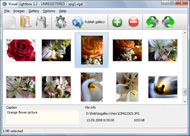
It's no secret that adding photos to your blog posts is one of the most effective ways to enhance your blog and attract attention to your writing. Flickr has millions of photos available in its database. A simple FREE tool called Flickr Gallery allows you to create a custom image gallery with a cool slide show of the most recent and most interesting photos from Flickr on your website or blog in a few easy steps. Just visit Flickr website and find photostream, photoset or a single photo you like. Enter the address of flickr page to add all photos from this page in your gallery, select the style of thumbnails and the overlay window and add the HTML embed code on your website or blog.
A few clicks and you'll see a stylish photo gallery with beautifull lightbox and zoom effects on your own website or blog!


Flickr Gallery for Windows   Flickr Gallery for MAC

Want more?

Example

Lightbox gallery sample

The following image set is generated by Flickr Gallery tool. Click any picture to run Lightbox gallery.

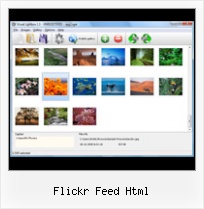
The sample above is an in-page usage demo of Lightbox gallery that uses images from Flickr. The slideshow created with Flickr Gallery wizard is placed inside the page layout. You can also check the full-page demo slideshow. This example takes whole browser area to show the Lightbox gallery that uses images from Flickr.Auto Load Flickr To Tumblr

How to Use

Step 1. Adding flickr images to your own gallery.


Locate the photo, photoset or photostream you want to use in your Flickr slideshow. Click on it to see the photo on its own page.

Copy URL of the flickr page.

Select Add images from Flickr... from the 'Add' button on the Toolbar.

Add images from Flickr

In the appeared window paste URL of the flickr page. Specify also the number of photos you want to add from the flickr page. Flickr Gallery will now include these photos in your project.

Add images from Flickr

If you have included the photos that you do not wish to be in your web gallery, you can easily remove them. Select all images that you wish to remove from photo gallery, and select Delete images. from the Images menu. You can pick and choose pictures by holding the CTRL while clicking the pictures you like.

Step 2. Adding caption.

The name of the photo on flickr page will automatically appear in the caption. When you select a photo you'll see the various info about it, such as: Path, Size, date of last change and Caption. You can add any comment or text about the photo (up to 512 symbols).

Step 3. Gallery properties.

Change the name of your flickr album, the size and quality of your pictures with Flickr Gallery. From the Gallery menu, select Properties or use "Edit Gallery Properties" button on the toolbar.

On the first tab of the Gallery Properties window you can change the name of your photo album and enable/disable the following properties: Slide Show, Auto play Slide Show, Zoom effect, Overlay Shadow. You can also set the Overlay shadow color and select the Engine you want to use (jQuery or Prototype + script.aculo.us).

On the second tab of the Gallery Properties window you can select the thumbnail you want to use, set the Thumbnails Resolution, Thumbnails Quality, Thumbnails Titles. Select Thumbnails Format (save in PNG or JPG format). Specify the Number of columns in you photo album and the Page color.

On the third tab of the Gallery Properties window you can select the template, Image resolution and Image quality of your pictures and change the Watermark.

You can set up the various sizes for exported images.

Control the quality of output PNG or JPEG format image by defining output "Image quality" and "Thumbnail quality" parameters (0%…100%).

Step 4. Save your photo gallery as project file.

When you exit Flickr Gallery application, you'll be asked if you want to save your project. The project consists of the pictures you choose to put on your web photo gallery and all your settings. It's a good idea to save the project, because that will allow you to change the project in case you decide to do something different with future galleries. So click Yes, then enter a name for your project. To select the location of your project, just click the Browse folders button and choose a different location. Then click Save.

Flickr Image Properties Flickr Feed Html

Download Flickr Gallery


Download Flickr Gallery Download Free Edition
for Windows
Download Flickr Gallery Download Free Edition
for MAC

Flickr Gallery is free for non-commercial use.

A small fee is required for business use. Flickr Gallery Business Edition additionally provides an option to remove the Flickr Gallery. Com credit string as well as a feature to put your own logo to images. After you conclude the payment via the secure order form, you will receive a license key instantly by e-mail that turns the Flickr Gallery Free Edition into a Business one. You can select the most appropriate payment mode: check, PayPal, bank transfer, credit card etc. Also you can get Business Edition for free if you help with translating Flickr Gallery into your native language, please contact us at for more info.

Sample Flickr Html

Buy Flickr GalleryBuy Business Edition
for Windows

$49
Single Website
$69
Unlimited Websites
Buy Flickr GalleryBuy Business Edition
for MAC

$49
Single Website
$69
Unlimited Websites

Support

For general help, troubleshooting and feature requests contact Customer Support at . Make sure to include details on your Flickr Gallery version, a link (or relevant code), browser and operating system.Best Flickr Slideshow For Blog

Feedback

    * First of all, I love you Flickr Gallery. I think it's beautiful! I purchased the lightbox “business edition” yesterday, and I’m very happy how easy it is to use. Found this to be one of the fastest ways to get a gallery on the web. Thanks.

    * I have just bought this product and think it is great. As it is extremely easy to use it is something I could get my clients to purchase to upload their own portfolio and latest projects etc.

    * Just bought the business version of Flickr Gallery and I just had to write and say how impressed I am with it. Really easy to use, intuitive interface and generates a truly professional presentation. Seldom have I been so pleased with a software purchase. Thank you.Website For Flickr Stream

    * I find Flickr Gallery (and lightbox2) a great tool and was about to proceed in its purchase.

FAQ

Q:I would like to have a few galleries in one website and even on one page.

A:To create several galleries on your page you should change following parameter in A tag for different galleries:

rel="lightbox_vlb"

For example, for the first gallery you should set rel="lightbox_vlb":

<!-- Start Flickr Gallery.com BODY section -->
<div id="vlightbox">
<a rel="lightbox_vlb" href="data/images/dscn6831.jpg" title="dscn6831" >
<img src="data/thumbnails/dscn6831.png" ><span></span></a>
<a rel="lightbox_vlb" href="data/images/dscn6823.jpg" title="dscn6823">
<img src="data/thumbnails/dscn6823.png"><span></span></a>
<a id="vlb" href="http://Flickr Gallery.com">Photo Gallery For Web by Flickr Gallery.com v2.0</a>
</div>
<!-- End Flickr Gallery.com BODY section -->

and for the second gallery rel="lightbox_vlb1":

<!-- Start Flickr Gallery.com BODY section -->
<div id="vlightbox">
<a rel="lightbox_vlb1" href="data/images/img_0501.jpg" title="img_0501">
<img src="data/thumbnails/img_0501.png"><span></span></a>
<a rel="lightbox_vlb1" href="data/images/img_0481.jpg" title="img_0481">
<img src="data/thumbnails/img_0481.png"><span></span></a>
<a id="vlb" href="http://Flickr Gallery.com">Photo Gallery For Web by Flickr Gallery.com v2.0</a>
</div>
<!-- End Flickr Gallery.com BODY section -->


RELATED

Flickr feed | aardbodem.nl Using http://openlayers.org/dev/examples/xml/georss-flickr.xml as a GeoRSS feed containing photos. dev/examples/georss-flickr.html. permalink [map baselayers="osm" layers="1,2" 1="georss|http://openlayers.org/dev/examples/xml/georss-flickr.xml|Flickr|icon=thumbnail"

Flickr: Discussing GM script: Flickr photoset RSS feed links Flickr is almost certainly the best online photo management and sharing application in the world. Show off your favorite photos and videos to the world, securely and privately show content to your friends and family, or blog the photos and videos

Create a Slick Flickr Gallery with SimplePie | Nettuts+ I've wanted to write a tutorial for quite some time now, and APIs have always been a particular interest of mine. So with my wife's recent foray into out with a fairly basic HTML structure to house. the various components of our Flickr feed

Images - Magnetic Premium HTML Template Custom HTML. Twitter feed. Flickr feed. Sliders. Default. Carousel. Nivo. 3D Flickr Feed. Additional "Action bar" which can be easy added or removed with few lines of

Jquery Flickr Slider Feed | Flickr Slideshow Jquery Flickr Slider Feed. With jQuery Thickbox Alternative comprehensible interface, you need just 4 simple steps to get your photo album website ready! flickr html captions slideshow embed

Flickr Feed Html : Flickr Gallery Flickr Feed Html. Improve your online photo gallery with Flickr Gallery!. Howto Explore Interestingness Flickr lazytom's FeedJumbler - flickr Aggregate/merge/combine several Atom or RSS feeds into a single feed or convert Atom into RSS or vice versa

Json Flickr Feed example | Css templates | CssTemplatesWeb In many cases, you want to show pictures on your website. In some of these cases, you'll want users to upload their own pictures. This could mean that you would

Google AJAX Feed API - GeoTagged Flickr Example Google AJAX Feed API - Maps - GeoTagged Flickr Photo Example (separate multiple tags with comma)

Parsing Flickr Feed with PHP tutorial - Barattalo HTML fixer. May 30 2010. Parsing Flickr Feed with PHP tutorial. Category: Php,Spiders & web bots — Giulio Pons @ 10:48 pm. I've spent about 30 minutes to find a javascript embed to print out a custom thumbs list of flickr photos, but I didn't find anything clean enaugh

" How to import flickr photos into tumblr " jongarcia.info/blog With this little update I've been playing with yahoo pipes to modify the feed of one of my flickr sets. import that feed url. If you already had been importing the flickr feed you'll have to

YCodaSlider 2.0 - Plugins - Demo Site http://www.gnu.org/licenses/gpl.html. Feeds Feed Plugin Adapter (require GOOGLE API KEY and jQuery gFeed Plugin) Flickr Feed Plugin Adapter. jQuery(document).ready(function() { jQuery("#yslider-flickr").ycodaflickr({proxy : "../../..exe/feed.php"}, function(){ YCodaSlider.Lazy.init("div#yslider-flickr"

Flickr like horizontal menu Flickr like horizontal menu. by Antonio Lupetti Tag css html Subscribe RSS Feed ReTweet Share on Facebook Add to Technorati. Do you like Flickr and its simple and clean interface? This tutorial explains how to implement an horizontal menu Flickr-like using CSS and Javascript to show/hide

A jQuery Flickr Feed Plugin This jQuery Flickr plugin allows you to pull a public Flickr feed and display it however you like. Compatible with lightbox, colorbox, cycle, etc

Reading RSS with PHP In this tutorial, we'll use SimpleXML and a custom PHP class to load and parse a user's Flickr RSS feed, isolate the pieces of information we need, and output the data as HTML

Flickr Photo Album using Feed Ticker - Dreamweaver - Premium In this article Patrick will show you how easy it is to get the feed from your photos from Flickr and automatically publish them on your own site as great looking, animated thumbnails list by using DMXzone's Feed Ticker Dreamweaver Extension

Matt McAlister :: The ultimate photoblogging toolset: Nokia There are several utilities that will change your desktop photo or screensaver based on an rss feed of flickr photos. At CES they showed a couple of photoframes that could take an RSS feed via wireless as well. http://cavitate.net/flashpoint/2006/01/wi_fi_enabled_lcd_picture_frame.html

Library of Congress Flickr feed (Scripting News) The Library of Congress is partnering with Flickr, releasing pictures that it believes are not copyrighted, through Flickr. If you click on this link on the machine that FlickrFan is running on, you'll automatically subcribe to the Library of Congress feed on Flickr

Consuming Flickr RSS feeds using ASP by Nick Dunn, published 'URL of your RSS feed (copy from the "Feed" link of your Flickr gallery 'Checks to see whether the cached HTML has expired. If cacheFileIsExpired(strCacheHTML, 12, "hours") Then '

Creating a Web Slice for your flickr badge § The Adventures Another benefit is it allows users to digest your site/blog/what have you in another way and if you've set up your CSS & HTML it is a piece of cake. ;) I am going to apply web slices to my "on Flickr" portion in my sidebar. a copy and paste (just remember to change the feed for your flickr ID

Pulling Your Flickr Feed with jQuery | Viget Inspire YOU HAVE TO PUT THE CODE in flickr-feed.js or else create a new .js file with new name picasa-feed.js and include in your page html, rem to remove original flickr-feed.js from your page. NIKI. Niki said on 08/24 at 09:19 PM. Bug Report Picasa Implementation

Wrox Article : Flickr Mashups: Visualizing the News : Page 2 Excerpt from Flickr Mashups First, you will use Magpie to retrieve a news feed and convert it into a PHP object. You will then look at the elements of that object and try to pick out some key words that describe each news story

Flickr feed - jQuery simplyScroll - Logicbox Home " jQuery " simplyScroll " Flickr example. Flickr image feed example. Jump to: [HTML] [Javascript] [CSS] [Comments] This uses the Flickr feeds to grab JSON image data. It does not require an API key. Note in the code in this example multiple tags would be separated by commas. HTML

PHP: fetching only images from a Flickr feed | onwebdev A Flickr feed is very useful when we want to retrieve our images Within this feed, we're only interested in the description element contained inside each item element. By default, all the content of this element is served as HTML and it's a little bit redundant because it also contains

Adding a Flickr Feed to your Site with jQuery | Leon Amarant Introduction This post outlines a quick and easy way to display your Flickr photostream on your personal web site using javascript (no server-side programming

How to use jQuery with a JSON Flickr feed to display photos How to use jQuery with a JSON Flickr feed to display photos and with another example of how to get photos from a Flickr JSON feed, check out http://docs.jquery.com/Ajax/jQuery.getJSON. To read up on the Flickr JSON object, head over to http://www.flickr.com/services/api/response.json.html

SimplePie Documentation: Flickr Lightbox A super-fast, easy-to-use, RSS and Atom parser written in PHP. Apparently, Flickr now has a different "secret" ID for the original image, which we don't have access to in the feed

Introduction To Web Development Using Javascript Templates About Flickr's Public Feed. Before we start our application, let me tell you about Flickr's public feed. Basically its an URL, A new URL pointing to Flickr's feed is constructed, which contains tags entered by the user. A new script tag

Top 500 Folders in Bloglines for flickr. Rank. Count. Feed. Subscribe. 1. 165. FlickrBlog. 2. 133. Flickr: Sign In. 3. 62. Server Lifehacker, the Productivity and Software Guide. 34. 5. Flickr: Photos tagged with nature. 35

