
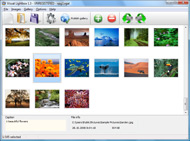



Overview

It's no secret that adding photos to your blog posts is one of the most effective ways to enhance your blog and attract attention to your writing. Flickr has millions of photos available in its database. A simple FREE tool called Flickr Gallery allows you to create a custom image gallery with a cool slide show of the most recent and most interesting photos from Flickr on your website or blog in a few easy steps. Just visit Flickr website and find photostream, photoset or a single photo you like. Enter the address of flickr page to add all photos from this page in your gallery, select the style of thumbnails and the overlay window and add the HTML embed code on your website or blog.
A few clicks and you'll see a stylish photo gallery with beautifull lightbox and zoom effects on your own website or blog!


Flickr Gallery for Windows   Flickr Gallery for MAC

Want more?

Example

Lightbox gallery sample

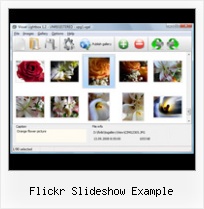
The following image set is generated by Flickr Gallery tool. Click any picture to run Lightbox gallery.

The photo gallery above is an in-page usage demo of Lightbox gallery that uses images from Flickr. The gallery created with Flickr Gallery software is placed inside the website page. You can also check the full-page demo gallery. This example takes whole browser area to show the website gallery.Integrating Flickr In Website 2009

How to Use

Step 1. Adding flickr images to your own gallery.


Locate the photo, photoset or photostream you want to use in your Flickr slideshow. Click on it to see the photo on its own page.

Copy URL of the flickr page.

Select Add images from Flickr... from the 'Add' button on the Toolbar.

Add images from Flickr

In the appeared window paste URL of the flickr page. Specify also the number of photos you want to add from the flickr page. Flickr Gallery will now include these photos in your project.

Add images from Flickr

If you have included the photos that you do not wish to be in your web gallery, you can easily remove them. Select all images that you wish to remove from photo gallery, and select Delete images. from the Images menu. You can pick and choose pictures by holding the CTRL while clicking the pictures you like.

Step 2. Adding caption.

The name of the photo on flickr page will automatically appear in the caption. When you select a photo you'll see the various info about it, such as: Path, Size, date of last change and Caption. You can add any comment or text about the photo (up to 512 symbols).

Step 3. Gallery properties.

Change the name of your flickr album, the size and quality of your pictures with Flickr Gallery. From the Gallery menu, select Properties or use "Edit Gallery Properties" button on the toolbar.

On the first tab of the Gallery Properties window you can change the name of your photo album and enable/disable the following properties: Slide Show, Auto play Slide Show, Zoom effect, Overlay Shadow. You can also set the Overlay shadow color and select the Engine you want to use (jQuery or Prototype + script.aculo.us).

On the second tab of the Gallery Properties window you can select the thumbnail you want to use, set the Thumbnails Resolution, Thumbnails Quality, Thumbnails Titles. Select Thumbnails Format (save in PNG or JPG format). Specify the Number of columns in you photo album and the Page color.

On the third tab of the Gallery Properties window you can select the template, Image resolution and Image quality of your pictures and change the Watermark.

You can set up the various sizes for exported images.

Control the quality of output PNG or JPEG format image by defining output "Image quality" and "Thumbnail quality" parameters (0%…100%).

Step 4. Save your photo gallery as project file.

When you exit Flickr Gallery application, you'll be asked if you want to save your project. The project consists of the pictures you choose to put on your web photo gallery and all your settings. It's a good idea to save the project, because that will allow you to change the project in case you decide to do something different with future galleries. So click Yes, then enter a name for your project. To select the location of your project, just click the Browse folders button and choose a different location. Then click Save.

Photoblog Flickr Demo Flickr Slideshow Example

Download Flickr Gallery


Download Flickr Gallery Download Free Edition
for Windows
Download Flickr Gallery Download Free Edition
for MAC

Flickr Gallery is free for non-commercial use.

A small fee is required for business use. Flickr Gallery Business Edition additionally provides an option to remove the Flickr Gallery. Com credit string as well as a feature to put your own logo to images. After you complete the payment via the secure order form, you will receive a license key instantly by e-mail that turns the Flickr Gallery Free Edition into a Business one. You can select the most appropriate payment method: bank transfer, credit card, check, PayPal etc. Also you can get Business Edition for free if you help with translating Flickr Gallery into your native language, please contact us at for more info.

Chrysler On Flickr

Buy Flickr GalleryBuy Business Edition
for Windows

$49
Single Website
$69
Unlimited Websites
Buy Flickr GalleryBuy Business Edition
for MAC

$49
Single Website
$69
Unlimited Websites

Support

For troubleshooting, feature requests and general help contact Customer Support at . Make sure to include details on your Flickr Gallery version, browser, operating system and a link (or relevant code).Flickrstream On Website Auto Play

Feedback

    * I am thrilled with what this tool can do for me thanks for all the hard work that must have gone into it.

    * Great product by the way and saved me loads of time. I really like your Flickr Gallery program! Very nice.

    * I LOVE your free Lightbox2 software tool and will purchase the business version shortly. I have seen the Lightbox JS effect used with video tutorials and I was hoping you have a version for video that I can purchase.
Video LightBox: http://videolightbox.comRemove Flickr Logo From Embedded Slideshow

    * I find Flickr Gallery (and lightbox2) a great tool and was about to proceed in its purchase.

FAQ

Q:I purchased your business license today but I don't see any way to update so the watermark is either missing or replace with mine.What do I do?

A:Free edition of Flickr Gallery doesn't allow you to remove our watermark.

Register your Flickr Gallery application at first. Use reg. key from the license message you received after the purchase. After the registration you can remove watermarks.

Open Gallery->Properties->Templates: Watermark. Click to disable this option or use your own watermark.


RELATED

Flick r S lideShow lite (these were constructed by the selection page) to make a request to Flickr for the 4) Format the slideshow URL for each set returned from Flickr according to the

Lake Trafford: An Embedded Flickr SlideShow | NFN 4 Good One feature is the embedding of a Flickr slide show into your post. The example here is a set of pictures I photographed of Lake Trafford, Immokalee while riding on an Airboat. We took of at the Lake Trafford Marina, Alligators and Airboats is the name of the company. How did I do this?

Flickr SlideShow with SWX - sephiroth.it Create a simple fading slideshow using the SWX Flickr API In this example we will create a very simple slideshow of images taken from a flickr user account using SWX

Flickr Slideshow : Flickr Gallery Don't allow your website visitors to get lost! Try Flickr Slide Show!. Linking To Pictures On Flickr Tumblr This example takes whole browser area to show the slideshow.Embed Flickr Sets Plugin

lib20 / flickr-slide-shows Resources for library and school technology workshops. Features sessions on WordPress in Libraries, Online Outreach, Google Tools and much more

Making a Flickr-powered Slideshow | Tutorialzine In this tutorial we will be developing a jQuery plugin that will make it possible to create slideshows, product guides or presentations from your Flickr photo sets

Buzz by Hubert Souchaud The plugin will be using Flickr's APIs and YQL to fetch the photos in the sets, after which it will create the markup of the slideshow and listen for events. The HTML Flickr Slideshow jQuery Plugin. The CSS. We need to provide the plugin with its own stylesheet, so it is easier to include into a

Flickrshow – A very simple Javascript slideshow for Flickr Flickrshow - A very simple Javascript slideshow for Flickr To add a slideshow to your page just include the script itself and add the code shown in the example below

Custom Yahoo Pipes/ Flickr Slideshows For Your Blog | Tubetorial While you can take a straight photostream and use a variety of web-based slideshow services, I've used a specific set of tools: Yahoo Pipes – to control the Flickr stream. SplashCast – to build and display the Flickr slideshow. The reason for this is that

Marquee Slideshow Examples : Free SlideShow Software Free Slideshow Creator! Marquee Slideshow Examples. Create an effective online photo galleries with Flickr Slideshow!. Web Slideshow Freeware Flickr and Photobucket support. Use most interesting photos from Flickr and Photobucket on your site or blog in a few easy steps. Marquee Slideshow

Flickr Slideshow Example | Flickr Slideshow Flickr Slideshow Example. jQuery Thickbox Alternative is a versatile, ready-made solution that allows professional and amateur web developers to create superior digital photo albums for their websites and web applications. export flickr slideshow

Customizing a Flickr Slideshow Using Slickr Flickr it is easy to scale your Flickr Slideshow to fit snugly in your sidebar using a single simple line of CSS

Flash & HTML slideshow templates | SlideshowBox Browse through dozens of flash slideshow templates inside SlideshowBox to see what you can do with this flexible flash component. See slideshow examples. All 24 slideshow templates support audio files for background music and RSS photo feeds (from Flickr, Picasa, Photobucket and SmugMug)

Our new slideshow: pass the popcorn! " Flickr Blog We've launched a new and improved fullscreen slideshow on Flickr, designed and rebuilt from the ground up to help you sit back and watch the A slideshow is available from just about every page where you see a group of photos on Flickr: photostream

Simple images slider to create Flickr-like slideshows If you like Flickr slideshow, this article explains how to implement it using Prototype-UI framework. For example to change the slideshow width (to display in this way more or less images on your slideshow) you can change the

Flickr Examples in About This Site at PHSNE Members Pages This page provides examples of various markup to support displaying Flickr images on your PHSNE Members' Pages. You can display individual photos from a Flicker account, or display a slide show or gallery of the photos assigned a specific Flickr tag

De Web Times - Sharing Useful Resources. " Blog Archive " 11 Lets look at some of the examples of Carousel/ Slide Show. If you like Flickr slideshow, this article explains how to implement it using Prototype-UI framework

Artotems Flickr in iWeb Flickr Slideshow in iWeb. Flickr is a wonderful community dedicated to 4. Once you are viewing the Slideshow click the "Share" button on the

how to: a slide show using flickr Or, create a new SlideTransition by implementing " com.forestandthetrees.slideShow.transition.ISlideTransition." Edit "FlickrPhotoGetter.as" to change the API calls to flickr. The example below gets user:eyeblink photos with tags: street, bw - photos below copyright James Wendell

Adding a Flickr Slide Show to Your Website Flickr offers a nice drag and drop feature for sorting and organizing your online photos. Below is an example of a quick slide show that was created from a few web sites we developed recently:

Flickr SlideShow Widget using AJAX Extender AJAX SlideShow control with very interactive live example using Flickr API. We will use the Array of Images retrieved from Flickr and will show it as slideshow

Flickr Releases Handy Embeddable Slide Show Yahoo's photosharing service Flickr is one of the more wonderful things on the web and today the company made a small release that a lot of people should enjoy quite a bit. There's never been a really easy way to embed a nice slide show of your

Using Flickr Slideshows in Plone — LearnPlone Flickr is a great tool for organizing and managing your photos. Learn how to insert a Flickr slideshow into your Plone site. As an example here is a sample slideshow built of all photos in Flickr tagged with "Plone

flickrslideshowlite - russelldad2 Peter A. Bromberg, Ph.D. – for his code examples and article Parsing The Querystring with JavaScript. Flickr - for creating an amazing image sharing tool with a brilliantly crafted API and an only moderately functional slideshow utility. ;) flickr Leech – So this is a little weird

How to post event photos on the Flickr photo sharing website Flickr allows you to 'tag' your photos with one or more labels or 'tags' If everyone who uploads photos of the event tags their photos with at least one unique tag that identifies the event then everyone's photos can be merged into a single slide show. Lets show you an example

Banksy group pool The Banksy pool To view this slideshow, JavaScript must be enabled, and you need the latest version of the Adobe Flash Player. Download the free Flash Player now!

Photo Galleries, Portfolios and Presentations In this example, it's set to display 10 "Small Square" images in 5 columns. Once you're done, click "Apply" and voila! Flickr Slideshow. A good way in which you can embed a slideshow of a specific Set of Flickr photographs in your Yola website

