


Overview

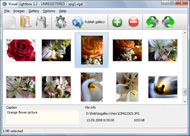
It's no secret that adding photos to your blog posts is one of the most effective ways to enhance your blog and attract attention to your writing. Flickr has millions of photos available in its database. A simple FREE tool called Flickr Gallery allows you to create a custom image gallery with a cool slide show of the most recent and most interesting photos from Flickr on your website or blog in a few easy steps. Just visit Flickr website and find photostream, photoset or a single photo you like. Enter the address of flickr page to add all photos from this page in your gallery, select the style of thumbnails and the overlay window and add the HTML embed code on your website or blog.
A few clicks and you'll see a stylish photo gallery with beautifull lightbox and zoom effects on your own website or blog!


Flickr Gallery for Windows   Flickr Gallery for MAC

Want more?

Example

Lightbox gallery sample

The following image set is generated by Flickr Gallery tool. Click any picture to run Lightbox gallery.

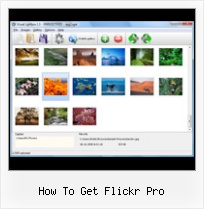
The photo gallery above is an in-page usage demo of Lightbox with images from Flickr. The website gallery created with Flickr Gallery software is placed inside the website page. You can also check the full-page demo gallery. This example takes whole browser area to show the slideshow.How To Display Privately Uploaded Flickr

How to Use

Step 1. Adding flickr images to your own gallery.


Locate the photo, photoset or photostream you want to use in your Flickr slideshow. Click on it to see the photo on its own page.

Copy URL of the flickr page.

Select Add images from Flickr... from the 'Add' button on the Toolbar.

Add images from Flickr

In the appeared window paste URL of the flickr page. Specify also the number of photos you want to add from the flickr page. Flickr Gallery will now include these photos in your project.

Add images from Flickr

If you have included the photos that you do not wish to be in your web gallery, you can easily remove them. Select all images that you wish to remove from photo gallery, and select Delete images. from the Images menu. You can pick and choose pictures by holding the CTRL while clicking the pictures you like.

Step 2. Adding caption.

The name of the photo on flickr page will automatically appear in the caption. When you select a photo you'll see the various info about it, such as: Path, Size, date of last change and Caption. You can add any comment or text about the photo (up to 512 symbols).

Step 3. Gallery properties.

Change the name of your flickr album, the size and quality of your pictures with Flickr Gallery. From the Gallery menu, select Properties or use "Edit Gallery Properties" button on the toolbar.

On the first tab of the Gallery Properties window you can change the name of your photo album and enable/disable the following properties: Slide Show, Auto play Slide Show, Zoom effect, Overlay Shadow. You can also set the Overlay shadow color and select the Engine you want to use (jQuery or Prototype + script.aculo.us).

On the second tab of the Gallery Properties window you can select the thumbnail you want to use, set the Thumbnails Resolution, Thumbnails Quality, Thumbnails Titles. Select Thumbnails Format (save in PNG or JPG format). Specify the Number of columns in you photo album and the Page color.

On the third tab of the Gallery Properties window you can select the template, Image resolution and Image quality of your pictures and change the Watermark.

You can set up the various sizes for exported images.

Control the quality of output PNG or JPEG format image by defining output "Image quality" and "Thumbnail quality" parameters (0%…100%).

Step 4. Save your photo gallery as project file.

When you exit Flickr Gallery application, you'll be asked if you want to save your project. The project consists of the pictures you choose to put on your web photo gallery and all your settings. It's a good idea to save the project, because that will allow you to change the project in case you decide to do something different with future galleries. So click Yes, then enter a name for your project. To select the location of your project, just click the Browse folders button and choose a different location. Then click Save.

Web Pages Using Flickr How To Get Flickr Pro

Download Flickr Gallery


Download Flickr Gallery Download Free Edition
for Windows
Download Flickr Gallery Download Free Edition
for MAC

Flickr Gallery is free for non-commercial use.

A small fee is required for business use. Flickr Gallery Business Edition additionally provides an option to remove the Flickr Gallery. Com credit line as well as a feature to put your own logo to images. After you conclude the payment via the secure order form, you will receive a license key instantly by e-mail that turns the Flickr Gallery Free Edition into a Business one. You can select the most suitable payment procedure: credit card, PayPal, check, bank transfer etc. Also you can get Business Edition for free if you help with translating Flickr Gallery into your native language, please contact us at for more info.

Flickr Slideshow Embed Title Description

Buy Flickr GalleryBuy Business Edition
for Windows

$49
Single Website
$69
Unlimited Websites
Buy Flickr GalleryBuy Business Edition
for MAC

$49
Single Website
$69
Unlimited Websites

Support

For troubleshooting, feature requests and general help contact Customer Support at . Make sure to include details on your browser, operating system, a link (or relevant code) and Flickr Gallery version.Flickr Group Map Slideshow

Feedback

    * I am thrilled with what this tool can do for me thanks for all the hard work that must have gone into it.

    * I find Flickr Gallery (and lightbox2) a great tool and was about to proceed in its purchase.

    * I would like to say that Flickr Gallery is a stunning lil program! Its almost too good to be true i'd say! I've been looking for tutorials to create a lightbox gallery, but just couldnt come right. Im so glad i found Flickr Gallery!Flickr Url Into Nextgen

    * Just a quick thank you for the software though, It's not often you get a free software version of this quality and style! Well done and please continue this amazing gallery. Hope to see more advances.

FAQ

Q:Instead of making one page with 40 photos, is there no property to make 2 or more pages?

A:You can do it in the following way:

1. Create your gallery in Flickr Gallery and publish it on a local drive in any test folder.
2. Make two copies of the generated index.html file (for example index1.html and index2.html).
3. Open index.html, index1.html and index2.html files in any text editor.
4. Find code for the gallery inside the BODY tag and cut some part of the images, so you'll have different images on each page.

<!-- Start Flickr Gallery.com BODY section -->
<div class="gallery">
<!-- leave the following code on index.html page -->
<a href="./data/images/1.jpg" rel="lightbox[sample]" title="Best Toy Ever"><img src="./data/thumbnails/1.png" /></a>
<a href="./data/images/8.jpg" rel="lightbox[sample]" title="PrueaMacro"><img src="./data/thumbnails/8.png" /></a>

<!-- leave the following code on index1.html page -->
<a href="./data/images/3.jpg" rel="lightbox[sample]" title="Macro Leaf."><img src="./data/thumbnails/3.png" /></a>
<a href="./data/images/11.jpg" rel="lightbox[sample]" title="Bell Pepper"><img src="./data/thumbnails/11.png" /></a>

<!-- leave the following code on index2.html page -->
<a href="./data/images/5_0.jpg" rel="lightbox[sample]" title="5"><img src="./data/thumbnails/5_0.png" /></a>
<a href="./data/images/6_0.jpg" rel="lightbox[sample]" title="6"><img src="./data/thumbnails/6_0.png" /></a>

<!--[if lte IE 6]><script src="engine/js/pngfix_vlb.js" type="text/javascript"></script><![endif]-->
<a id="vlightbox" href="http://Flickr Gallery.com/">Online Photo Album Sharing by Flickr Gallery.com</a>
</div>
<!-- End Flickr Gallery.com BODY section -->

5. Create links to switch between your pages, for example:
<a href="index.html">1</a>  <a href="index1.html">2</a>  <a href="index2.html">3</a> 


Q:I want to change color of the overlay shadow? How can I do this?

A:Open engine\css\Flickr Gallery.css and find the following code:

#overlay{
position: absolute;
top: 0;
left: 0;
z-index: 90;
width: 100%;
height: 500px;
background-color: #FFF;
filter:alpha(opacity=60);
-moz-opacity: 0.6;
opacity: 0.6;
}

set the background-color parameter :

#overlay{
position: absolute;
top: 0;
left: 0;
z-index: 90;
width: 100%;
height: 500px;
background-color: #FF00FF;
filter:alpha(opacity=60);
-moz-opacity: 0.6;
opacity: 0.6;
}


RELATED

Get Free Flickr PRO Account, if you support a Cause A Few of the good things happening on Flickr, this is how Flickr describe Flickr for Good' program. Flickr is giving out Free Flickr PRO accounts to

Why I Use Flickr Pro I'm not going to give a list of pros and cons for SmugMug and Flickr because you can easily look those up on Google. Instead, I'm just going to mention a few things that are important for me and how that It's great being able to get ideas from other people and learning of places to travel

Flickr Guide: How to Do Everything with Flickr Flickr Guide will show you how to do everything on Flickr. You can download and backup flickr pictures, set them as rotating wallpapers, browse pictures in 3D, make a screensaver and more

How to Sign Up For Flickr | eHow.com How to Sign Up For Flickr. Flickr is a popular photo sharing Web site that allows users to upload digital photos, sort them and organize them into albums. When you sign up for a Flickr account, you can easily start sharing,

Flickr Pro Account: Features and Review | MrinTech Someday back I bought for myself a Flickr Pro Account (for Personal Photo and Video Collection) and Flickr Pro Services are just awesome! In this post we

Flickr Flickr is almost certainly the best online photo management and sharing application in the world. Show off your favorite photos and videos to the world, securely and privately show content to your friends and family, or blog the photos and videos

How to Use Flickr: Basics and Beyond Flickr is one of the most popular photo-sharing sites on the Internet. Owned by Yahoo!, Flickr offers its users a website where they can create free accounts that let This page tells you how to set up an account with Flickr, and how to get the most out of your account once it's up and running

Flickr Pro - Geotag Trouble - Picnik Help Flickr Pro gives you the ability to replace your original photo with a modified copy when Read about this feature at Flickr.com. Replacing the existing copy allows you to maintain

Flickr Goes Pro — Elliott C. Back Apparently Flickr is out of the box, and they've doubled the lifetime of old pro accounts, AND given you 2 free accounts to donate to whomever you choose! If you've got an extra Flickr pro account, I'm a needy college student

Flickr Pro Review - Andrew Guyton's Blog contest/event, I received a year of Flickr Pro, free of charge. I'm no stranger to image sharing websites, having used deviantART and Facebook extensively and Photobucket occasionally. How does Flickr stack up to those sites, and other similar services? Focus

Video for all + HD! " Flickr Blog So, this is a perfect time for you to check out video mode on your camera. Everyone can now enjoy the HD video that our Pro members share on Flickr

Flickr - How To Information | eHow.co.uk Flickr how to articles and videos including How to Display a Photo, How to Add Flickr to Joomla, How to Add Captions on Flickr and much more!

flickr Photo Books | Inkubook Scoop out and use your photos from flickr to make a gorgeous Inkubook photo book. Scoop photos right out of your Flickr pro account and into your photo book. View Sample Books. Authorize Inkubook to Get Photos from Flickr® Flickr is great for storing your photos and sharing them with others

Free Flickr Pro Account for Yahoo! Photos Users Yahoo's decision to close down Yahoo Photos seems to have disappointed many users. Now, Yahoo wants to bring back smiles on their faces and encourage them

Free Flickr Pro Account You can get free Flickr pro account by participating in Free Flickr Pro Account contest. See how to get that:

get a flickr pro account Get advice and support on how to get a flickr pro account, and other life goals

How to get your free Flickr pro account with Rogers | Satish Today was the third time I tried to do this. The first 2 times were #epicfail, and I think I even called Rogers at some point to figure it out. Each time

Perfect Your Picasa to Flickr Workflow | Lifehacker Australia Desktop photo manager Picasa is a Google product, and photo-sharing web site Flickr's owned by Yahoo, and the two companies don't make it obvious how and photo-sharing web site Flickr s owned by Yahoo, and the two companies don't make it obvious how to get the apps to talk to one another

Flickr - Wikipedia, the free encyclopedia Flickr offers two types of accounts: Free and Pro. Free account users are allowed to As soon as a Pro account expires, it reverts back to the restrictions of a free account,

Should You Upgrade To A Flickr Pro Account? Thinking about spending the money to upgrade to the Flickr Pro account? Here are 5 reasons I made the switch and am glad I did

How to get into Flickr Explore? (Revised) | How to Live As you know, Flickr uses an algorithm to choose the best 500 photos every day and post them on Flickr Explore page. This mesmerizing collection is done How to get into Flickr Explore? ( Revised) 13 July 2007 2 Comments. As you know, Flickr uses an algorithm to choose the best 500 photos every day and

Help Index How do I upgrade to Flickr Pro? If I sign up to Flickr Pro is it charged to my Rogers bill? What if I don't have a credit card? Is there any other If I have a billing related question for my Flickr Pro services, should I contact Rogers or Yahoo?

So (Flickr) Pro " random process | charlie 2.0 I finally bit the $24.95US bullet and upgraded to a Pro account at Flickr. I've finally started to get my digital photography collection in order, and I felt a bit limited by the resolution limitations imposed by the free Flickr account

Flickr Pro : Flickr Gallery Flickr Pro. Don't allow your website visitors to get lost! Try Flickr Slide Show!. How To Add Captions On Flickr As it is extremely easy to use it is something I could get my clients to purchase to upload their own portfolio and latest projects etc

