



Overview

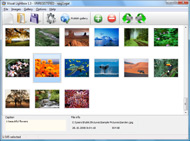
It's no secret that adding photos to your blog posts is one of the most effective ways to enhance your blog and attract attention to your writing. Flickr has millions of photos available in its database. A simple FREE tool called Flickr Gallery allows you to create a custom image gallery with a cool slide show of the most recent and most interesting photos from Flickr on your website or blog in a few easy steps. Just visit Flickr website and find photostream, photoset or a single photo you like. Enter the address of flickr page to add all photos from this page in your gallery, select the style of thumbnails and the overlay window and add the HTML embed code on your website or blog.
A few clicks and you'll see a stylish photo gallery with beautifull lightbox and zoom effects on your own website or blog!


Flickr Gallery for Windows   Flickr Gallery for MAC

Want more?

Example

Lightbox gallery sample

The following image set is generated by Flickr Gallery tool. Click any picture to run Lightbox gallery.

The photo gallery above is an in-page usage demo of Lightbox with images from Flickr. The website gallery created with Flickr Gallery software is placed inside the website page. You can also check the full-page demo gallery. This example takes whole browser area to show the slideshow.How To Get On Flickr Explore

How to Use

Step 1. Adding flickr images to your own gallery.


Locate the photo, photoset or photostream you want to use in your Flickr slideshow. Click on it to see the photo on its own page.

Copy URL of the flickr page.

Select Add images from Flickr... from the 'Add' button on the Toolbar.

Add images from Flickr

In the appeared window paste URL of the flickr page. Specify also the number of photos you want to add from the flickr page. Flickr Gallery will now include these photos in your project.

Add images from Flickr

If you have included the photos that you do not wish to be in your web gallery, you can easily remove them. Select all images that you wish to remove from photo gallery, and select Delete images. from the Images menu. You can pick and choose pictures by holding the CTRL while clicking the pictures you like.

Step 2. Adding caption.

The name of the photo on flickr page will automatically appear in the caption. When you select a photo you'll see the various info about it, such as: Path, Size, date of last change and Caption. You can add any comment or text about the photo (up to 512 symbols).

Step 3. Gallery properties.

Change the name of your flickr album, the size and quality of your pictures with Flickr Gallery. From the Gallery menu, select Properties or use "Edit Gallery Properties" button on the toolbar.

On the first tab of the Gallery Properties window you can change the name of your photo album and enable/disable the following properties: Slide Show, Auto play Slide Show, Zoom effect, Overlay Shadow. You can also set the Overlay shadow color and select the Engine you want to use (jQuery or Prototype + script.aculo.us).

On the second tab of the Gallery Properties window you can select the thumbnail you want to use, set the Thumbnails Resolution, Thumbnails Quality, Thumbnails Titles. Select Thumbnails Format (save in PNG or JPG format). Specify the Number of columns in you photo album and the Page color.

On the third tab of the Gallery Properties window you can select the template, Image resolution and Image quality of your pictures and change the Watermark.

You can set up the various sizes for exported images.

Control the quality of output PNG or JPEG format image by defining output "Image quality" and "Thumbnail quality" parameters (0%…100%).

Step 4. Save your photo gallery as project file.

When you exit Flickr Gallery application, you'll be asked if you want to save your project. The project consists of the pictures you choose to put on your web photo gallery and all your settings. It's a good idea to save the project, because that will allow you to change the project in case you decide to do something different with future galleries. So click Yes, then enter a name for your project. To select the location of your project, just click the Browse folders button and choose a different location. Then click Save.

Embed Multiple Flickr Albums How To Copy From Flickr

Download Flickr Gallery


Download Flickr Gallery Download Free Edition
for Windows
Download Flickr Gallery Download Free Edition
for MAC

Flickr Gallery is free for non-commercial use.

A small fee is required for business use. Flickr Gallery Business Edition additionally provides an option to remove the Flickr Gallery. Com credit string as well as a feature to put your own logo to images. After you finish the payment via the secure order form, you will receive a license key instantly by e-mail that turns the Flickr Gallery Free Edition into a Business one. You can select the most suitable payment method: bank transfer, PayPal, check, credit card etc. Also you can get Business Edition for free if you help with translating Flickr Gallery into your native language, please contact us at for more info.

Replace Photo Flickr Explore

Buy Flickr GalleryBuy Business Edition
for Windows

$49
Single Website
$69
Unlimited Websites
Buy Flickr GalleryBuy Business Edition
for MAC

$49
Single Website
$69
Unlimited Websites

Support

For feature requests, troubleshooting, general help contact Customer Support at . Make sure to include details on your Flickr Gallery version, operating system, browser and a link (or relevant code).200 Most Recent Images Flickr

Feedback

    * I'm absolutely loving Flickr Gallery Business and Video LightBox. Amazing, quick and painless, to create a custom, browser independent gallery. And it works first time - every time! Best value for money I've seen in quite a while...

    * Just bought the business version of Flickr Gallery and I just had to write and say how impressed I am with it. Really easy to use, intuitive interface and generates a truly professional presentation. Seldom have I been so pleased with a software purchase. Thank you.

    * This looks like EXACTLY what I need for my site. It would make my job much faster! Love your program. Thank you!!Gallery Drupal Flickr Lightroom

    * Just a quick thank you for the software though, It's not often you get a free software version of this quality and style! Well done and please continue this amazing gallery. Hope to see more advances.

FAQ

RELATED

A Note for How to Geotagging | Flickr - Photo Sharing! flickr (Yahoo) don't provide even street level map of Okinawa/Japan due to business reasons, so you cannot get the very exact location on flickr map. There are a couple of ways to geotag flickr photos and map them out on Google Maps, but this

Photo Copy for iPad on the iTunes App Store Photo Copy also displays the latest interesting images from Flickr. In addition to allowing the use of images in other iPad applications, photos from Flickr can be saved or downloaded to your camera roll for future use, such as viewing in the Photos application, iPad wallpaper or lock screen

The Messaging Times :: flickr Then, go back to your Flickr account and select the image (make sure you select the one that was resized. you copied from Flickr here. It should look something like http://farm3.static.flickr.com

Move or Copy Your Online Photos Easily with Migratr (Flickr Move or Copy Your Online Photos Easily with Migratr (Flickr, Picasa, etc.) - Taking You on a Guided Tour of the Web at Digital Alchemy It automates the task of downloading hundreds or thousands of photos from, say, Flickr and re-uploading them to an account at another photo site

The Squat Pen Rests: How to Copy Flickr Image Locations How to Copy Flickr Image Locations. The spaceball picture is really annoying. You head to Flickr, find the perfect image to accentuate your blog post, right click on the image, head to your to download the Flickr image. Make sure the tip of your arrow just barely crosses over into the image. If you

Web Album Copier Learn how to use Web Album Copier with tips and tricks presented in How to download Flickr photo albums - Easy steps describing how to download Flickr photo albums. How to copy Picasa web albums - Easy steps describing how to copy a

Backup Your Flickr Photos With Flickrfs - Wired How-To Wiki Dragging photos from your local machine to the mounted Flickr volume will automatically Backing up images already on Flickr works the same way -- just copy the files from Flickrfs to your local machine, and it will download your

Flickr Saves Spaceball Gif Instead of Photo – Solution By default photos at Flickr, equal or less in width than 500 can not be saved directly to PC using right click save option. Here is how you can save the Flickr Photo which gives you spaceball gif. One option is to use print screen' or some screen capture program'. Using print screen from

How to Copy Pictures of a Web Page | eHow.com How to Copy Pictures of a Web Page. Copying pictures of a web page requires opening an Internet browser window and using the right-click feature. Most computer mice have two mouse buttons. Pressing the button on the right is what

How to: Flickr Intro | BenBishop.me.uk Flickr isn't the first attempt at capturing the hearts of the amateur photographer in all of us, but it'scertainly the most successful. Started 2002,

Flickr expert tips: How to make the site work for you The Flickr site is easy to navigate, but you may not realize how various add-on programs and lesser-known Flickr site features can improve Flickr's functionality

How to download non-downloadable images from Flickr (with Here's how to get at the toughest to download Flickr images just using your web browser and built-in functionality. Technique will work with most photo sites

Movie Copy | Answerbag Movie Copy. Learn about Movie Copy on Answerbag.com. Get information and videos on Movie Copy including articles on dvd to dvd copying, how to copy a dvd, download dvd and more!

Peter Liu Photography - How To Embed A Flickr Slideshow In A I was browsing some Facebook pages and came across one with Flickr slideshows embedded in a tab, and decided I had to know how it was done. I also don't know whether I am supposed to be copying and pasting the HTML from Flickr or the FBML that you have posted or both?

Save unsavable images from any Web site You can save any image using firefox even if it is prevented using scripts or context menu disablein (this also will not work now in FF). Here is how you can save anything from a web page Home " Internet " How to save copy righted Images from Flickr

Copy Pictures from Flickr to Picasa Web Albums (or vice-versa) Copy Pictures from Flickr to Picasa Web Albums (or vice-versa) Migratr is a no-frills Windows utility that allows you to bulk move copy photographs from one picture sharing service to another effortlessly using

NBDemoFlickr - NetBeans Wiki Go to the opened FlickrDemoMaterials project, select Flickr.java and copy it into the image search project (use the refactoring copy option so SearchImageTask class signature params from to

Flickr Expert Tips: How to Make the Photo Site Work for You Flickr Expert Tips: How to Make the Photo Site Work for You To take advantage of this feature, just open your account's e-mail settings and copy the Flickr upload e-mail address to your contacts

Create local copy of image for Imagecache and ThickBox I really like the Flickr Sets import, fits my needs exactly. Please let me know how to find you, so I can PayPal you a few beers. straight conversion from emfield to imagefield, but then my head started to hurt, so I'll focus on "local version of emfield for Flickr" for now

Using Images from Flickr and Facebook - Nuvvo Support How to copy an image location from Flickr or Facebook to use in discussions, How to copy an image location from Flickr or Facebook to use in discussions, debates, and comments

PhotoCopy mirrors iPhoto images on Flickr | Photography How to make a photo journal in iPhoto. PhotoCopy lets you select individual iPhoto albums to share, and it uploads all of the photos and arranges them in matching sets. Metadata including title, date, time, rating, keywords and description is also copied to Flickr

Newbie's Guide to Flickr | Webware - CNET Wondering what Flickr is and why you should use it? We'll tell you. You can then copy this from your browser's address bar, or just right click the permalink and choose Copy link location. Your contact list shows name, user icon, location, and how many photos each user has

Why can't I copy an image from Flickr.com & save it to My Why can't I copy an image from Flickr.com & save it to My Pictures? To copy a picture from Flickr, you can take a screenshot of the page (press PrintScreen key, open Paint, paste the picture and save it to your

Flickr photo download: save those beautiful pictures with Firefox This transparent image will keep you from being able to right-click on the real picture This method was brought to my attention by mail, and here is how it works:

How To Copy Flickr Photos : Flickr Gallery How To Copy Flickr Photos. Flickr Slide Show is a versatile, ready-made solution that allows professional and amateur web developers to create superior digital photo albums for their websites and web applications.. Flickr Morfeoshow Tutorial

How To: Posting FlickR to WordPress Manually I'm going to go ahead and run a how-to on this despite the fact that I haven't gotten it perfect yet. It's tricky enough that someone might actually know more than me, and I might learn something from it. The reason I like to use FlickR when

How to Monitor Your Flickr Album - loose wire blog The best way to keep tabs on who is linking to your Flickr photo album is through Technorati, the blog-tracking service. But it's not as straightforward as it could be, so here's a guide, based almost entirely on that provided

Web 2.0 for Teaching & Learning - Tutorial_Flickr to publish a batch of photos into Flickr directly from your computer. You can link to Flickr photos from Wikispaces. For example the photos on Home are from Flickr. Here is how it's done. Step 1: Find & copy a Flickr photo's URL. Right

