



Overview

It's no secret that adding photos to your blog posts is one of the most effective ways to enhance your blog and attract attention to your writing. Flickr has millions of photos available in its database. A simple FREE tool called Flickr Gallery allows you to create a custom image gallery with a cool slide show of the most recent and most interesting photos from Flickr on your website or blog in a few easy steps. Just visit Flickr website and find photostream, photoset or a single photo you like. Enter the address of flickr page to add all photos from this page in your gallery, select the style of thumbnails and the overlay window and add the HTML embed code on your website or blog.
A few clicks and you'll see a stylish photo gallery with beautifull lightbox and zoom effects on your own website or blog!


Flickr Gallery for Windows   Flickr Gallery for MAC

Want more?

Example

Lightbox gallery sample

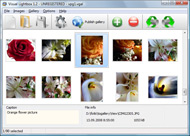
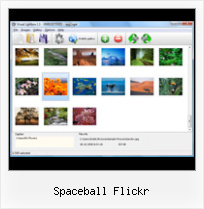
The following image set is generated by Flickr Gallery tool. Click any picture to run Lightbox gallery.

The photo gallery above is an in-page usage demo of Lightbox tool with Flickr images. The website gallery created with Flickr Gallery wizard is placed inside the page layout. You can also check the full-page demo lightbox gallery. This example takes whole browser area to show the web gallery.Flickr Photostream To Website

How to Use

Step 1. Adding flickr images to your own gallery.


Locate the photo, photoset or photostream you want to use in your Flickr slideshow. Click on it to see the photo on its own page.

Copy URL of the flickr page.

Select Add images from Flickr... from the 'Add' button on the Toolbar.

Add images from Flickr

In the appeared window paste URL of the flickr page. Specify also the number of photos you want to add from the flickr page. Flickr Gallery will now include these photos in your project.

Add images from Flickr

If you have included the photos that you do not wish to be in your web gallery, you can easily remove them. Select all images that you wish to remove from photo gallery, and select Delete images. from the Images menu. You can pick and choose pictures by holding the CTRL while clicking the pictures you like.

Step 2. Adding caption.

The name of the photo on flickr page will automatically appear in the caption. When you select a photo you'll see the various info about it, such as: Path, Size, date of last change and Caption. You can add any comment or text about the photo (up to 512 symbols).

Step 3. Gallery properties.

Change the name of your flickr album, the size and quality of your pictures with Flickr Gallery. From the Gallery menu, select Properties or use "Edit Gallery Properties" button on the toolbar.

On the first tab of the Gallery Properties window you can change the name of your photo album and enable/disable the following properties: Slide Show, Auto play Slide Show, Zoom effect, Overlay Shadow. You can also set the Overlay shadow color and select the Engine you want to use (jQuery or Prototype + script.aculo.us).

On the second tab of the Gallery Properties window you can select the thumbnail you want to use, set the Thumbnails Resolution, Thumbnails Quality, Thumbnails Titles. Select Thumbnails Format (save in PNG or JPG format). Specify the Number of columns in you photo album and the Page color.

On the third tab of the Gallery Properties window you can select the template, Image resolution and Image quality of your pictures and change the Watermark.

You can set up the various sizes for exported images.

Control the quality of output PNG or JPEG format image by defining output "Image quality" and "Thumbnail quality" parameters (0%…100%).

Step 4. Save your photo gallery as project file.

When you exit Flickr Gallery application, you'll be asked if you want to save your project. The project consists of the pictures you choose to put on your web photo gallery and all your settings. It's a good idea to save the project, because that will allow you to change the project in case you decide to do something different with future galleries. So click Yes, then enter a name for your project. To select the location of your project, just click the Browse folders button and choose a different location. Then click Save.

Save Picture On Flickr As Jpg Spaceball Flickr

Download Flickr Gallery


Download Flickr Gallery Download Free Edition
for Windows
Download Flickr Gallery Download Free Edition
for MAC

Flickr Gallery is free for non - commercial use.

A small fee is required for business use. Flickr Gallery Business Edition additionally provides an option to remove the Flickr Gallery. Com credit bar as well as a feature to put your own logo to images. After you finish the payment via the secure order form, you will receive a license key instantly by e-mail that turns the Flickr Gallery Free Edition into a Business one. You can select the most suitable payment method: check, credit card, PayPal, bank transfer etc. Also you can get Business Edition for free if you help with translating Flickr Gallery into your native language, please contact us at for more info.

Get Flickr Views

Buy Flickr GalleryBuy Business Edition
for Windows

$49
Single Website
$69
Unlimited Websites
Buy Flickr GalleryBuy Business Edition
for MAC

$49
Single Website
$69
Unlimited Websites

Support

For troubleshooting, feature requests and general help contact Customer Support at . Make sure to include details on your Flickr Gallery version, operating system, a link (or relevant code) and a browser.Display Flickr Feed

Feedback

๏ปฟ    * I'd like to express my gratitude to your efforts on creating such a nice piece of program and best of all it's free! Keep out the good work and I hope to see new features in the near coming future to rate you 5 star!

    * I LOVE your free Lightbox2 software tool and will purchase the business version shortly. I have seen the Lightbox JS effect used with video tutorials and I was hoping you have a version for video that I can purchase.
Video LightBox: http://videolightbox.com

    * I just tried the application, It is wonderful idea. Like you said in the website "few clicks without writing a single line of code" because most of the people is not web designers".Flickr Public Gallery

    * I have purchased the business and LOVE IT..Your product appears easy to use and close to what I need to help several of my clients..

FAQ

Q:I purchased your business license today but I don't see any way to update so the watermark is either missing or replace with mine.What do I do?

A:Free edition of Flickr Gallery doesn't allow you to remove our watermark.

Register your Flickr Gallery application at first. Use reg. key from the license message you received after the purchase. After the registration you can remove watermarks.

Open Gallery->Properties->Templates: Watermark. Click to disable this option or use your own watermark.


RELATED

Download Photo Images From Flickr Protected By Spaceball.gif How to download photo or images from Flickr.com that is protected by spaceball.gif? When saving an image to your computer you get an image with the file name called spaceball.gif then you should follow the rest of the steps to

Flickr spaceball.gif hack Flickr spaceball.gif hack. Posted in Tips, tricks & tools No Comments. Are you sick of that annoying spaceball.gif overlay that attempts to stop you saving "protected" images on Flickr.com? 2. Go to a Flickr page with a "protected" spaceball.gif image. 3. Right click on the image,

Flickr Spaceball : Flickr Gallery Flickr Spaceball. Make it easy for people to find all your photos on the site! Try Flickr Gallery!. Display Random Flickr Slideshow Appletv

Free spaceball Download - mac software Free spaceball Download - mac software at WareSeeker.com - white_dune 0.29 Beta 1294 is an extremely versatile graphical VRML97 editor yet a simple NURBS/Superformula 3D modeler and animation too. White_dune is a low level VRML97 tool for Unix

Download Protected Flickr Images instead of Spaceball.gif files Download Protected Flickr Images instead of Spaceball.gif files This is because Flickr always puts a transparent image file in a layer over the original picture

Download Flickr Photos Protected by Transparent spaceball.gif Download Flickr Photos Protected by Transparent spaceball.gif but in the case of protected Flickr images, all you will see on the desktop is a blank 1x1 pixel placeholder image called spaceball.gif

Download Flickr Photos protected by spaceball.gif! [Flickr Flickr protects pictures by putting the transparent spaceball.gif on the photos to protect some from being downloaded. It's been done by the users not wanting

Best Flickr Greasemonkey Scripts | Firefox Facts Many people love Flickr, but that doesn't mean it is perfect. 1. Flickr Image Unblocker โ€“ This script gets rid of that annoying image that hovers over an image to keep you from saving it. It remove the "spaceball.gif" blocking and does so very well

Helpful Tip: Remove Flickr Spaceball.gif in Firefox and Opera One of the things you may have noticed with Flickr is that the photos will have another image overlaid on top of them called spaceball.gif (here is an example photo) This prevents you from copying the address to the image or being able to save it

Can't Set Flickr Photo as Desktop Background, Larger Sizes This fake transparency is also placed over images belonging to free accounts, and is referred to as "spaceball.gif" Install the "Flickr remove spaceball" Firefox user script, and you'll be able to go back and set the photo as your desktop background

Flickr Saves Spaceball Gif Instead of Photo โ€“ Solution By default photos at Flickr, equal or less in width than 500 can not be saved directly to PC using right click save option. A default image spaceball.gif is

Picture this... | Digital Learning Environments However, navigating through Flickr, and finding images that are suitable, both in content, and copyright can be a daunting task. Flickr Creative Commons: "Spaceball." Anyone who has searched Flickr knows the disappointment when these words appear on the "save as" dialogue box. In Flickr,

30+ Flickr Greasemonkey Scripts So check out these 30+ Flickr Greasemonkey Scripts below: 21. Flickr remove spaceball โ€“ Removes the download deterrent image that appears over some photos. 22. Flickr Rich Edit โ€“ Gives you more options in the comments box when it comes to the font

How to avoid saving spaceball.gif at Flickr Some images at Flickr are weakly protected with an image overlay called spaceball.gif. Whenever you right-click the image to save it you do save spaceball.gif instead which is a 1x1 pixel image showing nothing at all. The same happens if you try

How to Save Pictures From Flickr - RoboXpress If you are trying to save picture from flickr but its save every time spaceball.gif picture with small spacebar and you feedup trying to save

Flickr remove spaceball for Greasemonkey Removes the empty image (download deterrent) positioned over some photos on Flickr Flickr remove spaceball. By Lenny Domnitser โ€” Last update Feb 18, 2007 โ€” Installed 21,154

Flickr photo download: save those beautiful pictures with Firefox Go to your favorite flickr homepage. And first try to simply download the image by rightclicking in it and choosing "Save Image If the link contains something like 'http://www.flickr.com/images/spaceball.gif', choose

Remove spaceball.gif in Flickr - Download Protected Photos So how do you remove the spaceball.gif? to download protected photos from flickr? Well there are a few ways to do this. The first is a very easy way There is a web-based option to download the protected flickr spaceballed image is to visit deFlickr

How To Save A Protected Flickr Image | PCLicious Video Tutorial: In this video tutorial I will how you how to easily save a protected Flickr image to your computer! You can use this one as an example: Miss Teary In Army Shirt. Right-click the protected Flickr image on its bottom and save the image, if its "spaceball.gif" disregard

Remotely hosted version

Top 15 Flickr Extensions for Firefox | Blog News Service Top 15 Flickr Extensions for Firefox Flickrfox โ€“ With Flickrfox you get a sidebar for your browser that allows you to search Flickr photostreams while other web pages load. FlickrSpaceBall โ€“ This extension removes the spaceball.gif that sits atop some images on Flickr. FlickrTrans

Biodegradable Geek | Tag Archive | flickr There are plenty of ways to save pictures you find on Flickr. One way of doing so (in Firefox) is right-clicking the browser page and heading to View Page Info -> Media. This is too much work. Flickr layers a transparent file named spaceball

a spaceball Free Download spaceballs, spaceballs 2, spaceballs part 1, spaceballs characters, spaceball flickr, spaceballs sequel, spaceballs assholes, spaceballs sounds, spaceballs the movie, spaceballs full movie, The above spaceball search only lists software in full, demo and trial versions for free download

jauzsi: flickr spaceball flickr spaceball ยท Monday November 7, 2005 by jauzsi. Flickr has a really annoying protection against downloading pictures from their site using the right click menu of your browser. They streched a 1ร—1 transparent pic over the picture you would

spaceball | Flickr - Photo Sharing! spaceball

