
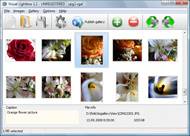



Overview

It's no secret that adding photos to your blog posts is one of the most effective ways to enhance your blog and attract attention to your writing. Flickr has millions of photos available in its database. A simple FREE tool called Flickr Gallery allows you to create a custom image gallery with a cool slide show of the most recent and most interesting photos from Flickr on your website or blog in a few easy steps. Just visit Flickr website and find photostream, photoset or a single photo you like. Enter the address of flickr page to add all photos from this page in your gallery, select the style of thumbnails and the overlay window and add the HTML embed code on your website or blog.
A few clicks and you'll see a stylish photo gallery with beautifull lightbox and zoom effects on your own website or blog!


Flickr Gallery for Windows   Flickr Gallery for MAC

Want more?

Example

Lightbox gallery sample

The following image set is generated by Flickr Gallery tool. Click any picture to run Lightbox gallery.

The photo gallery above is an in-page usage demo of Lightbox with images from Flickr. The web gallery created with Flickr Gallery software is placed inside the html page. You can also check the full-page demo slideshow. This example takes whole browser area to show the Lightbox gallery that uses images from Flickr.Flickr Gallery Iframe

How to Use

Step 1. Adding flickr images to your own gallery.


Locate the photo, photoset or photostream you want to use in your Flickr slideshow. Click on it to see the photo on its own page.

Copy URL of the flickr page.

Select Add images from Flickr... from the 'Add' button on the Toolbar.

Add images from Flickr

In the appeared window paste URL of the flickr page. Specify also the number of photos you want to add from the flickr page. Flickr Gallery will now include these photos in your project.

Add images from Flickr

If you have included the photos that you do not wish to be in your web gallery, you can easily remove them. Select all images that you wish to remove from photo gallery, and select Delete images. from the Images menu. You can pick and choose pictures by holding the CTRL while clicking the pictures you like.

Step 2. Adding caption.

The name of the photo on flickr page will automatically appear in the caption. When you select a photo you'll see the various info about it, such as: Path, Size, date of last change and Caption. You can add any comment or text about the photo (up to 512 symbols).

Step 3. Gallery properties.

Change the name of your flickr album, the size and quality of your pictures with Flickr Gallery. From the Gallery menu, select Properties or use "Edit Gallery Properties" button on the toolbar.

On the first tab of the Gallery Properties window you can change the name of your photo album and enable/disable the following properties: Slide Show, Auto play Slide Show, Zoom effect, Overlay Shadow. You can also set the Overlay shadow color and select the Engine you want to use (jQuery or Prototype + script.aculo.us).

On the second tab of the Gallery Properties window you can select the thumbnail you want to use, set the Thumbnails Resolution, Thumbnails Quality, Thumbnails Titles. Select Thumbnails Format (save in PNG or JPG format). Specify the Number of columns in you photo album and the Page color.

On the third tab of the Gallery Properties window you can select the template, Image resolution and Image quality of your pictures and change the Watermark.

You can set up the various sizes for exported images.

Control the quality of output PNG or JPEG format image by defining output "Image quality" and "Thumbnail quality" parameters (0%…100%).

Step 4. Save your photo gallery as project file.

When you exit Flickr Gallery application, you'll be asked if you want to save your project. The project consists of the pictures you choose to put on your web photo gallery and all your settings. It's a good idea to save the project, because that will allow you to change the project in case you decide to do something different with future galleries. So click Yes, then enter a name for your project. To select the location of your project, just click the Browse folders button and choose a different location. Then click Save.

Flickr Photo Album Plugin For Blogger Blogengine Net Flickr Gallery

Download Flickr Gallery


Download Flickr Gallery Download Free Edition
for Windows
Download Flickr Gallery Download Free Edition
for MAC

Flickr Gallery is free for non - commercial use.

A small fee is required for business use. Flickr Gallery Business Edition additionally provides an option to remove the Flickr Gallery. Com credit line as well as a feature to put your own logo to images. After you complete the payment via the secure order form, you will receive a license key instantly by email that turns the Flickr Gallery Free Edition into a Business one. You can select the most suitable payment procedure: credit card, PayPal, bank transfer, check etc. Also you can get Business Edition for free if you help with translating Flickr Gallery into your native language, please contact us at for more info.

Create A Flickr Gallery Embed

Buy Flickr GalleryBuy Business Edition
for Windows

$49
Single Website
$69
Unlimited Websites
Buy Flickr GalleryBuy Business Edition
for MAC

$49
Single Website
$69
Unlimited Websites

Support

For general help, feature requests, troubleshooting contact Customer Support at . Make sure to include details on your operating system, browser, Flickr Gallery version and a link (or relevant code).Link On Flickr

Feedback

    * I am thrilled with what this tool can do for me thanks for all the hard work that must have gone into it.

    * I ran into your website wile looking for a JavaScript to manage a personal Photo Gallery. I downloaded the trial version and immediately fell in love with your Flickr Gallery, it is one of the best products I’ve ever found; it is very user friendly and easy to use and creates great Photo Galleries.

    * I would like to say that Flickr Gallery is a stunning lil program! Its almost too good to be true i'd say! I've been looking for tutorials to create a lightbox gallery, but just couldnt come right. Im so glad i found Flickr Gallery!Codice Html Flickr Blog

    * First of all, your product is fantasitc. I looked at the others and your code generator app was insanely easy to use.

FAQ

Q:Is it possible to load a gallery from within image? So the gallery loads externally?

A:You should start the gallery onClick:

1) Add the following function into the <head> tag:

<script type="text/javascript">
function showLightBox()
{ Lightbox.start(document.getElementById('firstImage'));}
</script>

2) Specify the onClick event for the image (or link):
<img src="thumbnail_gr.jpg" onClick="javascript:showLightBox()" title="Click to see the demo" style="cursor: pointer;">
3) Set the ID for any image in your gallery (id="firstImage"), for example add it to the first image:
<a rel="lightbox_vlb" href="data/images/dscn6831.jpg" title="dscn6831" id="firstImage">
4) Use 'display: none;' property for your gallery in engine\css\vlightbox.css. Just change the following code:

#vlightbox a{
display:-moz-inline-stack;
display:inline-block;
zoom:1;
*display:inline;
position:relative;
vertical-align:top;
margin:3px;
width:160px;
font-family:Trebuchet,Tahoma,Arial,sans-serif;
font-size:11px;
font-weight:normal;
text-align:center;
opacity:0.87;
}

to:

#vlightbox a{
display:-moz-inline-stack;
display:none;
zoom:1;
*display:inline;
position:relative;
vertical-align:top;
margin:3px;
width:160px;
font-family:Trebuchet,Tahoma,Arial,sans-serif;
font-size:11px;
font-weight:normal;
text-align:center;
opacity:0.87;
}

RELATED

Nelspin.com | All posts tagged 'blogengine' Combining technology, photography, travel & all things outdoors (plus a few book reviews) Fans of Flickr and BlogEngine.net, you can use this User Control to display your Flickr photosets directly in your blog posts. The control will display thumbnails for up to 30 photos from a photoset at a time

Creating a Photo Gallery with FlickrNet Creating a Photo Gallery with FlickrNet. May 31, 2008 03:02 by Kevin Brammer. Updated 9/18/08. Live Demo. If you have been looking for a way to include your Flickr photos on your website using ASP.NET, then you definitely need to Gallery made possible with Flickr

Extensions Download custom extensions for BlogEngine.NET Gallery User Control - Automatically generate thumbnails of images in a folder and build a table to show them

Photo Art Gallery Blog | All posts tagged 'white house' Photography tips & news. Learn photography from photo sharing website, Photo Art Gallery. www.flickr.com/photos/whitehouse/with/5680724572/ Tags: osama, photography, white house, obama, clinton, mission. General | Photo News | Photography. Permalink | Comments (0) Powered by BlogEngine.NET 1.5.0.7

Windows Live Photo Gallery et FlickR Windows Live Photo Gallery et FlickR. October 18, 2007 08:25 by bgauth. Je viens de publier une note sur FrogZ et essayé Windows Live Photo Gallery Beta disponible depuis quelques

Telerik Gallery With Flickr Telerik Gallery With Flickr. Make superior ajax picture gallery for your web site with Ajax Photo Gallery!. photo gallery ftp

BlogEngine with simple gallery - Ales Rosina's Another .NET Blog Microsoft portal site for the Windows Forms and Windows Presentation Foundation (WPF) developer community. Download samples, download controls, post to the forums, read community blogs and product team blogs and learn about windows client

Dave Burke - Darth and the other Holy Men < Spam and BlogEngine.NET - Nadda, Nope, Nothin | My Introduction to BlogEngine.NET Extensions >> Darth and the other Holy Men. One of the photo feeds that has replaced the Flickr Donuts feed that I had to drop Media Gallery as Document Management System : New Sueetie Expanded View

Twitter Trackbacks for alextafoya.com | Flickr Gallery Danny Douglass created an excellent flickr photo gallery for Blogengine.NET. It's located here. Since GoDaddy is my host, I have to deal with medium trust issues, so Danny's gallery wouldnt work for me. Fortunately, Danny released the source for

Thickbox Blogengine - Javascript Window Gallery Thickbox Blogengine. Creating excellent dynamic photo gallery with minimum effort!. photo gallery ajax sample

BlogEngine Widgets Tutorial It is similar to SharePoint WebParts - you can drag it around, set properties etc. And, in BlogEngine, you can build widget just in few simple steps. In this tutorial we are going to build a widget to show selected Flickr photos in the sidebar using FlickrNet API

BillForney.com | New Flickr Photo Gallery New Flickr Photo Gallery. by Bill Forney 29. March 2009 23:00. I was feeling industrious blogengine.net. blogging software. c#. Collateral. Content Creation. dead

Brian Dorey.com | New gallery section Gallery Updates I have updated the site gallery with a flickr feed of my latest updates to Flickr http://www. Apex Views Flickr Gallery. My Twitter Profile. Powered by BlogEngine.NET 1.6.0.0 - Theme by apexweb - Log in

Flickr Ajax Slideshow | Flickr Slideshow Flickr Ajax Slideshow. Digital picture albums made with jQuery Thickbox Alternative are high-end web applications that look and behave exactly like desktop apps! blogengine net flickr image gallery

How To Hack Flickr : Flickr Gallery How To Hack Flickr. Flickr Slide Show is a ready-made, professional solution that allows webmasters to Make superior, cross-browser, fast-loading digital picture albums.. Flickr Mini Site

BlogEngine.Net Gallery User Control - Version 1.0 Released As promised, here is the first release of the BlogEngine.Net Gallery User Control. The Gallery User Control makes use of the BlogEngine.Net Lightbox

Gallery In Asp Net Using Flash - Flash Photo Gallery Gallery In Asp Net Using Flash. Enhance your web site with Flash Photo Gallery Free 3D Flash Gallery!. Flash Xml Photo List Gallery

togglebreakpoint.net | Hacking Flickr, jQuery and lightbox To Hacking Flickr, jQuery and lightbox To Make The Best Ever Photo Gallery You say you need a photo gallery, but you want it to be updated easily?

Amp Electric Vehicles | X PRIZE Knockout Photo Gallery View the full gallery on Flickr. Permalink | Comments (0) Comments are closed. Powered by BlogEngine.NET 1.6.1.0. Amp Electric Vehicles © 2011. All trademarks and registered trademarks are the property of their respective owners. PRIVACY POLICY TERMS & CONDITIONS NEWS INVESTORS FLEETS

Vincent Pang | All posts tagged 'flickr' Freelance Photographer in Malaysia for Events, Wedding, Products, Portrait, Fine Art and any photography related job

Flickr Gallery for BlogEngine.NET! I have finally followed through with the promise to offer a Flickr-integrated photo gallery that can be easily installed with BlogEngine.NET. If you have spent any time following my blog you know that I have dabbled with a variety of other media

Widgets - BlogEngine.NET gallery FlickrBar queries Flickr service and show results as mini-picture gallery in the side bar. Are you sure you wish to delete the package , version ? BlogEngine.NET | CodePlex | Web App Gallery. Powered by Orchard © 2010 Outercurve Foundation

CharminarHomes.com - Hyderabad Property Management Hyderabad Property Management & Construction Website. Ather M. Khan is currently working with Munsif TV as a Producer and Anchor please google or youtube "Ather M. Khan" Contact: Email: atherm@gmail.com Tel: 011 919030464229. Photos on flickr. Archives. 2011

alextafoya.com | Flickr Gallery Modified for GoDaddy Danny Douglass created an excellent flickr photo gallery for Blogengine.NET. The first function that is called when the gallery is accessed is called GetPhotoSets(). I added Flickr.CacheDisabled = true; as the first line of module to make this

AutoFlickr (BlogEngine's Lightbox/Flickr Extension) Creates a nice lightbox-enabled in-post gallery of your recent public (or private) images from Flickr. * Default Start Date * Default Tag * Default Maximum Number of Results * Default 'Thumbnail' Image Size * Default

